
1. Ifihan
Thank you for choosing the Lixada Cordless Robotic Pool Cleaner. This automatic pool cleaner is designed to provide efficient and hassle-free cleaning for various flat-bottom pool types. Please read this manual thoroughly before operating the device to ensure proper use, maintenance, and optimal performance.
2. Awọn ẹya Ọja
- Apẹrẹ Ailokun: Eliminates tangled cables, offering freedom of movement and ease of use.
- Ifamọ ti o lagbara: Equipped with two powerful motors and an oversized intake area to effectively collect debris such as leaves, sand, and gravel.
- Surface Control System: Adapts to the pool surface type, enabling a maximum climbing capacity of 18° for thorough cleaning.
- Independent Scrapers: Two independent scrapers assist in scrubbing the pool floor for enhanced cleaning.
- Akoko Iṣiṣẹ pipẹ: Features a built-in 5200 mAh battery, providing up to 120 minutes of cleaning after a 3-4 hour charge.
- Ìgbàpadà Àìfọwọ́sí: Automatically stops near the pool wall when the battery is low, allowing for easy retrieval with the included hook.
- Ibamu Wapọ: Suitable for flat-bottom pools, including indoor rectangular pools and outdoor rectangular, elliptical, or circular pools.

Image: The Lixada Cordless Robotic Pool Cleaner offers a hassle-free experience compared to traditional wired pool cleaners with messy hoses.

Image: The cleaner is equipped with powerful dual-motors that propel the device and filter pool water.

Image: Illustrates the cyclonic vacuum technology for powerful debris capture and the surface control system for maximum wall climbing performance.
3. Package Awọn akoonu
Jọwọ ṣayẹwo package ni pẹkipẹki lati rii daju pe gbogbo awọn nkan wa ati pe ko bajẹ:
- 1 x Lixada Robotic Pool Cleaner
- 1 x Power Adapter (110-220V)
- 2 x Floor Scrapers
- 2 x Skru
- 1 x Mu
- 1 x kio
- 1 x Itọsọna olumulo
4. Awọn ilana iṣeto
4.1 Ngba agbara si Ẹrọ
- Ensure the pool cleaner is dry before charging.
- So adapter agbara pọ mọ ibudo gbigba agbara lori mimọ.
- Plug the power adapter into a standard electrical outlet (110-220V).
- Ina ifihan agbara yoo tan imọlẹ. Gbigba agbara ni kikun maa n gba wakati mẹrin si mẹfa.
- Ni kete ti o ti gba agbara ni kikun, ge asopọ ohun ti nmu badọgba.

Image: The pool cleaner being charged using the provided power adapter. Ensure the device is dry before charging.
4.2 Attaching the Handle and Scrapers
- Align the handle with the designated slots on the top of the cleaner.
- Ṣe aabo imudani nipa lilo awọn skru ti a pese.
- Attach the two floor scrapers to the underside of the cleaner as indicated in the diagram (refer to the physical manual for detailed diagrams if available).
5. Awọn ilana Iṣiṣẹ
5.1 Starting the Cleaning Cycle
- Ensure the cleaner is fully charged.
- Gently lower the cleaner into the pool. It will sink to the bottom.
- Press the power button to start the cleaning cycle. The cleaner will begin moving and filtering water.
- The cleaner will operate for up to 120 minutes on a full charge.

Image: Gently lower the cleaner into the pool using the handle.

Image: The cleaner operating on the pool floor, collecting debris.
5.2 Setting Cleaning Patterns
The cleaner offers different cleaning patterns suitable for various pool shapes. Adjust the front and rear dials on the device to select the desired pattern:
- Mode 1: A-B - Recommended for oval pools.
- Mode 2: A-C - Recommended for free-formed pools.
- Mode 3: B-C - Default setting, suitable for most pools.

Image: Instructions for adjusting front and rear dials to set the desired cleaning pattern based on pool shape.
5.3 Gbigba Ohun Ìmọ́tótó
When the battery is low, the cleaner will automatically move to the nearest pool wall. Use the provided hook to carefully lift the cleaner out of the water. Ensure to turn off the device before charging or cleaning.
6. Itọju
6.1 Ninu Ajọ
- After each cleaning cycle, remove the cleaner from the pool.
- Open the filter compartment (refer to the physical manual for location).
- Yọ apẹ̀rẹ̀ àlẹ̀mọ́ kúrò kí o sì kó gbogbo ìdọ̀tí tí ó bá kó jọ dànù.
- Rinse the filter basket thoroughly with clean water.
- Reinsert the clean filter basket and close the compartment securely.
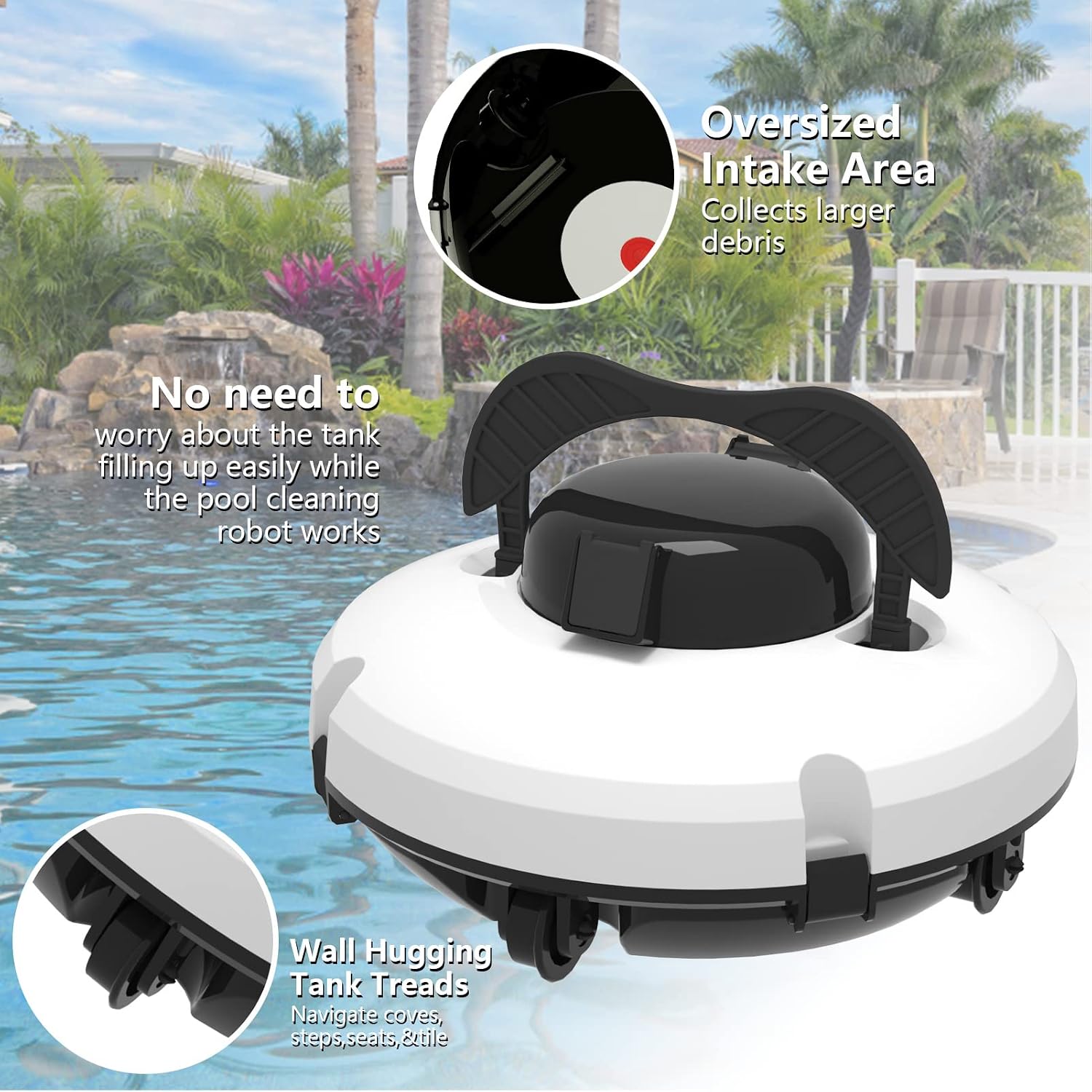
Image: The cleaner features an oversized intake area for collecting larger debris, reducing the frequency of filter emptying.
6.2 Gbogbogbo Cleaning ati Ibi ipamọ
- Wipe the exterior of the cleaner with a soft, damp asọ. Maṣe lo awọn kemikali lile.
- Store the cleaner in a cool, dry place away from direct sunlight and extreme temperatures.
- Ensure the battery is charged periodically during long storage periods to maintain battery health.
7. Laasigbotitusita
| Isoro | Owun to le Fa | Ojutu |
|---|---|---|
| Olùmọ́ kò tan. | Batiri kekere; Bọtini agbara ko tẹ ni deede. | Charge the cleaner fully. Press the power button firmly. |
| Cleaner moves slowly or stops. | Low battery; Filter basket is full; Obstruction in motors/wheels. | Recharge the battery. Clean the filter basket. Check for and remove any obstructions. |
| Iṣẹ ṣiṣe mimọ ti ko dara. | Filter basket is full; Incorrect cleaning pattern selected; Scrapers are worn. | Clean the filter basket. Adjust the cleaning pattern according to your pool shape. Inspect and replace scrapers if necessary. |
| Cleaner stirs up debris instead of collecting it. | Cleaner moving too fast for fine debris. | Ensure the filter is clean. For very fine debris, a slower pass or multiple cycles might be needed. |
8. Awọn pato
| Ẹya ara ẹrọ | Ẹ̀kúnrẹ́rẹ́ |
|---|---|
| Nọmba awoṣe | KFN5103152288932EF |
| Ohun elo | ABS (Acrylonitrile Butadiene Styrene) |
| Agbara Batiri | 5200 mAh |
| Akoko gbigba agbara | 3-4 wakati |
| Akoko Iṣiṣẹ | Titi di iṣẹju 120 |
| Mabomire Rating | IPX8 |
| Filter Fineness | 180um |
| Won won Ṣiṣẹ Voltage | 11.5 V |
| Adapter Input Frequency | 50/60 Hz |
| Adapter Output Voltage | 12.6 V |
| Awọn iwọn (L x W x H) | 33 x 33 x 15 cm (13 x 13 x 5.9 inches) |
| Apapọ iwuwo | 3.5 kg |
9. Atilẹyin ọja & Atilẹyin
Information regarding specific warranty terms and availability of spare parts is not provided in the product data. For warranty claims, technical support, or inquiries about spare parts, please contact your original retailer or the Lixada customer service directly. Keep your purchase receipt as proof of purchase.
Note: Some marketplace purchases may have different warranty conditions. Please verify with your seller.