
Ọrọ Iṣaaju
This manual provides detailed instructions for the installation, operation, and maintenance of your Strong SRT 7040 Digital Satellite HD Receiver. Please read this manual carefully before using the device to ensure proper functionality and to prevent damage.

Image: The Strong SRT 7040 DTT Tuner and its retail packaging.
The Strong SRT 7040 is a Full HD digital satellite receiver designed for Free-To-Air (FTA) channels. It features a USB port for multimedia playback and software updates, and supports Dolby Audio for enhanced sound quality.
1. Eto
1.1 Ṣiṣii silẹ
Ni ifarabalẹ yọ gbogbo awọn paati kuro ninu apoti. Rii daju pe awọn nkan wọnyi wa:
- Strong SRT 7040 DTT Tuner
- Iṣakoso latọna jijin (pẹlu awọn batiri AAA 2)
- Adapter agbara
- Itọsọna olumulo
1.2 Nsopọ Ẹrọ naa
Follow these steps to connect your SRT 7040 receiver:
- Igbewọle Satẹlaiti: Connect your satellite dish cable to the SAT IN ibudo lori ẹhin olugba naa.
- Video Output (HDMI): So okun HDMI kan pọ lati HDMI port on the receiver to an HDMI input on your television.
- Video Output (SCART): Alternatively, for older televisions, connect a SCART cable from the TV SCART port on the receiver to the SCART input on your television.
- Ìjáde ohùn (Digital): For digital audio, connect a coaxial cable from the COAXIAL S/PDIF port to your digital audio amplifier.
- Ìjáde ohùn (Analog): For analog audio, connect RCA cables from the AUDIO R/L ports to your audio Hi-Fi amplifier.
- Ẹrọ USB: If desired, connect a USB storage device to the USB port for multimedia playback or software updates.
- Agbara: So ohun ti nmu badọgba agbara pọ si 12V === 1.5A input on the receiver, then plug the adapter into a wall outlet.

Image: Rear panel connections of the Strong SRT 7040 DTT Tuner, showing SAT IN, HDMI, TV SCART, COAXIAL S/PDIF, AUDIO R/L, USB, and Power input.
1.3 First-Time Installation and Channel Scan
Upon first power-on, the receiver will guide you through an initial setup wizard. Follow the on-screen prompts to select your language, country, and perform an automatic channel scan. This process will detect and store all available satellite channels.
2. Awọn ilana Iṣiṣẹ
2.1 Iṣakoso latọna jijin Loriview
The included remote control allows you to access all functions of the SRT 7040. Insert the two AAA batteries into the remote control, ensuring correct polarity.

Image: The remote control for the Strong SRT 7040 DTT Tuner, showing buttons for power, numbers, volume, channel, menu, and special functions.
2.2 Ipilẹ Awọn iṣẹ
- Agbara: Tẹ awọn AGBARA button to turn the receiver on or off (standby mode).
- Aṣayan ikanni: Lo awọn CH+ / CH- buttons to change channels sequentially, or use the numeric keypad to enter a channel number directly.
- Iṣakoso iwọn didun: Lo awọn VOL+ / VOL- awọn bọtini lati ṣatunṣe iwọn didun ohun.
- Pa ẹnu mọ́: Tẹ awọn IKU bọtini lati fi si ipalọlọ awọn iwe ohun fun igba diẹ.
2.3 Lilọ kiri Akojọ aṣyn
Tẹ awọn Akojọ button to access the main menu. Use the arrow keys (UP, SILE, OSI, OTO) láti lọ kiri lórí àwọn àṣàyàn àti OK lati jẹrisi awọn aṣayan. Tẹ JADE to return to the previous screen or live TV.
2.4 Pataki Awọn ẹya ara ẹrọ
- Awọn aago: The receiver supports programming timers for recording or switching to specific channels at scheduled times. Access this feature via the menu.
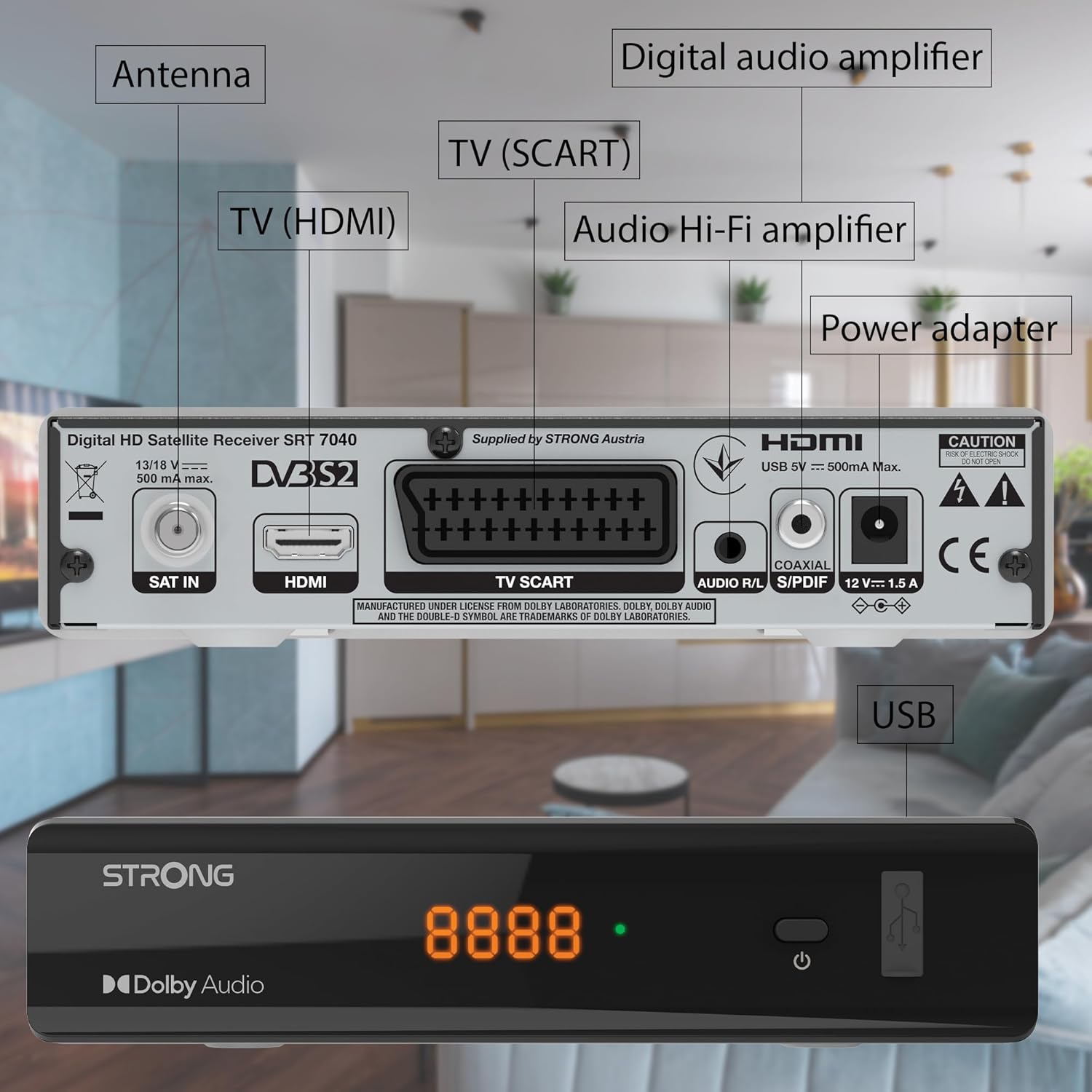
Image: The Strong SRT 7040 DTT Tuner displaying a timer icon, indicating its scheduling capabilities.
- Àwọn Àkójọ Àyànfẹ́: Create customized lists of your preferred channels for quick access.
- Awọn atunkọ: Enable or disable subtitles for compatible broadcasts using the SUB bọtini lori isakoṣo latọna jijin.
- Itọsọna Eto Itanna (EPG): Tẹ awọn EPG bọtini lati view program information for upcoming broadcasts.
- Dolby Audio: The receiver supports Dolby Audio for a high-quality sound experience.

Image: The Strong SRT 7040 DTT Tuner with the Dolby Audio logo, illustrating its sound processing capability.
3. Itọju
3.1 Ninu
To clean the receiver, disconnect it from the power supply. Use a soft, dry cloth to wipe the exterior. Do not use liquid cleaners, aerosols, or abrasive materials, as these can damage the finish or internal components.
3.2 Software imudojuiwọn
Lorekore ṣayẹwo olupese ká website for available software updates. Updates can improve performance, add new features, or resolve issues. Software updates are typically performed via the USB port following specific instructions provided with the update file.
3.3 Abo Alaye
- Má ṣe ṣí olugba casing. Ko si awọn ẹya ti olumulo-iṣẹ ninu. Tọkasi gbogbo iṣẹ si oṣiṣẹ oṣiṣẹ.
- Keep the receiver away from direct sunlight, heat sources, and moisture.
- Rii daju pe fentilesonu to peye ni ayika ẹrọ lati ṣe idiwọ igbona.
- Lo oluyipada agbara ti a pese nikan.
4. Laasigbotitusita
If you encounter problems with your SRT 7040, consult the following table before contacting support.
| Isoro | Owun to le Fa | Ojutu |
|---|---|---|
| Ko si agbara | Adapter agbara ko sopọ mọ; Ibi agbara ti bajẹ | Check power adapter connection; Try a different power outlet |
| No signal / Black screen | Satellite cable loose or disconnected; Incorrect input selected on TV; Satellite dish alignment issue | Check SAT IN cable connection; Ensure TV is on correct HDMI/SCART input; Perform a channel scan; Consult a professional for dish alignment if necessary |
| Isakoṣo latọna jijin ko ṣiṣẹ | Batteries depleted or incorrectly inserted; Obstruction between remote and receiver | Replace batteries; Ensure correct polarity; Remove any obstructions; Point remote directly at receiver |
| Didara aworan ti ko dara | Weak satellite signal; Incorrect display settings | Check satellite signal strength in menu; Adjust TV display settings; Ensure Full HD content is being broadcast |
5. Awọn pato
The following are the technical specifications for the Strong SRT 7040 Digital Satellite HD Receiver:
- Awoṣe: SRT 7040 (SAT FTA Full HD)
- Brand: Alagbara
- Awọn iwọn: 3.39 x 6.46 x 1.38 inches (8.6 x 16.4 x 3.5 cm)
- Ìwọ̀n Nkan: 9.2 iwon (260 Giramu)
- Àwọ̀: Dudu
- Imọ-ẹrọ Asopọmọra: USB
- Voltage: 100 - 240 V
- Igbohunsafẹfẹ: 50 - 60 Hz
- Lilo Agbara: 18 kWh (operational, typical)
- Iwọn iwọn otutu ti nṣiṣẹ: 0ºC si 40ºC
- Ọriniinitutu ibatan: 10% - 95%
- Awọn batiri: Awọn batiri AAA 2 (pẹlu fun isakoṣo latọna jijin)
- Pade Ni pato: DVB-S2
- To wa: Wally Receiver
6. Atilẹyin ọja ati Support
For warranty information and technical support, please refer to the warranty card included in your product packaging or visit the official Strong webojula. Tọju iwe-ẹri rira rẹ bi ẹri rira fun awọn iṣeduro atilẹyin ọja.
For further assistance, you may contact Strong customer service through the contact details provided on their official webojula.