
Ọrọ Iṣaaju
Thank you for choosing the GANA HDMI 2.1 Switch. This device allows you to seamlessly manage your HDMI connections, supporting high-resolution video and audio. Please read this manual carefully to ensure proper setup and operation.
Key Awọn ẹya ara ẹrọ
- HDMI 2.1 Bi-directional Functionality: Connects 2 HDMI source devices to 1 HDMI display (2 In 1 Out) or 1 HDMI source to 2 HDMI displays (1 In 2 Out). Note: Simultaneous display on two screens is not supported in 1 In 2 Out mode.
- Ultra-High-Definition 8K Resolution: Supports 8K@60Hz, 4K@120Hz (also 4K@165Hz/144Hz), and backward compatible with 2K@240Hz, 1080P@240Hz.
- Bandiwidi giga: Provides transfer rates up to 48Gbps.
- Awọn Imọ-ẹrọ Fidio To ti ni ilọsiwaju: Supports VRR (Variable Refresh Rate), Dynamic HDR, Chroma 4:2:0 / 4:2:2 / 4:4:4, Dolby Vision, and HDCP 2.3 compliance for a smoother and more realistic viewiriri iriri.
- Ikole ti o tọ: Features gold-plated connectors for corrosion resistance and an aluminum alloy housing for durability and efficient heat dissipation.
- Pulọọgi ati Ṣiṣẹ: No external power is typically needed for standard use. Easy setup with a manual select button.
Package Awọn akoonu
- 1 x GANA HDMI 2.1 Bi-directional Switch
- 1 x Itọsọna olumulo
Note: HDMI cables are NOT included and must be purchased separately.
Ọja Pariview
Familiarize yourself with the components and connections of your GANA HDMI 2.1 Switch.

Nọmba 1: GANA HDMI 2.1 Switch highlighting its compact design and the absence of external power requirements for typical operation.

Nọmba 2: Physical dimensions of the GANA HDMI 2.1 Switch, showing its compact size for easy integration into any setup.
Nọmba 3: Detail of the "Select" button, used for manual switching between HDMI sources or displays.
Nọmba 4: The USB-C port for optional external power, recommended for optimal performance with high-resolution setups.
Awọn ilana iṣeto
1. Awọn ọna asopọ
The GANA HDMI 2.1 Switch supports two primary connection modes:
Mode A: HDMI Switch (2 In 1 Out)
Connect two HDMI source devices (e.g., PC, PS5) to the two HDMI input ports on the switch. Connect one HDMI display (e.g., TV, monitor) to the HDMI output port of the switch. Use the "Select" button to switch between the two source devices.
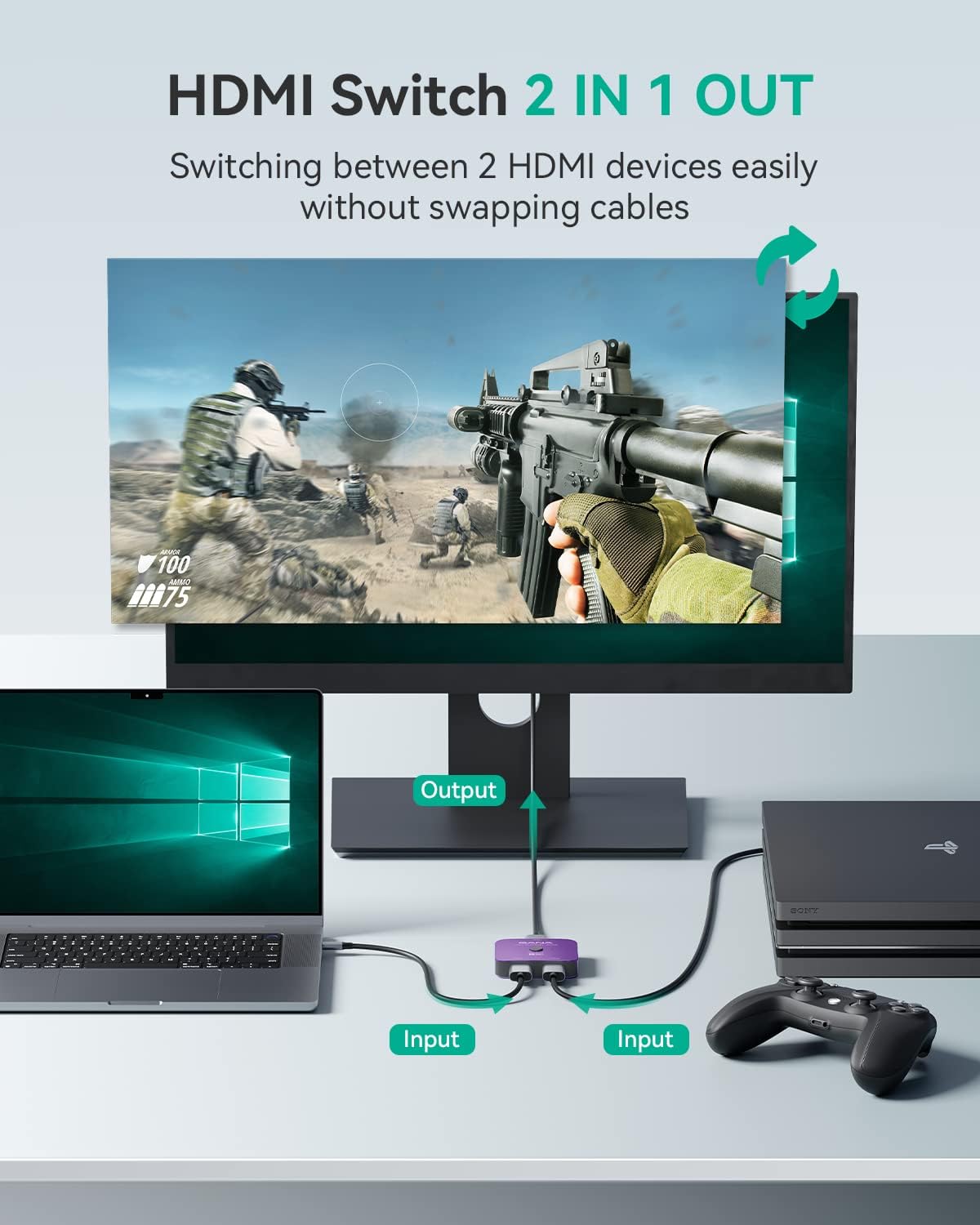
Nọmba 5: Setup for using the device as an HDMI Switch (2 In 1 Out).
Mode B: HDMI Splitter (1 In 2 Out)
Connect one HDMI source device (e.g., PC) to the HDMI input port on the switch. Connect two HDMI displays (e.g., TV, monitor) to the two HDMI output ports of the switch. Use the "Select" button to toggle between the two displays. Note: Only one display can be active at a time in this mode. Simultaneous display is NOT supported.

Nọmba 6: Setup for using the device as an HDMI Splitter (1 In 2 Out).
2. Cable Requirements
For optimal performance, especially when utilizing 8K resolution or high refresh rates (e.g., 4K@120Hz), it is crucial to use certified HDMI 2.1 cables for all connections to and from the switch.
3. Asopọ Agbara (Aṣayan)
The GANA HDMI 2.1 Switch is designed to be plug-and-play and typically does not require external power. However, for certain high-bandwidth devices or longer cable runs, connecting a USB-C power source (not included) to the designated port on the switch may enhance stability and performance.
Awọn ilana Iṣiṣẹ
Switching Between Devices/Displays
To switch between connected HDMI sources (in 2 In 1 Out mode) or displays (in 1 In 2 Out mode), simply press the "Select" button located on the top of the switch. The LED indicator will illuminate to show which input/output is currently active.
Note: This HDMI Switch does not support automatic switching. Manual button press is required for all changes.
Ibamu
The GANA HDMI 2.1 Switch is broadly compatible with devices featuring a standard HDMI interface:
- Awọn ẹrọ ti nwọle: Computers, XBox 360, XBox One, PS5/PS4/PS3, Blu-Ray DVD players, Roku, Apple TV, Fire Stick, etc.
- Awọn ẹrọ Ijade: HD-Ready or Full HD TVs, monitors, projectors, etc.

Nọmba 7: Visual representation of compatible input (Laptops, HD Players, Gaming Consoles) and output (Monitors, TVs, Projectors) devices.
Laasigbotitusita
- Kò sí ìbòjú àmì/ìbòjú tí ń tàn kálẹ̀:
- Rii daju pe gbogbo awọn kebulu HDMI ti sopọ ni aabo.
- Verify that you are using certified HDMI 2.1 cables, especially for 8K or 4K@120Hz content.
- Try connecting an external USB-C power source to the switch.
- Ensure your display device is set to the correct HDMI input.
- Test with different HDMI cables or directly connect devices to the display to rule out cable or device issues.
- Ko si Ohun:
- Ṣàyẹ̀wò àwọn ètò ohùn lórí ẹ̀rọ orísun rẹ kí o sì fi hàn.
- Ensure the HDMI cables support audio transmission.
- Cannot Display Simultaneously in 1 In 2 Out Mode:
- This device is designed to toggle between two displays in 1 In 2 Out mode, not to display simultaneously. This is normal operation.
If you continue to experience issues, please refer to the Warranty & Support section for assistance.
Awọn pato
| Ẹya ara ẹrọ | Ẹ̀kúnrẹ́rẹ́ |
|---|---|
| HDMI Ẹya | HDMI 2.1 |
| Atilẹyin ipinnu | 8K@60Hz, 4K@120Hz (4K@165Hz/144Hz), 2K@240Hz, 1080P@240Hz |
| Bandiwidi | 48Gbps |
| HDR atilẹyin | Dynamic HDR, Dolby Vision |
| Ibamu HDCP | HDCP 2.3 |
| Chroma Support | 4:2:0 / 4:2:2 / 4:4:4 |
| VRR Support | Bẹẹni |
| Asopọmọra Iru | HDMI |
| Ohun elo Ile | Aluminiomu Alloy |
| Iwọn Nkan | 3.17 iwon |
| Package Mefa | 5 x 4.33 x 0.83 inches |
Atilẹyin ọja & Atilẹyin
GANA provides lifetime technical support for this product. If you encounter any problems during use, please contact our customer service via message-centre. We aim to resolve your issue within 12 hours.
Alaye ni Afikun
For further visual guidance on product functionality, please refer to the official seller video below:
Fidio 1: Official seller video demonstrating the "8K 2X1 HDMI Switcher" functionality and setup.