
1. Ọja Ipariview
The Sudio F2 is a portable Bluetooth speaker designed for high-quality audio playback in various environments. It features Bluetooth 5.3 connectivity, an AUX input, IPX7 waterproof rating, and a unique broadcast function allowing connection of up to 100 speakers.

Iwaju view of the Sudio F2 Portable Bluetooth Speaker.
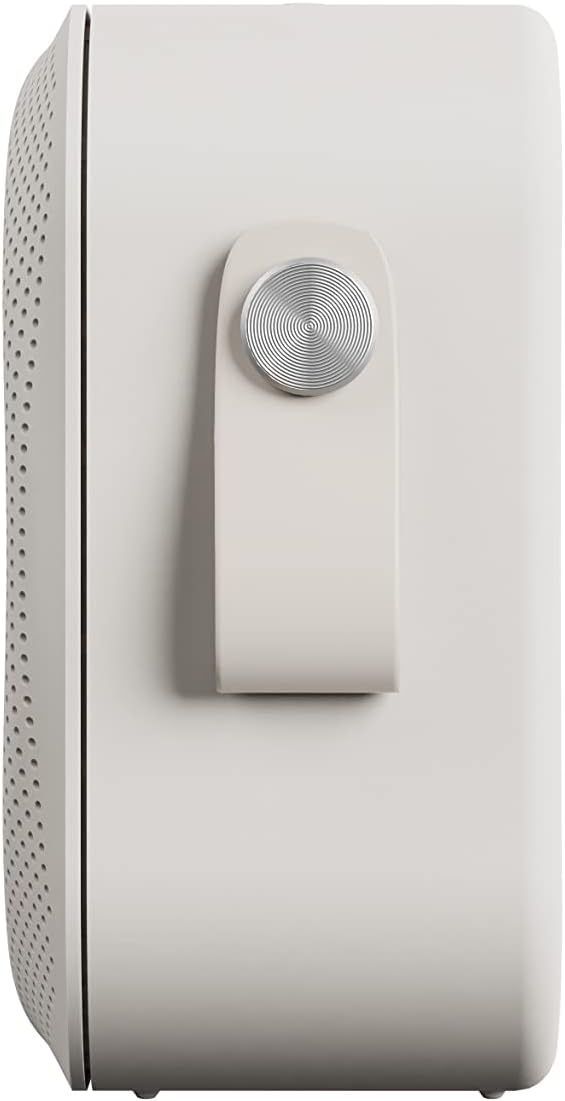
Apa view of the Sudio F2 speaker, highlighting the integrated silicone strap for portability.
2. Package Awọn akoonu
Rii daju pe gbogbo awọn nkan wa ninu package:
- Sudio F2 Portable Bluetooth Speaker
- Type-C USB-cable for charging
- Ilana Afowoyi (iwe yii)
3. Eto ati gbigba agbara
3.1 Ni ibẹrẹ idiyele
Before first use, fully charge your Sudio F2 speaker. Connect the provided Type-C USB cable to the charging port on the speaker and to a compatible USB power adapter (not included). A full charge takes approximately 4 hours and provides up to 15 hours of playtime.
3.2 Agbara Tan / Pa
- To power on: Press and hold the power button until the indicator light illuminates.
- To power off: Press and hold the power button until the indicator light turns off.

Apa view of the Sudio F2 speaker, showing the power button location.
4. Awọn ilana Iṣiṣẹ
4.1 Sisopọ Bluetooth
- Ensure the Sudio F2 speaker is powered on and in pairing mode (indicator light will flash).
- Lori ẹrọ rẹ (foonuiyara, tabulẹti, ati bẹbẹ lọ), mu Bluetooth ṣiṣẹ ki o wa awọn ẹrọ to wa.
- Select "Sudio F2" from the list.
- Once connected, the indicator light will become solid, and you will hear an audible confirmation.
The speaker uses Bluetooth 5.3 technology and has a connection range of up to 10 meters.
4.2 Iṣawọle AUX
To connect a device via AUX, insert a 3.5mm audio cable (not included) into the AUX input port on the Sudio F2 speaker and the other end into your audio source. The speaker will automatically switch to AUX mode.

The Sudio F2 speaker featuring its AUX input port for wired connections.
4.3 Broadcast Function (Multi-Speaker Pairing)
The Sudio F2 allows you to link up to 100 speakers simultaneously for a larger sound experience. This feature is activated using the broadcast function button.
- Connect your primary Sudio F2 speaker to your device via Bluetooth.
- Power on all other Sudio F2 speakers you wish to connect.
- On the primary speaker, press the broadcast function button (refer to the speaker diagram for location).
- The primary speaker will begin searching for other F2 speakers.
- Once connected, all linked speakers will play audio synchronously.

Multiple Sudio F2 speakers demonstrating the broadcast function for synchronized audio playback.

The Sudio F2 speaker connected to a turntable via AUX, illustrating its compatibility with various audio sources.
4.4 Awọn iṣakoso
The Sudio F2 features touch controls for playback and volume adjustments. Specific functions include:
- Ṣiṣẹ/Daduro: Single tap the main control button.
- Iwọn didun Soke/Isalẹ: Swipe or tap dedicated volume areas (refer to product diagram for exact locations).
- Itele / Tẹlẹ Orin: Double tap or triple tap the main control button (functionality may vary, refer to quick start guide for details).
5. Omi Resistance (IPX7)
The Sudio F2 speaker has an IPX7 waterproof rating, meaning it can be submerged in water up to 1 meter for 30 minutes. This makes it suitable for use in showers, by pools, or in rainy conditions. Ensure all ports are securely closed before exposing the speaker to water.

The Sudio F2 speaker, highlighting its IPX7 waterproof capability, suitable for wet environments.

A Sudio F2 speaker in a shower setting, demonstrating its waterproof design.
6. Itọju
6.1 Ninu
To clean your Sudio F2 speaker, use a soft, damp cloth. Avoid using harsh chemicals or abrasive materials, as these can damage the speaker's finish or waterproof seals. Ensure the speaker is dry before charging.
6.2 Ibi ipamọ
Tọ́jú agbọ́hùnsọ̀ náà sí ibi gbígbẹ tí ó tutù, tí kò sí ìmọ́lẹ̀ oòrùn tààrà àti ooru tó le koko. Tí o bá ń tọ́jú rẹ̀ fún ìgbà pípẹ́, gba agbára bátìrì náà lẹ́ẹ̀kọ̀ọ̀kan láti lè máa tọ́jú ìlera rẹ̀.
7. Laasigbotitusita
7.1 Ko si Agbara
- Ensure the speaker is fully charged. Connect it to a power source using the provided Type-C USB cable.
- Rí i dájú pé okùn gbigba agbara àti adapter náà ń ṣiṣẹ́ dáadáa.
7.2 Ko le So pọ nipasẹ Bluetooth
- Rii daju pe agbohunsoke wa ni ipo isọpọ (imọlẹ ina atọka).
- Rii daju pe Bluetooth ẹrọ rẹ ti ṣiṣẹ ati laarin awọn mita 10 ti agbọrọsọ.
- Try forgetting the "Sudio F2" device from your device's Bluetooth settings and re-pairing.
- Tun mejeeji agbọrọsọ ati ẹrọ rẹ bẹrẹ.
7.3 Ko si Ohun
- Ṣayẹwo awọn ipele iwọn didun lori mejeeji agbọrọsọ ati ẹrọ ti o sopọ.
- Ensure the speaker is correctly paired via Bluetooth or connected via AUX.
- If using AUX, verify the cable is fully inserted and functional.
7.4 Broadcast Function Not Working
- Ensure all speakers are Sudio F2 models.
- Verify that the primary speaker is successfully connected to your device via Bluetooth.
- Make sure all speakers are powered on and within close proximity to each other.
8. Awọn pato
| Ẹya ara ẹrọ | Sipesifikesonu |
|---|---|
| Orukọ awoṣe | Sudio F2 |
| Nọmba awoṣe | SD-1802 |
| Asopọmọra Technology | Bluetooth 5.3 |
| Alailowaya Ibiti | 10 Mita |
| Input Audio | AUX 3.5mm |
| Omi Resistance Ipele | IPX7 (Mabomire) |
| Akoko ere | Titi di wakati 15 |
| Akoko gbigba agbara | Awọn wakati 4 |
| Agbara Batiri | 2200 mAh |
| Agbọrọsọ Agbara Ijade ti o pọju | 20 Wattis |
| Idahun Igbohunsafẹfẹ | 35Hz - 18KHz |
| Iwọn Nkan | 410 Giramu (14.5 iwon) |
| Ọja Mefa | 2.16"D x 4.16"W x 4.17"H |
| Ọna Iṣakoso | Fọwọkan |
| Awọn irinše to wa | Type-C USB-cable for charging |
9. Atilẹyin ọja ati Support
9.1 atilẹyin ọja Alaye
The Sudio F2 Portable Bluetooth Speaker comes with a limited warranty. Please refer to the official Sudio website or your purchase documentation for specific terms and conditions regarding warranty coverage.
9.2 Onibara Support
For further assistance, technical support, or warranty claims, please contact Sudio customer service. You can find contact information and additional resources on the official Sudio webojula: Visit the Sudio Store on Amazon
10. Fidio ọja
Official Sudio F2 product video, showcasing the speaker's design and features in various settings.