
HOCO HC5
Hoco HC5 Cool Enjoy Sports Wireless Speaker User Manual
Awoṣe: HC5
Ọrọ Iṣaaju
O ṣeun fun riraasing the Hoco HC5 Cool Enjoy Sports Wireless Speaker. This manual provides important information regarding the setup, operation, and maintenance of your new speaker. Please read this manual thoroughly before using the product to ensure proper function and to extend its lifespan.
Alaye Aabo
- Ma ṣe fi agbọrọsọ si awọn iwọn otutu to gaju, imọlẹ orun taara, tabi ọriniinitutu giga.
- Yago fun sisọ tabi tẹriba agbọrọsọ si awọn ipa to lagbara.
- Maṣe ṣajọ, tunṣe, tabi tun agbọrọsọ naa ṣe funrararẹ. Tọkasi awọn oṣiṣẹ iṣẹ ti o peye.
- Pa agbohunsoke kuro lati omi ati awọn olomi miiran.
- Lo okun gbigba agbara pato nikan ati ohun ti nmu badọgba.
- Clean the speaker with a soft, dry cloth. Do not use harsh chemicals or abrasive cleaners.
Package Awọn akoonu

Image: Hoco HC5 speaker in its retail packaging, showing the speaker and its accessories.
Jọwọ ṣayẹwo awọn akoonu ti package farabalẹ. Ti awọn ohun kan ba nsọnu tabi bajẹ, kan si alagbata rẹ.
- Hoco HC5 Wireless Speaker
- Okun Ngba agbara USB
- AUX Cable
- Okùn ejika
- Afowoyi Olumulo (iwe-ipamọ yii)
Ọja Pariview
Familiarize yourself with the various parts and controls of your Hoco HC5 speaker.

Aworan: Iwaju view of the Hoco HC5 speaker, showcasing its cylindrical design, speaker grilles, and attached shoulder strap.

Aworan: Isunmọ view of one end of the Hoco HC5 speaker, highlighting the speaker driver and the robust casing.
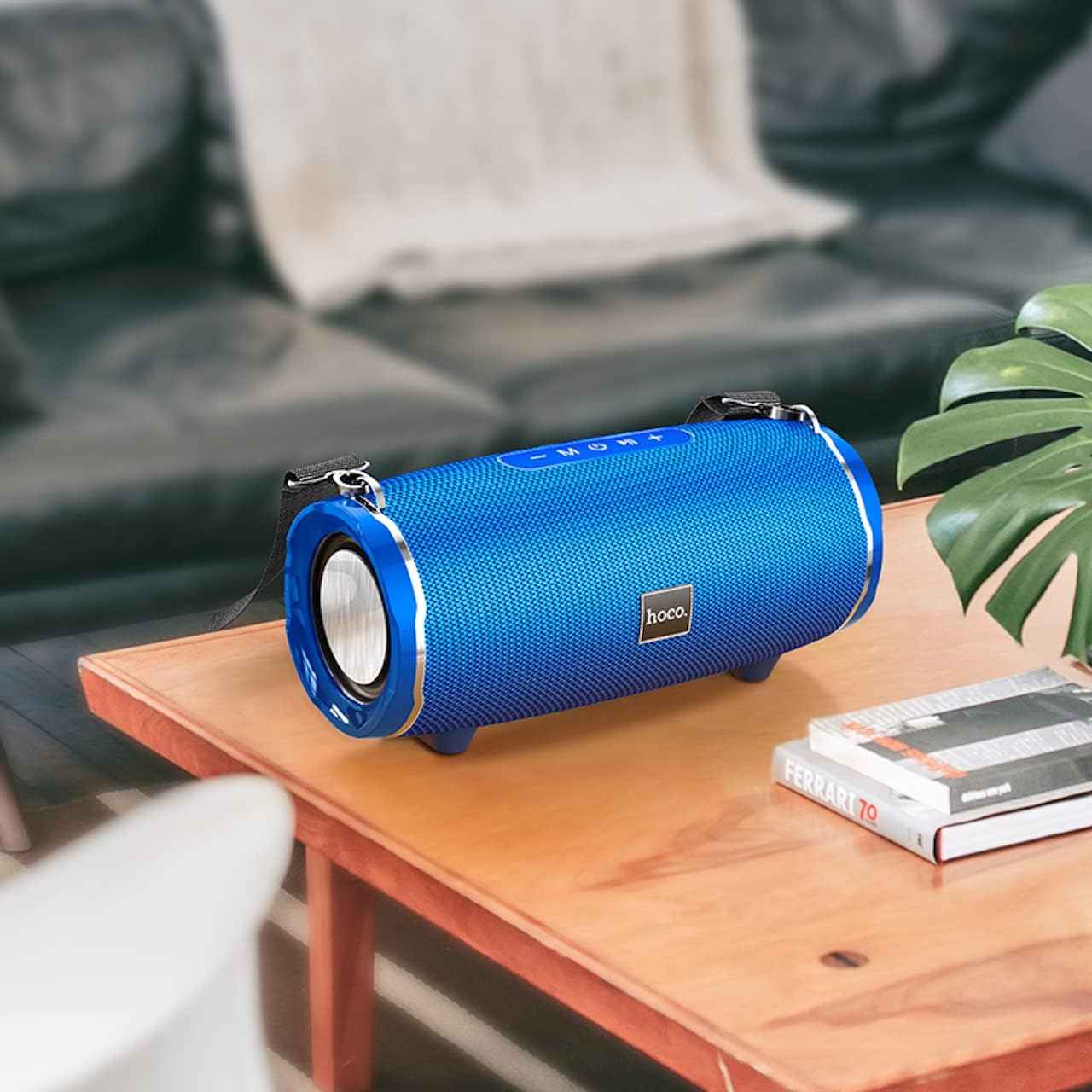
Image: The Hoco HC5 speaker placed on a wooden table, demonstrating its size and how it might appear in a home setting.
Control Panel (Top/Rear)
- Bọtini agbara: Tẹ mọlẹ lati tan/pa a.
- Bọtini Ipo (M): Short press to switch between Bluetooth, TF Card, USB, AUX, and FM modes.
- Play/Pause Button (▶⏸): Short press to play or pause music. In FM mode, short press to auto-scan and save stations.
- Iwọn didun isalẹ / Orin ti tẹlẹ (-): Tẹ kukuru fun orin ti o ti kọja. Tẹ gun lati dinku iwọn didun.
- Iwọn didun Up / Orin atẹle (+): Tẹ kukuru fun orin ti o tẹle. Tẹ gun lati mu iwọn didun pọ si.
Àwọn Ibudo (Ẹyìn/Ẹgbẹ́)
- Ibudo USB: Fun šišẹsẹhin okun filasi USB.
- Iho Kaadi TF: Fun TF (MicroSD) kaadi šišẹsẹhin.
- Ibudo AUX: Fún síso àwọn ẹ̀rọ ohùn ìta pọ̀ nípasẹ̀ okùn ohùn 3.5mm.
- Ibudo gbigba agbara: Fun gbigba agbara ti abẹnu agbohunsoke.
Ṣeto
Gbigba agbara si Agbọrọsọ
- So okun gbigba agbara USB pọ mọ ibudo gbigba agbara agbọrọsọ naa.
- Connect the other end of the USB cable to a USB power adapter (5V/1A recommended) or a computer's USB port.
- Ina Atọka gbigba agbara yoo tan imọlẹ lakoko gbigba agbara ati pipa nigbati o ba gba agbara ni kikun.
- Gbigba agbara ni kikun gba to wakati mẹta.
Titan / Paa
- Lati Fi agbara: Press and hold the Power button for a few seconds until you hear a power-on prompt.
- Lati Paarẹ: Press and hold the Power button again for a few seconds until you hear a power-off prompt.
Awọn ilana Iṣiṣẹ
Ipo Bluetooth
- Tan agbohunsoke. Yoo tẹ ipo sisopọ pọ si Bluetooth laifọwọyi, ti a fihan nipasẹ ina LED didan.
- Mu Bluetooth ṣiṣẹ lori ẹrọ rẹ (foonuiyara, tabulẹti, ati bẹbẹ lọ).
- Wa fun "HC5" in the list of available Bluetooth devices and select it to connect.
- Once connected, the LED indicator will stop flashing, and you will hear a connection tone.
- O le mu ohun ṣiṣẹ bayi lati ẹrọ rẹ nipasẹ agbọrọsọ.
- Use the Play/Pause, Volume Up/Down, and Previous/Next Track buttons on the speaker or your device to control playback.
TF Card / USB Mode
- Fi kaadi TF (MicroSD) tabi awakọ filasi USB sinu iho ti o baamu lori agbọrọsọ naa.
- The speaker will automatically switch to TF Card or USB mode and begin playing audio files. If not, short press the "M" (Mode) button to switch.
- Rii daju ohun rẹ files wa ni ọna kika ibaramu (fun apẹẹrẹ, MP3).
- Use the Play/Pause, Volume Up/Down, and Previous/Next Track buttons to control playback.
Ipo AUX
- So opin kan ti okun 3.5mm AUX si ibudo AUX ti agbọrọsọ.
- So opin miiran pọ mọ jaketi iṣelọpọ ohun ti ẹrọ ita rẹ (fun apẹẹrẹ, MP3 ẹrọ orin, kọnputa).
- The speaker will automatically switch to AUX mode. If not, short press the "M" (Mode) button to switch.
- Audio will now play through the speaker. Control playback from your external device.
Ipo Redio FM
- Short press the "M" (Mode) button until you enter FM radio mode.
- To auto-scan and save available FM stations, short press the Play/Pause button. The speaker will scan and store stations automatically.
- Lo awọn bọtini Orin Išaaju/Niwaju lati lọ kiri laarin awọn ibudo ti a fipamọ.
TWS (True Wireless Stereo) Function (If Supported)
The Hoco HC5 speaker supports TWS function, allowing you to pair two HC5 speakers together for a true stereo sound experience.
- Ensure both HC5 speakers are powered on and not connected to any Bluetooth device.
- On one of the speakers (this will be the primary speaker), long press the Play/Pause button until you hear a prompt indicating TWS pairing mode.
- Awọn agbohunsoke meji yoo wa laifọwọyi ati sopọ si ara wọn. Ni kete ti o ti sopọ, iwọ yoo gbọ ohun orin idaniloju kan.
- Now, connect your device to the primary speaker via Bluetooth as described in the "Bluetooth Mode" section.
- Audio yoo mu ṣiṣẹ ni sitẹrio nipasẹ awọn agbohunsoke mejeeji.
Itoju
- Ninu: Use a soft, dry, lint-free cloth to wipe the surface of the speaker. Do not use liquid cleaners, aerosols, or solvents.
- Ibi ipamọ: Nigbati o ko ba wa ni lilo fun awọn akoko ti o gbooro sii, tọju agbohunsoke ni itura, ibi gbigbẹ kuro lati orun taara ati awọn iwọn otutu to gaju.
- Itọju Batiri: Lati pẹ aye batiri, yago fun gbigba agbara si batiri ni kikun nigbagbogbo. Gba agbara si agbọrọsọ nigbagbogbo, paapaa ti kii ṣe ni lilo.
Laasigbotitusita
| Isoro | Owun to le Fa | Ojutu |
|---|---|---|
| Agbọrọsọ ko ni tan. | Batiri naa kere tabi ti dinku. | Gba agbara si agbọrọsọ ni kikun. |
| Ko le so pọ pẹlu ẹrọ Bluetooth. | Agbọrọsọ kò sí ní ipò ìsopọ̀; ẹ̀rọ Bluetooth ti pa; agbọrọsọ ti sopọ̀ mọ́ ẹ̀rọ mìíràn tẹ́lẹ̀. | Ensure speaker is in pairing mode (flashing LED). Turn off and on Bluetooth on your device. Disconnect from other devices. |
| Ko si ohun lati agbọrọsọ. | Ohùn náà kéré jù; ipò tí kò tọ́ ni a yàn; ìṣòro orísun ohùn. | Increase speaker and device volume. Press "M" button to select correct mode. Check audio source. |
| Gbigba redio FM ko dara. | Ifihan agbara; kikọlu ayika. | Relocate the speaker. Re-scan for stations. |
Awọn pato
| Ẹya ara ẹrọ | Ẹ̀kúnrẹ́rẹ́ |
|---|---|
| Awoṣe | HC5 |
| Ẹya Bluetooth | 5.0 (JL chip) |
| Iwọn Agbọrọsọ | 76mm * 2 |
| Ipilẹ Agbara Agbọrọsọ | 15W * 2 (Total 30W) |
| Agbara Batiri | 3600mAh |
| Akoko gbigba agbara | O fẹrẹ to awọn wakati 3.5 |
| Orin / Akoko Ọrọ | Titi di wakati 4 |
| Awọn aṣayan Asopọmọra | Bluetooth, TF card, USB, AUX, FM, TWS |
| Ọja Mefa | 292 x 139 x 132 mm |
| Iwọn Ọja | 1.5 kg |
| Ipo Ijade Ohun | Ayika |
| Iṣagbesori Iru | Tabili |
Atilẹyin ọja ati Support
The Hoco HC5 speaker comes with a standard manufacturer's warranty. Please refer to the warranty card included in your package for specific terms and conditions. For technical support, troubleshooting assistance, or warranty claims, please contact the retailer where you purchased the product or visit the official HOCO webojula fun alaye olubasọrọ.
Olupese: Hoco
Ilu isenbale: China
Ask a question about this manual
Ask about setup, troubleshooting, compatibility, parts, safety, or missing instructions. Manuals+ will review the question and use this page’s manual context to help answer it.