
Awọn Itọsọna Aabo pataki
Please read all instructions carefully before using your Calor Pro Express Ultimate II steam generator iron. Retain this manual for future reference.
- Always ensure the appliance is unplugged from the power outlet when not in use, before filling with water, and before cleaning.
- Ma ṣe lọ kuro ni irin laini abojuto lakoko ti o ti wa ni titan tabi ti sopọ si awọn mains.
- Keep the appliance and its cord out of reach of children and persons with reduced physical, sensory, or mental capabilities.
- Use only distilled or demineralized water in the water tank to prevent limescale buildup and ensure optimal performance.
- Do not touch the hot soleplate or steam as this can cause burns. Allow the iron to cool completely before handling or storing.
- Maṣe fi ohun elo naa bọ inu omi tabi omi miiran.
- Ti okun agbara ba bajẹ, o gbọdọ paarọ rẹ nipasẹ olupese, aṣoju iṣẹ rẹ, tabi awọn eniyan ti o ni oye kanna lati yago fun ewu kan.
Ọja Pariview
The Calor Pro Express Ultimate II GV9721C0 is a high-performance steam generator iron designed for efficient and powerful ironing. It features a durable Durilium Airglide soleplate and advanced steam technology to tackle even the toughest creases.

Image: The Calor Pro Express Ultimate II steam generator iron, showing its overall dimensions: approximately 41.5 cm length, 24.5 cm width, and 29.6 cm height.

Aworan: Isunmọ view of the iron's soleplate, featuring Durilium Airglide technology for smooth gliding and efficient steam distribution.
Ṣeto
- Yọ Ohun elo naa kuro: Carefully remove the steam generator iron from its packaging and remove all protective materials.
- Fi ohun elo naa si: Gbé ẹ̀rọ amúnááná sí orí ibi tí ó dúró ṣinṣin, tí ó tẹ́jú, tí ó sì lè kojú ooru, bí pátákó irin tí a ṣe fún àwọn ẹ̀rọ amúnáánáánááná.
- Kun Omi Omi: Open the water tank cap. Fill the tank with distilled or demineralized water up to the 'MAX' level indicator. Do not overfill. Close the cap securely.
- Sopọ si Agbara: Pulọọgi okun agbara sinu aaye itanna ti o dara.
Awọn ilana Iṣiṣẹ
Powering On and Heating
- Press the On/Off button located on the base unit. The indicator light will begin to flash, signaling that the appliance is heating up.
- Wait for the indicator light to become steady. This indicates that the iron has reached the optimal temperature and is ready for use.
Selecting Temperature and Steam Settings
The Calor Pro Express Ultimate II features automatic temperature adjustment, adapting to various fabric types. Always refer to the garment's care label for specific ironing instructions.

Image: The iron adjusting its temperature to perfectly suit various fabric types, ensuring optimal ironing results without damage.
Lilo Steam
- Steam Tesiwaju: Press and hold the steam trigger located under the iron's handle to release continuous steam.
- Steam Boost (Pressing Function): For stubborn creases, press the steam trigger fully to activate the powerful steam boost, delivering up to 600g/min of steam.

Image: The iron emitting ultra-powerful steam, demonstrating its high performance for effective wrinkle removal.
Inaro Nya
The iron can be used for vertical steaming of hanging garments, curtains, or delicate fabrics. Hold the iron a few centimeters away from the fabric and press the steam trigger.
Anti-Drip Išė
The integrated anti-drip system prevents water from leaking onto your garments, ensuring spotless ironing results even at lower temperatures.

Image: The iron in use, highlighting its anti-drip function which prevents water from leaking onto fabrics during ironing.
Itoju
Ninu Soleplate
- Rii daju pe irin ti yọ kuro ati pe o ti tutu si isalẹ patapata.
- Mu ese apẹrẹ pẹlu ipolowoamp, soft cloth. Do not use abrasive cleaners, metallic scouring pads, or sharp objects, as these can damage the soleplate coating.
Descaling (Anti-Calc Collector)
The appliance is equipped with an anti-calc collector to capture limescale particles, ensuring durable steam performance. Clean the collector regularly, especially if you notice reduced steam output or white flakes.
- Ensure the appliance is unplugged and completely cool (at least 2 hours after use).
- Unscrew and remove the anti-calc collector, typically located on the side of the steam generator base.
- Rinse the collector thoroughly under running water to remove all limescale deposits.
- Reinsert and screw the collector back into its position until it is securely tightened.
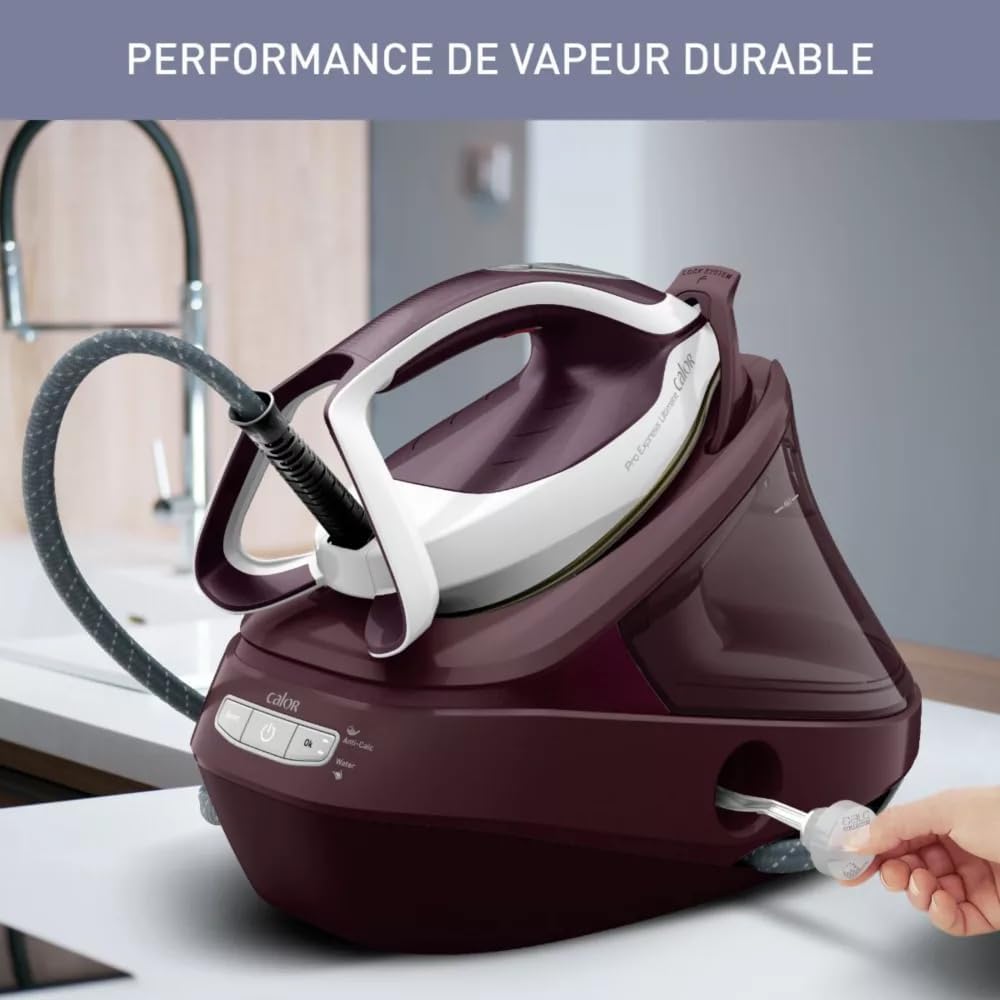
Image: The steam generator iron showing the location of the anti-calc collector, which helps maintain durable steam performance by collecting limescale.

Image: A hand demonstrating the removal of the anti-calc collector for cleaning, ensuring long-term steam performance.
Ibi ipamọ
- Gba ohun elo naa laaye lati tutu patapata ṣaaju titoju.
- Wrap the steam cord and power cord around the designated storage areas on the base unit.
- Lock the iron onto its base using the locking system for secure transport and storage.

Image: The steam generator iron being carried by its handle, illustrating its easy and secure transport feature with the iron locked onto its base.
Laasigbotitusita
If you encounter any issues with your steam generator iron, please consult the table below before contacting customer support.
| Isoro | Owun to le Fa | Ojutu |
|---|---|---|
| Ko si ategun ti wa ni iṣelọpọ. | Omi omi ti ṣofo. | Refill the water tank with distilled or demineralized water. |
| Ko si ategun ti wa ni iṣelọpọ. | The appliance has not reached operating temperature. | Wait for the indicator light to become steady before attempting to use steam. |
| Omi ti n rọ lati inu soleplate. | The iron's temperature is too low for steam production. | Increase the temperature setting or wait for the iron to fully heat up. The anti-drip system minimizes this, but proper temperature is key. |
| White flakes or reduced steam output. | The anti-calc collector needs cleaning. | Nu ohun tí ó ń dènà ìdènà-calc gẹ́gẹ́ bí a ti ṣàlàyé rẹ̀ nínú abala Ìtọ́jú. |
| Irin naa ko gbona. | The appliance is not properly plugged in or the power button is not pressed. | Check the power connection and ensure the On/Off button is pressed. |
Awọn pato
- Awoṣe: GV9721C0
- Brand: Kalori
- Agbara: 3000 Wattis
- Ìwúwo: 5.34 kilo
- Ohun elo Solelate: Stainless Steel (Durilium Airglide)
- Part Reference: 3121040085196
- Awọn ẹya pataki: Advanced steam technology, Anti-calc collector, Anti-drip system, Automatic temperature control, High-pressure steam output.
Atilẹyin ọja ati Support
For detailed warranty information, terms, and conditions, please refer to the warranty card included with your product at the time of purchase. Keep your proof of purchase for any warranty claims.
For technical support, spare parts, or service, please contact Calor customer service or visit the official Calor webojula.
- Olupese: KOLOR
- ASIN: B0C438KVR4
- Official Calor Webojula: Visit Calor Store on Amazon