
Ọrọ Iṣaaju
The Dirt Devil DD2505 Bagless Vacuum Cleaner is designed for efficient home cleaning, particularly beneficial for individuals with allergies or dust sensitivities. This vacuum features a HEPA 12 filter, which captures 99.5% of small dust particles, preventing them from recirculating into the air. Its bagless design includes a 2.5-liter dust collection bin for easy emptying and no need for replacement bags. The vacuum comes equipped with a combibrush for various floor types, a crevice tool, and an upholstery attachment, offering versatile cleaning options for both hard-to-reach areas and furniture.

Image: The Dirt Devil DD2505 Bagless Vacuum Cleaner, showcasing its compact design and transparent dustbin.
Eto ati Apejọ
Follow these steps to assemble your Dirt Devil DD2505 vacuum cleaner before first use.
- Yọ awọn ohun elo kuro: Carefully remove all parts from the packaging. Ensure all accessories (hose, telescopic tube, floor nozzle, crevice tool, upholstery brush) are present.
- So Hose naa: Fi okun rọ sinu agbawọle afamora lori ẹyọ akọkọ titi ti o fi tẹ ni aabo sinu aaye.
- Connect Telescopic Tube: Attach the telescopic metal tube to the handle end of the flexible hose. Adjust the tube length by pressing the release button and sliding it to your desired height.
- So Nozzle Ilẹ: Connect the combibrush floor nozzle to the end of the telescopic tube. Ensure it is firmly attached.
- Asopọ agbara: Extend the power cord from the vacuum cleaner. Plug the power cord into a suitable electrical outlet (220-240V AC, 50/60Hz).

Image: The Dirt Devil DD2505 vacuum cleaner fully assembled with hose, telescopic tube, and floor nozzle, ready for use.
Awọn ilana Iṣiṣẹ
Learn how to effectively use your vacuum cleaner and its attachments.
- Titan/Apapa: Press the power button located on the main unit to start or stop the vacuum cleaner.
- Using the Combibrush: The combibrush is suitable for various floor types. Use the foot switch on the nozzle to retract the bristles for hard floors or extend them for carpets and rugs.
- Lilo Ọpa Crevice: For narrow spaces, corners, and edges, attach the crevice tool directly to the hose handle or the telescopic tube.

Image: The crevice tool, ideal for cleaning tight spaces and corners.
- Using the Upholstery Brush: Attach the upholstery brush for cleaning furniture, curtains, or car interiors.
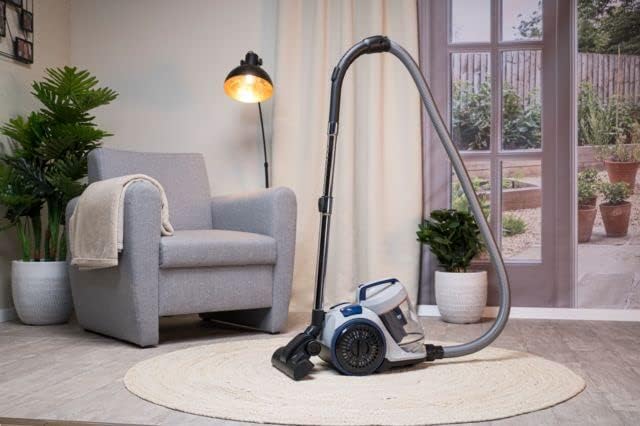
Image: The upholstery brush, designed for effective cleaning of fabric surfaces.
- Automatic Cable Rewind: After use, gently pull the power cord to activate the automatic cable rewind function. The cord will retract into the unit.
Itoju
Itọju deede ṣe idaniloju iṣẹ ṣiṣe ti o dara julọ ati fa igbesi aye ẹrọ mimọ igbale rẹ pọ si.
Ofo Dustbin
The 2.5-liter dustbin should be emptied regularly, especially when the 'Max' fill line is reached, to maintain suction power.
- Ge Agbara: Always unplug the vacuum cleaner from the power outlet before performing any maintenance.
- Yọ Dustbin kuro: Press the dustbin release button (if applicable) and lift the dustbin away from the main unit.
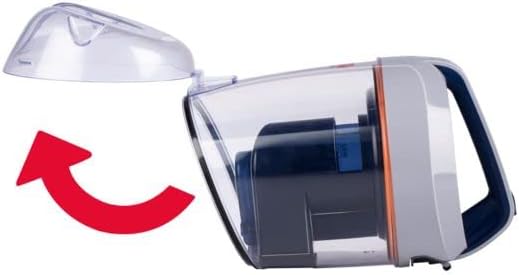
Image: Illustration showing how to detach the dustbin from the main vacuum unit.
- Awọn akoonu ofo: Position the dustbin over a waste bin. Open the bottom flap of the dustbin to release the collected dirt and debris.
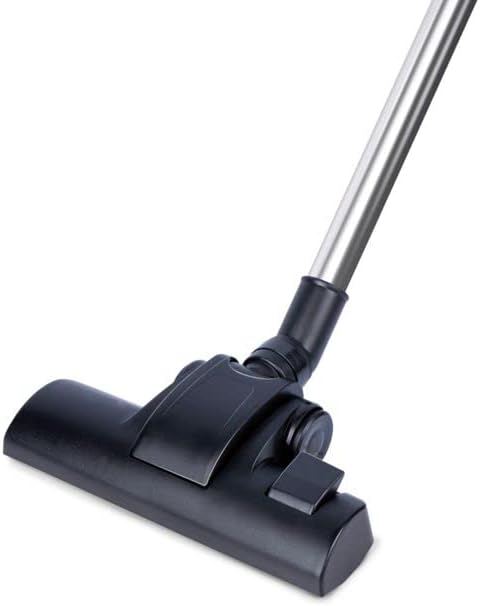
Image: The dustbin with its bottom flap open, ready to be emptied into a waste receptacle.
- Ṣe atunto: Close the dustbin flap securely and reattach the dustbin to the vacuum cleaner until it locks into place.
Cleaning the HEPA 12 Filter
The HEPA 12 filter is washable and should be cleaned periodically to maintain filtration efficiency. The frequency depends on usage.
- Àlẹ̀mọ́ ìwọlé: The HEPA filter is located within the dustbin assembly. Remove the dustbin as described above and locate the filter.
- Ajọ fifọ: Fi omi tútù fọ̀ àlẹ̀mọ́ HEPA títí omi náà yóò fi mọ́. Má ṣe lo àwọn ohun ìfọṣọ tàbí omi gbígbóná.
- Gbẹ ni kikun: Allow the filter to air dry completely for at least 24 hours before reinserting it into the vacuum cleaner. Do not use heat to dry the filter.
- Reinsert Filter: Once completely dry, place the filter back into its housing within the dustbin and reattach the dustbin to the vacuum.
Laasigbotitusita
If you encounter issues with your vacuum cleaner, refer to the following common problems and solutions.
- Ko si Agbara:
- Ṣayẹwo boya okun agbara ti wa ni edidi ni aabo sinu iṣan itanna ti n ṣiṣẹ.
- Ensure the power button on the vacuum cleaner is pressed.
- Pipadanu Ti Famu:
- Ṣayẹwo boya eruku eruku ti kun ati pe o nilo sisọnu.
- Inspect the HEPA filter for excessive dirt and clean it if necessary.
- Check the hose, telescopic tube, and floor nozzle for any blockages. Remove any obstructions carefully.
- Ariwo Dani:
- Turn off and unplug the vacuum. Check for any foreign objects caught in the brush roll or hose.
- Ensure all parts are correctly assembled and securely fastened.
Awọn pato
| Nọmba awoṣe | DD2505 |
| Ijade agbara | 800 W |
| Voltage | 220-240 V AC, 50/60 Hz |
| Dustbin Agbara | 2.5 liters |
| Àlẹmọ Iru | HEPA 12 (Washable) |
| USB Ipari | 5 mita |
| Radius ti nṣiṣẹ | 7.5 mita |
| Ariwo Ipele | 80 dB |
| Iwọn | 4.7 kilo |
| Awọn iwọn (L x W x H) | 38 x 27 x 32 cm |
| To wa Awọn ẹya ẹrọ | Combibrush, Crevice Tool, Upholstery Tool |
| Automatic Cable Rewind | Bẹẹni |
Atilẹyin ọja ati Support
This Dirt Devil DD2505 Bagless Vacuum Cleaner comes with a 2-odun lopolopo. For warranty claims, technical support, or service inquiries, please refer to the contact information provided with your purchase documentation or visit the official Dirt Devil webojula. Jọwọ ṣe idaduro ẹri rira rẹ fun ijẹrisi atilẹyin ọja.