
1. Ọja Ipariview
The GMBACK Wireless Switch 2 Pro Controller is a versatile gaming controller designed for a wide range of platforms, including Nintendo Switch 2/Switch/Lite/OLED, Apple devices (iPhone, iPad, Mac, TV, Apple Arcade MFi Games), Android devices (phone, tablet, Android TV, TV boxes), PC/Laptop (Windows 7/8/9/10/11), and Steam. It features advanced functionalities such as programmable buttons, 6-axis gyro motion control, adjustable vibration, turbo modes, and customizable RGB lighting to enhance your gaming experience.

Aworan: Iwaju view of the GMBACK Wireless Switch 2 Pro Controller, showcasing its ergonomic design and illuminated joysticks.
2. Package Awọn akoonu
Jọwọ ṣayẹwo awọn akoonu package lori ṣiṣi silẹ lati rii daju pe gbogbo awọn nkan wa:
- GMBACK Wireless Switch 2 Pro Controller
- Okun Ngba agbara USB
- Iwe afọwọkọ olumulo (iwe yii)
3. Eto ati Asopọ
3.1 Wide ibamu
The controller supports a broad range of devices. Ensure your device's Bluetooth is enabled before attempting to pair.
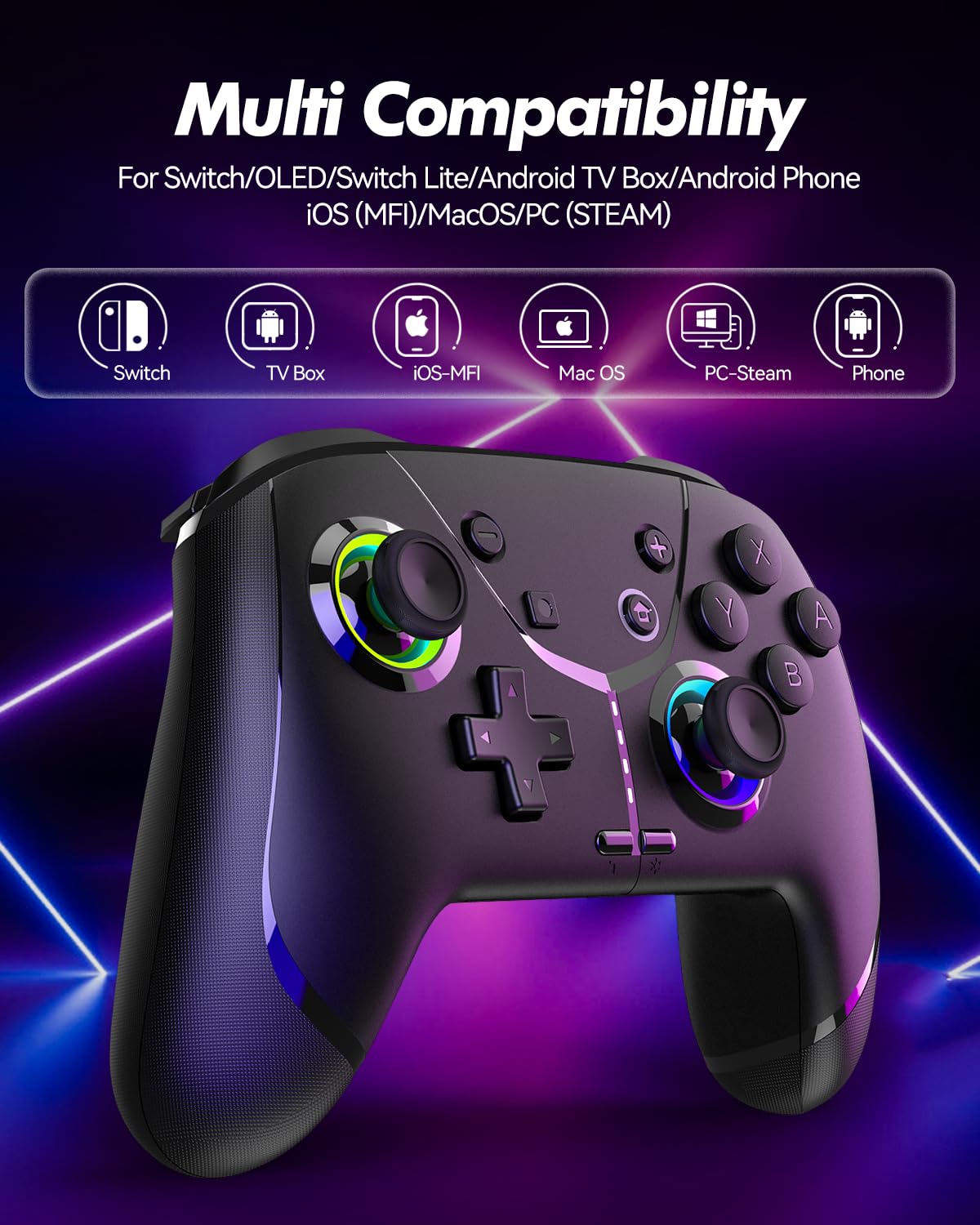
Image: Diagram illustrating the controller's compatibility with Nintendo Switch, TV Box, iOS-MFi, Mac OS, PC-Steam, and Phone devices.
3.2 Bluetooth Asopọ
To pair the controller via Bluetooth:
- Rii daju pe oludari ti gba agbara to.
- Tan oluṣakoso naa nipa titẹ bọtini Ile.
- Activate Bluetooth pairing mode on the controller (refer to specific device pairing instructions below).
- On your device (Switch, phone, PC), go to Bluetooth settings and search for new devices.
- Select "Pro Controller" or similar from the list to connect.
- Once connected, the indicator lights on the controller will stabilize.
3.3 Asopọ Onirin
For PC or other compatible devices, you can connect the controller directly using the provided USB cable. This will typically allow for plug-and-play functionality without requiring Bluetooth pairing.
4. Awọn ilana Iṣiṣẹ
4.1 Programmable Buttons (AR/AL)
The controller features two programmable buttons (AR and AL) on the back. These can be mapped to single buttons or record a sequence of up to 30 seconds of gaming operations.
- Mapping Single Buttons: Press the Program button, then the button you wish to map (e.g., A, B, X, Y, L, R, ZL, ZR, Left Joystick, Right Joystick, D-pad, +,-), then press AR or AL.
- Àwọn Macro Ìgbàsílẹ̀: Press the Program button, then perform the sequence of actions you wish to record. Press AR or AL again to save the macro.

Aworan: Isunmọ view of the controller's underside, highlighting the AR and AL programmable buttons and their mapping capabilities.
4.2 Motion Controls (6-Axis Gyro Sensor)
The built-in 6-axis gyro sensor allows for precise motion control in compatible games on Switch, mobile phones, PC, and TV. This feature enables intuitive aiming and movement based on the controller's orientation.

Image: Illustration of the 6-axis gyro sensor functionality, showing a user holding the controller with motion lines indicating active control in a racing game.
4.3 Adjustable Vibration
The asymmetric dual motors provide four adjustable vibration intensities (100%, 70%, 50%, 0%) for an immersive gaming experience. Adjust the vibration level to your preference through the controller's settings or specific button combinations (refer to the quick start guide for details).

Image: Visual representation of the dual vibration feature with intensity levels (None, Weak, Medium, Strong) and the auto/manual turbo function.
4.4 Turbo Modes
The controller offers both auto and manual turbo modes with three adjustable speeds (5, 10, or 15 shots per second). This feature allows for rapid, continuous input of a button press, useful in fast-paced games.
- Turbo afọwọṣe: Press the Turbo button and the desired action button simultaneously.
- Turbo laifọwọyi: Press the Turbo button and the action button twice.
- Iyara Ṣatunṣe: While in Turbo mode, press the Turbo button and move the right joystick up or down to cycle through speeds.
4.5 ABXY Function Switching
Easily switch between Nintendo Switch (A/B/X/Y) and Xbox (Y/X/B/A) button layouts without physically removing buttons. This ensures compatibility and comfort across different gaming platforms.

Image: Depiction of the ABXY button layout switching feature, showing the buttons rotating to indicate the change between Nintendo and Xbox configurations.
4.6 Wake-Up Function and RGB Light
The controller supports a wake-up function for connected devices (e.g., Nintendo Switch). It also features cool RGB lighting around the joysticks, which can be customized or turned off to suit your preference.

Image: The controller with illuminated RGB lights around the joysticks, indicating the "Wake Up & Cool LED Light" feature.
4.7 Screenshot Išė
A dedicated screenshot button allows you to capture in-game moments instantly on compatible platforms.
5. Gbigba agbara ati batiri Life
The controller is equipped with a built-in 800 mAh rechargeable battery, providing approximately 15-20 hours of gameplay on a full charge. Charging time is typically around 3 hours.
- Connect the controller to a USB power source (e.g., console, PC, USB wall adapter) using the provided USB charging cable.
- Àwọn iná àmì náà yóò fi ipò agbára hàn, wọn yóò sì pa tàbí yí àwọ̀ padà nígbà tí wọ́n bá ti gba agbára tán.

Image: Illustration highlighting the controller's ergonomic design and battery specifications: 800mAh Lithium Battery, 3H Charging Time, and 15-20H Playing Time.
6. Itọju
To ensure the longevity and optimal performance of your GMBACK Wireless Switch 2 Pro Controller:
- Jẹ́ kí olùdarí náà mọ́ nípa fífi aṣọ rírọ̀ tí ó gbẹ nu ún. Yẹra fún lílo àwọn kẹ́míkà líle tàbí àwọn ohun èlò ìfọ́ra.
- Tọju olutọju naa ni itura, aye gbigbẹ kuro lati orun taara ati awọn iwọn otutu to gaju.
- Yẹra fún fífi olùdarí náà sílẹ̀ tàbí kí o fi sí àwọn ìkọlù líle.
- Má ṣe gbìyànjú láti tú tàbí yí olùdarí náà padà, nítorí èyí yóò sọ àtìlẹ́yìn náà di òfo.
- Gba agbara fun oludari naa nigbagbogbo, paapaa ti ko ba si ni lilo nigbagbogbo, lati ṣetọju ilera batiri.
7. Laasigbotitusita
| Isoro | Owun to le Fa | Ojutu |
|---|---|---|
| Adarí ko ni tan. | Batiri kekere. | Charge the controller for at least 3 hours. |
| Kò le sopọ̀ mọ́ ara wọn nípasẹ̀ Bluetooth. | Controller not in pairing mode; Bluetooth interference; device Bluetooth off. | Ensure controller is in pairing mode. Turn off and on device Bluetooth. Move closer to the device. Try wired connection. |
| Aisun titẹ sii tabi ge asopọ. | Low battery; too far from device; wireless interference. | Charge controller. Move closer to device. Reduce other wireless device interference. |
| Buttons/Joysticks unresponsive. | Aṣiṣe sọfitiwia; ti ara bibajẹ. | Restart the controller and the connected device. If problem persists, contact customer support. |
| Gbigbọn kò ṣiṣẹ́. | Vibration intensity set to 0%; game does not support vibration. | Adjust vibration intensity. Check game settings. |
8. Awọn pato
- Awoṣe: 6-Axis Gyro Sensọ
- Asopọmọra: Bluetooth
- Ibamu: Nintendo Switch 2/Switch/Lite/OLED, Apple (iPhone, iPad, Mac, TV, MFi Games), Android (phone, tablet, TV), PC (Windows 7/8/9/10/11), Steam
- Batiri: 800 mAh Litiumu Batiri
- Akoko gbigba agbara: Isunmọ. wakati meji 3
- Àkókò eré: 15-20 wakati
- Awọn ẹya: Programmable Buttons, 6-Axis Gyro, Adjustable Vibration, Turbo Modes, ABXY Function Switching, Wake-up, RGB Light, Screenshot
- Ìwọ̀n Nkan: 11.3 iwon
- Awọn iwọn idii: 6.61 x 5.2 x 2.76 inches
- Olupese: GMBACK
9. Atilẹyin ọja ati Support
GMBACK is committed to providing high-quality products and excellent customer service. For any issues or inquiries regarding your controller, please refer to the following:
- Alaye Atilẹyin ọja: Please retain your proof of purchase for warranty claims. Specific warranty terms may vary; refer to the product packaging or contact GMBACK customer support for details.
- Atilẹyin Onibara: For technical assistance, troubleshooting, or warranty service, please contact GMBACK customer support through the retailer where you purchased the product or visit the official GMBACK store on Amazon: GMBACK Store.
- Ilana Olumulo Ayelujara: A PDF version of the user manual may be available for download at https://manuals.plus/m/56f01544f3b9d5425429644adc4053f7681b5d3717aa40f944cdb0f9bfccf36b.