
1. Ifihan
This manual provides detailed instructions for the installation, operation, and maintenance of your Yasorn eMylo Smart Single-Phase Electric Meter. This device is designed to monitor electricity usage, offering remote control and scheduling features via a smartphone application. Please read this manual thoroughly before use to ensure safe and efficient operation.

Image 1: Yasorn eMylo Smart Single-Phase Electric Meter.
2. Alaye Aabo
- Installation should only be performed by qualified personnel to prevent electric shock or damage to the device.
- Ensure the power supply is disconnected before any installation or wiring work.
- Ma ṣe fi ẹrọ naa han si ọrinrin, awọn iwọn otutu to gaju, tabi awọn agbegbe ibajẹ.
- Verify all connections are secure and correct according to the wiring diagram before applying power.
- Ẹrọ naa jẹ apẹrẹ fun lilo inu ile nikan.
3. Awọn ẹya Ọja
- Highest Accuracy: Utilizes a high-quality chipset and SMT technology for precise measurement, with an error margin within 0.3%.
- Iṣakoso latọna jijin ati ohun: Control devices remotely via the “Smart Life/Tuya“ APP and compatible with Alexa and Google Home for voice commands.
- Abojuto Lilo Agbara: Abojuto akoko gidi ti voltage, current, power, and total consumption on your smartphone or tablet app with a visual digital LCD display.
- Timing and Schedule Feature: Set schedules for appliances to automatically turn on/off, optimizing energy usage.
- Safety Flame Retardant Material: Constructed from eco-friendly flame-resistant ABS for enhanced safety and durability, offering good anti-electromagnetic interference and low power consumption.
4. Awọn pato
| Sipesifikesonu | Iye |
|---|---|
| Yiye | Ipele 1 |
| WiFi Support | 2.4 GHz (5G routers not supported) |
| Ti won won Lọwọlọwọ | 5 A |
| Ohun elo | ABS |
| Voltage | AC 90-250V / 50Hz |
| O pọju Lọwọlọwọ | 60A |
| Pulse Igbohunsafẹfẹ | 1200imp/kwh |
| Fifi sori ẹrọ | 35mm DIN Rail |
| Oṣuwọn Agbara | 1W/6VA |
| Ọja Mefa | 100 x 36 x 66 cm |
| Iwọn | 175 g |
| Ibaramu otutu | -45℃ ~ 75℃ |
5. Package Awọn akoonu
- 1 x WiFi Smart Meter
- 1 x Ilana itọnisọna
- 1 Set Accessories (for installation)
6. fifi sori
The eMylo Smart Electric Meter is designed for 35mm DIN-rail installation. Ensure the main power supply is turned off before beginning installation. Connect the device according to the wiring diagram provided in this manual and on the device itself.
6.1 Wiring aworan atọka
Refer to the diagram below for correct wiring. The wiring does not distinguish between L (Live) and N (Neutral) lines for the input voltage. However, ensure the Current Transformer (CT) is correctly installed around one of the load wires (either L or N) to measure current accurately. Do not connect the corresponding terminals incorrectly.

Image 2: eMylo Smart Meter showing wiring terminals and diagram.
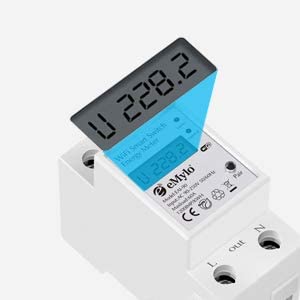
Image 3: Close-up of the meter's display and connection points.
6.2 Wiring Demonstration (General)
Video 1: A general demonstration of wiring a similar digital meter with a CT coil. Note that specific models and wiring might vary slightly, always refer to your product's diagram.
7. Isẹ
7.1 Agbára-ìbẹ̀rẹ̀ àti Ìsopọ̀ App
- After successful wiring, turn on the main power supply. The meter's display will illuminate.
- Download the “Smart Life” or “Tuya” app from your smartphone's app store.
- Forukọsilẹ tabi wọle si àkọọlẹ rẹ.
- Follow the in-app instructions to add a new device. Ensure your phone is connected to a 2.4GHz Wi-Fi network.
- The app will guide you through connecting the meter to your Wi-Fi network.
7.2 Iṣakoso Latọna jijin ati Abojuto
Ni kete ti o ba ti sopọ mọ, o le lo app naa lati:
- Turn connected appliances on or off remotely from anywhere.
- Monitor real-time voltage, lọwọlọwọ, agbara lọwọ, ati lapapọ agbara agbara.
- View historical energy consumption data to track usage patterns.
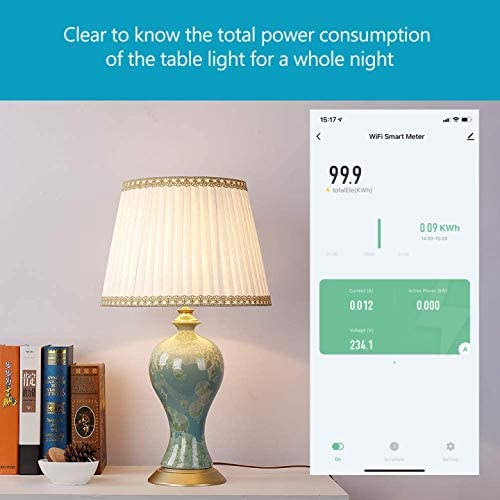
Image 4: App interface displaying real-time power consumption.

Image 5: Remote control of appliances via the smartphone app.
7.3 Ìṣètò àti Àwọn Iṣẹ́ Àkókò
Set up custom schedules and timers within the app to automate appliance operation. This feature helps in energy saving and convenience.

Image 6: Setting a schedule for a water heater in the app.
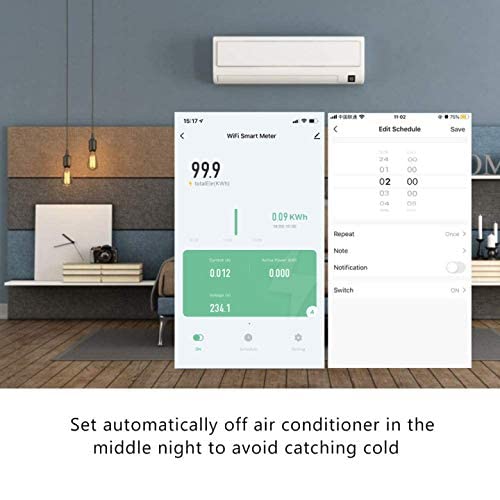
Image 7: Configuring an automatic off schedule for an air conditioner.
7.4 Iṣakoso ohun
Integrate the eMylo Smart Meter with Amazon Alexa or Google Home for convenient voice control of connected devices.
7.5 Data Storage and Reset
The meter stores energy data even when power is off. To reset the energy consumption data, use the designated key or button on the device (refer to the specific model's physical interface for location).
8. Itọju
- Jeki ẹrọ naa di mimọ ati ofe kuro ninu eruku. Lo asọ ti o gbẹ, asọ fun mimọ.
- Ma ṣe lo abrasive ose tabi epo.
- Nigbagbogbo ṣayẹwo awọn asopọ onirin fun wiwọ ati awọn ami ti wọ.
- Rii daju pe agbegbe iṣẹ wa laarin iwọn otutu ti a sọ ati awọn sakani ọriniinitutu.
9. Laasigbotitusita
- Ko si Ifihan: Check the power supply and ensure all input voltage connections are secure.
- Awọn kika ti ko tọ: Verify the CT coil is correctly installed around a single load wire and that the wiring matches the diagram. Ensure the CT is not damaged.
- Awọn ọran Asopọ App: Ensure your smartphone is on a 2.4GHz Wi-Fi network. Restart the meter and your router. Re-attempt the pairing process in the app.
- Iṣakoso latọna jijin Ko Ṣiṣẹ: Check your internet connection and the meter's Wi-Fi status in the app. Ensure the app is updated to the latest version.
10. Atilẹyin ọja ati Support
For warranty information and technical support, please refer to the documentation included with your purchase or contact Yasorn customer service directly. Details can typically be found on the product packaging or the official Yasorn webojula.