
1. Ifihan
This manual provides detailed instructions for the installation, operation, and maintenance of your VIMIN 6-Port 2.5G PoE Switch (Model VM-S250402P). This unmanaged switch is designed to enhance network performance with its high-speed ports and Power over Ethernet capabilities. Please read this manual thoroughly before using the device.

Figure 1: VIMIN 6-Port 2.5G PoE Switch (Model VM-S250402P)
2. Package Awọn akoonu
Verify that all items are present and in good condition. If any item is missing or damaged, please contact your vendor.
- 1x VIMIN 6-Port 2.5G PoE Switch (Model VM-S250402P)
- 1x Okun Agbara
- 4x Ethernet Cables (Cat 6 or above, approximately 1 meter each)
- 1x Itọsọna olumulo
3. Ọja Ipariview
3.1 Igbimọ iwaju
The front panel features the RJ45 ports, SFP ports, LED indicators, and the VLAN switch.

Figure 2: Front Panel Layout and Typical Connection Scenario
3.2 ru Panel
The rear panel typically contains the power input and ventilation openings.

Figure 3: Rear Panel with Ventilation and Power Input
3.3 LED Atọka
The LED indicators provide real-time status of the switch's operation.
| Atọka | Ipo | Apejuwe |
|---|---|---|
| 4x 2.5Gbps Ports (Yellow) | On | 2.5G Link established |
| 4x 2.5Gbps Ports (Green) | On | Ọna asopọ Aseyori |
| 2x 10G SFP (Yellow) | On | 10G Link established |
| 2x 10G SFP (Green) | On | Ọna asopọ Aseyori |
| PoE Link (Red) | On | PoE Agbara |
| PoE Link (Red) | Paa | Poe Pa |
| PWR (Agbara) | On | Agbara ẹrọ Tan |
| PWR (Agbara) | Paa | Device Powered Off |

Figure 4: LED Indicator Guide
4. Eto ati fifi sori
The VIMIN 6-Port 2.5G PoE Switch is designed for plug-and-play operation, requiring no complex configuration.
4.1 Basic Connection Steps
- So agbara: Plug the power cable into the switch's power input and then into a power outlet.
- Awọn ẹrọ Sopọ: Connect your network devices (e.g., NAS, APs, computers, routers) to the RJ45 ports using Ethernet cables. For 10Gbps connectivity, insert compatible SFP modules into the SFP ports and connect fiber optic cables.
- Jẹrisi Asopọmọra: Check the LED indicators to ensure proper link and activity.

Figure 5: Plug and Play Setup Guide
4.2 SFP Module Installation
The switch supports adaptive 1G/2.5G/10G optical fiber modules (modules are NOT included and must be purchased separately).
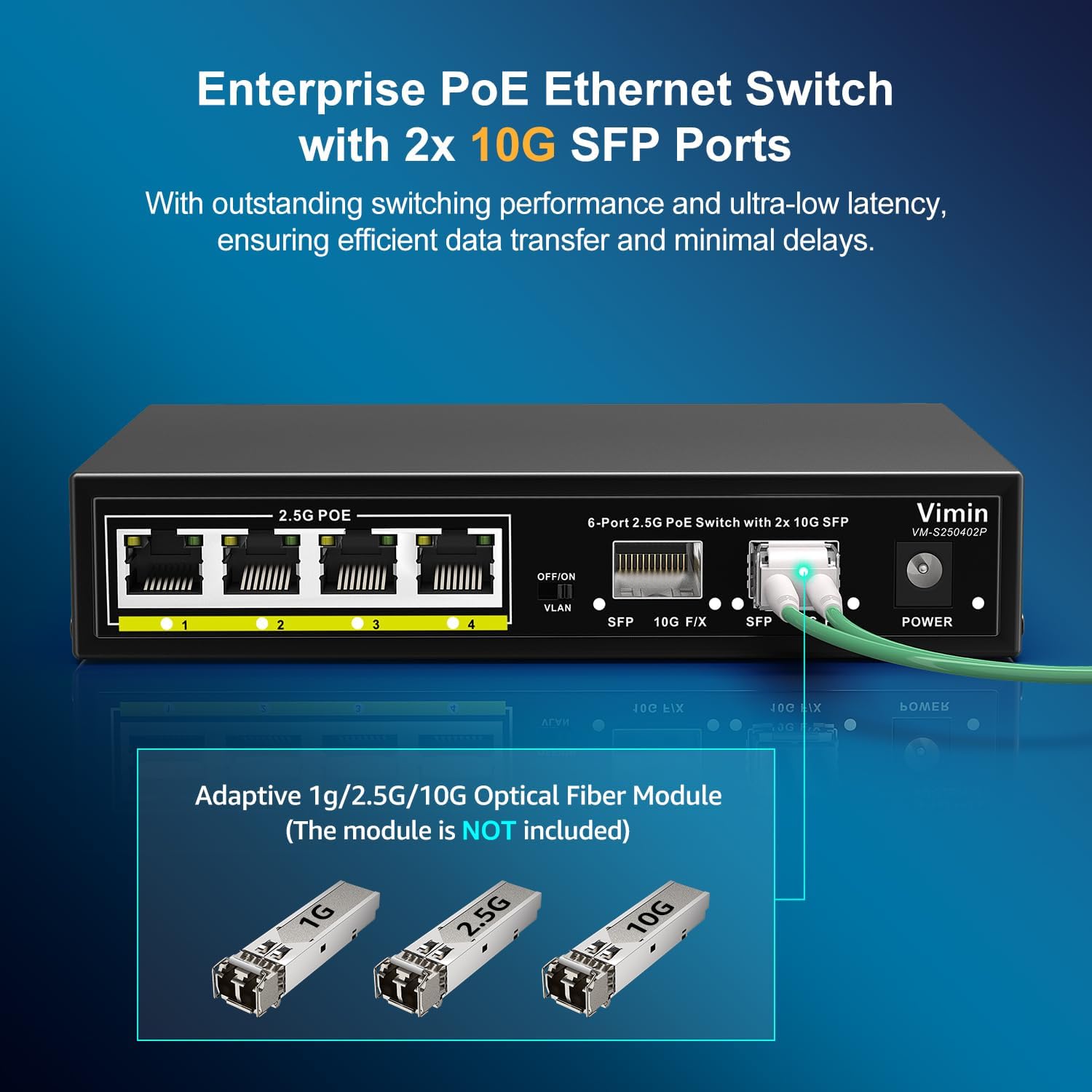
Figure 6: SFP Module Insertion
5. Isẹ
This unmanaged switch operates automatically once connected. It supports IEEE 802.3af/at standards, providing up to 30W of power per port with a total PoE budget of 65W. It does not support passive PoE.
5.1 One-Key VLAN Function
The switch features a One-Key VLAN mode. When activated, ports 1-4 are isolated from each other but maintain communication with the SFP ports. This enhances network security and optimizes bandwidth utilization by preventing direct communication between connected devices on ports 1-4.

Figure 7: One-Key VLAN Operation
6. Itọju
To ensure optimal performance and longevity of your VIMIN PoE switch, follow these maintenance guidelines:
- Ayika: Operate the switch within the recommended temperature range of 14°F to 131°F (-10°C to 55°C).
- Ninu: Jeki ẹrọ naa di mimọ ati ofe kuro ninu eruku. Lo asọ asọ ti o gbẹ fun mimọ.
- Afẹfẹ: Ensure proper airflow around the device. The fanless design relies on natural convection for heat dissipation.
- Agbara: Lo oluyipada agbara ti a pese nikan.

Figure 8: Durable and Stable Design Features
7. Laasigbotitusita
If you encounter issues with your VIMIN PoE switch, refer to the following common problems and solutions:
- Ko si Agbara: Ensure the power cable is securely connected to both the switch and the power outlet. Verify the power outlet is functional.
- Ko si Imọlẹ Ọna asopọ: Check if the Ethernet cable is properly connected to both the switch port and the device. Ensure the connected device is powered on and functioning correctly. Try a different cable or port.
- Ẹrọ PoE Ko Ṣiṣẹ Lori: Confirm that the connected device is PoE compatible (IEEE 802.3af/at). Check the PoE power budget (65W total, 30W per port) to ensure it's not exceeded. Ensure the PoE Link LED is on.
- Iyara Nẹtiwọọki o lọra: Verify that all connected devices and cables support 2.5G or 10G speeds. Ensure you are using Cat6 or higher Ethernet cables for optimal performance.
- VLAN Isolation Issue: If devices on ports 1-4 are communicating directly, ensure the One-Key VLAN switch is in the 'ON' position.
If the problem persists, please contact VIMIN technical support.
8. Awọn pato
| Ẹya ara ẹrọ | Apejuwe |
|---|---|
| Nọmba awoṣe | VM-S250402P |
| Awọn ibudo | 4x 2.5G PoE+ RJ45 Ports, 2x 10G SFP Ports |
| Yipada Agbara | 60Gbps |
| Poe Standard | IEEE 802.3af/at (Does NOT support passive PoE) |
| Lapapọ Poe Power isuna | 65W |
| Power per Port | Titi di 30W |
| VLAN iṣẹ | One-Key VLAN (Isolates ports 1-4, communicates with SFP ports) |
| Monomono Idaabobo | 6KV |
| Itutu agbaiye | Oniru Fanless |
| Ohun elo ọran | Irin Housing |
| Awọn iwọn otutu ti nṣiṣẹ | 14°F si 131°F (-10°C si 55°C) |
| Ọja Mefa | 6.3 x 4.33 x 1.3 inches (16 x 11 x 3.3 cm) |
| Iwọn Nkan | 1.89 poun (0.86 kg) |
| UPC | 790885573682 |
9. Atilẹyin ọja ati Support
VIMIN provides a one-year warranty for this product, ensuring reliability, quality, and performance. We also offer lifetime technical support to assist you with any questions or issues.
For technical assistance or warranty claims, please contact VIMIN support:
- Imeeli: support@vimintech.com
10. Fidio ọja
Wo fidio yii fun wiwo loriview of the VIMIN 6-Port 2.5G PoE Switch and its features.
Fidio: Pariview of the VIMIN 6-Port 2.5G PoE Switch, highlighting its 65W power budget and 60Gbps switching capacity.