
HOCO S19 Metal Grey
Hoco S19 Small Heartful ENC Noise Reduction Wireless Headphones
Itọsọna olumulo
Ọrọ Iṣaaju
Thank you for choosing the Hoco S19 Small Heartful ENC Noise Reduction Wireless Headphones. This manual provides detailed instructions on how to set up, operate, and maintain your new wireless headphones. Please read this manual carefully before use to ensure optimal performance and longevity of your device.
Alaye Aabo
- Má ṣe fi ẹ̀rọ náà sí ojú otútù tó le koko, ọriniinitutu, tàbí àwọn ohun tó lè ba nǹkan jẹ́.
- Keep the device away from water and liquids. It is not water resistant.
- Ma ṣe gbiyanju lati tunto tabi yi ẹrọ naa pada. Eyi yoo sọ atilẹyin ọja di ofo.
- Lo awọn kebulu gbigba agbara ti a pese tabi ifọwọsi.
- Yago fun gbigbọ ni awọn ipele iwọn didun giga fun awọn akoko gigun lati dena ibajẹ igbọran.
Package Awọn akoonu
Jọwọ ṣayẹwo package fun awọn nkan wọnyi:
- Hoco S19 Wireless Headphone
- Awọn iṣu Eti
- Okun gbigba agbara (USB)
- Itọsọna olumulo

Aworan: Iwaju view of the Hoco S19 retail packaging, showing the headphone and key features.
Ọja Pariview
Familiarize yourself with the components of your Hoco S19 headphone.

Aworan: Apa ọtun view of the Hoco S19 wireless headphone, highlighting the ear hook design and control buttons.
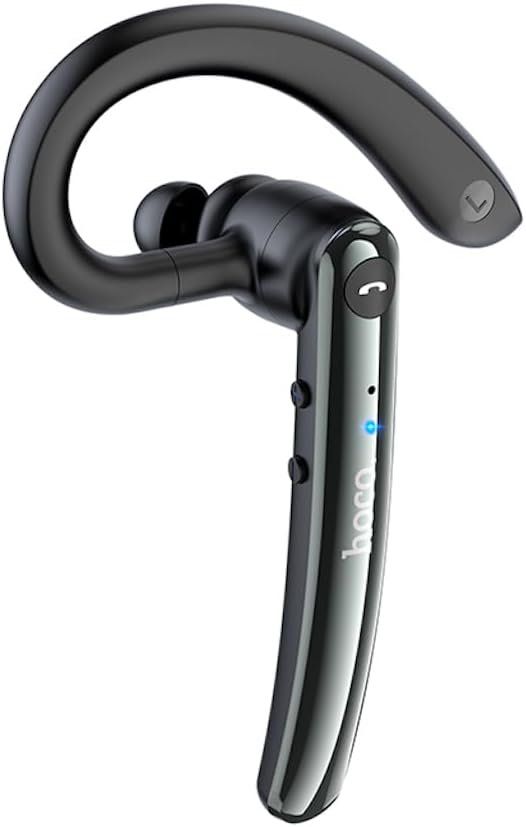
Aworan: Apa osi view of the Hoco S19 wireless headphone, showing the ergonomic ear hook and main body.

Aworan: Pada view of the Hoco S19 wireless headphone, displaying the charging port, model number (S19), input voltage, and various certification marks.
Awọn eroja pataki:
- Kio Eti: Designed for secure and comfortable fit.
- Ara akọkọ: Houses the battery, chip, and controls.
- Bọtini iṣẹ-pupọ: Fún agbára, ìsopọ̀, ìṣàkóso ìpè, àti ìṣàkóso orin.
- Awọn bọtini iwọn didun: For adjusting audio volume.
- Gbohungbohun: Dual microphones for ENC noise reduction.
- Ibudo gbigba agbara: Fun sisopọ okun gbigba agbara.
- Atọka LED: Ṣe afihan agbara, isopọpọ, ati ipo gbigba agbara.

Image: Inside of the Hoco S19 packaging, illustrating the location of the main and auxiliary microphones for enhanced call clarity.
Ṣeto
1. Ngba agbara si Agbekọri
Before first use, fully charge the headphone. The battery capacity is 90mAh.
- Connect the charging cable to the headphone's charging port and the other end to a USB power source (e.g., computer, wall adapter).
- The LED indicator will show charging status (e.g., red light).
- Charging takes approximately 1 hour. The LED indicator will change or turn off once fully charged.
2. Pairing with a Device (Bluetooth)
The Hoco S19 uses Bluetooth 5.0 for stable connectivity.
- Agbara Tan: Press and hold the Multi-function Button until the LED indicator flashes blue and red alternately, indicating pairing mode.
- Mu Bluetooth ṣiṣẹ: Lórí fóònù alágbèéká rẹ, tábìlẹ́ẹ̀tì, tàbí ẹ̀rọ mìíràn tí Bluetooth ń ṣiṣẹ́, lọ sí àwọn ètò Bluetooth kí o sì tan Bluetooth.
- Wa fun Awọn ẹrọ: Your device will automatically search for nearby Bluetooth devices.
- Select "Hoco S19": From the list of available devices, select "Hoco S19".
- Jẹrisi Isopọpọ: Once connected, the LED indicator on the headphone will flash blue slowly or turn off, and you will hear a voice prompt confirming the connection.
If pairing fails, turn off the headphone and your device's Bluetooth, then repeat the steps.
Awọn ilana Iṣiṣẹ
Titan / Paa
- Agbara Tan: Press and hold the Multi-function Button for approximately 3 seconds until the LED indicator flashes blue and you hear a voice prompt.
- Agbara Pa: Press and hold the Multi-function Button for approximately 5 seconds until the LED indicator turns red and you hear a voice prompt.
Awọn iṣẹ ipe
- Idahun/Ipe Ipari: Press the Multi-function Button once during an incoming call to answer. Press it again during a call to end.
- Kọ Ipe: Press and hold the Multi-function Button for approximately 2 seconds during an incoming call to reject.
- Nọmba Ikẹhin Tun Tun: Double-press the Multi-function Button when not on a call.
Sisisẹsẹhin Orin
- Ṣiṣẹ/Daduro: Press the Multi-function Button once during music playback.
- Orin t’okan: Tẹ mọlẹ bọtini Iwọn didun Up.
- Tẹlẹ Orin: Tẹ mọlẹ bọtini Iwọn didun isalẹ.
Iṣakoso iwọn didun
- Iwọn didun Up: Kukuru tẹ bọtini Iwọn didun Up.
- Iwọn didun isalẹ: Kukuru tẹ bọtini Iwọn didun isalẹ.
Idinku Ariwo ENC
The Hoco S19 features double-mark ENC (Environmental Noise Cancellation) for clearer calls. This feature is active during calls to reduce background noise.
Language Prompts
The headphone supports Chinese and English voice prompts. To switch languages, triple-click the Multi-function Button when the headphone is not connected to any device.
Itoju
- Ninu: Use a soft, dry cloth to clean the headphone. Do not use harsh chemicals or abrasive materials.
- Ibi ipamọ: Store the headphone in a cool, dry place away from direct sunlight and extreme temperatures.
- Itọju Batiri: To prolong battery life, avoid fully discharging the battery frequently. Charge the headphone regularly, even if not in use for extended periods.
Laasigbotitusita
| Isoro | Owun to le Fa | Ojutu |
|---|---|---|
| Headphone does not power on. | Batiri kekere. | Charge the headphone for at least 1 hour. |
| Ko le so pọ pẹlu ẹrọ. | Bluetooth not enabled on device; headphone not in pairing mode; too far from device. | Ensure Bluetooth is on. Put headphone in pairing mode (flashing blue/red). Keep devices within 10 meters. |
| Ko si ohun tabi didara ohun ti ko dara. | Volume too low; headphone not connected; interference. | Increase volume. Reconnect headphone. Move away from sources of interference. |
| Didara ipe ko dara. | Ariwo ayika; gbohungbohun ti dí. | Ensure microphone is clear. ENC noise reduction should help in noisy environments. |
Awọn pato
| Ẹya ara ẹrọ | Ẹ̀kúnrẹ́rẹ́ |
|---|---|
| Orukọ awoṣe | S19 |
| Asopọmọra Technology | Ailokun (Bluetooth) |
| Ẹya Bluetooth | 5.0 (Chip: Realtek RTL8763BMF) |
| Agbara Batiri | 90mAh |
| Akoko gbigba agbara | O fẹrẹ to wakati 1 |
| Ọrọ / Orin Time | Titi di wakati 9 |
| Akoko Iduro | Titi di wakati 200 |
| Idinku Ariwo | Double-mark ENC (Environmental Noise Cancellation) |
| Supported Prompts | Chinese ati English |
| Ohun elo | Acrylonitrile Butadiene Styrene (ABS) |
| Iwọn Nkan | 12 giramu |
| Àwọ̀ | Irin Grey |
| Omi Resistance Ipele | Ko Omi Resistant |
Atilẹyin ọja ati Support
HOCO products are designed and manufactured to the highest quality standards. For information regarding warranty coverage, please refer to the warranty card included with your purchase or visit the official HOCO webojula.
For technical support, troubleshooting assistance, or service inquiries, please contact your local HOCO distributor or the customer service department through the contact information provided on the HOCO official webojula tabi risiti rira rẹ.
Awọn orisun Ayelujara: For additional information, FAQs, and product updates, please visit the official HOCO webojula.
Ask a question about this manual
Ask about setup, troubleshooting, compatibility, parts, safety, or missing instructions. Manuals+ will review the question and use this page’s manual context to help answer it.