
1. Ifihan
This manual provides essential information for the safe and efficient use of your Samsung EcoFlex AI RB38C603DSA/EF combined refrigerator. Please read these instructions carefully before installation and operation, and keep them for future reference.

Aworan 1.1: Pariview of the Samsung EcoFlex AI RB38C603DSA/EF refrigerator, highlighting its dimensions (59.5 cm width, 203 cm height, 65.8 cm depth) and key features such as 390L capacity, AI Energy Mode, SpaceMax, Optimal Fresh+, Humidity Fresh+, and Total No Frost technology.
2. Eto ati fifi sori
2.1 Ṣiṣii ati Gbe
- Remove all packaging materials. Ensure no parts are missing or damaged.
- Gbe awọn firiji lori kan duro, ipele dada.
- Allow adequate space around the appliance for proper ventilation. The door opens 90 degrees without touching adjacent walls, facilitating placement.
2.2 Itanna Asopọ
- Connect the refrigerator to a grounded electrical outlet. The appliance uses a Type C/EF - 2 pin (EU/FR-DE hybrid) plug.
- Rii daju voltage matches the rating label on the appliance (220 Volts).
2.3 Isẹ ibẹrẹ
- After plugging in, allow the refrigerator to stand for at least 2-3 hours before loading food to stabilize internal temperatures.
- The Digital Inverter Compressor will adjust its speed to reach the set temperature efficiently.
3. Awọn ilana Iṣiṣẹ
3.1 otutu Iṣakoso
The refrigerator features adjustable temperature control. Refer to the internal control panel for setting desired temperatures for both the refrigerator and freezer compartments.
3.2 Ipo Agbara AI (Ohun elo SmartThings)
Activate the AI Energy Mode via the SmartThings app to monitor and reduce your refrigerator's energy consumption by up to 15%. This mode optimizes cooling performance based on usage patterns.
Video 3.1: This video demonstrates the AI Energy Mode feature, showing how to activate it through the SmartThings app to monitor and reduce energy consumption. It highlights the potential for up to 15% energy savings.

Image 3.2: A smartphone displaying the SmartThings app's AI Energy Mode interface, which allows users to monitor energy usage and activate energy-saving features for their connected refrigerator.
3.3 SpaceMax Technology
SpaceMax technology utilizes high-efficiency insulation to create thinner walls, providing more internal storage capacity (up to 32 liters more than traditional 2m combined refrigerators) without increasing ita mefa.
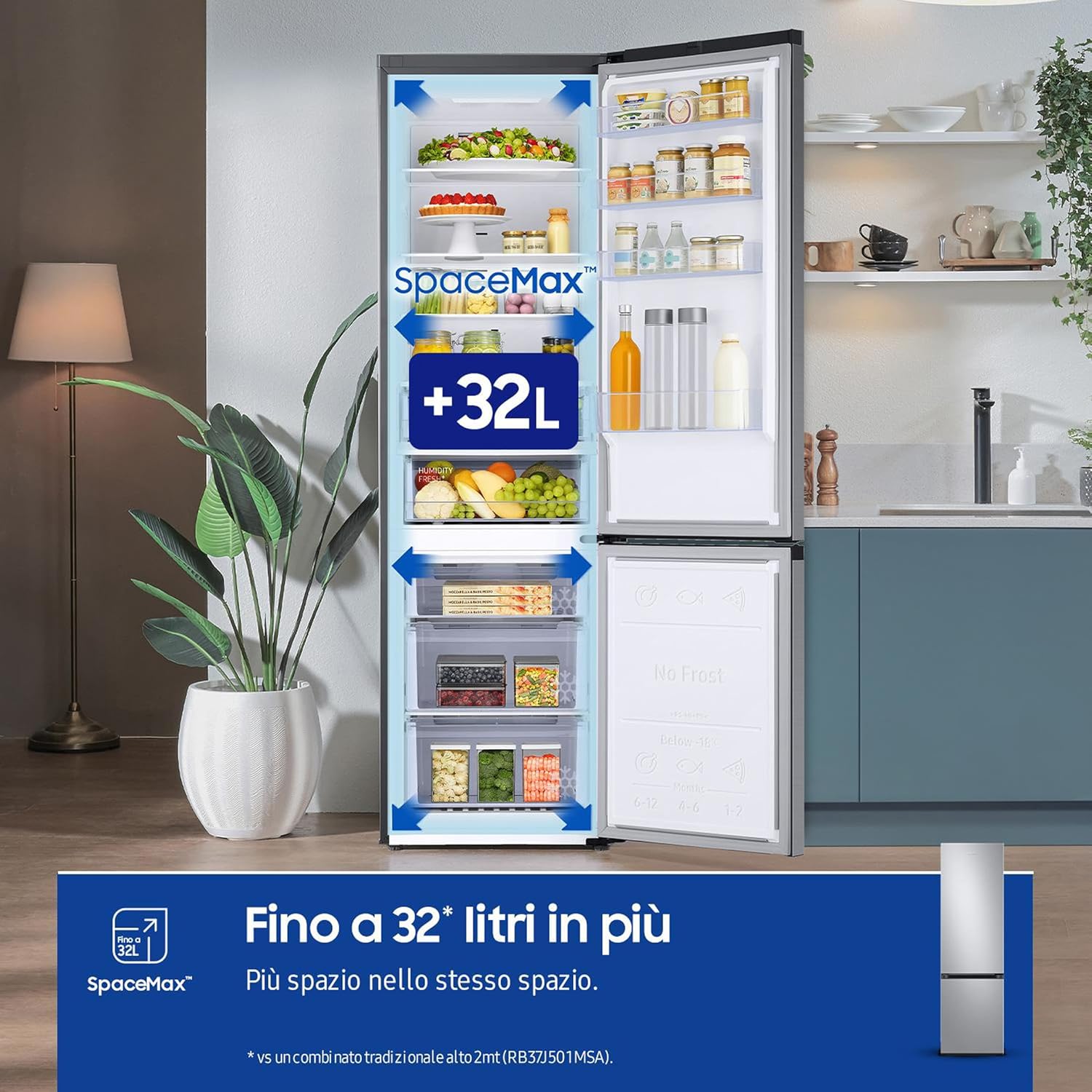
Image 3.3: The interior of the refrigerator showcasing the increased storage capacity provided by SpaceMax technology, allowing for more items to be stored within the same external footprint.
3.4 Lapapọ Ko si Frost
The Total No Frost feature prevents ice buildup in both the refrigerator and freezer compartments, eliminating the need for manual defrosting and ensuring consistent cooling performance.
3.5 Gbogbo Ni ayika Itutu
All Around Cooling ensures uniform cold air distribution throughout the entire refrigerator. Multiple vents on every shelf maintain a consistent temperature, keeping food fresher for longer.

Image 3.4: An illustration of the All Around Cooling system within the refrigerator, showing how cold air circulates evenly to every corner, ensuring consistent temperatures.
3.6 Optimal Fresh+ Drawer
The Optimal Fresh+ drawer offers flexible storage. It can be used as a single zone or divided into two zones with different temperatures, ideal for storing meat/fish on one side and fruits/vegetables on the other.

Image 3.5: The Optimal Fresh+ drawer, demonstrating its ability to be divided for separate storage of different food types, such as meat and produce, at optimized temperatures.
3.7 Humidity Fresh+ Drawer
The Humidity Fresh+ drawer allows you to adjust the humidity level by rotating a knob, creating an optimal environment for preserving fruits and vegetables.

Image 3.6: The Humidity Fresh+ drawer, illustrating its dedicated space for produce and the adjustable humidity control knob to maintain freshness.
4. Itọju
4.1 Ninu
- Yọọ firiji nigbagbogbo ṣaaju ki o to di mimọ.
- Clean the interior with a soft cloth and a mild detergent solution. Avoid abrasive cleaners.
- Pa awọn ita ita pẹlu ipolowoamp cloth. The Clean Back design facilitates easy cleaning of the rear.
- Regularly clean door seals to ensure a tight closure.
4.2 Digital ẹrọ oluyipada konpireso
The Digital Inverter Compressor is designed for long-lasting, quiet, and energy-efficient operation. It comes with a 20-year warranty, reflecting its durability.

Aworan 4.1: alaye view of the Digital Inverter Compressor, emphasizing its 20-year warranty, energy efficiency, and quiet operation.
5. Laasigbotitusita
If you experience issues with your refrigerator, please check the following common problems before contacting service:
- Firiji ko tutu: Ensure the power cord is securely plugged in and the temperature settings are correct. Check if the door is fully closed.
- Awọn ariwo ti ko wọpọ: Some operational noises are normal (e.g., compressor running, refrigerant flow). If the noise is excessive or unusual, ensure the refrigerator is level and not touching any walls.
- Omi jijo: Check if the drain hole is blocked or if the water dispenser (if applicable) is properly installed.
- Excessive heat on sides: It is normal for the sides of the refrigerator to feel warm, especially during initial operation or when the compressor is working hard, as this is where heat is dissipated.
For further assistance, please refer to the warranty and support section.
6. Awọn pato
| Ẹya ara ẹrọ | Sipesifikesonu |
|---|---|
| Brand | Samsung |
| Orukọ awoṣe | RB38C603DSA/EF |
| Awọn iwọn Ọja (DxWxH) | 59.5P x 65.8l x 203H cm |
| Agbara (Apapọ) | 390 liters |
| Firiji Net Agbara | 276 liters |
| Freezer Net Agbara | 114 liters |
| Iṣeto ni | Isalẹ firisa isalẹ |
| Àwọ̀ | Fadaka |
| Pataki Ẹya | Water Dispenser (Note: Product description mentions dispenser, but specifications list 'No' for 'Dispenser di acqua' and 'Non compatibile con casa intelligente' for smart home compatibility. Please verify actual product features.) |
| Iru fifi sori ẹrọ | Sisun |
| Defrost Eto | Ko si Frost |
| Voltage | 220 Volts |
| Selifu Iru | Gilasi |
| Nọmba ti selifu | 4 |
| Adijositabulu Iṣakoso iwọn otutu | Bẹẹni |
| Lododun Lilo Lilo | 211 kWh / ọdun |
| Agbara Agbara Kilasi | D |
| Ariwo Ipele | 35 dB |
| Iwọn | 71 kg (from feature bullets) / 140 kg (from specifications) - Please verify actual product weight. |
| Awọn eroja To wa | 1 x firiji |
For detailed energy information, please refer to the official EU EPREL database: https://eprel.ec.europa.eu/qr/1501901

Image 6.1: The EU Energy Label for the Samsung RB38C603DSA refrigerator, indicating its energy efficiency class D, annual energy consumption, and capacities.
7. Atilẹyin ọja ati Support
7.1 Atilẹyin ọja
Firiji Samsung yii wa pẹlu 2-odun olupese ká atilẹyin ọja. The Digital Inverter Compressor is further covered by a 20-odun atilẹyin ọja.
7.2 Onibara Support
For technical support, service requests, or warranty claims, please contact Samsung customer service. Refer to your purchase documentation or the official Samsung webAaye fun awọn alaye olubasọrọ kan pato si agbegbe rẹ.