
DINUY PT Sup EL4
DINUY PT Sup EL4 3-Wire Tactile Push-Button Timer Instruction Manual
Model: PT Sup EL4
1. Ifihan
This manual provides detailed instructions for the safe installation, correct operation, and proper maintenance of the DINUY PT Sup EL4 3-Wire Tactile Push-Button Timer. Please read this manual thoroughly before attempting any installation or operation to ensure optimal performance and safety. Keep this manual for future reference.
2. Alaye Aabo
IKILO: Electrical installation should only be performed by a qualified and licensed electrician.
- Always disconnect power at the main circuit breaker before performing any installation, maintenance, or troubleshooting.
- Daju pe awọn ipese voltage matches the specifications of the device (230 V AC, 50 Hz).
- Ma ṣe fi sori ẹrọ ni tutu tabi damp locations. The device has an IP20 protection rating, suitable for indoor dry environments.
- Ensure all wiring connections are secure and correctly insulated to prevent short circuits or electric shock.
- Failure to follow these instructions may result in electric shock, fire, serious injury, or property damage.
3. Ọja Ipariview ati Awọn ẹya ara ẹrọ
The DINUY PT Sup EL4 is a sophisticated 3-wire tactile push-button timer designed for controlling various types of lighting fixtures. Its modern design and advanced features make it suitable for a wide range of residential and commercial applications.

olusin 1: Iwaju view of the DINUY PT Sup EL4 Tactile Push-Button Timer. This image shows the white square-shaped device with a central power symbol, a small blue LED indicator, and two visible mounting screws.
Awọn ẹya pataki:
- 3-Fifi sori ẹrọ waya: Requires Phase (L), Neutral (N), and Lamp Return (L') for connection.
- Ibamu Agbaye: Suitable for all types of luminaires, including LED lamps, incandescent, halogen (230V and 12V with electronic/ferromagnetic transformers), and fluorescent lamps.
- Tactile Operation: Easy and intuitive control with a gentle touch.
- Aago to le ṣatunṣe: Configurable timing from 30 seconds to 12 minutes.
- Rearmable Function: The timer can be reset at any point during its cycle by another touch.
- Permanent Luminous LED: An integrated LED remains illuminated, indicating the device's status and aiding visibility in the dark.
- Iṣagbesori dada: Designed for easy surface wall installation.
- Awọn skru aabo: Includes screws designed to deter unauthorized removal.
- Zero-Crossing Detection: Enhances relay life and reduces electrical noise.
- Contactor Support: Can be used in conjunction with a contactor for higher load applications.
4. Awọn ilana fifi sori ẹrọ
Before beginning installation, ensure the main power supply to the circuit is turned OFF at the circuit breaker. This device is designed for surface mounting in a universal box.
4.1 Wiring aworan atọka
The DINUY PT Sup EL4 requires a 3-wire connection. Refer to the diagram below for correct wiring.
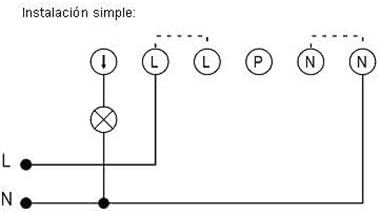
Figure 2: Wiring diagram for the DINUY PT Sup EL4. The diagram illustrates a 3-wire connection: 'L' for Phase, 'N' for Neutral, and a connection to the lamp. The dashed lines indicate optional connections for additional push-buttons (L) or neutral (N) connections.
- Sopọ awọn Ipele (L) wire from the electrical supply to the terminal marked 'L' on the device.
- Sopọ awọn Àdánù (N) wire from the electrical supply to the terminal marked 'N' on the device.
- Sopọ awọn Lamp Return (L') wire (the wire going to the light fixture) to the terminal indicated by the lamp symbol (often labeled with an arrow pointing down to a circle with an 'X').
- Rii daju pe gbogbo awọn asopọ wa ni wiwọ ati aabo.
4.2 Iṣagbesori
- After wiring, carefully place the device into the universal wall box.
- Secure the device to the wall box using the provided security screws. Do not overtighten.
- Once mounted, restore power at the main circuit breaker.
5. Awọn ilana Iṣiṣẹ
5.1 Ipilẹ isẹ
- To turn on the connected light, gently touch the tactile surface of the push-button. The light will illuminate, and the timer will begin its cycle.
- The integrated blue LED will remain permanently illuminated, indicating the device is powered and ready for operation.
5.2 Aago Išė
- Once activated, the light will remain on for the preset duration (adjustable between 30 seconds and 12 minutes).
- To extend the lighting duration, simply touch the tactile surface again at any point during the active timer cycle. This will rearm the timer, restarting the countdown from its full preset duration.
- The light will automatically turn off once the timer cycle completes without being rearmed.
6. Itọju
The DINUY PT Sup EL4 is designed for long-term, maintenance-free operation. However, periodic cleaning and inspection can help ensure its longevity and proper function.
- Ninu: To clean the surface of the device, use a soft, dry cloth. Do not use abrasive cleaners, solvents, or excessive moisture, as these can damage the finish or internal components.
- Ayewo: Periodically check the device for any visible damage or loose connections. If any issues are found, disconnect power immediately and consult a qualified electrician.
- Ko si Awọn apakan Iṣẹ Olumulo: There are no user-serviceable parts inside the device. Do not attempt to open or repair the unit yourself.
7. Laasigbotitusita
If you experience issues with your DINUY PT Sup EL4, refer to the following common troubleshooting steps:
| Isoro | Owun to le Fa | Ojutu |
|---|---|---|
| Imọlẹ ko tan. | Ko si agbara si ẹrọ naa. Ti firanṣẹ ti ko tọ. Aṣiṣe lamp. | Check the circuit breaker. Ensure power is restored. Verify wiring against the diagram (Section 4.1). Idanwo lamp with another switch or replace it. |
| Light stays on permanently or turns off too quickly. | Timer setting issue. Aṣiṣe ẹrọ. | The timer duration is factory set or adjusted internally. If the behavior is inconsistent with expected operation, consult a qualified electrician. If the issue persists after checking power and wiring, the device may require professional inspection. |
| Blue LED indicator is off. | Ko si agbara si ẹrọ naa. | Check the circuit breaker and ensure power is supplied to the device. |
If these steps do not resolve the issue, contact a qualified electrician or the manufacturer's support for assistance. Do not attempt to repair the device yourself.
8. Awọn alaye pato
| Paramita | Iye |
|---|---|
| Ipese Voltage | 230 V AC |
| Igbohunsafẹfẹ | 50 Hz |
| Ijẹ-ara-ẹni | 0.7 W |
| Relay Cut-off Power | 16 A |
| Max. Load (LED Lamps) | 400 W |
| Max. Load (Incandescent & Halogen 230V) | 3000 W |
| Max. Load (Halogen 12V with Electronic Transformer) | 3000 W |
| Max. Load (Halogen 12V with Ferromagnetic Transformer) | 2400 W |
| Max. Load (Fluorescent Lamps) | 1300 W (1300 VA) |
| Contactor Support | Bẹẹni |
| Odo-Rekọja erin | Bẹẹni |
| Iru fifi sori ẹrọ | 3 wires (Phase, Neutral, Lamp Return) |
| Permanent Lighting Function | Rara |
| Stop Warning Function | Rara |
| Minimum Timer Duration | 30 aaya |
| O pọju Aago Duration | 12 iṣẹju |
| Ti akoko Yipada | Rara |
| Luminous Push-buttons Support | Rara |
| Awọn iwọn otutu ti nṣiṣẹ | 0°C si 40°C |
| Permanent Luminous LED | Bẹẹni |
| Iṣagbesori | Universal box, Surface, Security screws |
| Idaabobo Ayika | IP20 (according to UNE20324) |
| Awọn Ilana Ibamu | UNE-EN60669-2-1 and UNE-EN60669-2-3 |
9. Atilẹyin ọja ati Support
Specific warranty information for the DINUY PT Sup EL4 is typically provided at the point of purchase or within the product packaging. Please refer to your purchase documentation for details regarding warranty coverage and duration.
For technical support, troubleshooting assistance beyond what is provided in this manual, or warranty claims, please contact your retailer or the official DINUY customer service. Contact information can usually be found on the manufacturer's webaaye tabi apoti ọja.
Awọn iwe aṣẹ ti o jọmọ - PT Sup EL4
 |
Bọtini Titari Tactile ti DINUY fun igba diẹ - Fifi sori ẹrọ ati Afowoyi olumulo Iwe itọnisọna pipe fun DINUY's Temporized Tactile Pushbutton, fifi sori ẹrọ, awọn alaye imọ-ẹrọ, ati iṣẹ fun awọn awoṣe bii PT EMP EL4, PT SUP EL4, ati PT GAR EL1. |
 |
DINUY IHEMT 1328 Timer Switch User Manual User manual for the DINUY IHEMT 1328 timer switch, providing operating instructions, installation guidelines, and connection diagrams in multiple languages. |
 |
DINUY Declaration of Conformity CE for PU KNT 104 Official Declaration of Conformity (CE) from DINUY, S.A. for the PU KNT 104 model, confirming compliance with EU directives on Electromagnetic Compatibility and hazardous substances. |
 |
DINUY MI EL3 125 Declaration of Conformity CE Declaration of Conformity for the DINUY MI EL3 125 timer, manufactured according to EU Low Voltage, EMC, and RoHS Directives and harmonised UNE-EN standards. |
 |
DINUY Declaration of Conformity CE - Minutero EL 3000 (MI EL3 003) Official Declaration of Conformity CE from DINUY, S.A. for the Minutero EL 3000 electrical timer, model MI EL3 003. Confirms compliance with EU Low Voltage Directive, EMC Directive, RoHS Directive, and relevant harmonised standards. |
 |
DINUY MI EL3 305 Declaration of Conformity CE Declaration of Conformity for the DINUY MI EL3 305 electrical timer, confirming compliance with EU directives and harmonised standards. |
Ask a question about this manual
Ask about setup, troubleshooting, compatibility, parts, safety, or missing instructions. Manuals+ will review the question and use this page’s manual context to help answer it.