
1. Ifihan ati Loriview
The UGREEN Uno 65W GaN USB-C Charger is a compact and efficient multi-port charging device. Utilizing advanced GaN (Gallium Nitride) technology, it offers high power output in a smaller form factor, reducing energy loss and heat generation during operation. This charger features an interactive LED display that indicates the charging status, providing a clear visual cue.
Equipped with two USB-C ports and one USB-A port, it supports various fast charging protocols, making it compatible with a wide range of devices including laptops, tablets, and smartphones. Integrated multiple safety features protect against short circuits, overcharging, overheating, and overvoltage, ensuring safe and reliable charging.

Image 1.1: UGREEN Uno 65W GaN USB-C Charger, showcasing awọn oniwe-iwapọ oniru.
2. Alaye Aabo
- Ma ṣe fi ṣaja han si awọn olomi, ọrinrin, tabi awọn iwọn otutu to gaju.
- Yago fun sisọ tabi tẹriba ṣaja si awọn ipa to lagbara.
- Do not disassemble, modify, or attempt to repair the charger. This may void the warranty and pose safety risks.
- Ensure proper ventilation when using the charger. Do not cover it with clothing or other materials.
- Use only compatible cables and devices with the charger.
- Jeki kuro ni arọwọto awọn ọmọde.
- Yọ ṣaja kuro ninu ibudo agbara nigbati ko ba si ni lilo tabi nigba iji ina.
3. Package Awọn akoonu
Jọwọ ṣayẹwo package fun awọn nkan wọnyi:
- UGREEN Uno 65W GaN USB-C Charger (Model CD361)
- Itọsọna olumulo
4. Awọn ẹya Ọja
- Ijade ti o pọju 65W: Pese soke si 65W ti agbara fun gbigba agbara iyara ti awọn ẹrọ ibaramu.
- GaNFast Technology: High-efficiency power conversion (95%) for reduced heat and compact size.
- Apẹrẹ Ibudo Pupo 3-ninu-1: Features 2 USB-C ports and 1 USB-A port for simultaneous charging of multiple devices.
- Ifihan LED: An interactive LED screen indicates the current charging status.
- Eto Aabo To ti ni ilọsiwaju: Built-in protections against short circuits, overcharging, overheating, and overvoltage.
- Removable Magnetic Feet: Provides stability and a unique aesthetic.
- Ibamu gbooro: Supports a wide range of devices including laptops, tablets, and smartphones from various brands.

Aworan 4.1: alaye view of the charger's ports, magnetic feet, and LED display.
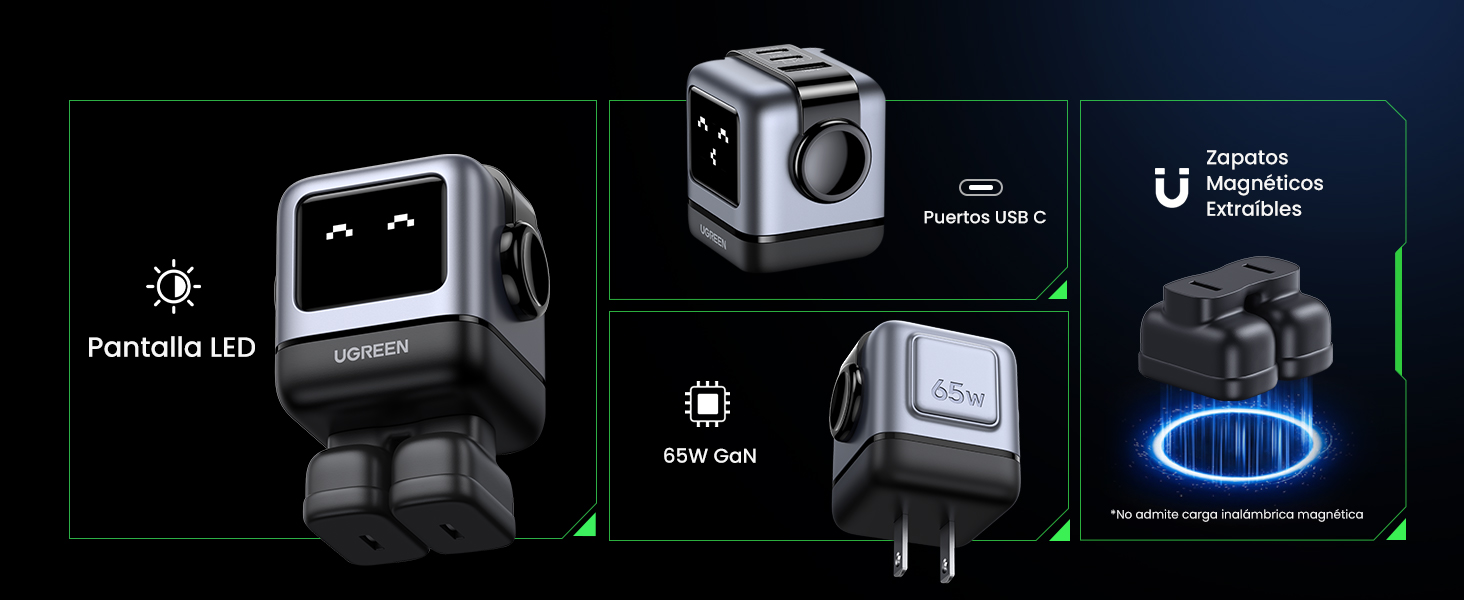
Image 4.2: The charger's LED display showing charging status.
5. Eto
- Yọ Ṣaja naa kuro: Carefully remove the UGREEN Uno 65W GaN USB-C Charger from its packaging.
- Attach Magnetic Feet (Optional): If desired, attach the removable magnetic feet to the bottom of the charger for added stability.
- Sopọ si Ile-iṣẹ Agbara: Plug the charger into a standard wall power outlet (AC 100-240V, 50/60Hz).
- Ṣetan fun Lilo: Agbára náà ti ṣetán láti so àwọn ẹ̀rọ rẹ pọ̀ mọ́ra.
6. Awọn ilana Iṣiṣẹ
6.1 Awọn ẹrọ Nsopọ
- Use a compatible USB-C to USB-C cable for devices that support USB-C charging.
- Use a compatible USB-A to [device connector] cable for devices that charge via USB-A.
- Connect the appropriate cable to one of the charger's ports (2x USB-C, 1x USB-A).
- So opin miiran ti okun pọ si ẹrọ rẹ.
6.2 Agbara pinpin
The charger intelligently distributes power based on the connected devices and their charging requirements:
- Lilo Ibudo Kanṣo: When only one USB-C port is used, it can deliver up to 65W (e.g., charging a MacBook Air M2 from 0% to 51% in approximately 30 minutes).
- Ọpọ Lilo Ibudo: When multiple ports are in use, the 65W total power is dynamically distributed. For example, if both USB-C ports are used, one might provide 45W for a laptop and the other 20W for a mobile device.
- Ibudo USB-A: The USB-A port provides standard charging output, typically up to 18W, depending on the device.
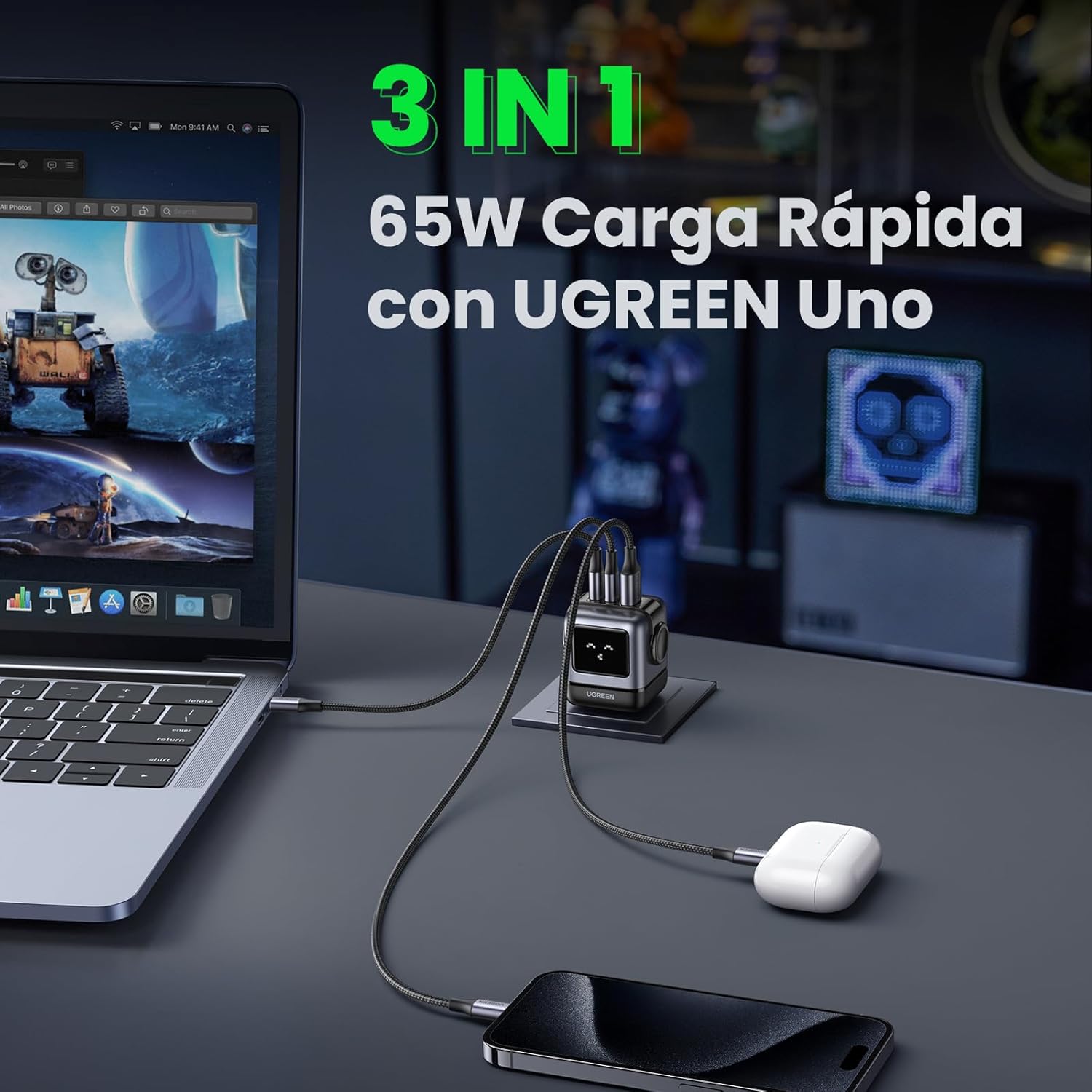
Image 6.1: The charger simultaneously charging a laptop, smartphone, and earbuds.
6.3 LED Display Indications
The LED display on the charger provides visual feedback on its operational status:
- Gbigba agbara: The LED display will show an animation or specific icon indicating that a device is actively charging.
- Ti gba agbara ni kikun: Once a connected device reaches full charge, the LED display will change to indicate completion.
- Laišišẹ: When no devices are connected or charging, the display may show a standby indicator.

Image 6.2: Comparison of the LED display during charging and when fully charged.
Akiyesi: The charger is not compatible with 60W fast charging for the Samsung S26 Ultra; it will charge at a maximum of 45W PPS for this device.
7. Itọju
- Ninu: Ge asopọ ṣaja kuro ni iṣan agbara ṣaaju ṣiṣe mimọ. Lo asọ ti o rọ, ti o gbẹ lati nu dada. Maṣe lo awọn olutọpa olomi tabi awọn aerosols.
- Ibi ipamọ: Tọju ṣaja ni itura, aye gbigbẹ kuro lati orun taara ati awọn iwọn otutu to gaju.
- Itọju USB: Yẹra fún títẹ̀ tàbí yíyí àwọn okùn gbigba agbara pọ̀ jù, nítorí èyí lè ba wọ́n jẹ́.
8. Laasigbotitusita
| Isoro | Owun to le Fa | Ojutu |
|---|---|---|
| Ẹrọ ko gba agbara. | 1. Charger not plugged in. 2. Cable is faulty. 3. Device is incompatible or port is damaged. | 1. Ensure the charger is securely plugged into a live power outlet. 2. Try a different charging cable. 3. Test with another device or try a different port on the charger. |
| Gbigba agbara lọra. | 1. Using a non-fast charging cable. 2. Multiple devices connected, distributing power. 3. Device does not support fast charging. 4. Device requires higher PPS than provided (e.g., S26 Ultra). | 1. Use a high-quality, fast-charging compatible cable. 2. Disconnect other devices to allow maximum power to a single device. 3. Verify your device supports fast charging. 4. Note that some devices may not achieve their absolute maximum charging speed if they require specific PPS profiles not fully supported by the charger. |
| Ṣaja kan lara gbona. | Normal operation, especially during high-power charging. | The charger is designed with thermal protection. If it becomes excessively hot, disconnect it and allow it to cool. Ensure adequate ventilation. |
| LED display not working or showing incorrect status. | Àṣìṣe ìgbà díẹ̀ tàbí ìṣòro agbára. | Unplug the charger from the wall outlet, wait a few seconds, and plug it back in. If the issue persists, contact customer support. |
9. Awọn pato
| Ẹya ara ẹrọ | Ẹ̀kúnrẹ́rẹ́ |
|---|---|
| Brand | UGREEN |
| Nọmba awoṣe | CD361 |
| Asopọmọra Iru | USB Iru-C |
| Awọn ẹrọ ibaramu | Game consoles, Laptops, Smartphones, Tablets (e.g., iPhone 8-17 Series, Galaxy S10-S24 Series, Pixel 8/7/6, MacBook Air/Pro, iPad Pro/Air/mini, Watch 8/7, HomePod, AirPods Pro) |
| Iṣagbewọle Voltage | 240 Volts (AC 100-240V) |
| Ampigba | 3.25 Amperes |
| Lapapọ Awọn ibudo USB | 3 (2x USB-C, 1x USB-A) |
| Ijade agbara ti o pọju | 65 Wattis |
| Ijade lọwọlọwọ | 5 Amperes |
| O wujade Voltage | 5 Volts |
| Orisun agbara | Ti firanṣẹ Electric |
| Iwọn Igbohunsafẹfẹ | 50-60 Hz |
| Main Power Asopọmọra Iru | 2-pin (North America Type A) |
| Gbigbe | Bẹẹni |
| Iwọn Nkan | 146 giramu |
| Ohun elo ita | GAN |
| Fọọmù ifosiwewe | Robot-shaped |
10. Atilẹyin ọja ati Support
10.1 atilẹyin ọja Alaye
This UGREEN product is covered by an 18-osu atilẹyin ọja Láti ọjọ́ tí a rà á. Àtìlẹ́yìn yìí bo àwọn àbùkù iṣẹ́-ọnà àti àwọn ìṣòro tí ó ń wáyé láti lílo déédé. Kò bo ìbàjẹ́ tí ó wáyé nípasẹ̀ ìlòkulò, ìjàǹbá, àwọn àtúnṣe tí a kò gbà láyè, tàbí àwọn àjálù àdánidá.
Jọwọ ṣe idaduro ẹri rira rẹ fun awọn iṣeduro atilẹyin ọja.
10.2 Onibara Support
For technical support, warranty claims, or any questions regarding your UGREEN Uno 65W GaN USB-C Charger, please contact UGREEN customer service through the following channels:
- Osise UGREEN Webojula: Ṣabẹwo www.green.com for FAQs, support resources, and contact information.
- Imeeli Atilẹyin: Tọkasi apakan olubasọrọ lori osise website for the appropriate email address.
- Online Retailer Support: If purchased from an online retailer, you may also contact their customer service for assistance.