
Ọrọ Iṣaaju
This manual provides comprehensive instructions for the installation, operation, and maintenance of your CANDY RO14126DWMST-S Front-Load Washing Machine. Please read this manual carefully before using the appliance to ensure safe and efficient operation. Keep this manual for future reference.
1. Eto ati fifi sori
1.1 Ṣiṣii silẹ
Carefully remove all packaging materials. This includes the polystyrene base, plastic bags, and any protective films. It is crucial to remove all transport bolts located at the rear of the machine before use. Failure to do so can cause significant damage to the appliance.

Aworan 1.1: Iwaju view of the washing machine with the door open, illustrating the drum for unpacking.
1.2 Ipo ipo
Place the washing machine on a firm, flat surface. Ensure there is sufficient space around the appliance for ventilation and maintenance. Avoid placing it on carpets or other materials that might obstruct the ventilation openings at the base.
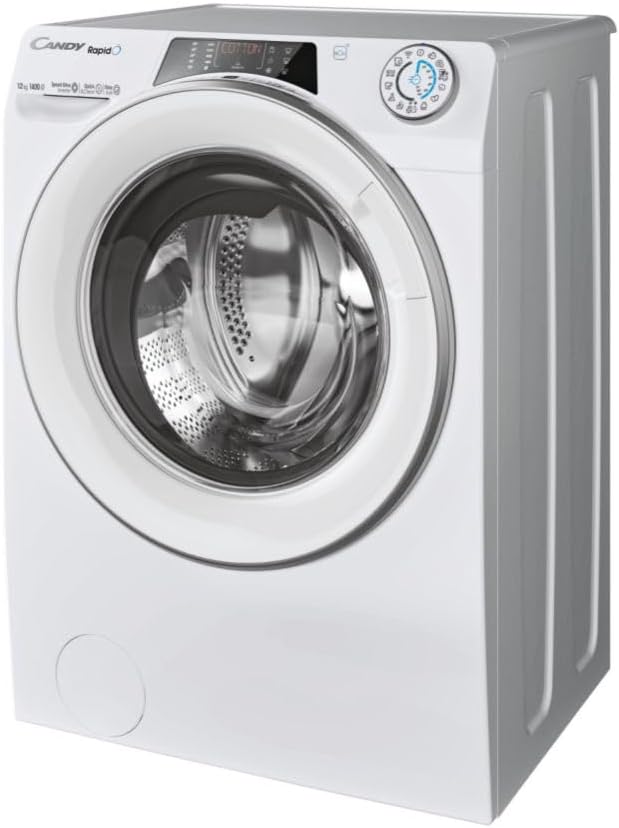
Aworan 1.2: Lapapọ view of the washing machine for proper positioning.
1.3 Ipele ipele
Adjust the machine's feet to ensure it is perfectly level. A level machine reduces vibration and noise during operation. Use a spirit level to check stability in all directions.
1.4 Omi Asopọ
Connect the water inlet hose to a cold water tap with a 3/4" thread. Ensure the connection is tight to prevent leaks. Do not reuse old hoses.
1.5 imugbẹ Asopọ
Securely attach the drain hose to a suitable drain pipe or place it over the edge of a sink, ensuring it is properly fixed to prevent displacement during draining.
1.6 Itanna Asopọ
Pulọọgi okun agbara sinu iṣan itanna ti ilẹ. Rii daju voltage ati igbohunsafẹfẹ baramu awọn pato lori awọn ohun elo ká Rating awo. Ma ṣe lo awọn okun itẹsiwaju tabi awọn oluyipada pupọ.
2. Awọn ilana Iṣiṣẹ
2.1 Iṣakoso igbimo Loriview
The control panel features a program selector dial, a digital display, and various function buttons. The digital display shows program information, time remaining, and error codes.

Image 2.1: Digital control panel with program selector and function buttons.
2.2 ikojọpọ ifọṣọ
Open the washing machine door and load your laundry. Do not overload the machine; ensure there is enough space for clothes to tumble freely. Close the door firmly until it clicks.
2.3 Olufunni ifọṣọ
Pull out the detergent drawer. It typically has three compartments: one for pre-wash detergent, one for main wash detergent, and one for fabric softener. Add the appropriate amount of detergent and softener according to the load size and program selected. Close the drawer gently.

Image 2.2: Detergent dispenser drawer with compartments for detergent and softener.
2.4 Eto Aṣayan
Turn the program selector dial to choose one of the 15 available wash programs. The digital display will show the default settings for the selected program. You can adjust options like temperature and spin speed using the corresponding buttons.
2.5 Bibẹrẹ Ayika
Once the program and options are selected, press the 'Start/Pause' button to begin the wash cycle. The machine will automatically proceed through the selected program.
2.6 Smart Features (hOn App)
This washing machine is equipped with Wi-Fi and Bluetooth connectivity. Download the hOn app on your smartphone to access additional features, including over 40 extra programs, personalized advice, and remote control of your appliance. Follow the in-app instructions for pairing your device.
3. Itọju
3.1 Ninu Drawer Detergent
Regularly clean the detergent drawer to prevent detergent residue buildup. Pull out the drawer completely, rinse it under running water, and use a brush to remove any stubborn deposits. Reinsert the drawer.
3.2 Ninu Ajọ Imugbẹ
The drain filter should be cleaned periodically to ensure proper drainage and prevent blockages. Locate the filter cover at the bottom front of the machine. Open the cover, place a shallow container underneath to catch any residual water, and unscrew the filter. Clean the filter under running water, removing any lint or foreign objects. Screw the filter back in and close the cover.

Image 3.1: Drain filter compartment with the filter removed for cleaning.
3.3 Ninu ilu
To maintain hygiene and prevent odors, run a drum cleaning cycle periodically. Consult your hOn app or the machine's program list for a dedicated cleaning program, often using hot water and a descaling agent.
3.4 Ode Ninu
Mu ese ita ti ẹrọ fifọ pẹlu asọ, damp asọ. Yago fun lilo abrasive afọmọ tabi olomi ti o le ba awọn ipari.
4. Laasigbotitusita
Ṣaaju ki o to kan si iṣẹ alabara, jọwọ tọka si tabili atẹle fun awọn ọran ti o wọpọ ati awọn ojutu wọn.
| Isoro | Owun to le Fa | Ojutu |
|---|---|---|
| Ẹrọ ko bẹrẹ | Power cord not plugged in; Door not closed properly; Program not selected; 'Start/Pause' button not pressed. | Check power connection; Ensure door is latched; Select a program; Press 'Start/Pause'. |
| Ko si gbigba omi | Omi tẹ ni pipade; Omi agbawole okun kinked tabi dina; Omi titẹ ju kekere. | Open water tap; Straighten hose, check for blockages; Check household water pressure. |
| Omi ti ko ṣan | Drain hose kinked or blocked; Drain filter blocked. | Straighten drain hose, check for blockages; Clean the drain filter (refer to Section 3.2). |
| Gbigbọn pupọ/ariwo | Machine not level; Transport bolts not removed; Uneven load in drum. | Adjust leveling feet; Remove transport bolts (refer to Section 1.1); Redistribute laundry evenly. |
| Awọn abajade fifọ ti ko dara | Incorrect detergent dosage; Overloading; Wrong program selected. | Use correct detergent amount; Do not overload; Select appropriate program for fabric type and soil level. |
| Awọn koodu aṣiṣe lori ifihan | Aṣiṣe pato. | Refer to the hOn app or the full user manual for specific error code meanings and solutions. |
5. Awọn pato
| Ẹya ara ẹrọ | Ẹ̀kúnrẹ́rẹ́ |
|---|---|
| Awoṣe | RO14126DWMST-S |
| Brand | Swiwiti |
| Agbara | 12 kg |
| O pọju omo ere | 1400 rpm |
| Agbara Kilasi | A |
| Awọn iwọn Ọja (HxWxD) | 85 x 60 x 67 cm |
| Iwọn Nkan | 77 kg |
| Àwọ̀ | Funfun |
| Ohun elo | Irin alagbara, Ṣiṣu, Gilasi |
| Voltage | 230 Volts |
| Ipele Ohun | 54 Decibels |
| Ifihan ara | LED |
| Nọmba ti Awọn eto | 15 (plus 40+ via hOn app) |
| Pataki Awọn ẹya ara ẹrọ | Mix Power System, Wi-Fi + Bluetooth Connectivity, Steam Function |
| Ọna fifi sori ẹrọ | Sisun |
| Awọn iṣakoso Iru | Fọwọkan |
6. atilẹyin ọja Information
This CANDY washing machine is covered by a manufacturer's warranty. Please refer to the warranty card included with your appliance for specific terms, conditions, and duration of coverage. In case of a defect, you may be eligible for repair or replacement. A 14-day return policy from the date of delivery typically applies for eligible purchases.
7. Onibara Support
For further assistance, technical support, or to schedule a service appointment, please visit the official CANDY website or contact their customer service department. You can find contact details on the CANDY webaaye tabi ni iwe ti a pese pẹlu ohun elo rẹ.
Official CANDY Webojula: www.candy-group.com