
1. Ifihan
The Net Wansa Smart TV Remote Control is designed for compatibility with Wansa Smart TVs. It features a compact and durable construction, engineered for ease of use. The remote control's design aims to provide efficient performance and a long operational lifespan. Its ergonomic form factor allows for comfortable handling and facilitates quick navigation through television functions. The device is constructed with a high-quality plastic body and a soft rubber keypad.
2. Ọja Ipariview
Yi apakan pese a visual ati ki o sapejuwe loriview ti iṣakoso latọna jijin.
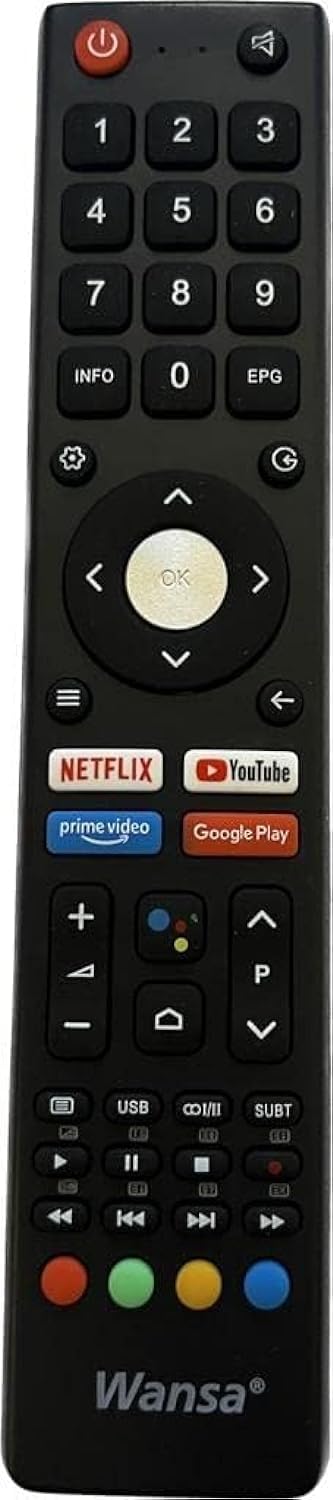
Aworan: Iwaju view of the Net Wansa Smart TV Remote Control RCU60WANSA. The remote is black with various buttons for TV operation.
Awọn ẹya pataki:
- Features high quality and a solid, durable design.
- Efficient performance extends the product's lifespan.
- High-quality plastic body and soft rubber keypad.
- Compact size and easy to use.
- Fits naturally in your hand and aids quick navigation.
3. Eto
3.1 Fifi sori batiri
- Wa yara batiri ni ẹhin isakoṣo latọna jijin.
- Ifaworanhan ṣii ideri kompaktimenti batiri.
- Fi awọn batiri AAA meji sii (kii ṣe pẹlu), aridaju polarity ti o pe (+ ati -) bi itọkasi inu yara naa.
- Pa ideri batiri naa ni aabo.
3.2 Initial Pairing (for Wi-Fi Connectivity)
This remote control utilizes Wi-Fi connectivity for enhanced functionality. Follow these steps to pair it with your Wansa Smart TV:
- Ensure your Wansa Smart TV is powered on.
- Tọkasi isakoṣo latọna jijin si TV.
- Tẹ mọlẹ NIPA button (if available, typically located in the battery compartment or on the back) or follow the on-screen instructions on your TV to initiate pairing mode. If no dedicated pairing button is present, consult your TV's manual for remote control pairing procedures.
- Once the TV recognizes the remote, a confirmation message should appear on the screen.
- Test the remote's functions to ensure successful pairing.
Note: If the remote control does not pair, ensure there are no obstructions between the remote and the TV, and that the batteries are correctly installed and charged.
4. Awọn ilana Iṣiṣẹ
The remote control provides intuitive access to your Wansa Smart TV's functions. Below are common operations:
- Bọtini agbara: Tẹ lati tan TV tabi pa.
- Iwọn didun Soke/Isalẹ: Ṣatunṣe ipele ohun.
- Ikanni Soke/Isalẹ: Yi TV awọn ikanni.
- Navigation Buttons (Arrow Keys): Lo lati lọ nipasẹ awọn akojọ aṣayan ko si yan awọn aṣayan.
- O dara/Bọtini Tẹ sii: Confirm selections or open items.
- Bọ́tìnì Ìpadà/Pada: Pada si iboju ti tẹlẹ tabi akojọ aṣayan.
- Bọtini Ile: Access the Smart TV's main home screen.
- Bọtini Mute: Temporarily silence the TV audio.
- Bọtini titẹ sii/Orisun: Yipada laarin awọn oriṣiriṣi awọn orisun titẹ sii (HDMI, AV, ati bẹbẹ lọ).
Refer to your Wansa Smart TV's on-screen interface for specific button functionalities related to smart features and applications.
5. Itọju
5.1 Ninu
- Mu ese isakoṣo latọna jijin kuro pẹlu asọ ti o gbẹ.
- Fun idoti alagidi, die-die dampen awọn asọ pẹlu omi tabi kan ìwọnba ninu ojutu. Yago fun ọrinrin pupọ.
- Do not use abrasive cleaners, alcohol, or solvents, as these can damage the surface and buttons.
5.2 Batiri Rirọpo
Replace batteries when the remote control becomes unresponsive or its range decreases. Always replace both batteries at the same time with new ones of the same type (AAA).
5.3 Ibi ipamọ
Ti iṣakoso latọna jijin kii yoo lo fun akoko ti o gbooro sii, yọ awọn batiri kuro lati yago fun jijo ati ibajẹ ti o pọju si ẹrọ naa.
6. Laasigbotitusita
Ti o ba pade awọn ọran pẹlu isakoṣo latọna jijin rẹ, tọka si awọn iṣoro ti o wọpọ ati awọn ojutu wọnyi:
| Isoro | Owun to le Fa | Ojutu |
|---|---|---|
| Latọna jijin ko dahun. | Awọn batiri ti o ku tabi ti ko tọ ti fi sori ẹrọ. | Rọpo awọn batiri pẹlu awọn tuntun, ni idaniloju polarity ti o pe. |
| Latọna jijin ko ṣakoso TV. | Not paired correctly (for Wi-Fi models) or line of sight obstructed (for IR functions). | Re-pair the remote control with the TV. Ensure no objects block the signal path. |
| Diẹ ninu awọn bọtini ko ṣiṣẹ. | Button stuck or internal fault. | Gently press the button multiple times. If the issue persists, consider replacing the remote. |
7. Awọn pato
Detailed specifications for the RCU60WANSA remote control:
| Olupese | Apapọ |
| Ilu isenbale | China |
| Nọmba Awoṣe Nkan | RCU60WANSA |
| Ọja Mefa | 21 x 4.5 x 1.5 cm |
| Brand | Apapọ |
| Àwọ̀ | Dudu |
| Maximum Number of Supported Devices | 1 |
| Awọn ẹrọ ibaramu | Tẹlifisiọnu |
| Asopọmọra Technology | Wi-Fi |
| Nọmba ti Awọn bọtini | 25 |
| Adarí Iru | Iṣakoso bọtini |
| Orukọ awoṣe | Wansa |
| Iwọn Nkan | 70 giramu |
| Batiri Apejuwe | Modern Design (Requires AAA batteries) |
8. Atilẹyin ọja ati Support
For warranty information or technical support, please refer to the documentation provided with your original purchase or contact the retailer where the product was acquired. Specific warranty terms and support channels may vary by region and retailer.