
1. Ifihan
O ṣeun fun riraasing the CANYON BSP-8 Bluetooth Speaker. This manual provides essential information for the safe and efficient use of your device. Please read it thoroughly before operation and retain it for future reference.
Awọn ẹya pataki:
- Ìjáde ohùn 10W: Ó fúnni ní ohùn tó ṣe kedere tó sì lágbára.
- Bluetooth 5.2: For stable and energy-efficient wireless connection up to 10 meters.
- Imọlẹ afẹyinti RGB: Integrated lighting for enhanced ambiance.
- Sitẹrio Alailowaya otitọ (TWS): Connect two BSP-8 speakers for a full stereo sound experience.
- Awọn aṣayan Sisisẹsẹhin lọpọlọpọ: Supports Bluetooth, AUX, USB, and MicroSD card inputs.
- Apẹrẹ to gbe: Compact size with a convenient hanger for easy transport.
- Igbesi aye batiri gigun: Titi di awọn wakati 3 ti akoko ere lori idiyele kan.
2. Alaye Aabo
- Ma ṣe fi agbọrọsọ si awọn iwọn otutu to gaju, imọlẹ orun taara, tabi ọriniinitutu giga.
- Yago fun sisọ tabi tẹriba agbọrọsọ si awọn ipa to lagbara.
- Do not disassemble or attempt to repair the speaker yourself. Contact qualified service personnel.
- Jẹ́ kí agbọ́hùnsọ̀ náà jìnnà sí omi àti àwọn ohun míràn. Kò lè mú omi jáde.
- Lo okun gbigba agbara ti a pese nikan tabi okun Iru-C ti a fọwọsi fun gbigba agbara.
- Sọ batiri ati agbọrọsọ kuro ni ibamu si awọn ilana agbegbe.
3. Package Awọn akoonu
- CANYON BSP-8 Bluetooth Speaker
- USB Iru-C Ngba agbara USB
- Itọsọna olumulo
4. Ọja Ipariview
Mọ ararẹ pẹlu awọn paati ati awọn idari ti agbọrọsọ.
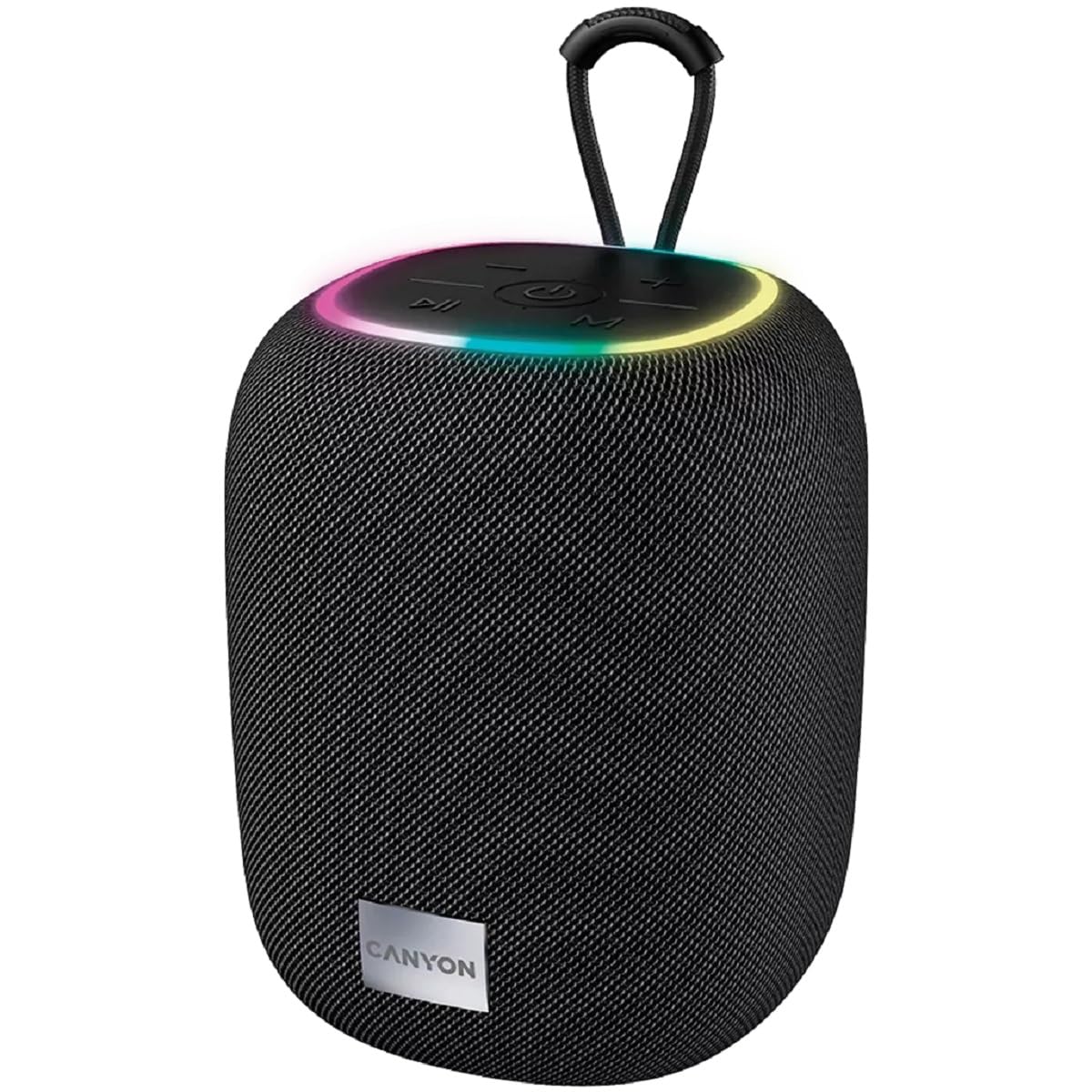
Aworan 1: Oke view of the CANYON BSP-8 speaker, showing the control buttons, RGB backlight, and integrated hanger.
Àwọn bọ́tìnì ìṣàkóso (Pánẹ́lì òkè):
- Bọtini agbara: Press and hold to turn on/off. Short press to play/pause.
- Iwọn didun isalẹ / Bọtini orin ti iṣaaju: Tẹ kukuru fun iwọn didun isalẹ. Tẹ gun fun orin iṣaaju.
- Iwọn didun Up / Bọtini orin atẹle: Tẹ kukuru fun iwọn didun soke. Tẹ gun fun orin atẹle.
- Bọtini Ipo (M): Short press to switch between Bluetooth, AUX, USB, and MicroSD modes.

Aworan 2: Ẹyin view of the CANYON BSP-8 speaker, illustrating the various input ports including AUX, USB, TF (MicroSD) card slot, and DC5V Type-C charging port.
Input Ports (Rear Panel):
- Ibudo AUX: Fun sisopọ awọn ẹrọ ohun afetigbọ ita nipasẹ okun ohun afetigbọ 3.5mm kan.
- Ibudo USB: Fun ohun orin lati inu kọnputa filasi USB kan.
- TF Card Slot (MicroSD): For playing audio from a MicroSD card.
- Ibudo DC5V (Iru-C): Fun gbigba agbara si agbọrọsọ.
5. Eto
5.1 Gbigba agbara si Agbọrọsọ
- Connect the provided USB Type-C cable to the DC5V port on the speaker.
- So opin okun miiran pọ si ohun ti nmu badọgba agbara USB (5V/1A niyanju) tabi ibudo USB ti kọnputa kan.
- Ina Atọka gbigba agbara yoo tan imọlẹ. Yoo pa tabi yi awọ pada ni kete ti o ti gba agbara ni kikun.
Note: For optimal battery life, fully charge the speaker before first use.

Image 3: Illustration showing the 1800 mAh battery capacity and up to 3 hours of playtime for the CANYON BSP-8 speaker.
5.2 Titan / Pa a
- Lati Fi agbara: Press and hold the Power button for approximately 3 seconds. You will hear an audible prompt.
- Lati Paarẹ: Press and hold the Power button for approximately 3 seconds. You will hear an audible prompt.
5.3 Sisopọ Bluetooth
- Tan agbohunsoke. Yoo tẹ ipo sisopọ pọ si Bluetooth laifọwọyi, ti a fihan nipasẹ ina LED didan.
- Enable Bluetooth on your mobile device (smartphone, tablet, computer).
- Wa fun available Bluetooth devices and select "CANYON BSP-8" from the list.
- Once paired, the LED light will stop flashing, and you will hear a confirmation sound.
Note: The speaker will automatically reconnect to the last paired device if it is within range and Bluetooth is enabled.

Image 4: Illustration highlighting the stable and energy-efficient Bluetooth 5.2 connection with an operating range of up to 10 meters.
5.4 Otitọ Sitẹrio Alailowaya (TWS) Sisọpọ
To connect two CANYON BSP-8 speakers for a stereo sound experience:
- Ensure both BSP-8 speakers are powered on and not connected to any Bluetooth device.
- Lórí agbọ́hùnsọ̀kan (èyí ni yóò jẹ́ agbọ́hùnsọ̀kan àkọ́kọ́), tẹ bọ́tìnnì Agbára lẹ́ẹ̀mejì. Yóò wọ inú ipò ìsopọ̀ TWS.
- Àwọn agbọ́hùnsọ̀kan méjèèjì yóò wá ara wọn láìfọwọ́sí, wọn yóò sì so pọ̀ mọ́ ara wọn. O ó gbọ́ ìfọwọ́sí nígbà tí o bá ti so wọ́n pọ̀.
- Once TWS is established, connect your mobile device to the primary speaker via Bluetooth as described in section 5.3.
Note: TWS mode only works with two identical CANYON BSP-8 speakers.
6. Awọn ilana Iṣiṣẹ
6.1 Ti ndun Audio
- Ipo Bluetooth: Lẹ́yìn tí a bá ti ṣe àṣeyọrí sí ìsopọ̀pọ̀, ohùn láti inú ẹ̀rọ tí a so pọ̀ yóò máa dún nípasẹ̀ agbọ́hùnsọ̀kan náà.
- Ipo AUX: Connect a 3.5mm audio cable from your external audio device to the AUX port on the speaker. Press the 'M' button to switch to AUX mode.
- Ipo USB: Insert a USB flash drive into the USB port. The speaker will automatically switch to USB mode and begin playing audio files. If not, press the 'M' button.
- Ipo Kaadi MicroSD: Insert a MicroSD card into the TF card slot. The speaker will automatically switch to MicroSD mode and begin playing audio files. If not, press the 'M' button.
6.2 Sisisẹsẹhin Iṣakoso
- Ṣiṣẹ/Daduro: Kukuru tẹ bọtini agbara.
- Iwọn didun Up: Kukuru tẹ bọtini Iwọn didun Up (+).
- Iwọn didun isalẹ: Kukuru tẹ bọtini Iwọn didun isalẹ (-).
- Orin t’okan: Tẹ bọtini iwọn didun Up (+) gun.
- Tẹlẹ Orin: Tẹ bọtini Iwọn didun isalẹ (-) gun.
6.3 RGB Backlight
The speaker features an integrated RGB backlight on the top panel. The backlight activates automatically when the speaker is powered on. There are no specific controls for changing the RGB pattern or turning it off/on independently of the speaker's power state.