
Ọrọ Iṣaaju
Welcome to the Liectroux C30B Robotic Vacuum Cleaner and Mop. This intelligent device is designed to simplify your home cleaning routine by sweeping, vacuuming, and mopping various floor types, including hard floors, carpets, and rugs. It features smart navigation, app control, and compatibility with virtual assistants like Alexa and Google Home, ensuring a thorough and effortless cleaning experience.
This manual provides detailed instructions for setting up, operating, and maintaining your Liectroux C30B robot vacuum to ensure optimal performance and longevity.
Fidio: Pariview of the Liectroux C30B Robotic Vacuum Cleaner and Mop, demonstrating its key features and operation.
Ọja Pariview
The Liectroux C30B is an advanced robotic cleaner offering multiple functionalities for a pristine home environment. It combines powerful suction with intelligent mopping capabilities, adapting to various surfaces and cleaning needs.
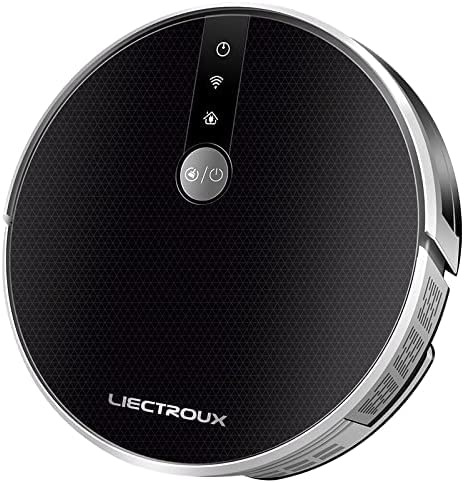
Aworan: Oke-isalẹ view of the Liectroux C30B Robotic Vacuum Cleaner, showcasing awọn oniwe-aso oniru.
Awọn ẹya pataki:
- 3-in-1 Fifọ: Sweeps, vacuums, and mops various floor types, including hard floors and carpets, with a V-shaped central brush for efficient particle collection.
- Agbara gbigba giga: Provides maximum power for effective cleaning, removing even the smallest debris.
- Lilọ kiri Smart: Utilizes intelligent mapping to plan the most efficient cleaning routes, avoiding repetitive actions and ensuring complete coverage.
- Anti-Collision and Anti-Fall Sensors: Equipped with a comprehensive set of sensors to detect obstacles and prevent falls from stairs or elevated surfaces.
- Apẹrẹ tẹẹrẹ: Pro kekere rẹfile allows it to clean under furniture, beds, and sofas, reaching difficult-to-access areas.
- Ngba agbara laifọwọyi: Returns to its charging base automatically when the battery is low or cleaning is complete.
- Ohun elo Iṣakoso: Manage and monitor cleaning schedules, modes, and real-time location from your smartphone, even when you are away from home.
- Iṣakoso ohun: Compatible with virtual assistants like Amazon Alexa and Google Assistant for convenient hands-free operation.
- Awọn ọna Isọmọ Ọpọ: Offers various modes including Automatic, Single Room, Spot Cleaning, Edge Cleaning, and Mopping to suit different cleaning requirements.
- Isẹ idakẹjẹ: Designed with a noise reduction system for a quiet cleaning experience.

Aworan: Illustration of the Liectroux C30B's high suction power, effectively capturing debris.

Aworan: Visual representation of the Liectroux C30B's smart map navigation, showing its cleaning path.

Aworan: Screenshot of the mobile application showing real-time cleaning tracking for the Liectroux C30B.

Aworan: Close-up of the Liectroux C30B's smart water reservoir for mopping functionality.

Aworan: Depiction of the Liectroux C30B's compatibility with virtual assistants like Alexa and Google Home.

Aworan: Image illustrating the Liectroux C30B's quiet operation, suitable for use while resting.

Aworan: Diagram showing the anti-fall and anti-collision sensor system of the Liectroux C30B.
Ohun ti o wa ninu Apoti
Upon unboxing your Liectroux C30B, please ensure all components are present and in good condition. The package typically includes:
- Liectroux C30B Robotik Vacuum Isenkanjade
- Ibi iduro gbigba agbara
- Adapter agbara
- Àwọn Búrẹ́sì Ẹ̀gbẹ́ (ṣeto)
- Fẹlẹ akọkọ
- eruku
- Water Tank with Mop Cloth
- Ọpa mimọ
- Itọsọna olumulo
- Iṣakoso latọna jijin (ti o ba wulo)

Aworan: The Liectroux C30B robot vacuum alongside its remote control and a smartphone displaying the control app.
Ṣeto
- Unpack and Remove Protective Film: Carefully remove the robot and all accessories from the packaging. Remove any protective films or stickers from the robot and charging dock.
- Fi Awọn Brushes ẹgbẹ sori ẹrọ: Tẹ awọn fẹlẹ ẹgbẹ si awọn ọpa ni isalẹ robot naa titi ti wọn yoo fi tẹ sinu aaye naa.
- Ibudo Gbigba agbara aaye: Position the charging dock against a wall in an open area, ensuring there are no obstacles within 1 meter (3 feet) to the sides and 2 meters (6 feet) in front. Plug the power adapter into the dock and a wall outlet.
- Idiyele Ibẹrẹ: Place the robot onto the charging dock. Ensure the charging contacts on the robot align with those on the dock. The robot will begin charging, and the indicator light will show its charging status. For first use, fully charge the robot (approximately 4-6 hours).
- Ṣe igbasilẹ ohun elo naa: Scan the QR code in the manual or search for the 'Liectroux' app in your smartphone's app store (iOS or Android). Follow the in-app instructions to register and connect your robot to your home Wi-Fi network.
- Prepare for Mopping (Optional): If using the mopping function, fill the water tank with clean water (and a small amount of neutral cleaning solution if desired). Attach the mop cloth firmly to the water tank and slide the tank into the robot until it clicks.
Awọn ilana Iṣiṣẹ
Starting and Stopping Cleaning:
- Ibẹrẹ Afowoyi: Press the power button on the robot or the 'Clean' button on the remote control to start automatic cleaning.
- Ibẹrẹ App: Open the Liectroux app, select your device, and tap 'Start' or choose a specific cleaning mode.
- Òfin ohùn: If connected to Alexa or Google Home, use commands like "Alexa, start cleaning" or "Hey Google, tell Liectroux to clean."
- Duro/Duro: Press the power button again, the 'Pause' button on the remote, or use the app to pause or stop cleaning.
Awọn ipo mimọ:
The Liectroux C30B offers several cleaning modes to suit your needs:
- Fifọ aifọwọyi: The robot intelligently navigates and cleans the entire area.
- Isọdọmọ Aami: Fojusi lori agbegbe idọti kan pato, mimọ ni apẹrẹ ajija.
- Isọfọ eti: Fọ pẹlú Odi ati aga egbegbe.
- Ninu iyẹwu kanṣoṣo: Cleans a designated room and then returns to the charging dock.
- Ipo fifọ aṣọ: When the water tank is installed, the robot will mop the floor while vacuuming.
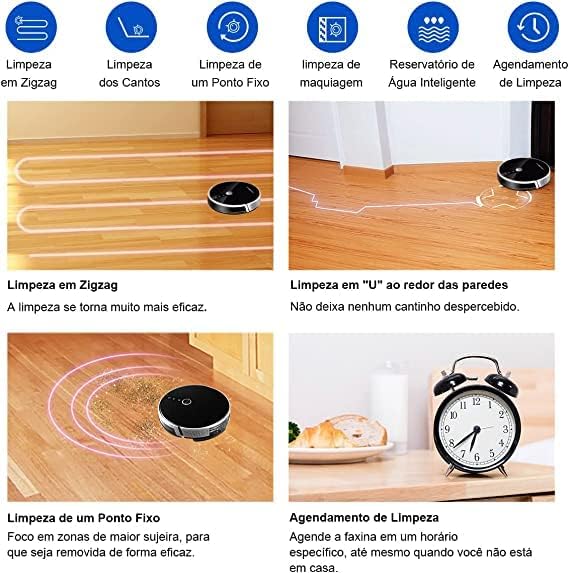
Aworan: Visual guide to the Liectroux C30B's various cleaning modes, including zigzag, edge, spot, and scheduled cleaning.
Ṣiṣeto Iṣeto:
Use the Liectroux app to set up cleaning schedules. You can program the robot to clean at specific times and days, even when you are not home.
Itoju
Regular maintenance ensures your Liectroux C30B operates efficiently and extends its lifespan. Always turn off the robot and disconnect it from the charging dock before performing any maintenance.
Dustbin ati Ajọ:
- Dustbin ofo: After each cleaning cycle, or when the dustbin full indicator lights up, remove and empty the dustbin.
- Awọn Ajọ mimọ: Tap the HEPA filter to remove dust. Rinse the primary filter and dustbin with water. Allow them to air dry completely before reinserting. Replace HEPA filters every 3-6 months, depending on usage.
Water Tank and Mop Cloth:
- Omi Omi Sofo: Lẹ́yìn gbogbo ìgbà tí o bá ti ń fọ omi, da omi tó bá kù nínú àpò omi náà.
- Aṣọ Mop Mọ: Remove the mop cloth and wash it by hand or machine. Allow it to air dry completely.
Fọlẹ:
- Fẹlẹ akọkọ: Remove the main brush cover and lift out the brush. Use the cleaning tool to remove hair and debris. Cut tangled hair with scissors if necessary.
- Awọn brushes ẹgbẹ: Pull the side brushes off. Remove any hair or debris. If brushes are worn or damaged, replace them.
Awọn sensọ ati Awọn olubasọrọ gbigba agbara:
- Wipe all sensors (anti-drop, anti-collision) and charging contacts on both the robot and the charging dock with a clean, dry cloth.
Laasigbotitusita
Ti o ba pade awọn ọran pẹlu Liectroux C30B rẹ, tọka si awọn iṣoro ati awọn solusan ti o wọpọ wọnyi:
| Isoro | Owun to le Fa | Ojutu |
|---|---|---|
| Robot ko ni tan-an. | Batiri kekere; Pa a agbara. | Gba agbára rọ́bọ́ọ̀tì náà; Rí i dájú pé sáyà agbára náà wà nílẹ̀. |
| Robot ko gba agbara. | Àwọn olùbáṣepọ̀ gbígbà agbára dọ̀tí; Ibùdó gbígbà agbára kò ní agbára. | Clean charging contacts; Ensure dock is plugged in. |
| Robot di nigbagbogbo. | Obstacles; Loose cables/rugs. | Clear obstacles; Tidy up cables and loose rugs. |
| Iṣẹ ṣiṣe mimọ ti ko dara. | Dustbin full; Brushes tangled; Filters clogged. | Empty dustbin; Clean/replace brushes and filters. |
| Robot ko le sopọ si Wi-Fi. | Incorrect password; Router issues; 5GHz network. | Verify password; Restart router; Ensure 2.4GHz network. |
Awọn pato
Here are the technical specifications for the Liectroux C30B Robotic Vacuum Cleaner and Mop:
- Brand: LIECTROUX
- Awoṣe: C30B
- Àwọ̀: Dudu
- Awọn ẹrọ ibaramu: Amazon Echo, Google Home, Smartphones, Tablets
- Awọn ẹya pataki: Scheduling, Anti-collision, Anti-fall, Wet/Dry Cleaning, Portable
- Orisun Agbara: Agbara Batiri
- Iru Batiri: Litiumu-dẹlẹ
- Igbesi aye batiri: Titi di iṣẹju 100
- Voltage: 110-220 Volts (Bivolt)
- Okunfa Fọọmu: Robotik
- Awọn iwọn idii: 58 x 40 x 13.5 cm
- Ìwọ̀n Nkan: 2.7 kg
- GTIN/EAN: 6939809301671
Atilẹyin ọja ati Support
The Liectroux C30B Robotic Vacuum Cleaner and Mop comes with a manufacturer's warranty. Please refer to the warranty card included in your product packaging for specific terms and conditions, including warranty duration and coverage details.
For technical support, troubleshooting assistance, or to inquire about replacement parts, please contact Liectroux customer service through the contact information provided in your product documentation or on the official Liectroux webojula. Tọju iwe-ẹri rira rẹ bi ẹri rira fun awọn iṣeduro atilẹyin ọja.