
1. Ifihan
Welcome to your WOOXGEHM 4-in-1 Wired Arcade Fight Stick Joystick. This manual provides essential information for setting up, operating, and maintaining your new arcade controller. Designed for compatibility with Nintendo Switch, PC, PlayStation 3, and Android devices, this joystick enhances your gaming experience with precise control and turbo functions.
2. Alaye Aabo
Awọn Itọsọna Aabo
- Pa ẹrọ naa kuro ninu omi ati ọrinrin.
- Yago fun ṣiṣafihan ẹrọ naa si awọn iwọn otutu to gaju.
- Ma ṣe gbiyanju lati tunto tabi tun ẹrọ naa funrararẹ.
- Lo awọn kebulu ti a pese nikan ati awọn ẹya ẹrọ.
- Jeki kuro ni arọwọto awọn ọmọde kekere.
3. Package Awọn akoonu
Kini To wa
- 1 x Universal Arcade Fight Stick
- 1 x Remote Lever Handle (Joystick)
- 1 x Fixed Small Parts (e.g., suction cups)
- 1 x Ilana itọnisọna
4. Ọja Ipariview
The WOOXGEHM Arcade Fight Stick is designed for comfort and precision, featuring a spherical metal joystick and six round control buttons. It also includes additional buttons for various functions and platform compatibility.

Nọmba 1: WOOXGEHM 4-in-1 Wired Arcade Fight Stick Joystick, top view. A black arcade fight stick with a red spherical joystick on the left and six red circular action buttons on the right. Smaller function buttons are located above the main action buttons. The surface features a racing car graphic.
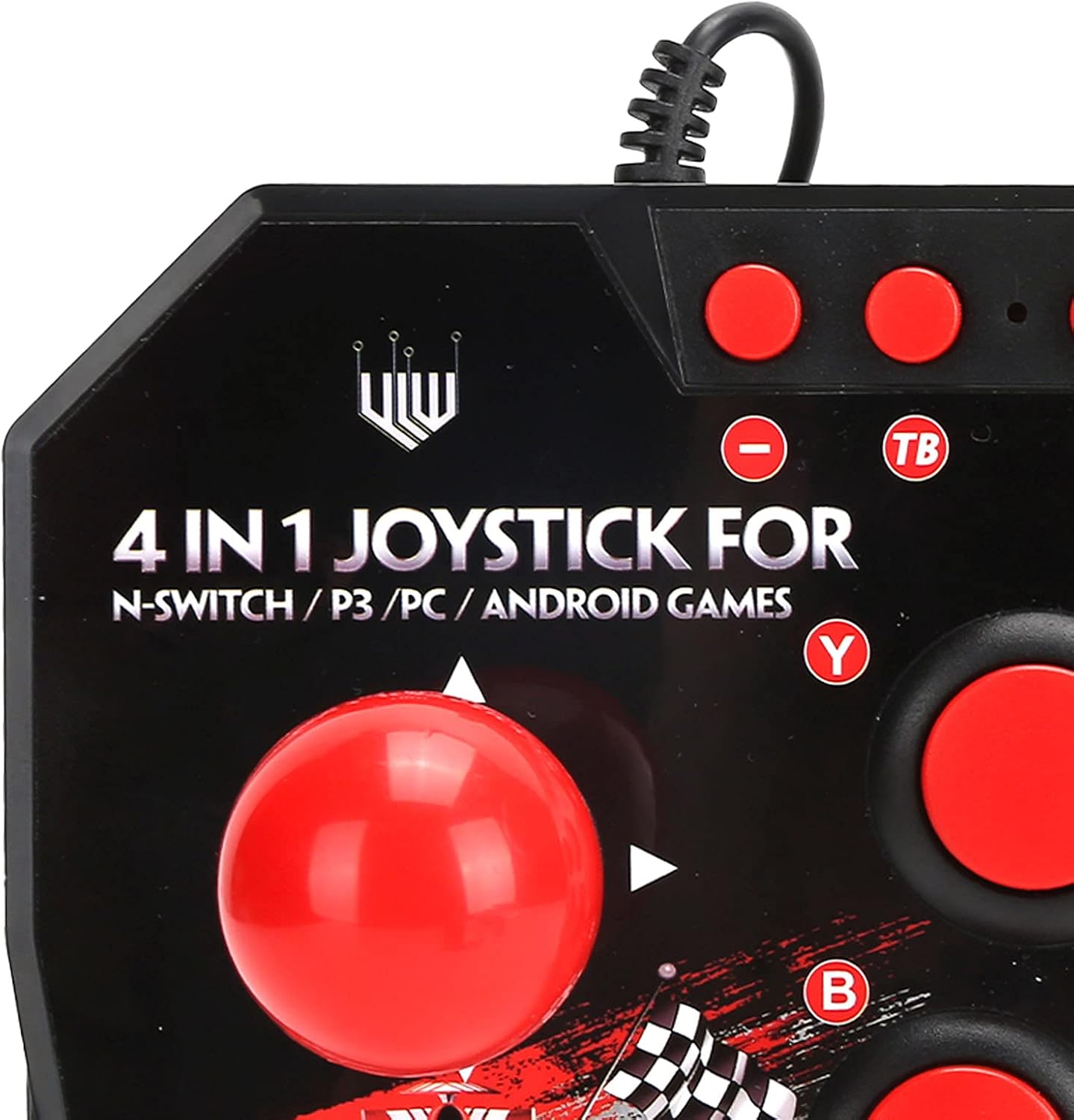
Nọmba 2: Close-up of WOOXGEHM 4-in-1 Wired Arcade Fight Stick Joystick buttons. A detailed view of the joystick's top panel, showing the "4 IN 1 JOYSTICK FOR N-SWITCH / P3 / PC / ANDROID GAMES" text, along with the red spherical joystick and several red action buttons labeled Y, B, X, A, L, R, and smaller buttons for Turbo functions.

Nọmba 3: Isalẹ view of WOOXGEHM 4-in-1 Wired Arcade Fight Stick Joystick with suction cups. The underside of the arcade fight stick, showing four clear suction cups designed to secure the device to a flat surface during use. The label indicates "Input: DC5V / 500mA", "Working current: 20mA", and "MADE IN CHINA".
5. Eto ati Asopọ
The arcade fight stick connects via a wired USB cable. Ensure your console or device is powered on before connecting.
5.1 Nintendo Switch Connection
- Connect the USB cable from the arcade fight stick to an available USB port on your Nintendo Switch dock.
- Ensure "Pro Controller Wired Communication" is enabled in your Switch System Settings.
- The controller should be automatically recognized.
5.2 PC Asopọ
- Connect the USB cable from the arcade fight stick to an available USB port on your PC.
- The system should automatically install the necessary drivers. If not, manual driver installation may be required (refer to your PC's operating system documentation).
- The controller will be recognized as a standard USB gamepad.
5.3 PLAYSTATION 3 (PS3) Asopọmọra
- Connect the USB cable from the arcade fight stick to an available USB port on your PS3 console.
- A gbọdọ mọ oludari naa laifọwọyi ki o si ṣetan fun lilo.
5.4 Asopọ Ẹrọ Android
- Connect the USB cable from the arcade fight stick to your Android device using an OTG (On-The-Go) adapter (not included).
- Ensure your Android device supports OTG functionality.
- The controller should be recognized as an external gamepad.

Nọmba 4: Multi-platform compatibility. This image illustrates the multi-platform compatibility of the arcade fight stick, showing it connected to a Nintendo Switch console, a PlayStation 3, a PC monitor, and an Android device, highlighting its versatility.

Nọmba 5: Plug-and-Play functionality. This image highlights the plug-and-play nature of the arcade fight stick, showing it connected to a PlayStation console, a Nintendo Switch, and a monitor displaying game content, emphasizing ease of use across platforms.
6. Awọn ilana Iṣiṣẹ
6.1 Ipilẹ idari
- Joysticks: Use the spherical metal joystick for directional movement.
- Awọn bọtini iṣe: The six large round buttons (A, B, X, Y, L, R) are for primary game actions.
- Awọn bọtini iṣẹ: Smaller buttons above the main action buttons provide additional controls (e.g., Home, Select, Start).
6.2 Turbo Functions
The controller features turbo functions for rapid button presses.
- To activate Turbo for a button, press and hold the desired action button, then press the "TB" (Turbo) button. The button will now rapidly repeat its input when held down.
- To deactivate Turbo, press and hold the same action button, then press the "TB" button again.
6.3 Ipo Yipada
The joystick may have a mode switch to toggle between different input modes (e.g., D-Pad, Left Analog Stick, Right Analog Stick) for specific games or platforms. Refer to the small buttons near the top left of the controller for these options.
7. Itọju ati Itọju
Itọju Ọja
- Ninu: Wipe the surface of the joystick with a soft, dry cloth. Do not use abrasive cleaners or solvents.
- Ibi ipamọ: Tọju ẹrọ naa ni itura, aye gbigbẹ kuro lati orun taara nigbati ko si ni lilo.
- Iṣakoso USB: Yago fun awọn atunse didasilẹ tabi fifaju iwọn lori okun USB lati yago fun ibajẹ.
8. Laasigbotitusita
Wọpọ Oran ati Solusan
- Controller not recognized:
Ojutu: Ensure the USB cable is securely connected to both the joystick and the device/console.
Ojutu: For Nintendo Switch, verify "Pro Controller Wired Communication" is enabled in system settings.
Ojutu: Gbiyanju lati sopọ si ibudo USB miiran.
Ojutu: Restart your console/PC/Android device. - Buttons or joystick unresponsive:
Ojutu: Disconnect and reconnect the joystick.
Ojutu: Test the joystick on another compatible device to determine if the issue is with the controller or the device. - Iṣẹ Turbo ko ṣiṣẹ:
Ojutu: Ensure you are correctly activating/deactivating the turbo mode as described in the Operating Instructions.
9. Awọn pato
Imọ ni pato
| Ẹya ara ẹrọ | Ẹ̀kúnrẹ́rẹ́ |
|---|---|
| Awoṣe | B0C7GYXMLZ |
| Brand | WOOXGEHM |
| Adarí Iru | Button Control, Joystick |
| Ni wiwo Hardware | USB |
| Ohun elo | Acrylonitrile Butadiene Styrene (ABS) |
| Iwọn Nkan | kilo 0.52 (1.14 poun) |
| Iwọn (O fẹrẹ to.) | 21 x 15 x 6 cm (8.3 x 5.9 x 2.4 inches) |
| Ṣiṣẹ Voltage/lọwọlọwọ | DC5V/20mA |
| Okun USB Ipari | 3 m / 9.8 ft |
| Ibamu | Nintendo Switch, PC, PS3, Android Games |

Nọmba 6: Technical specifications overview. An image displaying the technical specifications of the arcade fight stick, including item type, material (ABS), size (21 x 15 x 6 cm), working voltage/current (DC5V/20mA), and USB cable length (3m/9.8ft), along with a list of package contents.
10. Atilẹyin ọja ati Support
Alaye atilẹyin ọja
This WOOXGEHM product comes with a standard manufacturer's warranty. For specific warranty terms and conditions, please refer to the warranty card included in your package or contact WOOXGEHM customer support.
Onibara Support
If you encounter any issues or have questions regarding your Arcade Fight Stick, please visit the official WOOXGEHM webojula tabi kan si wọn onibara iṣẹ fun iranlowo.