
1. Ifihan
This manual provides detailed instructions for the installation, operation, and maintenance of the Erayak GT-800 MPPT On-Grid 800W Micro Inverter. Please read this manual thoroughly before installation and operation to ensure proper function and safety.

Figure 1: Erayak GT-800 Micro Inverter with its monitoring application interface.
2. Awọn Ilana Aabo pataki
Observe the following safety precautions during all stages of installation, operation, and maintenance of the Erayak GT-800 Micro Inverter:
- Àwọn òṣìṣẹ́ tó péye gbọ́dọ̀ fi sori ẹrọ ní ìbámu pẹ̀lú àwọn òfin àti ìlànà iná mànàmáná agbègbè.
- Ensure the inverter is disconnected from all power sources (solar panels and AC grid) before performing any service or maintenance.
- The device is equipped with an integrated ENS protection circuit and 6000V overvoltage Idaabobo.
- The Erayak GT-800 meets German standards VDE-AR-N 4105:2018-11 and EN50549-1.
- Do not attempt to open or repair the inverter. Refer all servicing to qualified service personnel.
- Rii daju pe ilẹ ti o tọ ti ẹrọ oluyipada.
- The inverter is IP66 rated for water and dust resistance, suitable for outdoor installation. However, avoid submerging the device.

Figure 2: The Erayak GT-800 Micro Inverter features an IP66 waterproof rating, indicating protection against dust and powerful water jets.
3. Package Awọn akoonu
Daju pe gbogbo awọn nkan wa ati pe ko bajẹ lori ṣiṣi silẹ:
- 1 x Erayak GT-800 Micro Inverter
- 1 x 2-meter AC Connection Cable
- 2 x Sets of Screws for mounting
- 1 x User Manual (English version provided here)
4. Imọ ni pato
| Ẹya ara ẹrọ | Sipesifikesonu |
|---|---|
| Orukọ awoṣe | GT800 |
| Niyanju Module Power | 250W to 550W per panel (max 800W total) |
| Iṣagbewọle Voltage Ibiti | 20V - 50V |
| MPPT Peak Voltage Ibiti | 22V - 48V |
| Ibẹrẹ Voltage | 22V |
| O pọju Input Voltage | 50V |
| O pọju Input Kukuru-Circuit Lọwọlọwọ | 2 x 16A |
| Won won Power o wu | 800W |
| Rated Output Current (at 230V) | 3.5A |
| Won won wu Voltage / Ibiti | 230V (180V - 275V) |
| Imudara Iwọn CEC | 96.50% |
| Awọn iwọn (LxWxH) | 230 x 200 x 40 mm |
| Idaabobo Rating | IP66 |
| Iduro Agbara Agbara | <50mW |
5. Eto ati fifi sori
The Erayak GT-800 Micro Inverter is designed for easy installation. Follow these steps for a successful setup:
- Iṣagbesori: Securely mount the micro inverter in a suitable location, preferably in a shaded area to optimize performance. Use the provided screw sets.
- Isopọmọ igbimọ oorun: Connect up to two solar panels (250W to 550W each) to the inverter's MC4 compatible module connectors. Ensure correct polarity. The input voltage ibiti o jẹ 20V-50V.
- AC Grid Connection: Connect the inverter to your AC grid using the provided 2-meter AC connection cable. The inverter supports AC Daisy Chain cabling for multiple units.
- Parallel Installation (Optional): For larger systems, multiple GT-800 inverters can be connected in parallel. Each inverter operates independently, ensuring continuous power generation even if one unit experiences an issue.
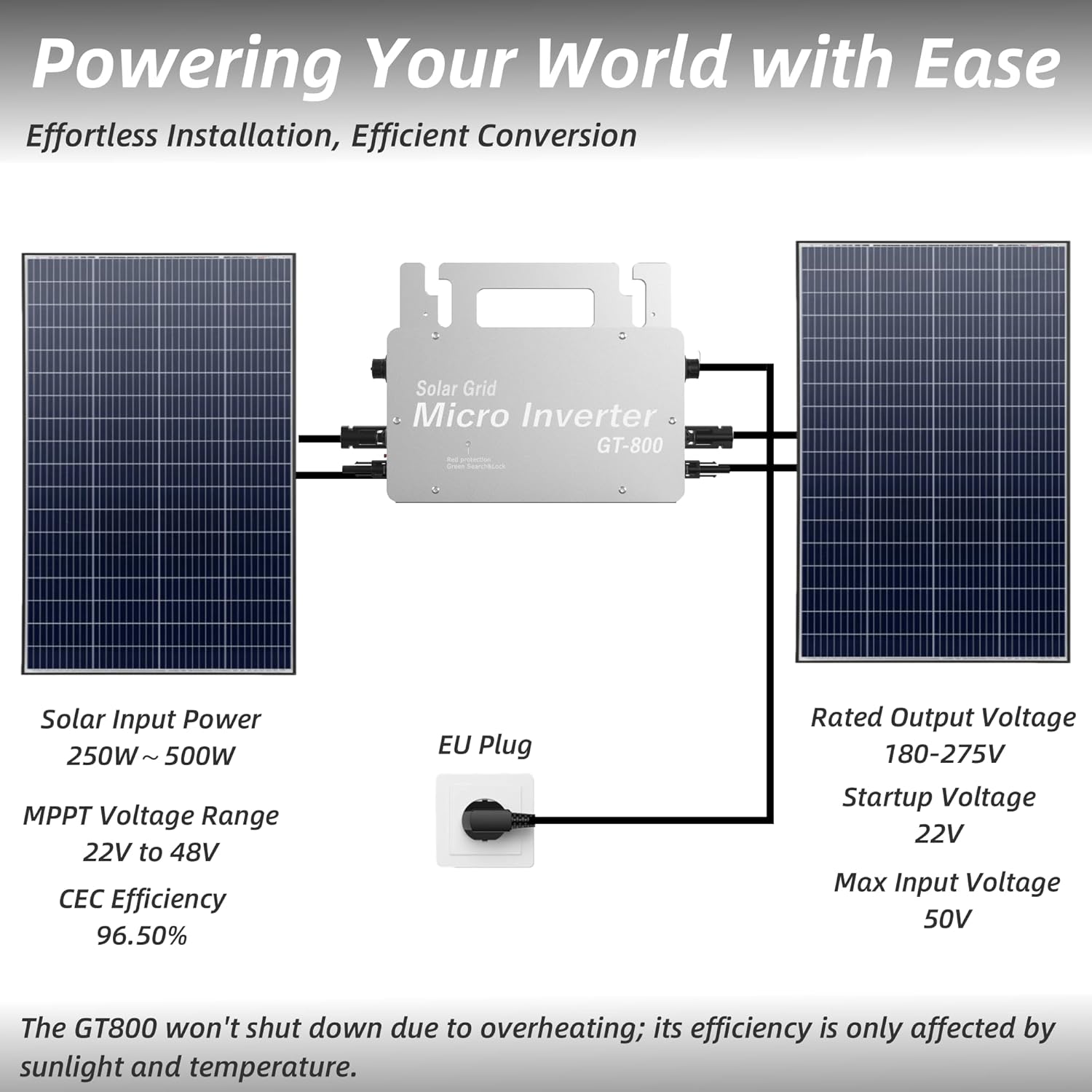
Figure 3: Basic installation diagram illustrating solar panel and AC grid connections.

Olusin 4: Example of a parallel installation with two GT-800 micro inverters and four solar panels.
6. Isẹ
The Erayak GT-800 Micro Inverter features advanced technology for optimal performance and monitoring.
6.1 MPPT ọna ẹrọ
The inverter utilizes Maximum Power Point Tracking (MPPT) technology to optimize the current detection of solar panels. With a CEC efficiency of 96.5%, the dual MPPT tracker ensures optimal performance by accurately capturing and converting sunlight into electricity, maximizing power output by over 25% compared to systems without MPPT.
6.2 WiFi SmartLife App Monitoring
The GT-800 allows for remote control and monitoring via the SmartLife mobile application. This application enables you to:
- Monitor electricity production efficiency in real-time.
- Track energy capture and consumption.
- Control the inverter's switching system remotely.
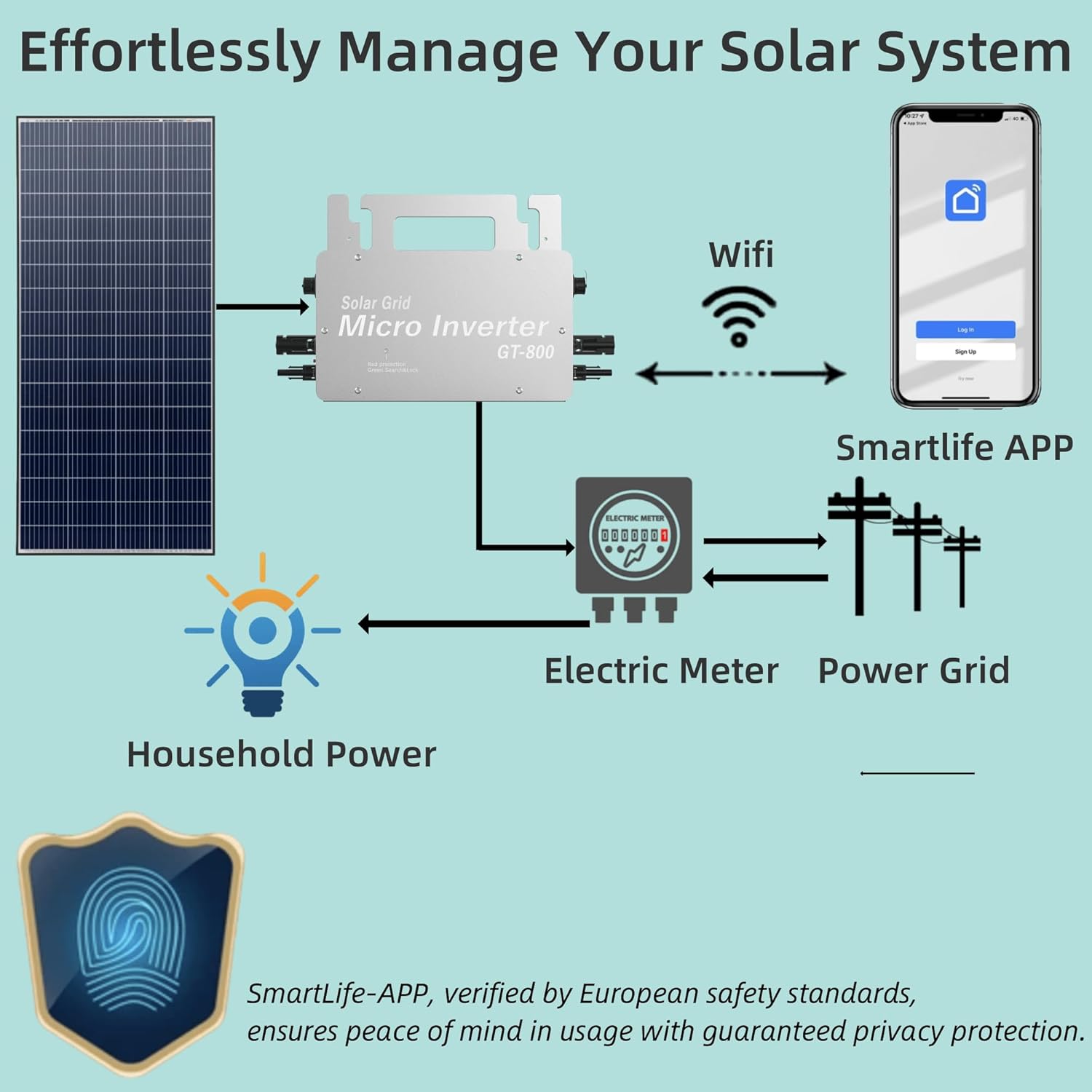
Figure 5: System overview demonstrating connectivity with the SmartLife App for monitoring.
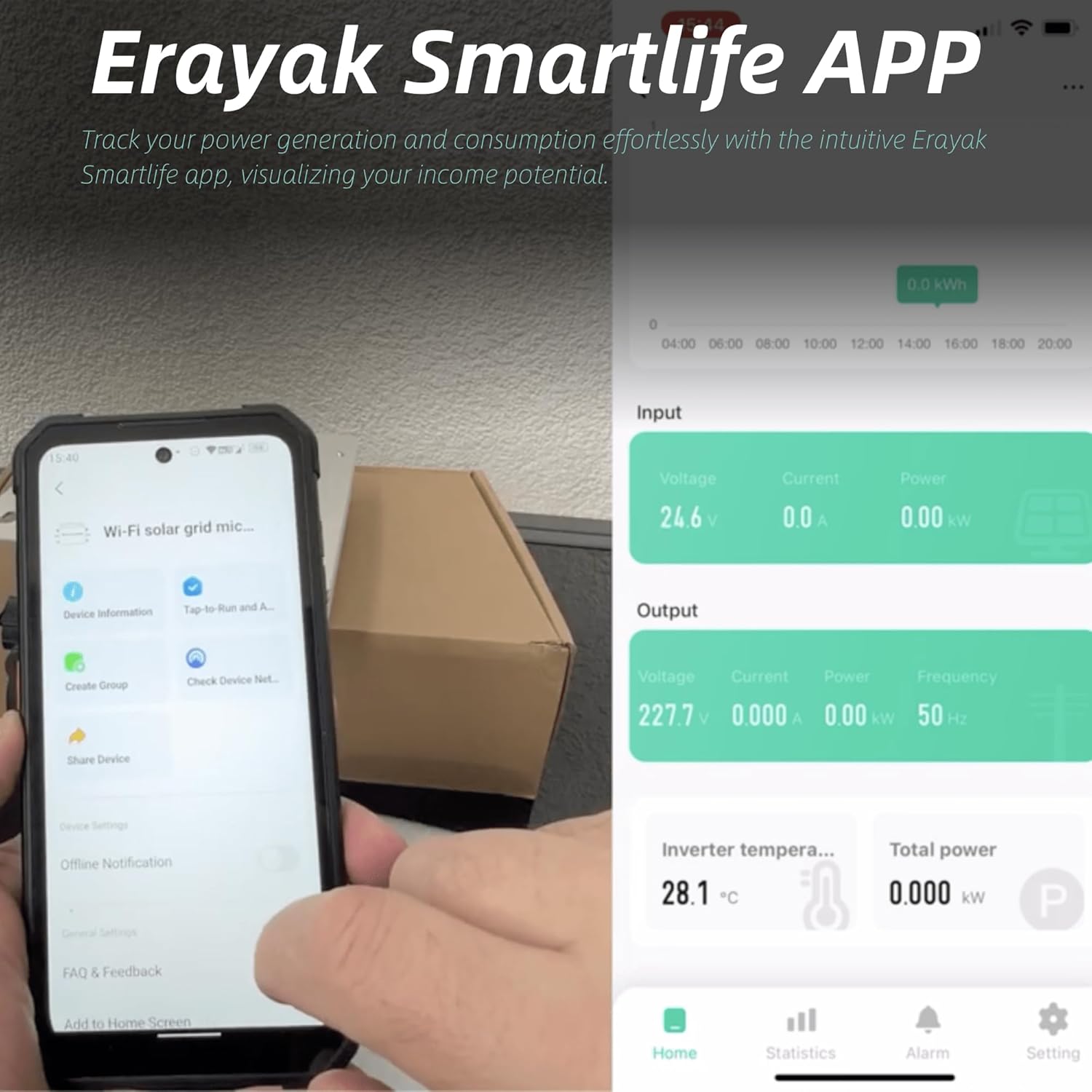
Figure 6: The Erayak SmartLife App interface displaying real-time operational data.
6.3 Auto-Cooling Feature
The GT-800 incorporates an auto-cooling technology. At high temperatures, the inverter automatically cools itself. The minimum power output is 400W during this process. After cooling, the output power automatically increases to maximize energy consumption and prevent overheating shutdowns.

Figure 7: Performance graph demonstrating the GT-800's overheat shutdown prevention mechanism, maintaining output even at elevated temperatures.
7. Itọju
Regular maintenance ensures the longevity and optimal performance of your Erayak GT-800 Micro Inverter:
- Ninu: Periodically clean the exterior of the inverter to remove dust and debris. Use a soft, damp asọ. Maṣe lo awọn kẹmika lile tabi awọn ohun elo abrasive.
- Awọn isopọ: Annually inspect all electrical connections (MC4 and AC) for tightness and signs of corrosion. Ensure they are secure.
- Afẹfẹ: Ensure that the area around the inverter is clear to allow for proper airflow and cooling.
- Abojuto: Regularly check the SmartLife App for any error messages or unusual performance readings.
8. Laasigbotitusita
This section provides solutions to common issues you might encounter with your Erayak GT-800 Micro Inverter.
| Isoro | Owun to le Fa | Ojutu |
|---|---|---|
| Ko si iṣelọpọ agbara | No sunlight, DC input voltage too low, AC grid disconnected, inverter fault. | Check solar panel connections and sunlight conditions. Verify AC grid connection. If issue persists, contact support. |
| Iwọn agbara kekere | Shading on panels, dirty panels, high ambient temperature (auto-cooling engaged), panel degradation. | Clear shading, clean panels. Ensure adequate ventilation. Monitor app for temperature readings. |
| WiFi asopọ oran | Weak WiFi signal, incorrect network settings, app error. | Ensure inverter is within WiFi range. Reconfigure WiFi settings in the app. Restart the app or inverter. |
| Inverter overheating | Insufficient ventilation, prolonged high ambient temperature. | Ensure proper airflow around the inverter. The auto-cooling feature will reduce output to prevent damage. If persistent, relocate to a cooler spot. |
9. Atilẹyin ọja ati Support
The Erayak GT-800 Micro Inverter comes with a 5-odun atilẹyin ọja. Erayak provides a German repair service and 24-hour technical support for any inquiries or issues you may encounter.
For technical assistance or warranty claims, please contact Erayak customer service through the contact information provided with your purchase or on the official Erayak webojula.