
Ọrọ Iṣaaju
Thank you for choosing the Syncwire Bluetooth 5.3 FM Transmitter Car Adapter. This device allows you to stream music and calls wirelessly from your Bluetooth-enabled device to your car's FM radio, while also providing fast charging capabilities for your mobile devices. Please read this manual carefully to ensure proper use and optimal performance.
Alaye Aabo
- Use according to manufacturer's instructions.
- Avoid interference with other wireless devices.
- Mu ẹrọ naa pẹlu iṣọra lati yago fun ibajẹ.
- Follow temperature and humidity guidelines for storage and operation.
- Ma ṣe tuka tabi gbiyanju lati tun ẹrọ naa ṣe funrararẹ.
Ọja Awọn ẹya ara ẹrọ
- Bluetooth 5.3 Imọ-ẹrọ: Provides a fast, stable, and smart connection with minimal sound quality loss for music and calls.
- Dual USB Fast Charging: Equipped with a PD 36W USB-C port and a 12W USB-A port, allowing simultaneous charging of two devices. Features over-current, over-voltage, intelligent temperature, and short-circuit protection.
- Hi-Fi Deep Bass: Enhance your audio experience with deep bass by pressing the dedicated 'B' button.
- Imọlẹ LED Ayika: Features a colorful rainbow light design that can be easily turned on or off by double-pressing the 'B' button.
- Npe ni Ọwọ: Noise Suppression (CVC) technology and echo-cancellation ensure clear hands-free communication.
- USB Drive Support: Play music directly from a USB stick (up to 64GB).
Awọn ilana iṣeto
- Fi Oluyipada sii: Plug the Syncwire FM Transmitter into your car's 12V/24V cigarette lighter socket. The LED display will light up, showing the current FM frequency.
- Select an Unused FM Frequency: Tune your car's FM radio to an empty frequency with no active broadcast. This will minimize interference and provide the clearest audio.
- Ìwọ̀n Ìgbà Tí A Ń Gbé Kalẹ̀: On the Syncwire transmitter, long-press the multi-function knob (phone button) until the frequency display flashes. Use the left/right arrows (or rotate the knob) to adjust the transmitter's frequency to match the empty frequency on your car radio. Once matched, the display will stop flashing.
- So pọ pẹlu Bluetooth: Mu Bluetooth ṣiṣẹ lori ẹrọ alagbeka rẹ. Wa fun available devices and select "SW-XC727" to pair. Once connected, the display will show "bt" (Bluetooth) and you can start streaming audio.
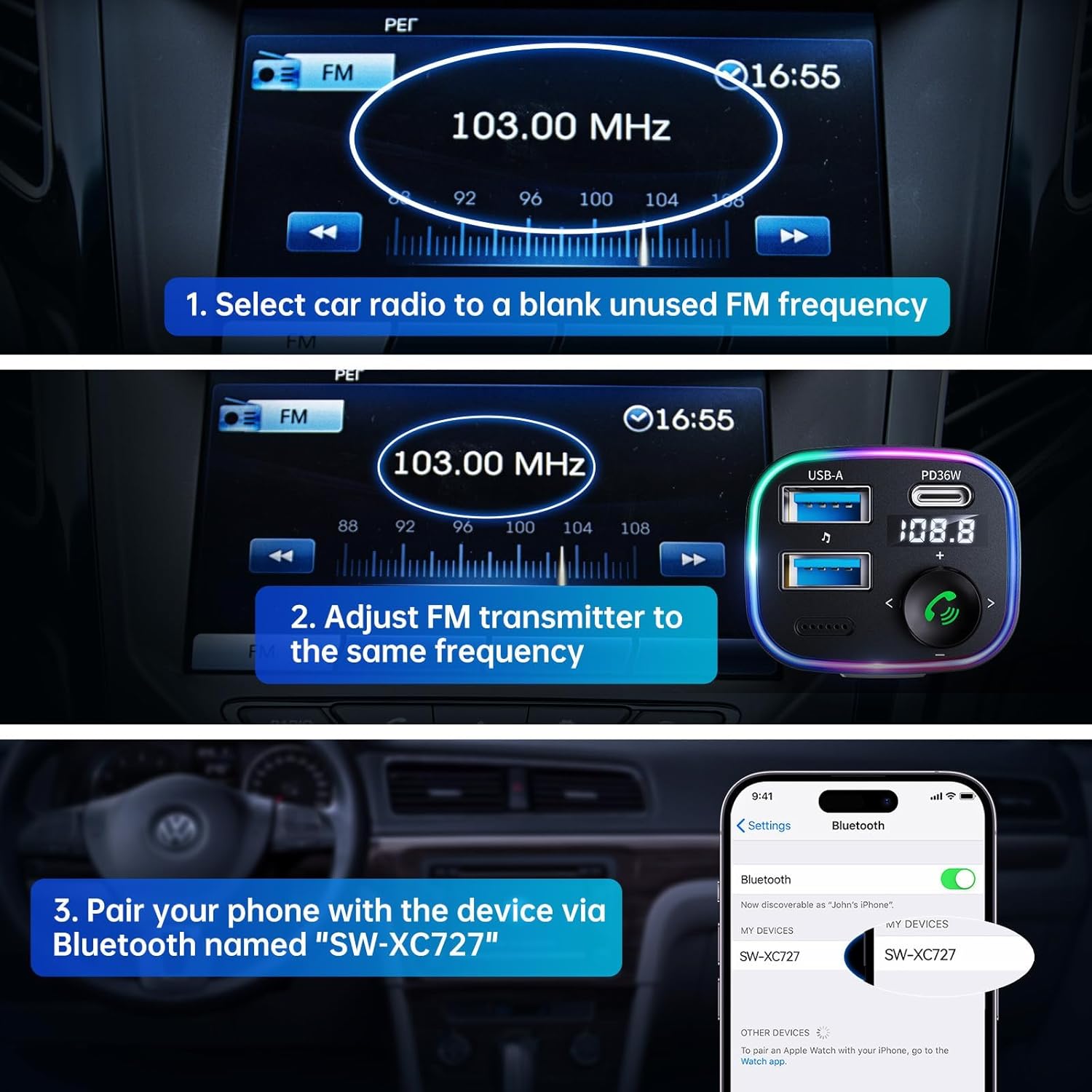
Image: Visual guide for connecting the Syncwire FM Transmitter to your car radio and phone.
Awọn ilana Iṣiṣẹ
Sisisẹsẹhin Orin
- Ṣiṣanwọle Bluetooth: After successful Bluetooth pairing, play music from your phone. The audio will transmit to your car's speakers.
- Sisisẹsẹhin Drive USB: Insert a USB flash drive (up to 64GB) containing MP3/WMA/WAV/FLAC files into the designated USB-A port (with music note icon). The device will automatically detect and play music from the drive.
- Ṣatunṣe Iwọn didun: Rotate the multi-function knob clockwise to increase volume, counter-clockwise to decrease.
- Itele / Tẹlẹ Orin: Use the left (<) and right (>) arrow buttons to skip tracks.
- Baasi didn: Press the 'B' button once to activate Hi-Fi Deep Bass mode (display shows 'b1'). Press again to deactivate (display shows 'b0').
Ọwọ-Free Ipe
- Idahun/Ipe Ipari: Press the multi-function knob (phone button) once to answer an incoming call or end an ongoing call.
- Kọ Ipe: Long-press the multi-function knob to reject an incoming call.
- Titun: Double-press the multi-function knob to redial the last number.
Awọn ẹrọ gbigba agbara
The adapter features two charging ports:
- PD 36W USB-C Port: Fun gbigba agbara yara awọn ẹrọ ibaramu.
- 12W USB-A Port: For standard charging of devices.

Image: Detail of the charging and USB drive ports on the Syncwire FM Transmitter.
Ambient LED Light Control
The device features a colorful LED light ring. To turn the lights on or off, double-press the 'B' button located on the side of the adapter.
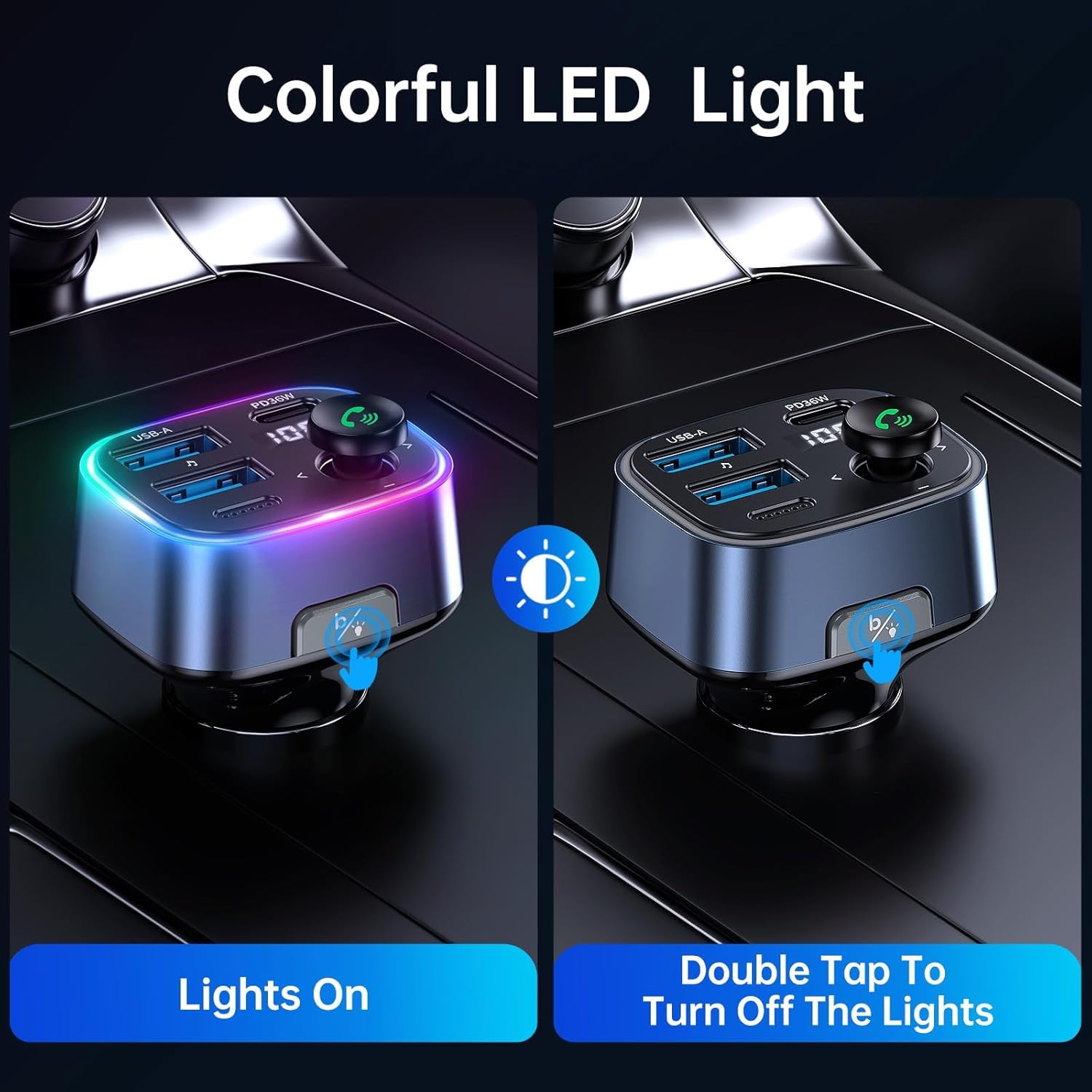
Image: Demonstrating how to control the ambient LED lights on the Syncwire FM Transmitter.
Itoju
- Jeki ẹrọ naa di mimọ nipa fifẹ rẹ pẹlu asọ ti o gbẹ.
- Yago fun ṣiṣafihan ẹrọ naa si awọn iwọn otutu to gaju, oorun taara, tabi ọrinrin.
- Ma ṣe lo abrasive ose tabi epo.
- Tọju ni itura, ibi gbigbẹ nigbati ko si ni lilo.
Laasigbotitusita
- Didara Audio/Aimi:
- Ensure your car radio and the FM transmitter are tuned to the exact same unused frequency.
- Try a different FM frequency if the current one has interference.
- Adjust the volume on both your phone and car radio to an appropriate level.
- Awọn oran Asopọ Bluetooth:
- Make sure Bluetooth is enabled on your phone and the transmitter is powered on.
- Gbagbe ẹrọ naa lati awọn eto Bluetooth ti foonu rẹ ki o gbiyanju lati so pọ lẹẹkansi.
- Tun foonu rẹ ati atagba FM tun bẹrẹ.
- Gbigba agbara Ko ṣiṣẹ:
- Check if the transmitter is securely plugged into the car's power outlet.
- Ensure your charging cable is not damaged and is properly connected.
- Verify that your device is compatible with the charging ports (e.g., PD fast charging).
Awọn pato
| Ẹya ara ẹrọ | Ẹ̀kúnrẹ́rẹ́ |
|---|---|
| Nọmba awoṣe | SW-XC727 |
| Ẹya Bluetooth | 5.3 |
| Iṣagbewọle Voltage | 12V-24V (Vehicle Powered) |
| USB-C o wu | PD 36W |
| Ṣiṣejade USB-A | 12W |
| Lapapọ Ijade | 48W |
| Awọn ọna kika Audio atilẹyin | MP3, WMA, WAV, FLAC |
| USB Drive Capacity | Titi di 64GB |
| Ohun elo | Ṣiṣu |
| Awọn iwọn | 4.45 x 3.35 x 1.42 inches |
| Iwọn | 2.57 iwon |
Atilẹyin ọja ati Support
Syncwire provides a 36-osu atilẹyin ọja ati igbesi aye support for this product. If you encounter any issues or have questions, please contact Syncwire customer service for assistance. They are committed to finding a satisfying solution.
For support, please contact the seller, Syncwire Shop, through the platform where you purchased the product.