
1. Ifihan ati Loriview
The Buffbee Sound Machine & Alarm Clock is a versatile 2-in-1 device designed to enhance your sleep and wake-up experience. It combines a high-quality sound machine with a precise digital alarm clock, offering a range of features to create a peaceful environment and ensure timely waking.

Image 1.1: The Buffbee device highlighting its dual functionality as a sound machine and an alarm clock.
Awọn ẹya pataki:
- 2-in-1 Iṣẹ-ṣiṣe: Combines a sound machine and a digital alarm clock in one compact unit.
- 18 Awọn ohun adun: Includes 5 white noises, 3 fan sounds, and 10 nature sounds (ocean, lullaby, waves, rain, thunderstorm, stream, croaks, bird chirps, summer night, campfire) to aid sleep and relaxation.
- Adjustable Display Brightness: Clock face brightness can be dimmed from 0% to 100% to suit your preference.
- Iṣakoso iwọn didun to pe: Offers 30 levels of volume adjustment for optimal sound output.
- Akoko oorun: Set the sound machine to automatically turn off after 15, 30, 60, 90, or 120 minutes, or allow continuous play.
- Imọlẹ Alẹ 7-Awọ: Features a soothing colored light at the base with 7 color options and ON/OFF functionality.
- Agbọrọsọ Didara: Equipped with a 5W speaker for rich, detailed sound.

Aworan 1.2: Iwaju view of the Buffbee Sound Machine & Alarm Clock, displaying the time and the top control panel.
2. Eto
2.1 Ṣíṣí àpótí àti Àkóónú rẹ̀
Carefully remove the Buffbee Sound Machine & Alarm Clock from its packaging. Verify that all components are present:
- Buffbee Sound Machine & Alarm Clock unit
- Power Adapter (USB cable and wall adapter)
- Afowoyi Olumulo (iwe-ipamọ yii)
2.2 Asopọ agbara
The device is powered by an electrical cable.
- Insert the small end of the USB power cable into the DC IN port on the back of the Buffbee unit.
- Plug the larger end of the USB cable into the provided wall adapter.
- So ohun tí a fi ń ṣe àgbékalẹ̀ ògiri mọ́ inú ìsopọ̀ iná mànàmáná déédéé.
The device will power on automatically, and the digital display will illuminate.
2.3 Ṣiṣeto Aago naa
Upon initial power-on or after a power outage, you may need to set the correct time.
- Tẹ mọlẹ Eto akoko button (usually indicated by a clock icon) on the top panel until the hour digits begin to flash.
- Lo awọn +/- buttons (or arrow buttons) to adjust the hour.
- Tẹ awọn Eto akoko bọtini lẹẹkansi lati yipada si atunṣe iṣẹju.
- Lo awọn +/- awọn bọtini lati ṣatunṣe awọn iṣẹju.
- Tẹ awọn Eto akoko button one more time to confirm and exit time setting mode.
3. Awọn ilana Iṣiṣẹ
3.1 Sound Machine Function
The Buffbee Sound Machine offers 18 soothing sounds to help you relax and sleep.

Aworan 3.1: Ti abẹnu view illustrating the upward-firing speaker for enhanced sound quality.
Awọn ohun ti ndun:
- Tẹ awọn Ipo Ohun button (often a music note icon) to cycle through the available sound categories (White Noise, Fan Sounds, Nature Sounds).
- Lo awọn Next/Previous Sound buttons (arrow icons) to select a specific sound within the chosen category.
- The sound will begin playing automatically.
Iṣatunṣe Iwọn didun:
The device features 30 levels of precise volume control.
- Tẹ awọn Iwọn didun soke (+) or Iwọn didun isalẹ (-) buttons to increase or decrease the sound volume.

Image 3.2: Illustration of the auto-off timer and 30-level precise volume control features.
Ṣiṣeto Aago oorun:
The sleep timer allows the sound machine to turn off automatically after a set duration.
- Tẹ awọn Aago button (often an hourglass icon) repeatedly to cycle through the available timer options: 15 minutes, 30 minutes, 60 minutes, 90 minutes, 120 minutes, or continuous play (indicated by 'ON' or no timer display).
- The selected timer duration will be displayed briefly on the screen.
3.2 Itaniji Aago Išė
The Buffbee device functions as a digital alarm clock with customizable wake-up sounds.
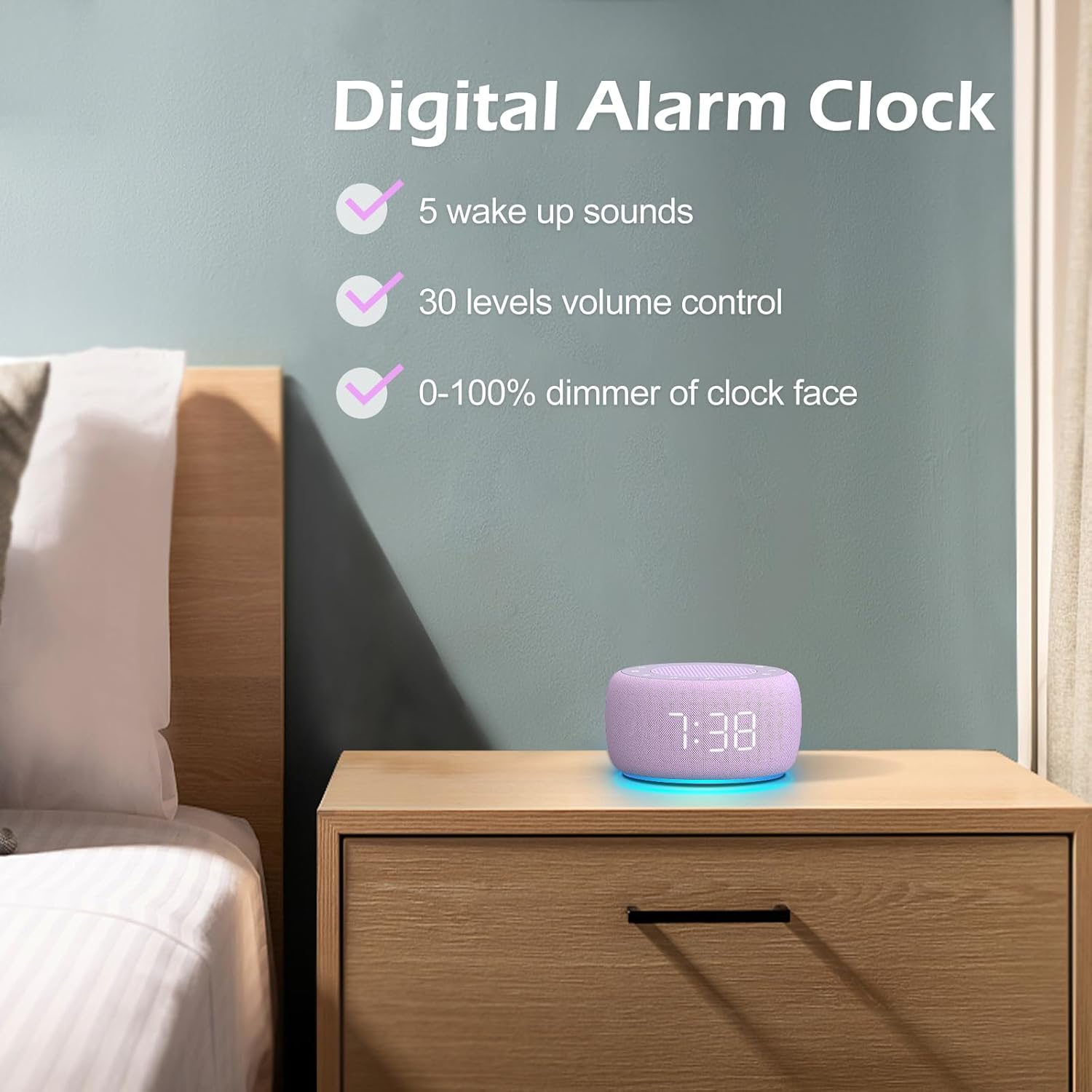
Aworan 3.3: Pariview of the digital alarm clock features, including wake-up sounds, volume control, and display dimmer.
Ṣiṣeto Itaniji kan:
- Tẹ mọlẹ Eto itaniji button (often an alarm clock icon) until the alarm hour digits begin to flash.
- Lo awọn +/- awọn bọtini lati ṣatunṣe aago itaniji.
- Tẹ awọn Eto itaniji bọtini lẹẹkansi lati yipada si atunṣe iṣẹju.
- Lo awọn +/- awọn bọtini lati ṣatunṣe awọn iṣẹju itaniji.
- Tẹ awọn Eto itaniji button one more time to confirm the alarm time.
- After setting the time, you can select the wake-up sound by pressing the Ohun Yan button (if available, or use +/- buttons while alarm sound is flashing). There are 5 wake-up sounds available.
- Tẹ awọn Eto itaniji button again to activate the alarm. An alarm icon will appear on the display.
Iṣẹ́ lẹ́ẹ̀kọ̀ọ̀kan:
Nigbati itaniji ba dun, tẹ bọtini naa Didun button (usually a large button on top or a dedicated snooze icon) to temporarily silence the alarm for a few minutes (typically 9 minutes). The alarm will sound again after the snooze period.
Pipa Itaniji naa:
Láti pa itaniji náà pátápátá, tẹ Itaniji Tan/Pa a button (often the same as the Alarm Set button, or a dedicated toggle). The alarm icon will disappear from the display.
3.3 Display & Light Functions
Iṣatunṣe Imọlẹ Ifihan:
The digital display brightness can be adjusted from 0% (completely dark) to 100% (brightest).

Image 3.4: Demonstration of the 0-100% display dimmer feature, showing various brightness levels.
- Tẹ awọn Dimmer button (often a sun icon) repeatedly to cycle through different brightness levels.
- Mu awọn Dimmer button to smoothly adjust the brightness from 0% to 100% and vice versa. Release the button at your desired brightness.
Lilo Imọlẹ Alẹ:
The device features a colored night light at its base with 7 color options.

Image 3.5: The Buffbee device showcasing its 7-color night light feature in a bedroom setting.
- Tẹ awọn Imọlẹ button (often a light bulb icon) to turn the night light ON.
- Tẹ awọn Imọlẹ bọ́tìnì náà leralera láti yípo nípasẹ̀ àwọn àwọ̀ 7 tó wà.
- Tẹ awọn Imọlẹ button one more time after cycling through all colors to turn the night light OFF.
4. Itọju
4.1 Ninu
To maintain the appearance and functionality of your Buffbee device:
- Yọọ ẹrọ naa nigbagbogbo lati iṣan agbara ṣaaju ṣiṣe mimọ.
- Lo aṣọ rirọ, gbẹ, tí kò ní àwọ̀ láti nu àwọn ojú ìta rẹ̀.
- Do not use abrasive cleaners, waxes, or solvents, as these may damage the finish.
- Yago fun gbigba ọrinrin sinu eyikeyi awọn ṣiṣi.
4.2 Ibi ipamọ
Nigbati o ko ba wa ni lilo fun awọn akoko ti o gbooro sii, tọju ẹrọ naa ni itura, aye gbigbẹ, kuro lati orun taara ati awọn iwọn otutu to gaju.
4.3 Abo ikilo
Jọwọ ṣe akiyesi awọn iṣọra ailewu wọnyi:
- Ọja yii kii ṣe nkan isere. Jeki kuro ni arọwọto awọn ọmọde.
- Handle with care to avoid electric shock. Do not expose the device to water or excessive moisture.
- Use within recommended noise exposure limits to prevent hearing damage.
- Ma ṣe gbiyanju lati tunto tabi tun ẹrọ naa funrararẹ. Tọkasi gbogbo iṣẹ si oṣiṣẹ oṣiṣẹ.
5. Laasigbotitusita
If you encounter issues with your Buffbee Sound Machine & Alarm Clock, please refer to the following common problems and solutions:
| Isoro | Owun to le Fa | Ojutu |
|---|---|---|
| Ẹrọ naa ko ṣiṣẹ. | Ko si asopọ agbara tabi adapter ti o ni abawọn. | Ensure the power cable is securely plugged into the device and the wall outlet. Try a different outlet. |
| Ko si ohun lati agbọrọsọ. | Volume is too low or muted. Incorrect sound selected. | Mu iwọn didun pọ si nipa lilo awọn Iwọn didun soke (+) button. Ensure a sound is selected and not paused. |
| Itaniji ko dun. | Alarm is not set or not activated. Alarm volume is too low. | Verify that the alarm time is set correctly and the alarm icon is displayed. Increase the alarm volume (if separate from main volume). |
| Ifihan naa ti di dudu ju tabi o ti tan imọlẹ ju. | Display dimmer setting is incorrect. | Tẹ tabi mu awọn Dimmer button to adjust the brightness to your preference. |
| Night light is not working. | Night light is turned off. | Tẹ awọn Imọlẹ button to turn on and cycle through colors. |
6. Awọn pato
Detailed technical specifications for the Buffbee Sound Machine & Alarm Clock (Model BK11):
| Ẹya ara ẹrọ | Sipesifikesonu |
|---|---|
| Brand | BUFFBEE |
| Nọmba awoṣe | BK11 |
| Àwọ̀ | Awọ aro |
| Ohun elo | Ṣiṣu |
| Orisun agbara | Okun Itanna |
| Ọja Mefa | 14.3 x 11.2 x 7.7 cm (5.6 x 4.4 x 3.0 inches) |
| Iwọn Nkan | 322 giramu (0.71 poun) |
| Ijade Agbọrọsọ | 5W |
| Ohun Aw | 18 Soothing Sounds (5 White Noise, 3 Fan, 10 Nature) |
| Awọn ipele iwọn didun | 30 Precise Levels |
| Ifihan Dimmer | 0-100% Adjustable Brightness |
| Night Light Awọn awọ | 7 Awọn awọ |
| Awọn aṣayan Aago oorun | 15, 30, 60, 90, 120 minutes, or Continuous Play |
| Wake-up Sounds | 5 Alarm Sounds |
7. Atilẹyin ọja ati Support
7.1 atilẹyin ọja Alaye
This product comes with a standard manufacturer's warranty. Please refer to the product packaging or the seller's webAaye fun awọn ofin atilẹyin ọja kan pato, pẹlu iye akoko ati awọn alaye agbegbe.
7.2 Onibara Support
For any questions, technical assistance, or warranty claims, please contact Buffbee customer support through the retailer's platform or the official Buffbee website. Have your product model number (BK11) and purchase details ready when contacting support.