
1. Ifihan
This manual provides detailed instructions for the installation, operation, and maintenance of the EVURU DDS668 Single Phase LCD Digital Energy Meter. This device is designed to accurately measure electrical energy consumption (kWh), voltage, current, and power in single-phase 220V electrical systems. Please read this manual thoroughly before installation and use to ensure proper function and safety.

Nọmba 1: Iwaju view of the EVURU DDS668 Single Phase LCD Digital Energy Meter, showing the LCD display with energy readings and control button.
2. Alaye Aabo
- Fifi sori yẹ ki o ṣee ṣe nipasẹ oṣiṣẹ ti o peye nikan.
- Rí i dájú pé a ti ge ina kuro kí a tó fi sori ẹrọ tabi ṣiṣẹ́ waya.
- Do not operate the meter in environments exceeding its specified temperature and humidity ranges.
- Do not attempt to open or repair the meter; refer to qualified service personnel.
3. Awọn ẹya Ọja
- LCD display with backlight for clear readings.
- Measures total energy (kWh), temporary energy (kWh), real-time voltage, lọwọlọwọ, ati agbara.
- Pulse LED indicator for active energy measurement.
- 35mm DIN rail installation.
- Manual button for cycling through display parameters and resetting temporary kWh.
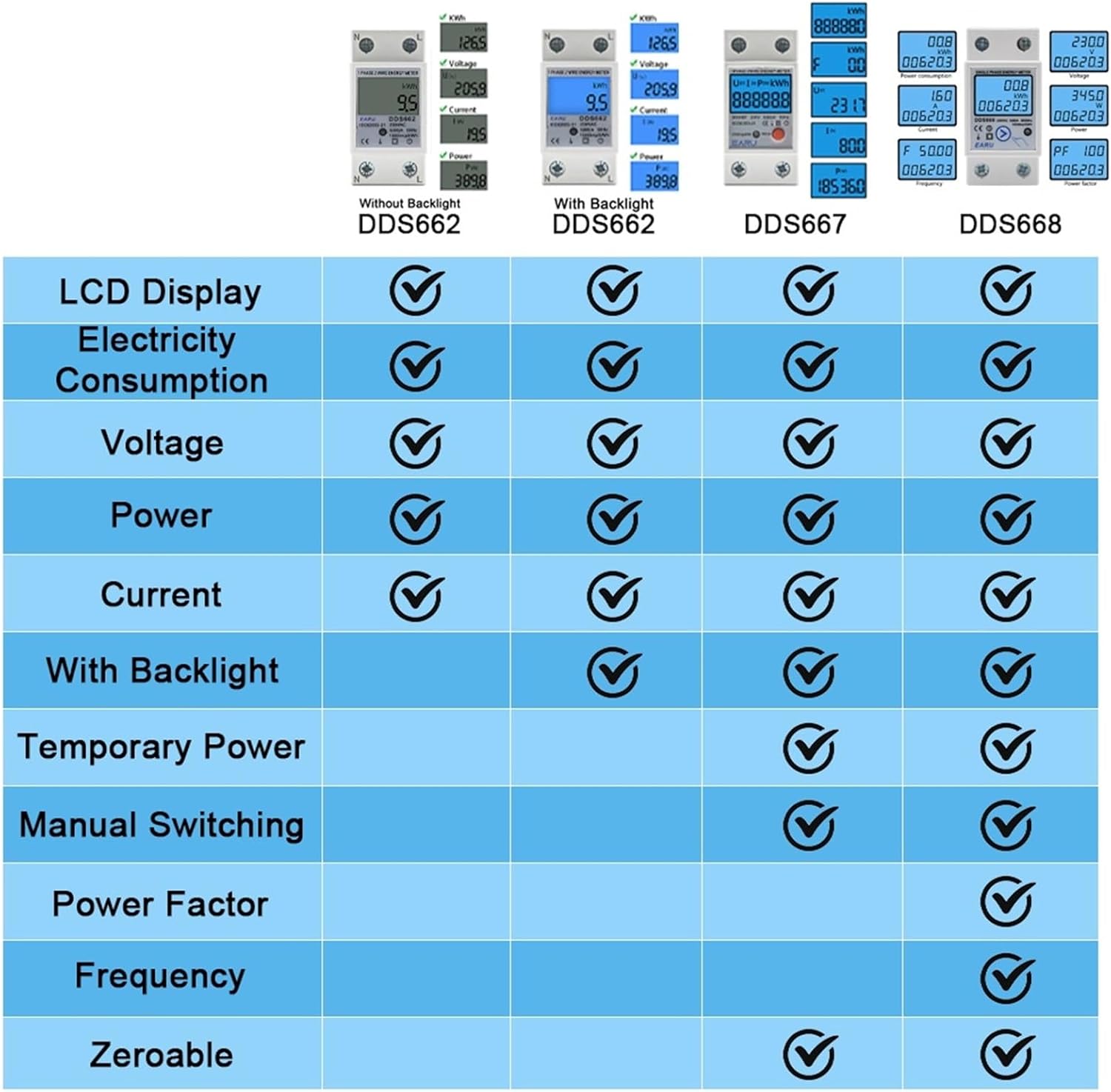
Nọmba 2: A comparison table highlighting features such as electricity consumption, voltage, power, current, backlight, temporary power, manual switching, power factor, frequency, and zeroable functions across different EVURU meter models (DDS662, DDS667, DDS668).
4. fifi sori
4.1 DIN Rail iṣagbesori
The EVURU DDS668 energy meter is designed for standard 35mm DIN rail installation. Ensure the DIN rail is securely mounted in a suitable electrical enclosure.

Nọmba 3: An EVURU energy meter shown mounted on a standard 35mm DIN rail, illustrating the ease of installation.
4.2 Awọn itọnisọna Wiring
The DDS668 model supports two wiring configurations. Always ensure the power supply is disconnected before performing any wiring. Connect the Neutral (N) and Live (L) wires according to the chosen method.
- Upper Input, Lower Output: Input wires connect to the top terminals, and output wires connect to the bottom terminals.
- Lower Input, Upper Output: Input wires connect to the bottom terminals, and output wires connect to the top terminals.

Nọmba 4: Wiring diagrams for DDS667 and DDS668 models, illustrating both the "Upper Input, Lower Output" and "Lower Input, Upper Output" connection methods for Neutral (N) and Live (L) terminals.
5. Isẹ
5.1 Agbara Lori
Once correctly wired and mounted, restore power to the circuit. The LCD display will illuminate, showing the current energy readings.
5.2 Ifihan Lilọ kiri
The meter's display cycles through various parameters. Press the button located on the front panel to manually switch between the following readings:
- Lapapọ Agbara (kWh)
- Temporary Energy (kWh)
- Real-akoko Voltage (V)
- Real-time Current (A)
- Real-time Power (W)
The pulse LED will flash to indicate active energy measurement.
5.3 Resetting Temporary Energy (kWh)
To reset the temporary energy (kWh) reading to zero, press and hold the button on the front panel for approximately 6 seconds. Note that the total energy (kWh) reading cannot be reset.
6. Awọn pato

Nọmba 5: Detailed instrument parameters and physical dimensions for the DDS667 and DDS668 energy meters, including voltage, current, pulse frequency, temperature, humidity, and wiring modes.
| Paramita | Value (DDS668) |
|---|---|
| Irinse Name | DDS668 Single Phase Energy Meter |
| AC Voltage | 220V (Forukọsilẹ) |
| O pọju Lọwọlọwọ | 80A |
| Gbigbe Range | 0.05Ib-Imax |
| Pulse Igbohunsafẹfẹ | 1000imp / kWh |
| Ibaramu otutu | -35°C si +65°C |
| Ọriniinitutu ibatan | Ko si ju 95% |
| Fifi sori ẹrọ | 35mm DIN Rail |
| Iwọn Iwọn | Functional Loss at 50Hz or 60Hz Rated Frequency |
| Awọn iwọn (H x W x D) | 78.5mm x 36mm x 65.8mm (isunmọ.) |
7. Itọju
The EVURU DDS668 energy meter requires minimal maintenance. To ensure optimal performance and longevity:
- Keep the meter clean and free from dust and debris. Use a soft, dry cloth for cleaning.
- Avoid exposing the meter to direct sunlight, extreme temperatures, or high humidity for extended periods.
- Regularly inspect wiring connections to ensure they are secure and free from corrosion.
8. Laasigbotitusita
If you encounter issues with your EVURU DDS668 energy meter, consider the following basic troubleshooting steps:
- Ko si Ifihan: Check the power supply to the meter. Ensure all wiring connections are secure and correct.
- Awọn kika ti ko tọ: Verify that the wiring is correct according to the installation diagrams. Ensure the meter is rated for your specific voltage ati lọwọlọwọ awọn ibeere.
- Pulse LED Not Flashing: This may indicate no current flow or a wiring issue. Check the load and connections.
- If problems persist after performing these checks, contact customer support. Do not attempt to repair the device yourself.
9. Atilẹyin ọja ati Support
Information regarding specific warranty terms and customer support contact details for the EVURU DDS668 Single Phase LCD Digital Energy Meter was not provided in the product description. Please refer to the product packaging or the seller's webojula fun alaye yi.