
1. Ifihan
The Ankilo Mini Bluetooth 5.3 Receiver/Transmitter is a versatile 2-in-1 audio adapter designed to add Bluetooth functionality to non-Bluetooth devices. Featuring the latest Bluetooth 5.3 technology, it ensures stable connections and a transmission range of up to 33 feet (10 meters). This device is suitable for use with cars, speakers, stereo systems, and headphones, allowing you to enjoy wireless audio streaming and hands-free calling.

Figure 1: Ankilo Mini Bluetooth 5.3 Receiver/Transmitter.

Figure 2: Highlighting Bluetooth 5.3 for stable connections, auto reconnect in RX mode, 33 ft signal range, and fast transmission.
2. Ọja Ipariview
Familiarize yourself with the device's components:
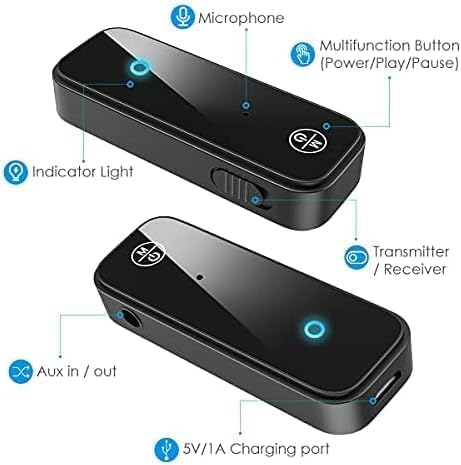
Figure 3: Labeled diagram of the Ankilo Bluetooth adapter. Key components include the Microphone, Multifunction Button (Power/Play/Pause), Indicator Light, Transmitter/Receiver (TX/RX) switch, Aux in/out port, and 5V/1A Charging port.
3. Package Awọn akoonu
Rii daju pe gbogbo awọn nkan wa ninu package:
- 1 x Ankilo Mini Bluetooth 5.3 Receiver/Transmitter
- 1 x 3.5mm Audio Connector (new and old versions may be sent randomly)
- 1 x Okun Ngba agbara USB
- 1 x Itọsọna olumulo
4. Eto ati Asopọ
4.1. Ipo olugba (RX)
Use Receiver Mode to stream audio from your Bluetooth-enabled device (e.g., smartphone, laptop) to a non-Bluetooth audio system (e.g., car stereo, wired speakers, wired headphones).
- Yipada si Ipo RX: Locate the TX/RX switch on the side of the adapter and slide it to the "RX" position.
- Sopọ si Eto Olohun: Plug the 3.5mm audio connector into the Aux in/out port of the Bluetooth adapter. Then, plug the other end of the 3.5mm audio connector into the auxiliary input port of your non-Bluetooth audio system.
- Tan-an ati Sopọ: Press and hold the Multifunction Button (power button) for 3 seconds to turn on the device. The indicator light will flash red and blue alternately, indicating it is in pairing mode.
- Sopọ pẹlu Ẹrọ Rẹ: On your smartphone or other Bluetooth-enabled device, go to Bluetooth settings and search for "Ankilo" or "ZF-360" (or similar device name). Select it to connect. Once connected, the indicator light on the adapter will turn solid blue.

Figure 4: Step-by-step visual guide for connecting in both Receiver (RX) and Transmitter (TX) modes.
4.2. Ipo Gbigbe (TX)
Use Transmitter Mode to stream audio from a non-Bluetooth audio source (e.g., TV, computer, MP3 player) to your Bluetooth headphones or speakers.
- Yipada si Ipo TX: Locate the TX/RX switch on the side of the adapter and slide it to the "TX" position.
- Sopọ si Orisun Olohun: Plug the 3.5mm audio connector into the Aux in/out port of the Bluetooth adapter. Then, plug the other end of the 3.5mm audio connector into the auxiliary output port of your non-Bluetooth audio source (e.g., TV headphone jack).
- Tan-an ati Sopọ: Press and hold the Multifunction Button (power button) for 3 seconds to turn on the device. The indicator light will flash red and blue alternately, indicating it is in pairing mode.
- Papọ pẹlu Awọn agbekọri/Agbohunsoke Bluetooth: Put your Bluetooth headphones or speakers into pairing mode. The adapter will automatically search and connect to your headphones/speakers. Once connected, the indicator light on the adapter will turn solid red.
Video 1: General guide on how to use an Aux Bluetooth Adapter for Car. (Note: Product shown may vary slightly from Ankilo model.)
Video 2: Demonstration of ensuring the audio plug is firmly inserted for optimal sound quality. (Note: Product shown may vary slightly from Ankilo model.)
5. Awọn ọna ṣiṣe ati Awọn iṣẹ
5.1. Ọwọ-Ọfẹ Npe
The adapter features a built-in HD microphone for convenient hands-free calling while driving or performing other tasks.
- Dahun/Fi ipe duro: Tẹ Bọtini Multifunction lẹẹkan.
- Kọ Ipe: Tẹ mọlẹ Multifunction Button fun iṣẹju-aaya 2.
- Nọmba Ikẹhin Tun Tun: Tẹ bọtini Multifunction lẹẹmeji.
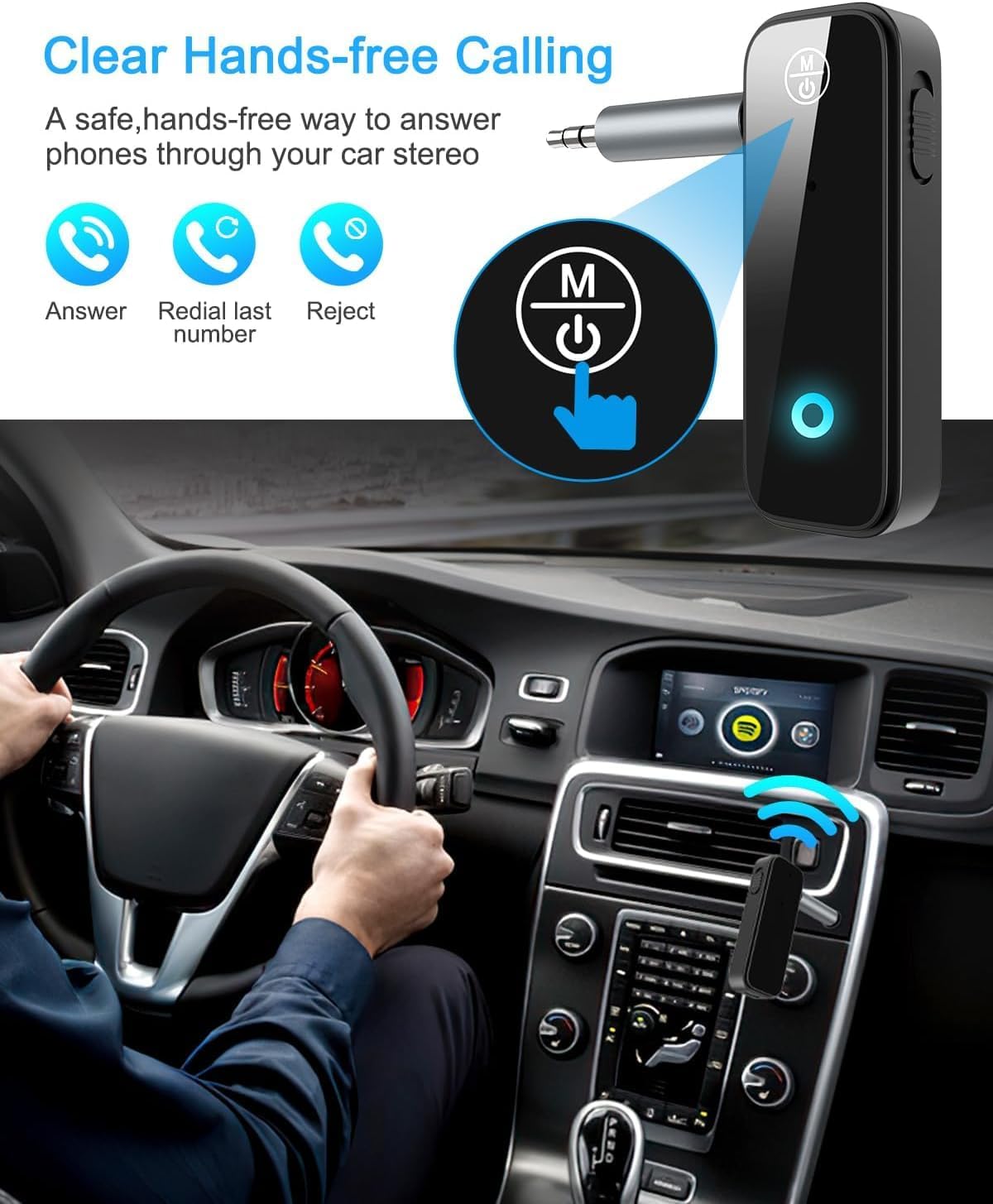
Figure 5: Visual representation of hands-free calling functionality in a vehicle.
5.2. Iṣakoso Sisisẹsẹhin Orin
- Ṣiṣẹ/Daduro: Tẹ Bọtini Multifunction lẹẹkan.
- Orin t’okan: Tẹ bọtini "+" lẹẹkan.
- Tẹlẹ Orin: Tẹ bọtini "-" lẹẹkan.
- Iwọn didun Up: Tẹ bọtini "+" mọlẹ.
- Iwọn didun isalẹ: Tẹ bọtini "-" mọlẹ.
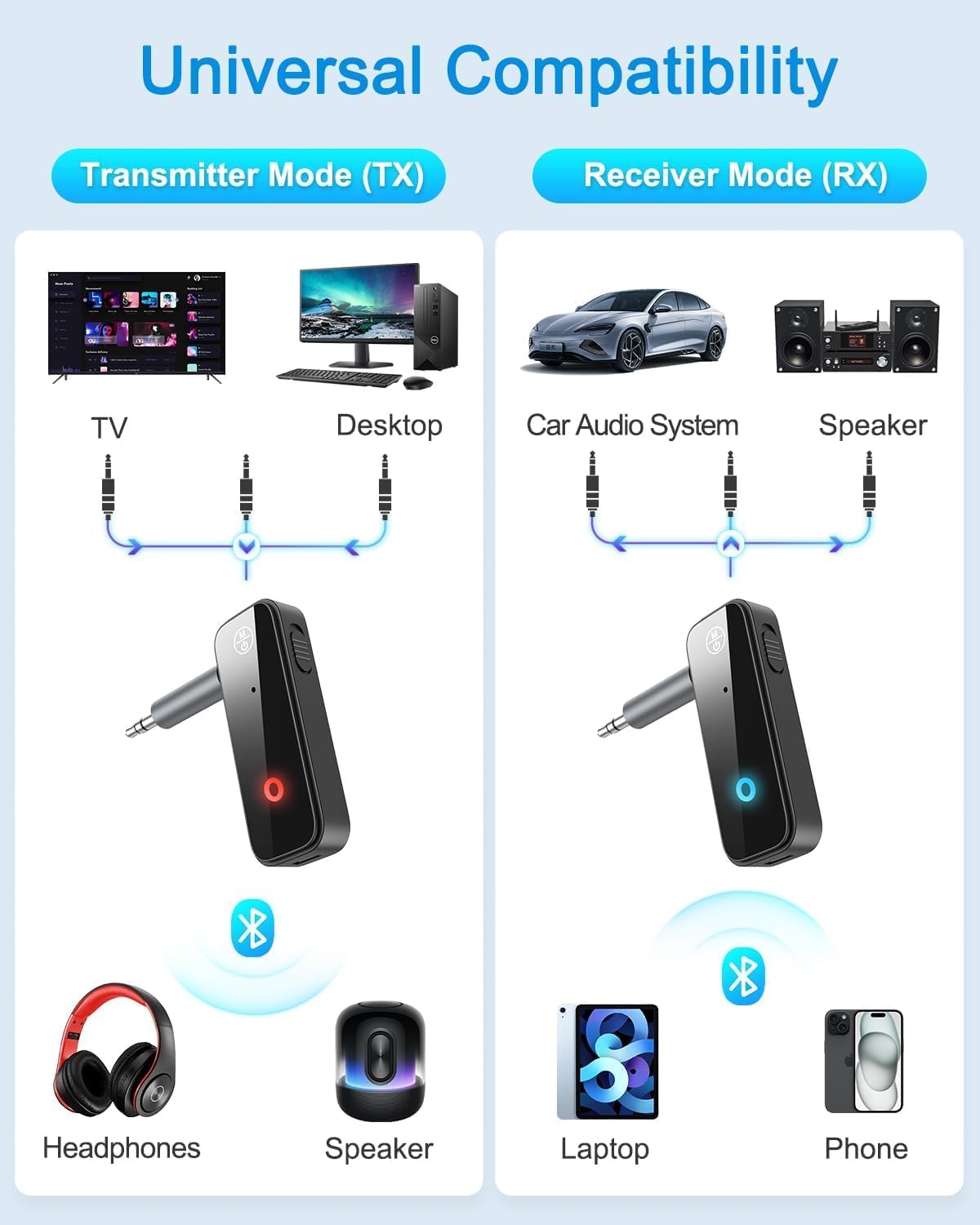
Figure 6: Illustrates the universal compatibility of the device in both Transmitter (TX) and Receiver (RX) modes with various devices like TVs, desktops, car audio systems, speakers, headphones, laptops, and phones.
6. Gbigba agbara ati batiri Life
The Ankilo Mini Bluetooth adapter is equipped with a built-in rechargeable battery. A full charge takes approximately 2 hours and provides up to 8 hours of music playback or call time.
- Gbigba agbara: Connect the provided USB charging cable to the 5V/1A Charging port on the adapter and to a USB power source. The red indicator light will be solid during charging and turn off when fully charged.
- Itọkasi Batiri Kekere: When the battery is low, the red indicator light will flash.

Figure 7: Details on the device's 8-hour battery life, 2-hour fast charging, and USB charging port.
7. Awọn pato
| Ẹya ara ẹrọ | Ẹ̀kúnrẹ́rẹ́ |
|---|---|
| Brand | Ankilo |
| Awoṣe | CP210-MA06CA-KH |
| Ẹya Bluetooth | 5.3 |
| Awọn ọna ṣiṣe | Receiver (RX) & Transmitter (TX) |
| Gbigbe Range | Titi de 33 ẹsẹ (10 mita) |
| Igbesi aye batiri | Approx. 8 hours (music/call) |
| Akoko gbigba agbara | Isunmọ. wakati meji 2 |
| Gbigba agbara Port | 5V/1A (USB) |
| Ohun Input/O wu | 3.5mm Iranlọwọ |
| Gbohungbohun ti a ṣe sinu | Yes (HD) |
| Ohun elo | Ṣiṣu |
| Ọja Mefa | 6.7 x 1.8 x 10 cm; 30g |
8. Laasigbotitusita
- Ẹrọ ko ṣiṣẹ lori: Ensure the device is fully charged. Connect it to a power source using the USB cable.
- Ko le so pọ pẹlu ẹrọ kan:
- Ensure the adapter is in the correct TX or RX mode.
- Make sure the adapter is in pairing mode (red and blue lights flashing alternately).
- Ensure the target device (phone, headphones, speaker) is also in pairing mode.
- Turn off and on the Bluetooth function on your device and try searching again.
- Pa awọn asopọ Bluetooth ti tẹlẹ lori awọn ẹrọ mejeeji ti o ba jẹ dandan.
- No audio or low audio:
- Check that the 3.5mm audio connector is fully and firmly inserted into both the adapter and the audio system/source.
- Ensure the volume on both the adapter and the connected audio device is turned up.
- Verify that the adapter is correctly connected to the audio source/system (TX mode for output, RX mode for input).
- Asopọmọra igba diẹ: Ensure there are no significant obstacles (like walls) between the adapter and the connected Bluetooth device. Keep devices within the 33-foot (10-meter) range.
9. Alaye Aabo
- Má ṣe fi ẹ̀rọ náà sí ibi tí ó gbóná janjan, ọrinrin tàbí àyíká tí ó lè ba nǹkan jẹ́.
- Ma ṣe tuka tabi gbiyanju lati tun ẹrọ naa ṣe funrararẹ.
- Jeki kuro ni arọwọto awọn ọmọde.
- Note: This adapter is not suitable for SONY devices. Please confirm compatibility before purchase.
10. Atilẹyin ọja ati Support
Ankilo offers a 12-month quality protection warranty and 60 days free replacement for this product. For any questions or concerns, please contact our customer support. We are committed to responding within 24 hours to assist you.