
1. Ifihan
This manual provides comprehensive instructions for the ANCEL VOD700 All System OBD2 Scanner and the ANCEL BM200 12V Car Battery Tester. The VOD700 is designed for advanced diagnostics and maintenance functions specifically for Volvo vehicles, while also offering standard OBD2 functions for all vehicle brands. The BM200 is a Bluetooth-enabled battery monitor and tester for 12V lithium and lead-acid batteries, providing cranking, charging, and load test capabilities.
2. ANCEL VOD700 OBD2 Scanner Overview
2.1 Key Awọn ẹya ara ẹrọ
- All System Diagnostics for Volvo: Engine, Transmission, Airbag, BMS, TPMS, ABS, SAS, A/C, EPB, GPS, ESP, and more.
- Professional Maintenance Functions: EPB Reset, Oil Reset, BMS Reset, ABS Bleeding, TPMS Reset, DPF Regeneration, Fuel Injector Coding, Auto Gearbox Reset, Chassis Reset, Battery Registration, SRL Reset, ETC Reset.
- Multiple OBD Level Diagnostics: Read Codes, Erase Codes, I/M Readiness, Data Stream, Evap System Test, Vehicle Information, DTC Lookup, Turn off Malfunction Indicator Light (MIL).
2.2 Volvo Vehicle Compatibility (VOD700)
The ANCEL VOD700 is compatible with a wide range of Volvo models across various years. Refer to the compatibility chart below for specific models and their supported year ranges.

Image: ANCEL VOD700 Volvo Compatibility Chart. This chart details the specific Volvo models and their corresponding production years that are compatible with the VOD700 scanner for diagnostic and maintenance functions.
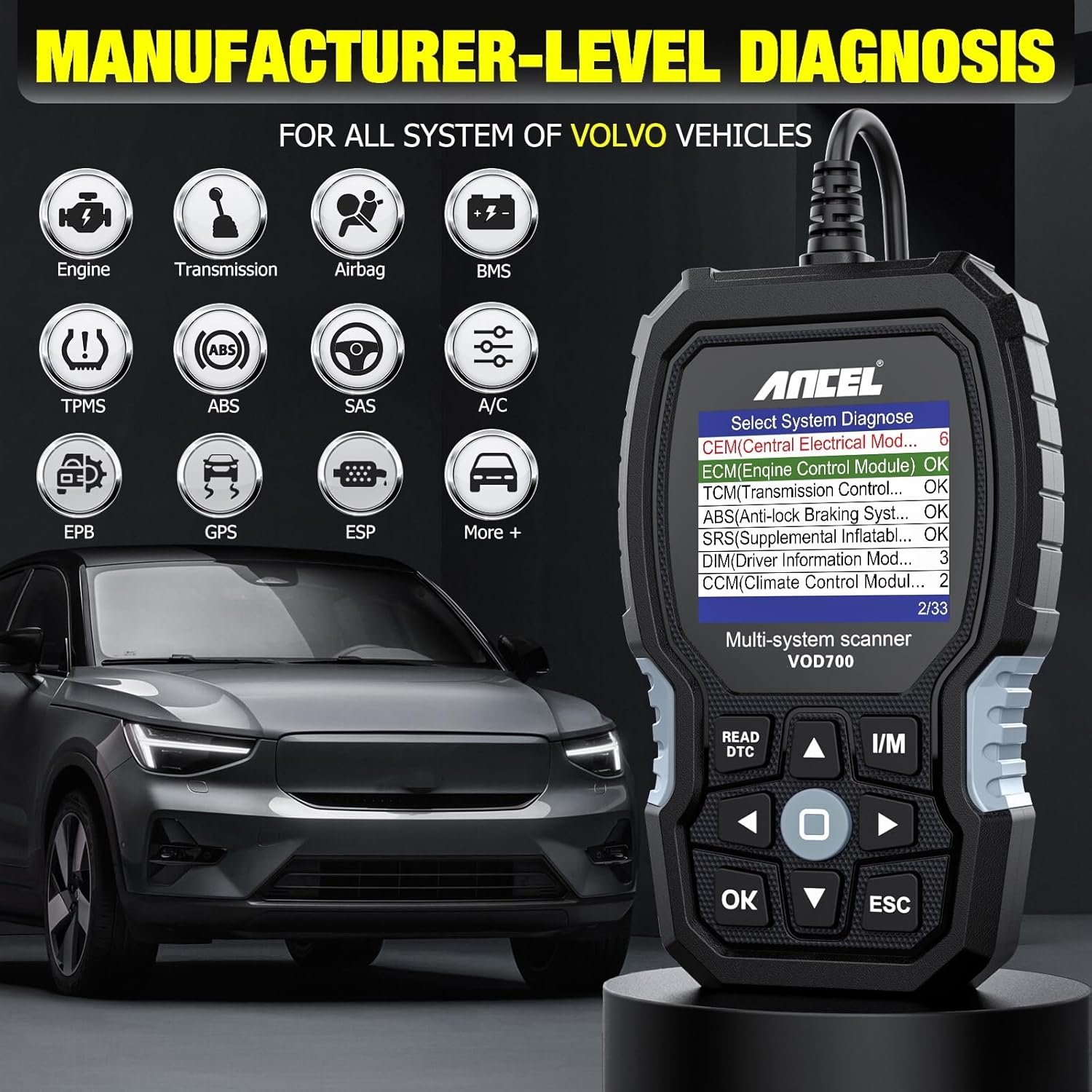
Image: ANCEL VOD700 Manufacturer-Level Diagnostics. The VOD700 scanner interface displaying options for diagnosing various systems in Volvo vehicles, including Engine, Transmission, Airbag, and more.
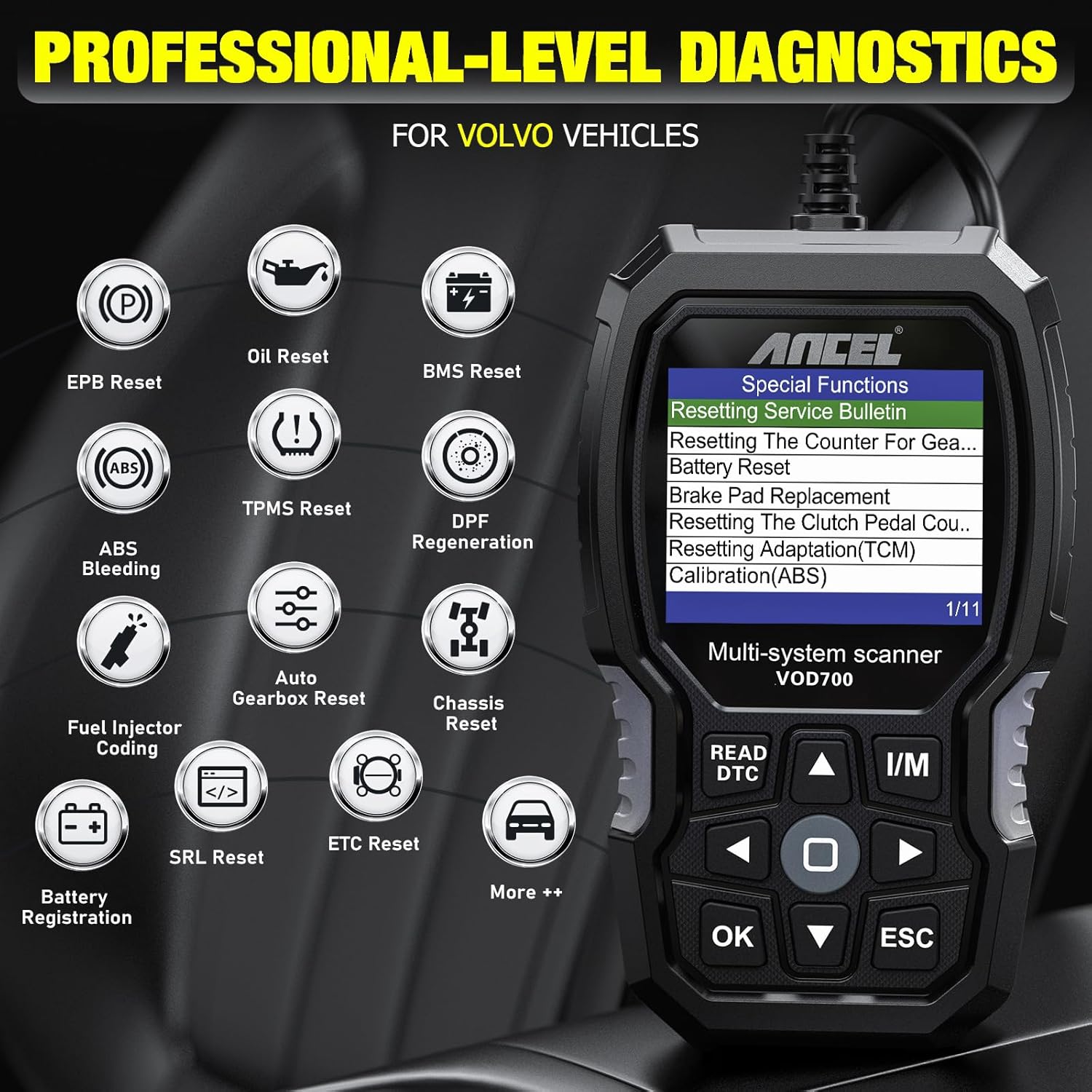
Image: ANCEL VOD700 Professional Diagnostics. The VOD700 scanner showing a menu of advanced maintenance and reset functions available for Volvo vehicles.

Image: ANCEL VOD700 Multiple OBD Level Diagnostics. The VOD700 scanner interface showing general OBD functions applicable to engine systems across all vehicle brands.
3. ANCEL BM200 Battery Tester Overview
3.1 Key Awọn ẹya ara ẹrọ
- Multi-functional 12V Battery Tester: Supports both lithium and lead-acid batteries.
- Comprehensive Tests: Voltage Test, Cranking Test, Charging Test, Battery Load Test.
- Bluetooth 4.2 Asopọmọra: Connects to a mobile application for data display and analysis.
- Abojuto ati Gbigbasilẹ: Features alarm functions and records voltage itan.
3.2 Vehicle Battery Compatibility (BM200)
The ANCEL BM200 supports all 12V vehicle batteries, making it versatile for various applications.

Image: ANCEL BM200 Battery Monitor. The compact ANCEL BM200 device with its battery connection cables, showing QR codes for app download.

Image: ANCEL BM200 Multi-functional Battery Tester in Use. The BM200 connected to a car battery, with a smartphone displaying the battery's state of charge, voltage, and temperature, along with test options.

Image: ANCEL BM200 Professional Cranking and Charging Test. The BM200 connected to a battery, with the app showing detailed results of cranking and charging system tests, including voltage awọn sakani.

Image: ANCEL BM200 12V Vehicle Battery Compatibility. This image illustrates the wide range of 12V vehicles and equipment, such as boats, SUVs, and motorcycles, that the BM200 battery tester supports.
4. Awọn ilana iṣeto
4.1 ANCEL VOD700 Setup
- Locate the vehicle's OBD-II diagnostic port, typically found under the dashboard on the driver's side.
- Rí i dájú pé iná ọkọ̀ náà ti pa.
- Connect the VOD700 scanner's OBD-II cable to the vehicle's diagnostic port.
- Turn the vehicle's ignition to the ON position (engine off). The scanner will power on automatically.
4.2 ANCEL BM200 Setup
- Download the ANCEL BM200 application from the Google Play Store or Apple App Store.
- Rí i dájú pé àwọn ìpele bátìrì ọkọ̀ náà mọ́ tónítóní tí kò sì ní ìbàjẹ́ kankan.
- So pupa clamp of the BM200 to the positive (+) battery terminal.
- Connect the blue clamp of the BM200 to the negative (-) battery terminal.
- Open the BM200 application on your smartphone and follow the on-screen instructions to pair the device via Bluetooth.
5. Awọn ilana Iṣiṣẹ
5.1 ANCEL VOD700 General Operation
- Use the directional buttons (up, down, left, right) to navigate through the menu options on the VOD700 screen.
- Press the 'OK' button to confirm a selection or enter a sub-menu.
- Press the 'ESC' button to return to the previous screen or exit a function.
- For standard OBD2 functions, select 'OBDII' from the main menu to read/clear codes, view live data, and check I/M readiness.
- For Volvo-specific diagnostics and maintenance, select 'For Volvo' or the relevant reset function (e.g., 'EPB Reset', 'Oil Reset') from the main menu.
5.2 ANCEL VOD700 Electronic Parking Brake (EPB) Reset for Volvo
This procedure outlines how to use the VOD700 to retract the electronic parking brake calipers for brake pad replacement on compatible Volvo vehicles.
- Ensure the VOD700 is connected to the vehicle's OBD-II port and the ignition is in the ON position.
- From the main menu, select 'EPB Reset'.
- Choose 'Brake Pad Replacement' from the EPB reset options.
- Select your specific Volvo model and year from the list.
- Follow the on-screen prompts to initiate the parking brake release for maintenance. The tool will communicate with the vehicle's system to retract the calipers.
- Once the brake pads are replaced and the brake system is reassembled, reconnect the VOD700.
- Navigate back to the 'EPB Reset' menu and select 'Exit from Maintenance Mode' to re-engage the electronic parking brake.
5.3 ANCEL BM200 Battery Testing Operation
- Ensure the BM200 is correctly connected to the 12V battery terminals.
- Open the ANCEL BM200 application on your paired smartphone.
- The app will display real-time battery voltage.
- Select desired test: 'Voltage Test', 'Cranking Test', 'Charging Test', or 'Battery Load Test'.
- Follow the on-screen instructions within the app to perform each test. For Cranking Test, you may be prompted to start the engine.
- Review the test results and voltage history displayed in the application.
6. Itọju
- Ninu: Wipe the devices with a soft, dry cloth. Avoid using abrasive cleaners or solvents.
- Ibi ipamọ: Store the VOD700 and BM200 in a dry, cool environment, away from direct sunlight and extreme temperatures.
- Software Updates (VOD700): Lojoojumọ ṣayẹwo osise ANCEL website for software updates to ensure optimal performance and compatibility with new vehicle models.
- Firmware Updates (BM200): Check the ANCEL BM200 app or official website for any available firmware updates for the battery monitor.
7. Laasigbotitusita
- Ẹrọ ti ko ni agbara: Ensure the VOD700 is securely connected to the OBD-II port and the vehicle's ignition is on. For BM200, ensure clamps are correctly attached to battery terminals.
- Connection Issues (BM200): Verify Bluetooth is enabled on your smartphone and the BM200 is within range. Restart the app and the device if necessary.
- Diagnostic Errors (VOD700): Check vehicle compatibility. Ensure the ignition is on and the connection is stable. Consult the vehicle's service manual for specific error code meanings.
- Àwọn Ìkà Tí Kò Péye (BM200): Ensure battery terminals are clean. Verify the battery type (lithium/lead-acid) is correctly selected in the app if applicable.
For further assistance, refer to the official ANCEL support resources.
8. Awọn pato
8.1 ANCEL VOD700 OBD2 Scanner
- Iṣẹ ṣiṣe: All System Diagnostics, Maintenance Resets (EPB, Oil, BMS, ABS Bleeding, TPMS, DPF, Injector Coding, Auto Gearbox, Chassis, Battery Reg, SRL, ETC), Standard OBD2 functions.
- Ibamu Ọkọ: Specific Volvo models (refer to compatibility chart) and all OBD2 compliant vehicles for engine diagnostics.
- Orisun Agbara: Vehicle OBD-II port.
8.2 ANCEL BM200 12V Car Battery Tester
- Batiri Voltage: 12V.
- Awọn oriṣi Batiri: Lithium, Lead-Acid.
- Awọn iṣẹ idanwo: Voltage Test, Cranking Test, Charging Test, Battery Load Test.
- Asopọmọra: Bluetooth 4.2.
- Awọn ẹya afikun: Alarm, Voltage History Record.
- Orisun Agbara: Battery Powered (from the 12V battery being tested).
9. Atilẹyin ọja ati Support
ANCEL products are designed for reliability and performance. For warranty information, technical support, or to access additional resources, please visit the official ANCEL webojula tabi olubasọrọ onibara iṣẹ.
- Official ANCEL Store: Visit the ANCEL Store on Amazon
- BM200 Product Information: Quicklynks BM6-ANCEL Product Page