
THOMSON 50UA5S13
Ìwé Ìtọ́sọ́nà Olùlò TV Android Smart 4K UHD THOMSON 50UA5S13 50-inch
1. Ifihan
Welcome to the user manual for your new THOMSON 50UA5S13 50-inch 4K UHD Smart Android TV. This manual provides essential information for setting up, operating, and maintaining your television. Please read it thoroughly to ensure optimal performance and safe use of your device.
Your THOMSON TV offers a stunning 4K UHD display, providing four times the detail of Full HD. It features the Android TV operating system, granting access to a vast array of applications, intelligent voice control via Google Assistant, and seamless content streaming with Chromecast built-in. Enjoy immersive audio with Dolby Audio technology and versatile content reception through its integrated triple tuner (DTT, cable, or satellite).

olusin 1: Iwaju view of the THOMSON 50UA5S13 4K UHD Smart Android TV displaying various streaming app icons.
2. Alaye Aabo
Before operating your television, please read all safety instructions carefully. Keep this manual for future reference.
- Ibi ti ina elekitiriki ti nwa: Rí i dájú pé TV náà so mọ́ ihò agbára pẹ̀lú vol tó tọ́tage bi itọkasi lori aami ọja.
- Afẹfẹ: Ma ṣe dina awọn ṣiṣi atẹgun. Gba aaye to peye ni ayika TV fun sisan afẹfẹ to dara lati ṣe idiwọ igbona.
- Ibi: Place the TV on a stable, level surface. Avoid placing it in direct sunlight, near heat sources, or in environments with high humidity or dust.
- Omi ati Ọrinrin: Ma ṣe fi TV han si ojo tabi ọrinrin. Ma ṣe gbe awọn nkan ti o kun fun awọn olomi, gẹgẹbi awọn ikoko, lori TV.
- Ninu: Yọ TV kuro ṣaaju ki o to di mimọ. Lo asọ asọ ti o gbẹ. Ma ṣe lo olomi tabi awọn olutọpa aerosol.
- Ṣiṣẹ: Maṣe gbiyanju lati ṣe iṣẹ TV funrararẹ. Tọkasi gbogbo iṣẹ si awọn oṣiṣẹ iṣẹ ti o peye.
3. Package Awọn akoonu
Jẹrisi pe gbogbo awọn ohun kan wa ninu package:
- THOMSON 50UA5S13 50-inch 4K UHD Smart Android TV
- Remote Control (Premium backlit)
- Okun agbara
- Iduro TV (awọn ege 2) ati awọn skru
- Kaadi atilẹyin ọja
- Ìtọ́sọ́nà Ìbẹ̀rẹ̀ Kíákíá (a lè fi kún un lọ́tọ̀ọ̀tọ̀)
4. Ti ara Oṣo
4.1 So Iduro TV
- Farabalẹ gbe oju TV si isalẹ lori rirọ, dada mimọ lati ṣe idiwọ ibajẹ iboju.
- Ṣe deede awọn ege imurasilẹ pẹlu awọn iho ti o baamu ni isalẹ ti TV.
- Ṣe aabo awọn iduro nipa lilo awọn skru ti a pese. Rii daju pe wọn ti di ṣinṣin.
4.2 Iṣagbesori odi (aṣayan)
This TV supports VESA wall mounts with a 200x200 pattern. A wall mount bracket is not included and must be purchased separately. Follow the instructions provided with your wall mount bracket for proper installation. Ensure the wall can support the weight of the TV and the mount.
4.3 Mefa ati Placement
Consider the TV's dimensions for optimal placement in your viewagbegbe ing.

Figure 2: Diagram showing the dimensions of the THOMSON 50UA5S13 TV: 112 cm width, 69 cm height (with stand), 26 cm depth (with stand).
5. Awọn isopọ
Connect your TV to various external devices using the ports located on the back and side panels.

Figure 3: Illustration of the back panel ports including HDMI, LAN, USB, Audio Out, Satellite, Antenna, AV In, and Common Interface.
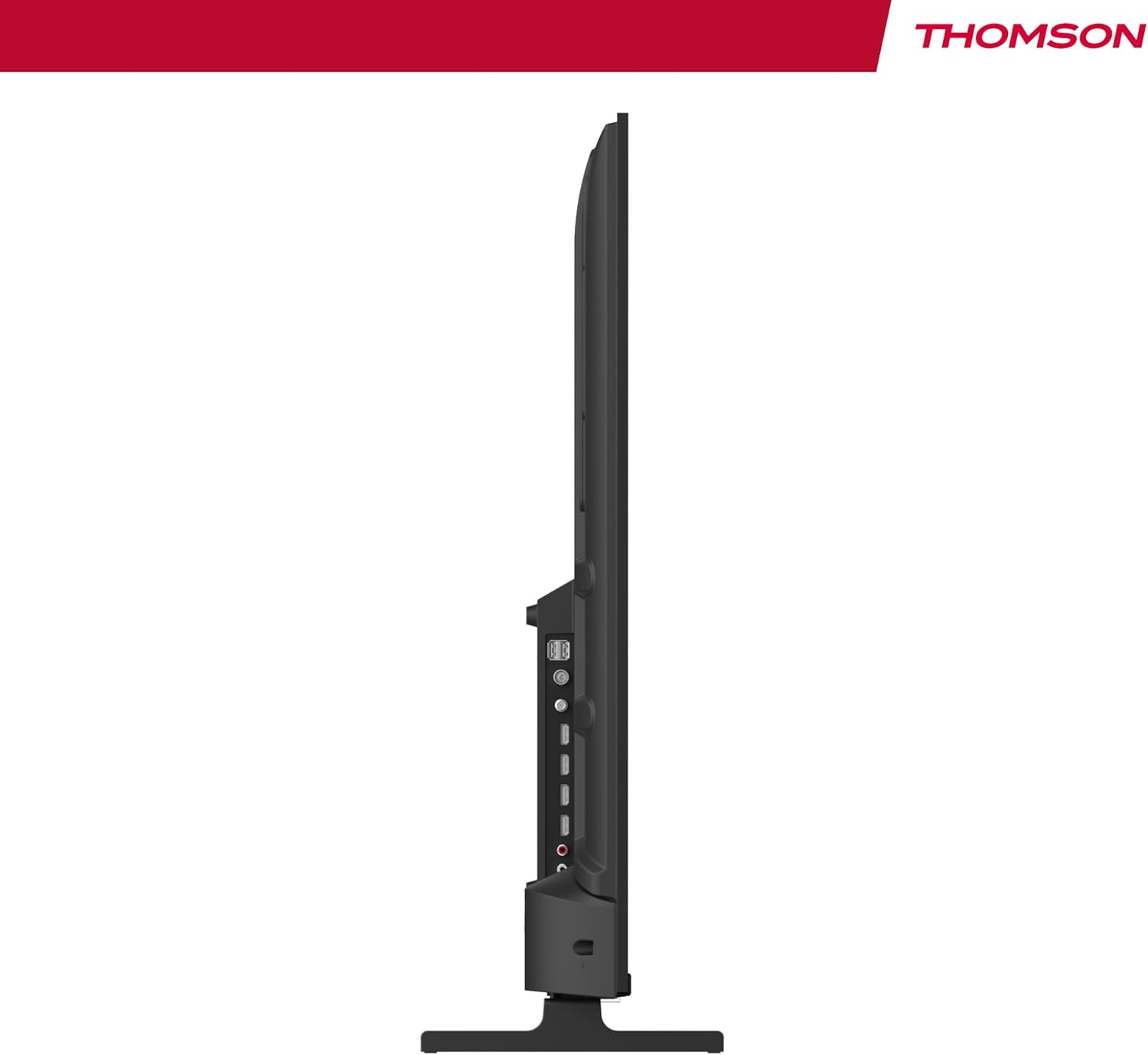
olusin 4: Ẹgbẹ profile view of the TV, showing accessible ports on the side.
- Agbara: So okun agbara pọ si TV ati iṣan ogiri kan.
- Eriali/Kábù/Sátẹ́ẹ̀lì: Use the appropriate input for your broadcast signal (DTT, cable, or satellite).
- HDMI (x4): Connect external devices such as Blu-ray players, game consoles, or set-top boxes.
- USB (x2): So awọn ẹrọ ibi ipamọ USB pọ fun ṣiṣiṣẹsẹhin media.
- Lan: So okùn Ethernet pọ fun asopọ intanẹẹti onirin.
- Audio Out (Digital Optical): Sopọ si eto ohun ita fun imudara ohun afetigbọ.
- AV Ninu: So awọn ẹrọ agbalagba pọ nipa lilo fidio apapo ati awọn kebulu ohun sitẹrio.
- Ìfọwọ́sowọ́pọ̀ tí a wọ́pọ̀ (CI+): Insert a CI+ module and smart card for encrypted digital services.
- Bluetooth: Pair wireless headphones, speakers, or other compatible Bluetooth devices.
6. Initial Setup and Android TV
6.1 First-Time Power On
- After connecting all necessary cables, plug the TV into a power outlet.
- Tẹ bọtini agbara lori isakoṣo latọna jijin tabi lori TV.
- Tẹle awọn itọsọna loju iboju lati yan ede ti o fẹ.
6.2 Eto nẹtiwọki
Connect your TV to the internet for access to Android TV features and apps.
- Wi-Fi: Yan nẹtiwọọki Wi-Fi rẹ lati inu atokọ naa ki o tẹ ọrọ igbaniwọle sii.
- Ẹ̀rọ onífóònù (LAN): If you connected an Ethernet cable, the TV should automatically detect the wired connection.
6.3 Google Account Sign-in
Sign in with your Google Account to access the Google Play Store, Google Assistant, and personalized recommendations.
6.4 Ṣíṣàyẹ̀wò ikanni
After network setup, the TV will guide you through scanning for available channels based on your antenna, cable, or satellite connection.
7. Ṣiṣẹ TV rẹ
7.1 Iṣakoso latọna jijin
The premium backlit remote control allows easy navigation, even in low light. Key features include:
- Bọtini agbara: Tan TV si tan tabi paa.
- Awọn bọtini lilọ kiri: Fun lilọ kiri akojọ aṣayan.
- Iwọn didun/Awọn bọtini ikanni: Ṣatunṣe iwọn didun ati yi awọn ikanni pada.
- Bọtini Iranlọwọ Google: Mu iṣakoso ohun ṣiṣẹ.
- Favorites Button: Quickly launch your designated favorite application.
- Awọn bọtini Ọna abuja App: Wiwọle taara si awọn iṣẹ ṣiṣanwọle olokiki.
7.2 Android TV Awọn ẹya ara ẹrọ
Your THOMSON TV runs on Android TV, providing a smart and intuitive user experience.

Figure 5: The Android TV home screen displaying various applications and content recommendations.
- Awọn ohun elo: Access over 400,000 movies and TV shows from apps like Netflix, Prime Video, Disney+, YouTube, Spotify, and Apple TV.
- Oluranlọwọ Google: Use your voice to control the TV, search for content, get answers, and manage smart home devices. Simply press the Google Assistant button on your remote and speak your command.

Figure 6: A user interacting with the Google Assistant via the TV remote control.
- -Itumọ ti Chromecast: Wirelessly stream movies, music, and videos from compatible smartphones, tablets, or computers directly to your TV.
7.3 Aworan Eto
Ṣe ilọsiwaju rẹ viewiriri pẹlu awọn imọ-ẹrọ aworan to ti ni ilọsiwaju:
- 4K UHD: Enjoy ultra-high definition resolution with 8 million pixels for incredibly detailed and precise images.
- HDR (High Dynamic Range) & Dolby Vision: These technologies enhance contrast, brightness, and color accuracy, providing a more realistic and vibrant picture.

Figure 7: Visual comparison illustrating the enhanced detail of 4K UHD (3840x2160) over Full HD (1920x1080).

Figure 8: Comparison showing the improved contrast and color depth with Dolby Vision compared to Standard Dynamic Range (SDR).
7.4 Ohun Eto
Experience dynamic and immersive audio:
- Dolby Audio / Dolby Atmos: Creates a rich, room-filling sound experience. (Note: Dolby Atmos requires compatible sound equipment).

Figure 9: Visual representation of Dolby Atmos sound creating an immersive audio experience around viewbẹẹni.
8. Itọju
8.1 Ninu TV
- Yọọ TV nigba gbogbo ṣaaju ṣiṣe mimọ.
- Use a soft, lint-free cloth to gently wipe the screen and TV body.
- Fun awọn ami alagidi, fẹẹrẹ dampen the cloth with water or a specialized screen cleaner (ensure it's safe for TV screens) and wipe gently. Never spray liquid directly onto the screen.
8.2 Software imudojuiwọn
Your Android TV may receive periodic software updates to improve performance and add new features. Ensure your TV is connected to the internet to receive these updates. You can usually check for updates in the TV's settings menu.
9. Laasigbotitusita
Ti o ba pade awọn ọran pẹlu TV rẹ, tọka si awọn solusan ti o wọpọ wọnyi:
| Isoro | Owun to le Solusan |
|---|---|
| Ko si agbara | Ṣayẹwo boya okun agbara ti wa ni edidi ni aabo sinu TV ati iṣan ogiri. Gbiyanju iṣan ti o yatọ. |
| Ko si aworan/ohun | Ensure the correct input source is selected. Check cable connections to external devices. For sound, check volume levels and external audio system connections. |
| Isakoṣo latọna jijin ko ṣiṣẹ | Check or replace the batteries. Ensure there are no obstructions between the remote and the TV's IR sensor. |
| Ko le sopọ si Wi-Fi | Rii daju pe olulana Wi-Fi rẹ wa ni titan ati ṣiṣẹ. Tun-tẹ ọrọ igbaniwọle Wi-Fi sii. Gbiyanju tun TV ati olulana bẹrẹ. |
| Slow performance or apps | Close unused applications. Clear cache for problematic apps in settings. Restart the TV. Ensure a stable internet connection. |
10. Awọn pato
Detailed technical specifications for the THOMSON 50UA5S13 TV:
| Ẹya ara ẹrọ | Sipesifikesonu |
|---|---|
| Brand | Thomson |
| Nọmba awoṣe | 50UA5S13 |
| Iwon iboju | 50 inches (126 cm) |
| Ifihan ọna ẹrọ | UHD (LED LCD) |
| Ipinnu | 3840 x 2160 (4K UHD) |
| Oṣuwọn sọtun | 60 Hz |
| Pataki Awọn ẹya ara ẹrọ | Flat Screen, Android TV, Google Assistant, Chromecast built-in, HDR, Dolby Vision, Dolby Audio |
| Asopọmọra | Bluetooth, Wi-Fi, 4x HDMI, 2x USB, LAN, Digital Optical Audio Out, AV In, CI+ |
| Tuner | Triple Tuner (ATSC for Antenna, Cable, Satellite) |
| Iṣeto ohun | 2.0 |
| Awọn iwọn (L x W x H) | 111.1 x 26 x 69.2 cm (pẹlu iduro) |
| Iwọn | 8.5 kilo |
| VESA Odi Oke | 200x200 mm (mount not included) |
| Agbara Agbara Kilasi | E |
For detailed energy information, please refer to the EU EPREL database:
EPREL Product Information Sheet

Figure 10: The EU Energy Label for the THOMSON 50UA5S13 TV, indicating its energy efficiency class and consumption.
11. Atilẹyin ọja ati Support
Your THOMSON 50UA5S13 TV comes with a full 3-year manufacturer's warranty, demonstrating its reliability and quality. For warranty claims or technical support, please refer to the warranty card included in your package or visit the official THOMSON support website for your region. Keep your proof of purchase for warranty validation.
Awọn iwe aṣẹ ti o jọmọ - 50UA5S13
 |
Thomson Streaming Box 260 Pro მომხმარებლის სახელმძღვანელო Thomson Streaming Box 260 Pro-ს ინსტალაციისა და გამოყენების დეტალური სახელმძღვანელო, რომელიც მოიცავს უსაფრთხოების ინსტრუქციებს, დაყენებას, ფუნქციებს და ტექნიკურ მახასიათებლებს. |
 |
Thomson Streaming Dongle 150 Castors pẹ̀lú Google TV: Ìwé Ìtọ́sọ́nà Olùlò Ìwé ìtọ́ni tó péye fún Thomson Streaming Dongle 150 Cast, tó ní Google TV nínú. Ó ní àwọn ìtọ́ni ètò, àwọn ẹ̀yà ara ẹ̀rọ, ìtọ́sọ́nà ìṣàkóso láti ọ̀nà jíjìn, ìsopọ̀mọ́ra, àwọn ètò, ìṣòro, àti àwọn ìlànà ìmọ̀ ẹ̀rọ. |
 |
Thomson Smart TV z Android TV: Uporabniški priročnik Podroben uporabniški priročnik za Thomson Smart TV z operacijskim sistemom Android TV. Ta vodnik ponuja navodila za namestitev, začetno nastavitev, uporabo funkcij kot so Google Assistant, Chromecast, Google Play, ter reševanje pogostih težav. Vključuje tehnične specifikacije in licenčne informacije. |
 |
Manuale Utente Thomson Go Plus Pro Guida completa all'installazione, configurazione e utilizzo del Thomson Go Plus Pro Smart Display, incluse informazioni sulla sicurezza, specifiche tecniche e risoluzione dei problemi. |
 |
Thomson Android TV Benutzerhandbuch Umfassende Anleitung zur Installation, Einrichtung und Bedienung Ihres Thomson Android Smart TV. Enthält Sicherheitshinweise, technische Daten und Fehlerbehebung. |
 |
Thomson Android TV User Manual: Setup, Features, and Troubleshooting Comprehensive user manual for Thomson Android TVs, covering initial setup, remote control, installation, app usage, settings, channel management, troubleshooting, and technical specifications. Learn how to get the most out of your Thomson Smart TV. |
Ask a question about this manual
Ask about setup, troubleshooting, compatibility, parts, safety, or missing instructions. Manuals+ will review the question and use this page’s manual context to help answer it.