
Hoco WE-1005004459784466-002
Hoco Smart Eti Alailowaya Bluetooth 5.3 Afọwọkọ olumulo Earbuds
Model: WE-1005004459784466-002
Ọja Pariview
The Hoco Smart Ear Wireless Bluetooth 5.3 Earbuds offer a seamless audio experience with advanced features. These smart touch stereo earbuds come with a digital LED display charging case, providing convenience and clear battery status at a glance. Designed for comfort and high-quality sound, they are ideal for daily use with mobile phones and other compatible devices.
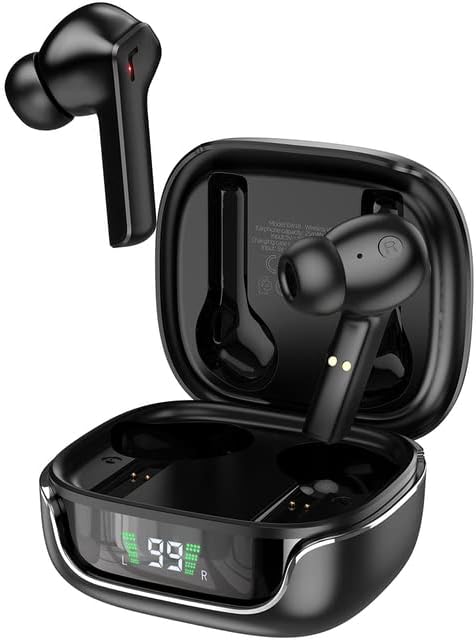
Image: The Hoco Smart Ear Wireless Bluetooth 5.3 Earbuds, showcasing both earbuds and their sleek charging case with a digital LED display.
Package Awọn akoonu
- Hoco Smart Ear Wireless Bluetooth 5.3 Earbuds
- Ngba agbara Case
- Itọsọna olumulo
- Ngba agbara USB
Ṣeto
Pipọpọ Ibẹrẹ
To pair your Hoco Smart Ear Earbuds for the first time, ensure they are fully charged. Open the charging case; the earbuds will automatically enter pairing mode. On your device (e.g., smartphone), navigate to Bluetooth settings and select 'Hoco EW18' or a similar name from the list of available devices. Once connected, the earbuds are ready for use.

Image: A visual representation of the Hoco earbuds establishing a wireless connection using Bluetooth 5.3 technology, highlighting stable and low-power consumption.

Image: The earbuds and charging case next to a smartphone, illustrating the automatic pairing feature and the ability to switch between devices seamlessly.
Atunsopọ
After initial pairing, the earbuds will automatically reconnect to the last paired device when taken out of the charging case and Bluetooth is enabled on the device.
Awọn ilana Iṣiṣẹ
The Hoco Smart Ear Earbuds feature intuitive touch controls for various functions:

Image: A detailed diagram illustrating the touch control functions of the Hoco earbuds, including playback, track navigation, call management, power, and voice assistant activation.
- Ṣiṣẹ/Daduro: Click the touch area once.
- Orin t’okan: Double click the touch area.
- Tẹlẹ Orin: Triple click the touch area.
- Idahun Ipe: Click the touch area once.
- Ipe Idorikodo: Double click the touch area.
- Kọ Ipe: Gigun tẹ agbegbe ifọwọkan fun iṣẹju meji 2.
- Tan-an: Open the cover of the charging case (automatic boot).
- Ji Siri/Oluranlọwọ ohun: Gigun tẹ agbegbe ifọwọkan fun iṣẹju meji 2.
Itoju
Láti rí i dájú pé àwọn agbekọri rẹ pẹ́ títí àti pé wọ́n ń ṣiṣẹ́ dáadáa, tẹ̀lé àwọn ìlànà ìtọ́jú wọ̀nyí:
- Ninu: Mọ awọn afikọti nigbagbogbo ati apoti gbigba agbara pẹlu asọ ti o gbẹ, asọ ti ko ni lint. Maṣe lo awọn kẹmika lile tabi awọn ohun elo abrasive.
- Awọn olubasọrọ gbigba agbara: Periodically clean the charging contacts on both the earbuds and inside the case to ensure a proper connection.
- Ibi ipamọ: Nigbati ko ba si ni lilo, tọju awọn afikọti sinu apoti gbigba agbara wọn lati daabobo wọn lati eruku ati ibajẹ.
- Yago fun Ọrinrin: Keep the earbuds and case away from water and excessive moisture.
- Iwọn otutu: Yago fun ṣiṣafihan ọja naa si awọn iwọn otutu to gaju.
Laasigbotitusita
If you encounter issues with your Hoco Smart Ear Earbuds, refer to the following common solutions:
- Ko si Ohun:
- Rii daju pe awọn agbekọri ti gba agbara.
- Ṣayẹwo iwọn didun ẹrọ ati iwọn didun agbekọri.
- Verify Bluetooth connection. Try disconnecting and reconnecting.
- Agbohun-eti Ko Sopọ:
- Rii daju pe awọn agbekọri wa ni ipo sisọpọ (ọran ṣiṣi).
- Paa ati tan Bluetooth lori ẹrọ rẹ.
- Gbagbe ẹrọ inu awọn eto Bluetooth ti foonu rẹ ki o tun-meji.
- Rii daju pe ko si awọn ẹrọ miiran ti o sopọ si agbekọri.
- Awọn ọran gbigba agbara:
- Ṣayẹwo boya okun gbigba agbara ti sopọ ni aabo.
- Ensure the charging contacts on both earbuds and case are clean.
- Gbiyanju okun gbigba agbara ti o yatọ tabi ohun ti nmu badọgba agbara.
- Asopọmọra Laarin:
- Rí i dájú pé o wà láàárín ìwọ̀n Bluetooth tó gbéṣẹ́.
- Din kikọlu kuro lati awọn ẹrọ alailowaya miiran.
Awọn pato
Detailed technical specifications for the Hoco Smart Ear Wireless Bluetooth 5.3 Earbuds:
| Ẹya ara ẹrọ | Sipesifikesonu |
|---|---|
| Awoṣe | WE-1005004459784466-002 |
| Ẹya Bluetooth | 5.3 |
| Nọmba ti Awakọ | 2 |
| Diamita Awakọ | 13mm |
| Lapapọ ti irẹpọ iparun | 15% |
| Ipalara | 32 ohm |
| Agbekọri Fọọmù ifosiwewe | Ninu Eti |
| Asopọmọra Technology | Bluetooth |
| Imọ-ẹrọ Ibaraẹnisọrọ Alailowaya | Bluetooth |
| Awọn ẹrọ ibaramu | Awọn foonu alagbeka |
| Cable Ẹya | Cable-free (Wireless) |
| Àwọ̀ | Dudu |
| Akọkọ Wa Ọjọ | Oṣu Keje 6, Ọdun 2023 |

Aworan: Ohun exploded view illustrating the 13mm moving coil driver and bio-carbon fiber composite diaphragm, designed for immersive sound quality.

Image: A person wearing the Hoco earbuds, highlighting the soft silicone ear caps and in-ear ergonomic design for comfortable wear and pure sound enjoyment.
Atilẹyin ọja ati Support
Hoco is committed to customer satisfaction and product quality. We offer the following:
- Atilẹyin fun oṣu 12: All products come with a 12-month warranty.
- Iṣẹ onibara: If you experience any issues with defective or incorrect products, please contact us through the Amazon platform. We are dedicated to providing the best solution, including full refunds or product replacements, to ensure 100% customer satisfaction.
- Ẹri Ifijiṣẹ: We ensure product delivery within the specified timeframe on our sales page.
Ask a question about this manual
Ask about setup, troubleshooting, compatibility, parts, safety, or missing instructions. Manuals+ will review the question and use this page’s manual context to help answer it.