
WORKPRO W125241AE
WORKPRO 20V Electric Drain Auger Instruction Manual
Àwòṣe: W125241AE
Àmì ìtajà: WORKPRO
Ọrọ Iṣaaju
The WORKPRO 20V Electric Drain Auger is a professional-grade cordless tool designed for efficient and convenient drain clearing. With its powerful motor and flexible cable, it effectively removes stubborn clogs in various plumbing systems, including sinks, toilets, sewers, and bathtubs. Its lightweight and cordless design enhances portability and practicality for both professional and home use.
Alaye Aabo
Nigbagbogbo ka ati loye gbogbo awọn ikilọ aabo, awọn itọnisọna, awọn apejuwe, ati awọn pato ti a pese pẹlu ohun elo agbara yii. Ikuna lati tẹle gbogbo awọn ilana ti a ṣe akojọ rẹ si isalẹ le ja si mọnamọna, ina, ati/tabi ipalara nla. Fi gbogbo awọn ikilo ati awọn ilana fun itọkasi ojo iwaju.
- Wear appropriate personal protective equipment, including gloves and eye protection, when operating the drain auger.
- Rii daju pe agbegbe iṣẹ jẹ itanna daradara ati laisi awọn idiwọ.
- Do not operate the tool in wet conditions or near flammable liquids or gases.
- Keep hands and loose clothing away from the rotating cable and drum.
- Nigbagbogbo ge asopọ idii batiri ṣaaju ṣiṣe eyikeyi awọn atunṣe, yiyipada awọn ẹya ẹrọ, tabi titoju ohun elo naa.
- Ọja yii ni awọn kemikali ti a mọ si Ipinle California lati fa akàn ati awọn abawọn ibimọ tabi ipalara ibisi miiran.
Ọja irinše

Figure 1: The WORKPRO 20V Electric Drain Auger, including the main unit, 2.0Ah battery, charger, and tool bag.
The WORKPRO 20V Electric Drain Auger set includes:
- 20V Electric Drain Auger Unit
- 2.0Ah Rechargeable Lithium-Ion Battery
- Ṣaja kiakia
- Apo Irinṣẹ
Awọn ẹya aworan atọka

Figure 2: Key components of the WORKPRO 20V Electric Drain Auger.
Familiarize yourself with the following parts of your drain auger:
- Front Operating Handle: Used to control the feed direction of the cable.
- Forward/Reverse Lever: Toggles the rotation direction of the cable (clockwise/counter-clockwise).
- Variable Speed Switch Trigger: Controls the speed of the cable rotation.
- USB: The flexible snake that extends into the drain to clear clogs.
- Imọlẹ iṣẹ LED: Ó tan ìmọ́lẹ̀ sí àwọn ibi iṣẹ́ dúdú.
- Ilu: Houses the coiled cable.
- Rear Water Drain Port: Allows for easy draining and cleaning of the drum.
Ṣeto
Ngba agbara si Batiri naa

Figure 3: Charging the 20V 2.0Ah Lithium-Ion battery.
Before first use, fully charge the 2.0Ah lithium-ion battery. The quick charger can fully recharge the battery in approximately 1 hour. Ensure the battery is securely inserted into the charger and the charger is connected to a power outlet.
So Batiri naa
Once charged, slide the battery pack into the base of the drain auger until it clicks securely into place.
Awọn ilana Iṣiṣẹ
The WORKPRO Electric Drain Auger is designed for pipes ranging from 3/4 inches up to 2 inches in width, with a 25-foot (7.6m) cable. The olive-shaped head is ideal for navigating L, S, and U bends.
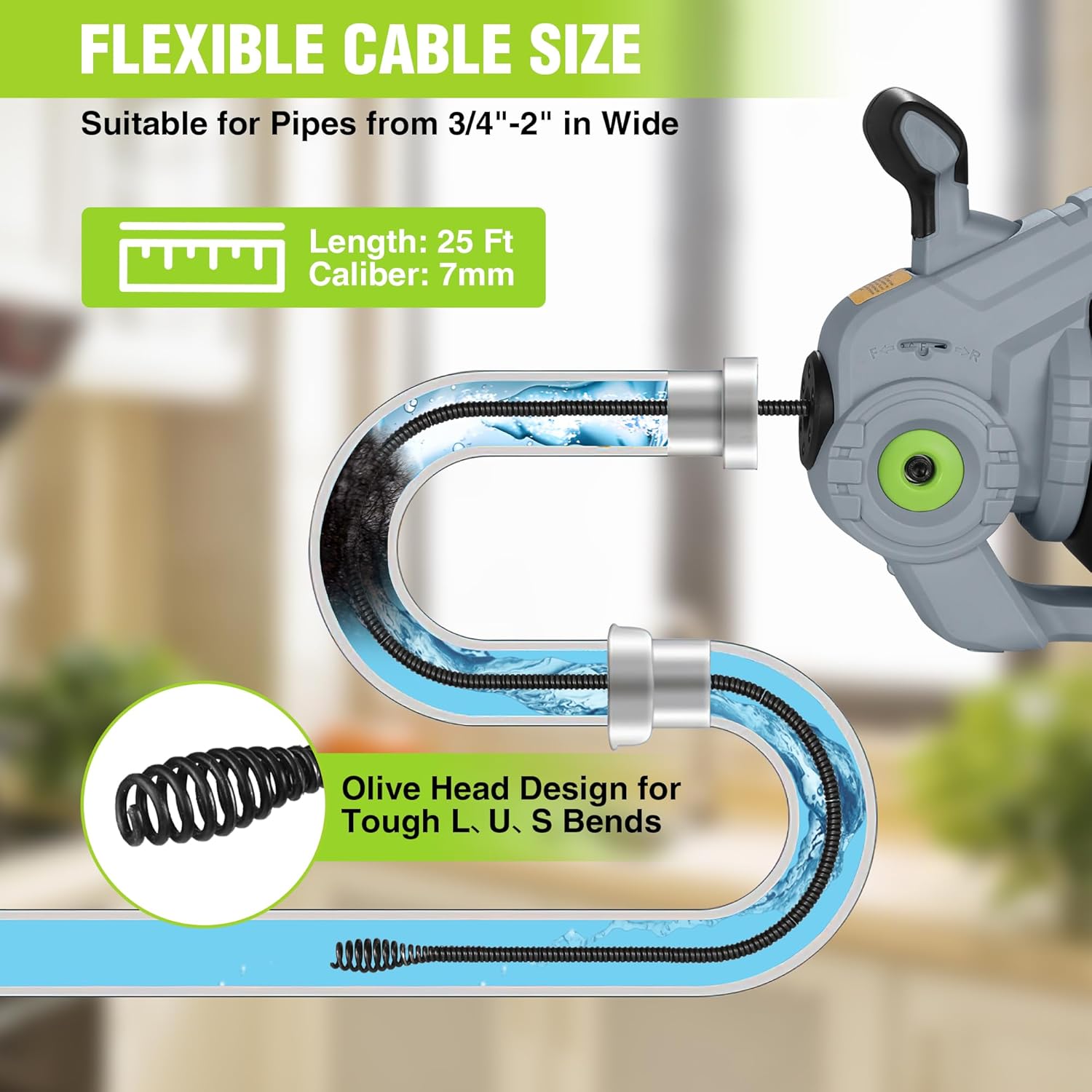
Figure 4: The flexible cable and olive-shaped head are designed for various pipe configurations.
Awọn Igbesẹ Isẹ ipilẹ:
- Ṣetan Agbegbe: Clear the drain opening and ensure you have a bucket or container ready to catch any debris or water.
- Fi okun waya sii: Manually feed the cable into the drain opening. For best results, ensure at least 4 inches of cable are extended from the drum before starting the motor.
- Yan Itọsọna: Use the Forward/Reverse Lever to select the desired rotation direction (Forward for extending the cable, Reverse for retracting).
- Engage and Feed:
- To feed the cable forward, press the Front Operating Handle forward (towards the cable exit).
- To retract the cable, pull the Front Operating Handle backward (towards the handle).
- Iyara Iṣakoso: Press the Variable Speed Switch Trigger to start the motor and control the cable's rotation speed. Adjust the speed as needed for different types of clogs.
- Pa ìdènà náà mọ́: Slowly feed the cable into the drain, allowing the rotating head to break up and clear the obstruction. If the cable encounters resistance, gently work it back and forth.
- Yọ okun waya naa kuro: Once the clog is cleared, switch the Forward/Reverse Lever to Reverse and pull the Front Operating Handle backward to retract the cable.
- Nu kuro: After use, clean the cable and the drum thoroughly.

Figure 5: Visual guide to operating the drain auger.

Figure 6: The built-in LED light provides illumination in dark areas.
Itoju
Proper maintenance ensures the longevity and optimal performance of your WORKPRO Electric Drain Auger.
- Ninu ilu naa: After each use, especially when dealing with dirty drains, utilize the rear water drain port to clean and drain the drum. This helps prevent rust and buildup inside the unit.
- Itọju USB: Clean any debris from the cable after each use. If the cable becomes kinked or damaged, it may need to be replaced to ensure safe and effective operation.
- Ipamọ Batiri: Store the battery in a cool, dry place away from direct sunlight and extreme temperatures. For long-term storage, it is recommended to charge the battery to about 50% capacity.
- Isọsọ gbogboogbo: Mu ese ita ti ọpa pẹlu ipolowoamp asọ. Maṣe lo awọn kẹmika ti o lewu tabi awọn afọmọ abrasive.

Figure 7: The rear water drain port for easy cleaning.
Laasigbotitusita
| Isoro | Owun to le Fa | Ojutu |
|---|---|---|
| Irinṣẹ ko ni tan-an. | Batiri ko gba agbara tabi ko fi sii daradara. | Rii daju pe batiri ti gba agbara ni kikun ati ti tẹ ni aabo si aaye. |
| Cable does not extend or retract. | Forward/Reverse Lever not engaged or Front Operating Handle not pushed/pulled. | Ensure the Forward/Reverse Lever is set to 'F' (Forward) or 'R' (Reverse) and the Front Operating Handle is correctly manipulated. |
| Cable gets stuck or tangled in the drum. | Improper operation, forcing the cable, or cable damage. | Do not force the cable. Ensure the Front Operating Handle is used correctly to feed/retract the cable. If tangled, carefully open the drum (refer to advanced maintenance if applicable) and untangle. If cable is damaged, replace it. |
| Ineffective clog removal. | Wrong cable size for pipe, severe clog, or incorrect technique. | Verify pipe diameter is within 3/4"-2" range. Try adjusting speed and gently working the cable. For very stubborn clogs, multiple passes or professional assistance may be required. |
Awọn pato
- Nọmba awoṣe: W125241AE
- Orisun Agbara: 20V Lithium Ion Battery (included)
- Gigun USB: 25 Ft (7.6m)
- Applicable Pipe Diameter: 3/4" - 2"
- RPM ti o pọju: Titi di 560 rpm
- Ìwọ̀n Nkan: 11.68 iwon
- Awọn iwọn ọja: 16.3 x 8.3 x 10.2 inches
- Àwọ̀: Grẹy
- Olupese: Hang Zhou Great Star Industrial Co., Ltd.
Onibara Service & amupu;
If you have any questions or require assistance with your WORKPRO 20V Electric Drain Auger, please contact WORKPRO customer service. We are dedicated to answering your questions and welcome any comments or suggestions you may have.
Please refer to your product packaging or the official WORKPRO webojula fun awọn julọ lọwọlọwọ alaye olubasọrọ.
Ask a question about this manual
Ask about setup, troubleshooting, compatibility, parts, safety, or missing instructions. Manuals+ will review the question and use this page’s manual context to help answer it.