
Ọrọ Iṣaaju
This document serves as an instruction manual for the Generic Easytry20679 infrared replacement remote control. This remote is designed for use with Costzon FWAM-01989 and Sykik SP2091BT Bluetooth Portable PA Systems. Please note that as a replacement unit, its functionality may vary slightly from the original remote control.
Ọja Pariview
The Easytry20679 is an infrared (IR) remote control featuring a standard button layout for audio system operation. It allows for convenient control of compatible PA systems from a distance.
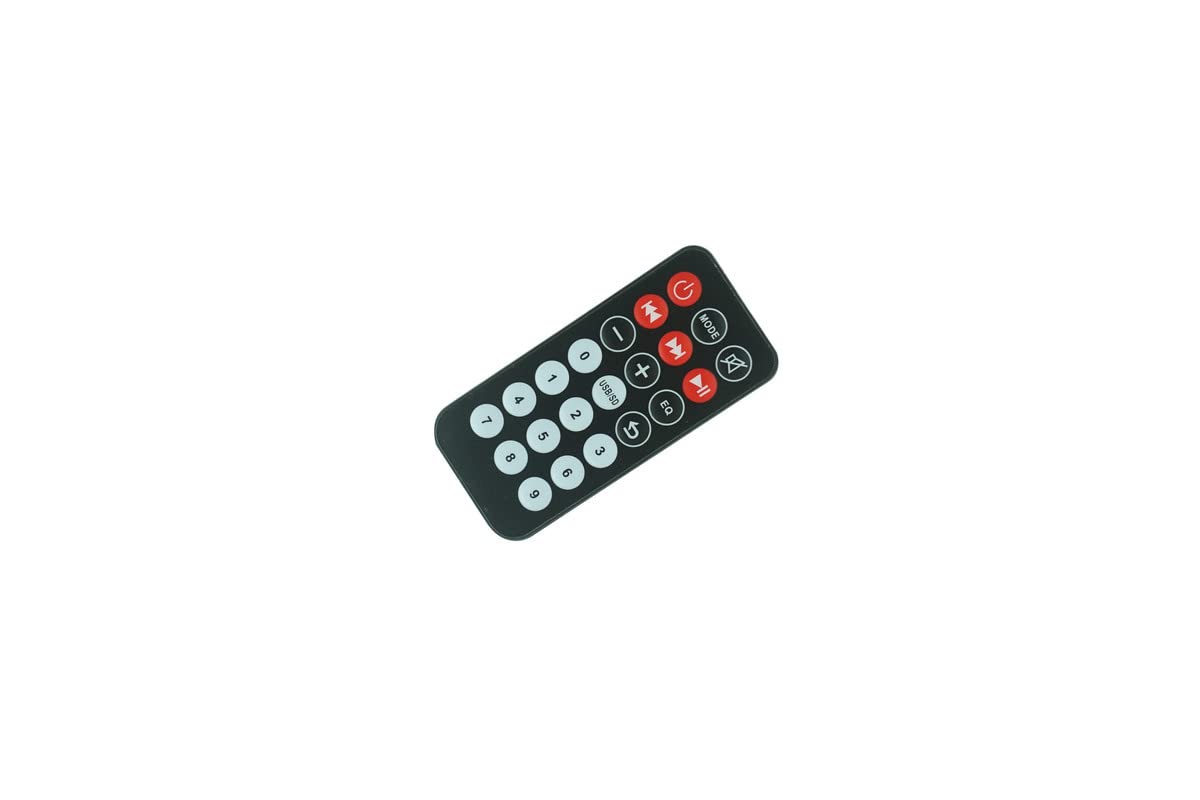
Nọmba 1: Iwaju view of the remote control, displaying all operational buttons.

Nọmba 2: Pada view ti isakoṣo latọna jijin, fifi aaye batiri han.
Ṣeto
Fifi sori batiri
The remote control requires two (2) CR2 batteries for operation. Batteries are not included with the remote control and must be purchased separately.
- Wa ibi tí a ti lè rí i pé ó wà ní ẹ̀yìn ibi tí a ti ń lo agbára ìdarí (wo Àwòrán 2).
- Gbe ideri apo batiri naa si isalẹ tabi si itọsọna ti ọfà fihan lati ṣii rẹ.
- Insert two CR2 batteries, ensuring the positive (+) and negative (-) terminals align correctly with the markings inside the compartment.
- Pa ideri batiri naa ni aabo.
After installing the batteries, the remote control is ready for use.
Awọn ilana Iṣiṣẹ
This remote control operates via infrared signals. Ensure there is a clear line of sight between the remote control and the IR receiver on your PA system for proper functionality.
Awọn iṣẹ ipilẹ
- Bọtini agbara (⏻): Press to turn the PA system on or off.
- Bọtini MODE: Cycles through input modes (e.g., Bluetooth, USB, SD, AUX, FM).
- Bọtini Parẹ🔇): Pa tabi mu ohun ti o jade kuro.
- Iṣakoso Iwọn didun (- / +): Ṣe atunṣe ipele iwọn didun ohun.
- Iṣakoso Itọpa (⏮ / ⏭): Rekọja si išaaju tabi atẹle orin/ibudo.
- Bọtini ṣiṣẹ/Duro duro (⏯): Ṣiṣẹ tabi daduro ṣiṣiṣẹsẹhin media.
- Bọtini EQ: Yiyipo nipasẹ tito oluṣeto.
- USB/SD Button: Selects USB or SD card input directly.
- Bọtini Nọmba (0-9): Used for direct track selection or frequency input in FM mode.
Akiyesi pataki: As a replacement remote, some functions or buttons may not operate identically to your original remote or may not be supported by your specific PA system model. Full compatibility with all original functions cannot be guaranteed.
Itoju
Batiri Rirọpo
Replace batteries when the remote control's range decreases or it stops responding. Always replace both batteries simultaneously with new CR2 batteries. Do not mix old and new batteries or different battery types.
Ninu
To clean the remote control, use a soft, dry cloth. For stubborn dirt, lightly dampen the cloth with water. Do not use abrasive cleaners, solvents, or chemical sprays, as these can damage the remote's surface or internal components.
Ibi ipamọ
Tọju isakoṣo latọna jijin ni itura, aye gbigbẹ kuro lati orun taara ati awọn iwọn otutu to gaju. Ti a ko ba lo latọna jijin naa fun akoko ti o gbooro sii, o ni imọran lati yọ awọn batiri kuro lati yago fun jijo.
Laasigbotitusita
- Latọna jijin ko dahun:
- Ṣayẹwo boya awọn batiri ti wa ni fi sii bi o ti tọ pẹlu polarity to tọ.
- Replace the batteries with fresh CR2 batteries.
- Ensure there is a clear line of sight between the remote's IR emitter and the PA system's IR receiver. Obstructions can block the signal.
- Rí i dájú pé o wà láàárín ibi tí agbára ìṣàkóṣo latọna jijin náà ti gbéṣẹ́.
- Àwọn iṣẹ́ kan kò ṣiṣẹ́:
- This is a replacement remote. It may not support all functions of your original remote or your specific PA system model. Refer to your PA system's original manual for its remote control capabilities.
Awọn pato
| Brand | Gbogboogbo |
| Nọmba awoṣe | Easytry20679 |
| Awọn ẹrọ ibaramu | Costzon FWAM-01989, Sykik SP2091BT |
| Asopọmọra Technology | Infurarẹẹdi (IR) |
| Adarí Iru | Iṣakoso bọtini |
| Batiri Iru | 2 x CR2 (kò sí nínú rẹ̀) |
| ASIN | B0CBQ2GGXV |
Alaye atilẹyin ọja
This product comes with a 90-day warranty from the date of purchase. This warranty covers manufacturing defects. Please retain your proof of purchase for any warranty claims.
Atilẹyin
For further assistance regarding the functionality of this replacement remote control, please refer to the instruction manual provided with your Costzon FWAM-01989 or Sykik SP2091BT Bluetooth Portable PA System. As this is a generic replacement, specific technical support for this remote may be limited.