
Ọrọ Iṣaaju
Thank you for choosing the Lecoo MCS30 Wireless Portable Speaker. This device is designed to provide high-quality audio and voice amplification with versatile connectivity options. Please read this manual carefully before using the product to ensure proper operation and to maximize its lifespan.
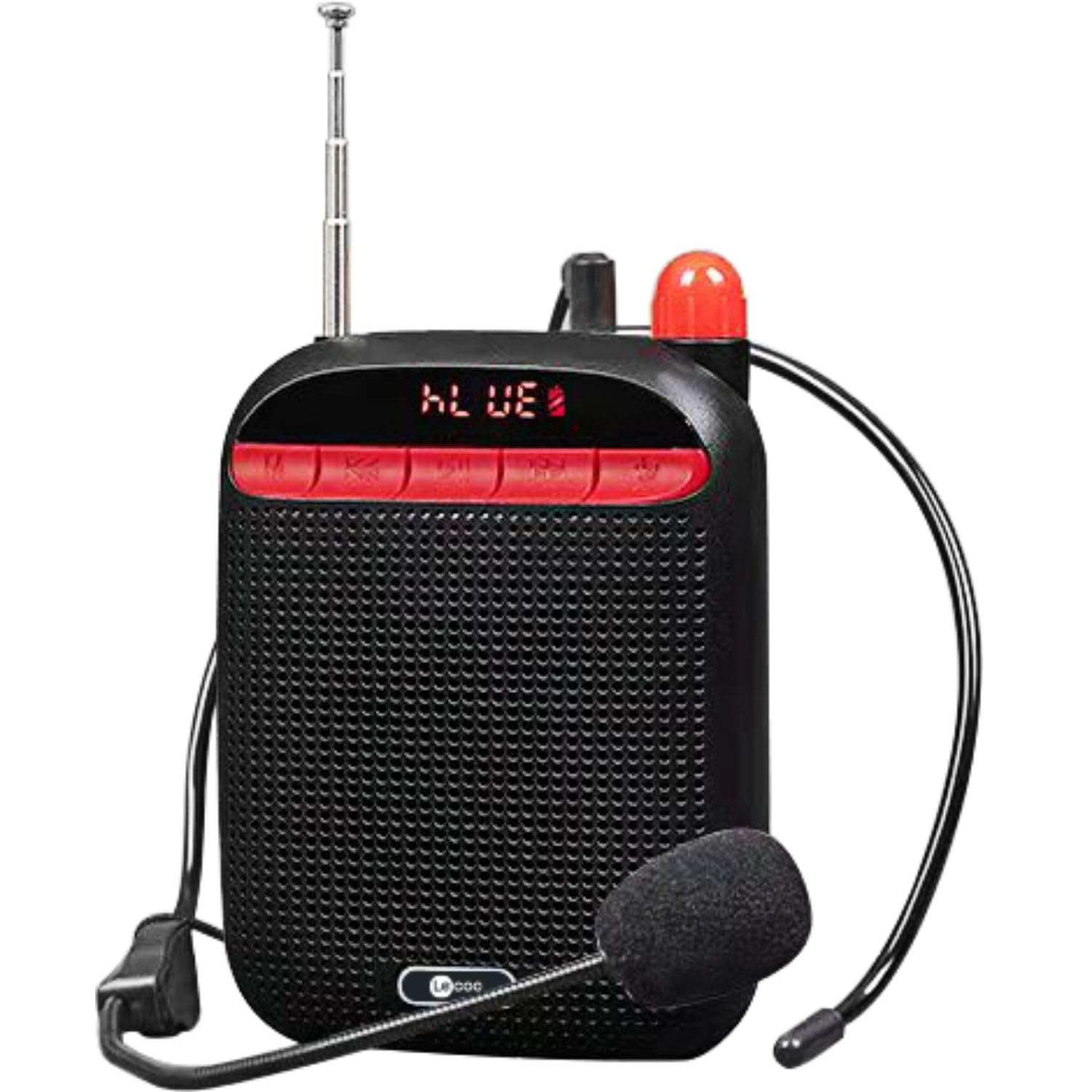
Image: Two Lecoo MCS30 portable speakers, one white and one black, shown with their respective wired headset microphones. Both speakers feature an extendable antenna and front-facing controls.
Ọja Pariview
The Lecoo MCS30 is a compact and powerful portable speaker featuring multiple input options and dual microphone support for amplification and recording. Familiarize yourself with the device's components and controls.
Awọn iṣakoso nronu iwaju ati Ifihan

Aworan: Iwaju isunmọ view of the black Lecoo MCS30 speaker, highlighting the digital display and the red control buttons for mode selection, track navigation, and microphone functions.
- Iboju ifihan: Ó ń fi ipò ìsinsìnyí hàn, ìwífún nípa ipasẹ̀ orin, àti ipò bátírì.
- Bọtini Ipo (M): Switches between Bluetooth, USB, AUX, and SD card modes.
- Bọ́tìnì Ìsàlẹ̀/Ìtẹ̀síwájú: Tẹ kukuru fun orin iṣaaju, tẹ gun lati dinku iwọn didun.
- Bọ́tìnnì Ṣíṣe/Sánu duro: Ó máa ń gbé ohùn sókè tàbí ó máa ń dá dúró.
- Bọ́tìnì Tókàn/Ìgbéga Ìwọ̀n: Tẹ kukuru fun orin atẹle, tẹ gun lati mu iwọn didun pọ si.
- Bọtini gbohungbohun: Activates/deactivates microphone functions.
Àwọn ìsopọ̀ ẹ̀gbẹ́ àti ẹ̀yìn

Aworan: Oke-isalẹ view of the Lecoo MCS30 speaker, revealing the USB port, TF (SD card) slot, AUX input, and microphone input ports.
- Iṣawọle MIC: For connecting external microphones (headset or lapel).
- Ibudo USB: Fun šišẹsẹhin okun filasi USB.
- Iho Kaadi TF: Fun ṣiṣiṣẹsẹhin kaadi SD.
- Iṣawọle AUX: Fun sisopọ awọn ẹrọ ohun afetigbọ ita nipasẹ okun 3.5mm kan.
- Ibudo Ngba agbara DC 5V: Fun gbigba agbara ẹrọ.
- Agbara Yi pada: On/Off toggle.
- Eriali: Extendable antenna for improved signal reception (if applicable for radio functions).
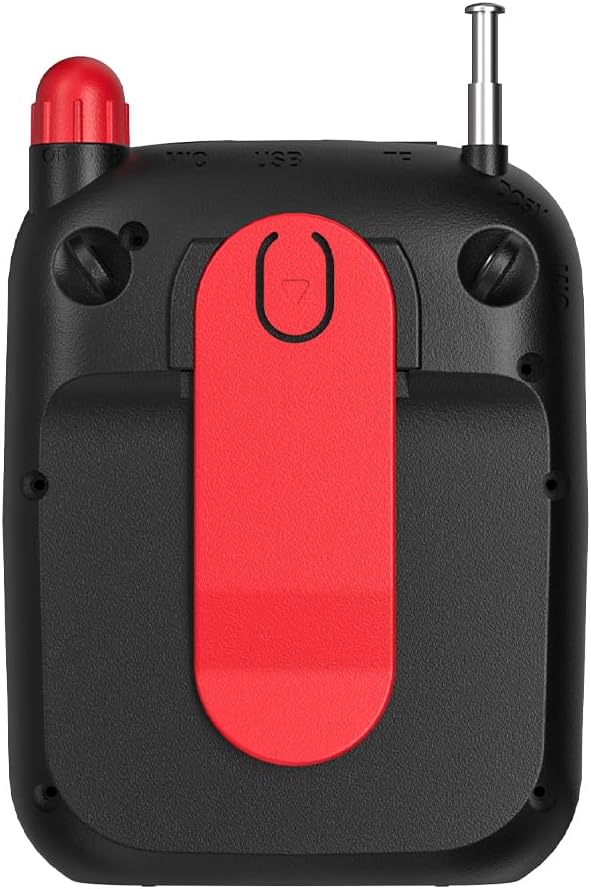
Aworan: Ẹyin view of the Lecoo MCS30 speaker, clearly showing the integrated red belt clip for portable use.
- Agekuru igbanu: For attaching the speaker to clothing or a belt for hands-free use.
Ṣeto
1. Gbigba agbara Agbọrọsọ
- Connect the charging cable to the DC 5V port on the speaker.
- So opin okun miiran pọ si ohun ti nmu badọgba agbara USB (kii ṣe pẹlu) tabi ibudo USB ti kọnputa kan.
- The display will indicate charging status. A full charge typically takes 3-4 hours.
- Ge asopọ ṣaja naa nigbati o ba ti gba agbara patapata lati pa agbara batiri mọ.
2. Agbara lori / Paa
- To power on, slide the power switch to the 'ON' position. The display will light up.
- Lati pa agbara, rọra yipada agbara si ipo 'PA'.
3. Ìsopọ̀ Bluetooth àkọ́kọ́
- Ensure the speaker is powered on and in Bluetooth mode (the display will show 'BLUE' or a Bluetooth icon). If not, press the 'M' (Mode) button to switch.
- Lori ẹrọ alagbeka rẹ (foonuiyara, tabulẹti, kọǹpútà alágbèéká), mu Bluetooth ṣiṣẹ ki o wa awọn ẹrọ to wa.
- Select 'Lecoo MCS30' from the list of found devices.
- Once paired, the speaker will emit a confirmation sound, and the display will indicate a successful connection.
Awọn ilana Iṣiṣẹ
1. Bluetooth Sisisẹsẹhin
- After successful pairing, open your music player on your connected device and start playback.
- Use the speaker's 'Previous/Volume Down' and 'Next/Volume Up' buttons for track navigation (short press) and volume adjustment (long press).
- Use the 'Play/Pause' button to control playback.
2. USB / SD Kaadi Sisisẹsẹhin
- Insert a USB flash drive into the USB port or an SD card into the TF card slot.
- The speaker will automatically switch to USB or SD card mode and begin playing MP3 files. If not, press the 'M' (Mode) button to select the correct mode.
- Use the speaker's control buttons for track navigation and volume adjustment.
3. AUX Input Sisisẹsẹhin
- So opin kan ti okun ohun afetigbọ 3.5mm (kii ṣe pẹlu) si ibudo titẹ sii AUX lori agbọrọsọ.
- So opin miiran pọ si ori agbekọri ti ẹrọ ohun rẹ.
- Press the 'M' (Mode) button until the speaker enters AUX mode.
- Start playback from your audio device. Volume can be controlled via both the speaker and the connected device.
4. Microphone Usage and Voice Recording
- Connect the headset microphone or a lapel microphone to the MIC input port.
- Press the 'Microphone' button to activate the amplification function. Your voice will be amplified nipasẹ agbọrọsọ.
- To record your voice, ensure a USB flash drive or SD card is inserted. Press and hold the 'Microphone' button (or follow specific instructions if a dedicated record button exists, otherwise assume long press). The speaker will indicate recording has started.
- Press the 'Microphone' button again to stop recording. Recorded files are saved to the USB drive or SD card.
5. Iṣakoso iwọn didun
- Long press the 'Next/Volume Up' button to increase the volume.
- Long press the 'Previous/Volume Down' button to decrease the volume.
Itoju
Ninu
- Pa dada agbọrọsọ nu pẹlu asọ ti o gbẹ.
- Má ṣe lo àwọn ohun ìfọṣọ, ọtí líle, tàbí àwọn ohun èlò ìfọ́mọ́ra kẹ́míkà, nítorí pé wọ́n lè ba ìparí rẹ̀ jẹ́.
- Avoid getting moisture into any ports or openings.
Ibi ipamọ
- Tọju agbohunsoke ni itura, aye gbigbẹ kuro lati orun taara ati awọn iwọn otutu to gaju.
- If storing for an extended period, charge the battery periodically (e.g., every 3 months) to maintain battery health.
Laasigbotitusita
- Ko si Agbara:
Ensure the speaker is fully charged. Check the power switch is in the 'ON' position. - Ko si Ohun:
Check the volume level on both the speaker and the connected device. Ensure the correct input mode (Bluetooth, USB, AUX, SD) is selected. Verify cables are securely connected for AUX input. - Bluetooth Ko Sopọ:
Ensure the speaker is in Bluetooth pairing mode. Turn off and on Bluetooth on your device. Move the speaker closer to your device. Clear previous Bluetooth connections on your device and try pairing again. - Gbohungbohun Ko Ṣiṣẹ:
Ensure the microphone is securely plugged into the MIC input. Press the 'Microphone' button to activate it. Check the microphone's own power source if it has one. - Gbigbasilẹ Ko Ṣiṣẹ:
Ensure a compatible USB flash drive or SD card is inserted and has sufficient free space. Check if the recording function is properly activated (refer to 'Microphone Usage and Voice Recording' section).
Awọn pato
| Ẹya ara ẹrọ | Apejuwe |
|---|---|
| Brand | Lekoo |
| Awoṣe | MCS30 |
| Asopọmọra Technology | Bluetooth 5.3, USB, AUX, SD Card |
| Agbara Ijade | 5W |
| Iwọn Igbohunsafẹfẹ | 100Hz-20KHz |
| Awọn ẹrọ ibaramu | Smartphone, Laptop, Karaoke Machine, MP3 Player, Tablet |
| Atilẹyin Gbohungbohun | Dual Microphone (Headset/Lapel) with Amplification and Recording |
| Audio kika Support | MP3 |
| Àwọ̀ | Dudu |
Atilẹyin ọja ati Support
The Lecoo MCS30 Portable Speaker comes with a Lecoo Turkey Warranty. For warranty claims or technical support, please refer to the warranty card included with your product or visit the official Lecoo webojula.
O le wa alaye diẹ sii ati atilẹyin nipasẹ lilo si Lecoo Store on Amazon.