
Ọrọ Iṣaaju
This manual provides comprehensive instructions for the HOCO Y1 Pro Smart Sports Watch. Please read this manual carefully before using the device to ensure proper operation and to maximize its features. Keep this manual for future reference.
Package Awọn akoonu
Nigbati o ba ṣii package, rii daju pe gbogbo awọn nkan wa:
- HOCO Y1 Pro Smart Sports Watch
- Ngba agbara USB
- Itọsọna olumulo
Ọja Pariview
The HOCO Y1 Pro Smart Sports Watch features a 1.91-inch TFT display and a durable design suitable for sports and daily wear.

Nọmba 1: Iwaju view of the HOCO Y1 Pro Smart Watch, showing the main watch face with time, date, battery level, and activity data.

Nọmba 2: Apa view illustrating the digital crown and the side button for navigation and control.
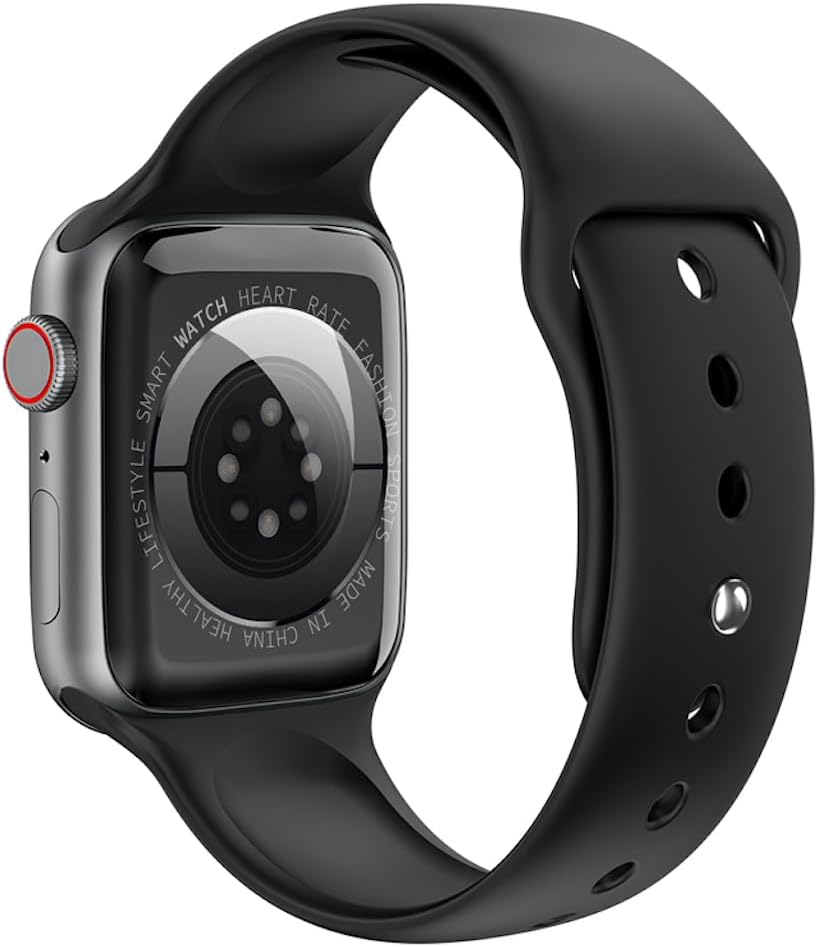
Nọmba 3: Ẹyìn view of the watch, highlighting the optical heart rate sensors and charging contacts.
Awọn eroja:
- Ifihan: 1.91-inch TFT color touchscreen.
- Crown oni-nọmba: Ti a lo fun lilọ kiri awọn akojọ aṣayan ati ṣatunṣe awọn eto.
- Bọtini ẹgbẹ: Typically used for power on/off, returning to the home screen, or accessing specific functions.
- Sensọ Oṣuwọn Ọkan: Located on the back for continuous heart rate monitoring.
- Awọn olubasọrọ gbigba agbara: Magnetic contacts on the back for connecting the charging cable.
Ṣeto
1. Ngba agbara ẹrọ
Before initial use, fully charge your HOCO Y1 Pro Smart Watch. Connect the magnetic charging cable to the charging contacts on the back of the watch and plug the USB end into a power adapter (not included) or a computer's USB port.
- Gbigba agbara ni kikun maa n gba to wakati mẹta.
- Agbara batiri jẹ 280mAh.
- Expected battery life: 3 days with dual Bluetooth enabled, 5-7 days with calls turned off.
2. Agbara Tan / Paa
- Agbara Tan: Press and hold the side button until the HOCO logo appears.
- Agbara Pa: Tẹ mọlẹ bọtini ẹgbẹ, lẹhinna yan "Agbara Paa" loju iboju.
3. Fifi sori App ati Sisopọ
To unlock the full functionality of your HOCO Y1 Pro, download and install the companion application on your smartphone. Wa fun the official HOCO smartwatch app in your device's app store (e.g., Google Play Store or Apple App Store).
- Ensure your watch is powered on and fully charged.
- Mu Bluetooth ṣiṣẹ lori foonuiyara rẹ.
- Open the HOCO companion app and follow the on-screen instructions to create an account or log in.
- Within the app, select "Add Device" or "Pair New Device" and choose "HOCO Y1 Pro" from the list of available devices.
- Jẹrisi ibeere sisopọ lori foonu mejeeji ati aago rẹ.
- The watch supports dual Bluetooth for calls and data synchronization.
Awọn ilana Iṣiṣẹ
Ipilẹ Lilọ kiri
- Ra soke/isalẹ: Yi lọ nipasẹ awọn akojọ aṣayan tabi awọn iwifunni.
- Ra osi/Ọtun: Wọle si awọn iṣẹ iyara tabi awọn oju aago oriṣiriṣi.
- Fọwọ ba: Yan ohun kan tabi jẹrisi iṣẹ kan.
- Crown oni-nọmba: Rotate to scroll, press to return to the home screen or open the app list.
- Bọtini ẹgbẹ: Short press to return to the previous screen or home screen. Long press for power options.
Iṣẹ Ipe
With dual Bluetooth enabled and paired to your smartphone, the HOCO Y1 Pro supports making and receiving calls directly from your wrist.
- Ṣiṣe awọn ipe: Access the dialer or contacts list on the watch to initiate a call.
- Gbigba Awọn ipe: When a call comes in, you can answer or reject it from the watch screen.
Abojuto Ilera
- Erin Oṣuwọn Ọkàn: Aago naa n ṣe abojuto oṣuwọn ọkan rẹ nigbagbogbo. View data akoko gidi lori aago tabi awọn aṣa alaye ninu app naa.
- Abojuto oorun: Wear the watch to bed to track your sleep patterns, including deep sleep, light sleep, and wake times.
- Exercise Pedometer: Ṣe atẹle awọn igbesẹ ojoojumọ rẹ, ijinna, ati awọn kalori sisun.
Sports Modes and GPS Track
The watch offers various sports modes to track your workouts. When connected to your phone's GPS, it can record your outdoor activity routes.
- Select a sports mode (e.g., running, walking) from the watch menu.
- Ensure GPS tracking is enabled in the app for outdoor activities.
Awọn iwifunni
Receive notifications for calls, messages, and app alerts directly on your watch. Configure notification settings within the companion app.
Awọn iṣẹ afikun
- Remote Music: Ṣakoso ṣiṣiṣẹ orin lori foonu alagbeka rẹ lati aago.
- Real-time Weather: View current weather conditions and forecasts (requires app connection).
- Iwadi Foonu Alagbeka: Use the watch to locate your paired smartphone by making it ring.
Itoju
Ninu
Regularly clean your watch to ensure optimal performance and hygiene.
- Nu iboju naa ki o si fi okùn naa nu pẹlu asọ, damp asọ.
- Yago fun lilo awọn kẹmika lile tabi awọn ohun elo abrasive.
- Rii daju pe awọn olubasọrọ gbigba agbara jẹ mimọ ati ki o gbẹ ṣaaju gbigba agbara.
Atako omi (IP68)
The HOCO Y1 Pro is IP68 waterproof, meaning it is resistant to dust and can withstand immersion in water up to 1.5 meters for up to 30 minutes. While it is suitable for daily use and light water activities, it is not recommended for diving, hot showers, or prolonged submersion.
- Ma ṣe ṣiṣẹ awọn bọtini labẹ omi.
- Gbẹ aago naa daradara lẹhin ti o ba fi omi han.
Laasigbotitusita
| Oro | Owun to le Solusan |
|---|---|
| Aago naa ko tan ina. | Rii daju pe aago naa ti gba agbara ni kikun. Sopọ mọ ṣaja fun o kere 30 iṣẹju. |
| Ko le ṣe alawẹ-meji pẹlu foonuiyara. |
|
| Inaccurate heart rate or activity data. |
|
| Awọn iwifunni ko gba. |
|
| Iboju ko dahun. | Try restarting the watch by long-pressing the side button. If unresponsive, allow the battery to drain completely and then recharge. |
Awọn pato
| Ẹya ara ẹrọ | Ẹ̀kúnrẹ́rẹ́ |
|---|---|
| Orukọ awoṣe | Y1 pro |
| Iboju akọkọ | TFT 1.91 inches; Resolution: 240*285 pixel |
| Sipiyu | Realtek 8762CW |
| Iranti | RAM 192KB + ROM 64MB |
| Asopọmọra | Dual Bluetooth (supports calls) |
| Omi Resistance | IP68 mabomire |
| Agbara Batiri | 280mAh litiumu Iwon |
| Igbesi aye batiri | 3 days (dual Bluetooth on), 5-7 days (calls off) |
| Awọn iṣẹ pataki | GPS track support, Information push, Heart rate detection, Sleep monitoring, Exercise pedometer, Remote music, Real-time weather, Mobile phone search |
| Awọn ede atilẹyin | 22 language packs including Chinese, English, Russian, Arabic, Vietnamese, Danish, Thai, Polish, Persian, Spanish, Malay, Greek, French, Italian, German, Portuguese, Turkish, Latin, Romanian, Hebrew, Burmese, Ukrainian. |
| Package Mefa | 21.9 x 6.9 x 3.2 cm |
| Iwọn Nkan | 176 g |
Alaye Aabo
- Ma ṣe gbiyanju lati tunto tabi yi ẹrọ naa pada.
- Jeki ẹrọ naa kuro ni awọn iwọn otutu to gaju, oorun taara, ati ina.
- Yago fun ṣiṣafihan ẹrọ naa si awọn aaye oofa to lagbara.
- Lo okun gbigba agbara ti a pese nikan.
- Consult a medical professional before starting any new exercise regimen, especially if you have pre-existing health conditions. The heart rate data is for reference only and should not be used for medical diagnosis.
- Sọ ẹrọ naa ati batiri rẹ ni ifojusọna ni ibamu si awọn ilana agbegbe.
Atilẹyin ọja ati Support
For warranty information and technical support, please refer to the documentation included with your purchase or visit the official HOCO webojula. Jeki ẹri rira rẹ fun awọn iṣeduro atilẹyin ọja.
Olupese: Hoco
ASIN: B0CBVTSX1V
UPC/EAN: 6931474766106