
Ọrọ Iṣaaju
Thank you for choosing the Hoco Y7 Smart Sport Watch. This manual provides essential information for setting up, operating, and maintaining your device. Please read it thoroughly before use to ensure optimal performance and longevity of your watch.
Package Awọn akoonu
Daju pe gbogbo awọn nkan wa ninu apo rẹ:
- Hoco Y7 Smart Sport Watch
- Ngba agbara USB
- Afowoyi Olumulo (iwe-ipamọ yii)

Image: The Hoco Y7 Smart Sport Watch packaging, showing the watch and its box.
Ọja Pariview
The Hoco Y7 Smart Sport Watch features a 1.32-inch TFT OGS capacitive touch screen and a durable design. Key components include:
- Ifihan: 1.32-inch TFT OGS capacitive touch screen with 360x360 resolution.
- Awọn bọtini ẹgbẹ: For power, menu navigation, and quick access functions.
- Awọn sensọ: Located on the back for heart rate detection and other health monitoring.
- Awọn olubasọrọ gbigba agbara: Awọn olubasọrọ oofa lori ẹhin fun gbigba agbara.
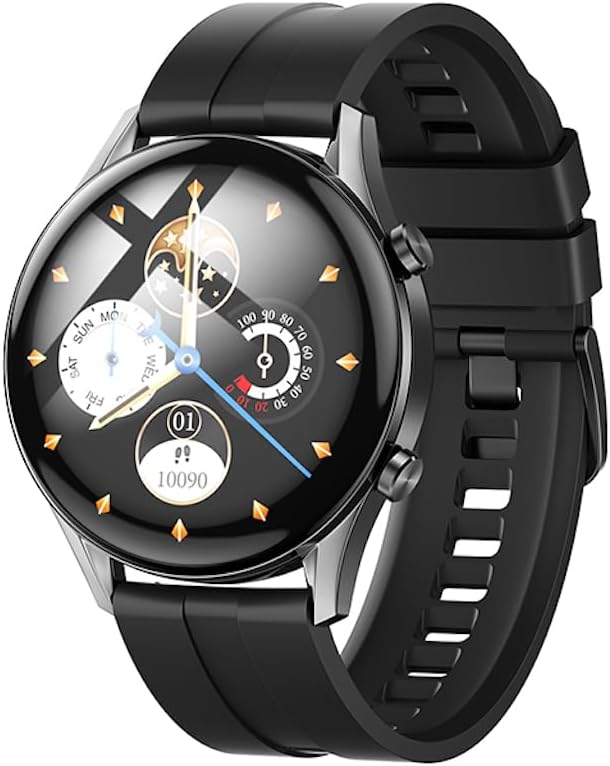
Aworan: Iwaju view of the Hoco Y7 Smart Sport Watch, displaying a detailed watch face with time, date, and activity tracking.
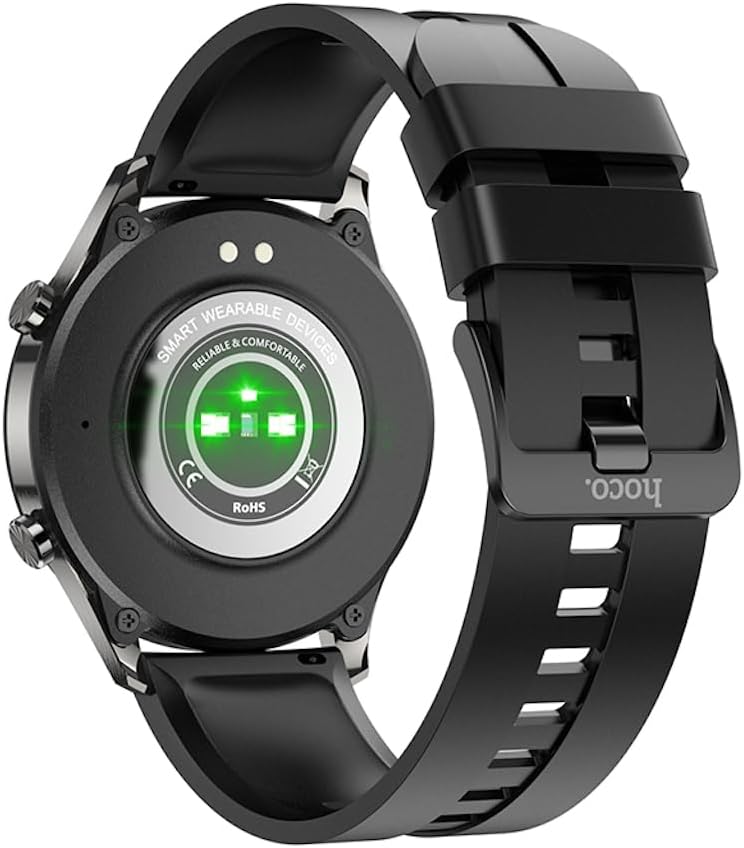
Aworan: Pada view of the Hoco Y7 Smart Sport Watch, showing the optical heart rate sensors and charging contacts.
Ṣeto
1. Ngba agbara ẹrọ
Before first use, fully charge your Hoco Y7 Smart Sport Watch. Connect the magnetic charging cable to the charging contacts on the back of the watch and plug the USB end into a standard USB power adapter (not included) or a computer's USB port.
- Gbigba agbara ni kikun maa n gba to wakati mẹta.
- Ifihan aago naa yoo fihan ipo gbigba agbara.
2. Agbara lori / Paa
- Agbara Tan: Press and hold the side button until the Hoco logo appears.
- Agbara Pa: From the watch face, swipe down to access quick settings, or navigate to the settings menu. Select the power off option and confirm. Alternatively, press and hold the side button and select "Power Off" when prompted.
3. Sopọ pẹlu Foonuiyara Foonuiyara Rẹ
To unlock the full features of your Hoco Y7 Smart Sport Watch, pair it with your smartphone via Bluetooth 5.0. The watch does not support direct calls, but connects for data synchronization and notifications.
- Ṣe igbasilẹ App Companion: Wa fun the official Hoco Smart Watch app on your smartphone's app store (e.g., Google Play Store for Android or Apple App Store for iOS). Install the app.
- Mu Bluetooth ṣiṣẹ: Rii daju pe Bluetooth ti ṣiṣẹ lori foonuiyara rẹ.
- Ṣii App naa: Launch the Hoco Smart Watch app and follow the on-screen instructions to create an account or log in.
- Fi ẹrọ kun: In the app, navigate to the "Add Device" or "Pair Device" section. The app will search for nearby Hoco Y7 watches.
- Yan Agogo Rẹ: Once your watch appears in the app's list, select it to initiate the pairing process.
- Jẹrisi Isopọpọ: A pairing request may appear on both your watch and smartphone. Confirm the pairing on both devices.
Once paired, the watch will synchronize data with the app, and you can customize settings, receive notifications, and view alaye ilera ati data aṣayan iṣẹ-ṣiṣe.

Image: The Hoco Y7 Smart Sport Watch positioned next to a smartphone and laptop, illustrating its connectivity with other devices.
Awọn ilana Iṣiṣẹ
1. Ipilẹ Lilọ kiri
- Afi ika te: Tap to select, swipe left/right/up/down to navigate through menus and screens.
- Bọtini ẹgbẹ: Press to return to the watch face, or to access the main menu from the watch face. A long press may activate power options.
2. Yíyípadà Àwọn Ojú Aago
From the main watch face, press and hold the screen. Swipe left or right to browse available watch faces. Tap to select and apply a new watch face. More watch faces can be downloaded and customized via the companion app.

Image: The Hoco Y7 Smart Sport Watch showing a watch face focused on health metrics like heart rate and battery percentage.
3. Abojuto Ilera
The Hoco Y7 supports various health monitoring functions:
- Erin Oṣuwọn Ọkàn: Swipe to the heart rate interface or select it from the menu. The watch will automatically measure your heart rate. Ensure the watch is snug on your wrist for accurate readings.
- Àtòjọ iṣẹ́: Ṣe àtòjọ àwọn ìgbésẹ̀, ìjìnnà, àti àwọn kalori tí a jó ní gbogbo ọjọ́. View daily summaries on the watch or detailed reports in the app.
- Abojuto oorun: Automatically monitors your sleep patterns when worn during sleep. Provides data on deep sleep, light sleep, and awake times.
4. idaraya Awọn ọna
The watch supports multiple sport modes, including running, walking, climbing, and yoga. To start a workout:
- From the main menu, select the "Sport" or "Workout" icon.
- Choose your desired activity (e.g., Running, Walking, Climbing, Yoga).
- Tap to start the activity. The watch will begin tracking relevant metrics like duration, heart rate, and calories.
- To pause or end a workout, swipe or press the side button as indicated on screen.
5. Awọn iwifunni
Once paired with your smartphone, the Hoco Y7 can display notifications for calls, messages, and app alerts. Ensure notification permissions are enabled in both your phone's settings and the Hoco Smart Watch app.
6. Awọn Eto Ede
The watch supports 19 languages. To change the language:
- Navigate to the "Settings" menu on your watch.
- Find and select "Language".
- Yan ede ti o fẹ lati inu atokọ naa.
Itoju
1. Ninu Rẹ Watch
Mimọ deede ṣe iranlọwọ lati ṣetọju irisi aago ati iṣẹ ṣiṣe:
- Pa iboju ati ara rẹ pẹlu asọ ti ko ni lint.
- For stubborn spots, dampen awọn asọ die-die pẹlu omi. Yago fun lilo awọn kẹmika lile tabi awọn ohun elo abrasive.
- Clean the charging contacts periodically with a dry cloth to ensure good connection.
2. Omi Resistance (IP68)
The Hoco Y7 Smart Sport Watch is IP68 waterproof, meaning it is resistant to dust and can withstand immersion in water up to 1.5 meters for up to 30 minutes. It is suitable for daily use, hand washing, and light rain. However, it is not recommended for hot showers, saunas, or diving, as steam and high water pressure can compromise the seal.

Image: The Hoco Y7 Smart Sport Watch partially submerged in water, demonstrating its IP68 waterproof capability.
3. Itọju batiri
- Yago fun awọn iwọn otutu to gaju, eyiti o le ba igbesi aye batiri jẹ.
- Gba agbara aago naa nigbagbogbo, ṣugbọn maṣe jẹ ki o fi silẹ patapata fun igba pipẹ.
- The typical battery life is up to 6 days, depending on usage.
Laasigbotitusita
| Isoro | Owun to le Fa | Ojutu |
|---|---|---|
| Aago naa ko tan ina. | Batiri kekere. | Charge the watch for at least 30 minutes before attempting to power on. |
| Ko le ṣe alawẹ-meji pẹlu foonuiyara. | Bluetooth ti pa; aago naa ko le de ibi ti a le de; iṣoro ohun elo. | Ensure Bluetooth is enabled on your phone. Keep watch close to phone. Restart both watch and phone. Reinstall the companion app. |
| Awọn iwifunni ko gba. | Permissions not granted; app not running in background. | Check notification permissions in phone settings and the Hoco app. Ensure the app is running in the background. |
| Àwọn ìka ìlù ọkàn tí kò péye. | Watch too loose or too tight; sensor dirty. | Adjust watch strap for a snug fit. Clean the heart rate sensor on the back of the watch. |
Awọn pato
| Ẹya ara ẹrọ | Ẹ̀kúnrẹ́rẹ́ |
|---|---|
| Awoṣe | Hoco Y7 |
| Iboju akọkọ | TFT 1.32 inch OGS capacitive touch screen |
| Ipinnu | 360 x 360 awọn piksẹli |
| Sipiyu | Realtek 8762D |
| Iranti | RAM192KB + ROM128MB + FLASH 128MB |
| Ẹya Bluetooth | 5.0 (does not support calls) |
| Agbara Batiri | 330mAh |
| Igbesi aye batiri | Títí di ọjọ́ 6 (lílò déédéé) |
| Mabomire Rating | IP68 |
| Awọn sensọ | Iwari Oṣuwọn Ọkàn |
| Supported Sports Modes | Running, Walking, Climbing, Yoga, etc. |
| Awọn ede atilẹyin | 19 languages (English, Simplified Chinese, Russian, Arabic, Vietnamese, Thai, Polish, Spanish, Malay, Greek, French, Italian, German, Portuguese, Indonesian, Turkish, Japanese, Korean, Ukrainian) |
| Operating System (Companion App) | Android (as per product specifications, likely refers to app compatibility) |
| Iwọn Nkan | 173 g |
Atilẹyin ọja ati Support
For product support, technical assistance, or warranty inquiries, please contact your retailer or the official HOCO customer service. Refer to the product packaging or the HOCO official webojula fun alaye olubasọrọ.
Please note that while extended warranty options may be available from third-party providers, any standard manufacturer's warranty terms are typically provided at the point of purchase or through official HOCO channels.