
HOCO EQ2 EARBUDS
HOCO EQ2 True Wireless Earbuds User Manual
Model: EQ2 EARBUDS | Brand: HOCO
1. Ifihan
The HOCO EQ2 True Wireless Bluetooth Headset is designed to provide an exceptional audio experience with its ergonomic design and secure fit. These earbuds offer comfortable and immersive listening, featuring seamless connectivity, intuitive touch controls, and impressive sound quality. This manual provides detailed instructions to help you get the most out of your HOCO EQ2 earbuds.
2. Ohun ti o wa ninu Apoti
Upon opening your HOCO EQ2 package, you will find the following items:
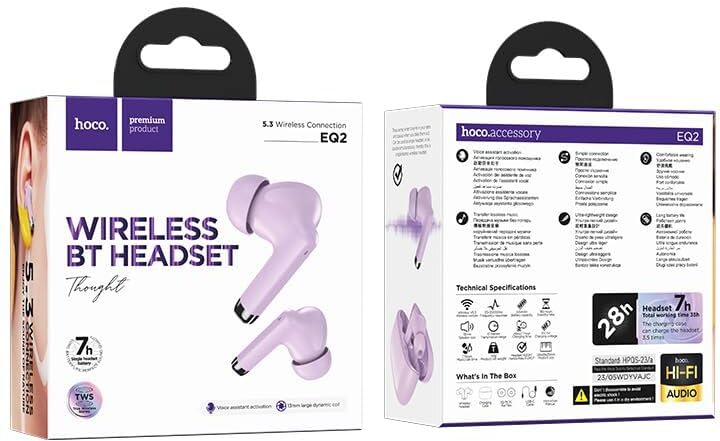
- HOCO EQ2 Earbuds (Left and Right)
- Ngba agbara Case
- Okun Ngba agbara USB
- Awọn Imu Eti (Awọn Iwọn Pupọ)

Image: The HOCO EQ2 earbuds, charging case, and accessories as they appear in the product packaging.
3. Ọja Ipariview
The HOCO EQ2 earbuds are designed for comfort and high-quality audio. They feature a lightweight plastic construction, weighing only 50g in total, and come with three sizes of ear caps (XS, M, XL) to ensure a comfortable and secure fit for prolonged use.

Image: A pair of purple HOCO EQ2 earbuds resting in their open charging case, showcasing wọn oniru.
The earbuds are available in personalized colors including Purple, White, and Black, allowing you to choose a style that suits you.

Image: Display of HOCO EQ2 earbuds in purple, white, and black, alongside a table detailing product parameters.
4. Key Awọn ẹya ara ẹrọ
- Ohun Iduroṣinṣin Giga: Equipped with 13mm composite fiber PU diaphragm dynamic coil speakers, delivering rich and delicate sound for an immersive audio experience.
- Asopọmọra Bluetooth ti ilọsiwaju: Features Bluetooth 5.3 with a JL AC6983D2 chip for quick, stable, and low-latency connections, ensuring seamless audio streaming.
- Awọn iṣakoso Fọwọkan Intuitive: A variety of functional operations can be performed with simple touch gestures on the earbuds, including play/pause, next/previous track, and voice assistant activation.
- Magnetic Switch & Automatic Pairing: The earbuds support master-slave switching and automatically pair when the charging case lid is opened, providing a hassle-free connection.
- 360° Surround Audio: Experience immersive sound with 360-degree surround audio capabilities.

Image: The white HOCO EQ2 charging case and a detailed diagram illustrating the 13mm moving coil speaker for high-fidelity sound.
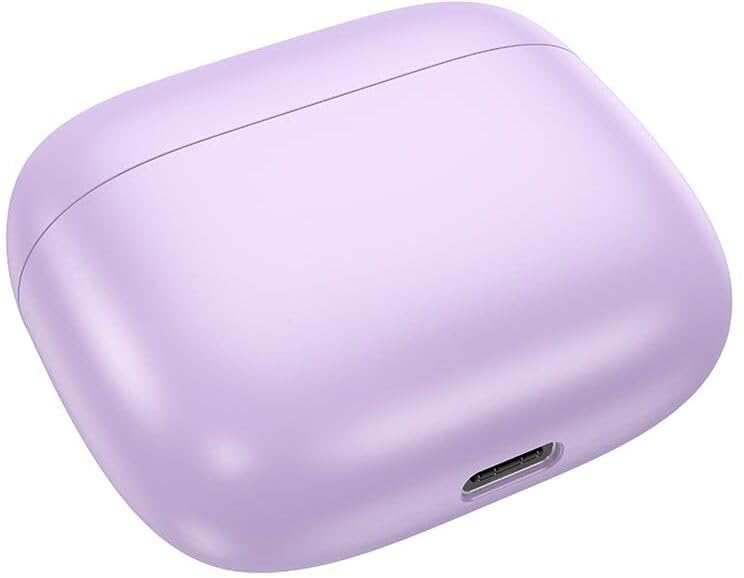
Image: A visual guide to the touch control gestures and their corresponding functions on the HOCO EQ2 earbuds.
Fidio: Ipariview of the HOCO EQ2 Wireless Earbuds, highlighting their main features and design.
5. Eto ati Sisopọ
Pipọpọ Ibẹrẹ
- Rii daju pe awọn agbekọri mejeeji ti gba agbara.
- Ṣii ideri apoti gbigba agbara. Awọn agbekọri yoo tẹ ipo isọpọ sii laifọwọyi.
- Lori ẹrọ rẹ (foonuiyara, tabulẹti, ati be be lo), jeki Bluetooth.
- Wa fun available Bluetooth devices and select "HOCO EQ2" from the list.
- Ni kete ti a ti sopọ, itọka ohun kan yoo jẹrisi isọdọkan aṣeyọri.
Asopọmọra aifọwọyi
After initial pairing, the earbuds will automatically reconnect to the last paired device when the charging case lid is opened, provided Bluetooth is enabled on the device and it is within range.
6. Awọn iṣakoso
The HOCO EQ2 earbuds feature intuitive touch controls on each earbud. Refer to the diagram below for specific functions:
- Tap the touch area (L/R): Mu orin ṣiṣẹ / sinmi.
- Double tap the touch area (L/R): Itele orin.
- Triple tap the touch area (L/R): Ti tẹlẹ orin.
- Long press the touch area for 2s (L/R): Activate voice assistant (Siri, Google Assistant, etc.).
Image: A visual representation of the touch control gestures and their corresponding functions on the HOCO EQ2 earbuds.
7. Gbigba agbara ati batiri Life
The HOCO EQ2 earbuds and charging case provide extended listening time:
- Agbara Batiri Agbekọri: 40mAh (agbohungbohun kọọkan)
- Ngba agbara Batiri Agbara: 320mAh
- Single Headset Use Time: O fẹrẹ to awọn wakati 7
- Total Playback Time (with charging case): Titi di wakati 40
- Akoko Iduro: Titi di wakati 180
Awọn ilana gbigba agbara
- Gbe awọn agbekọri sinu apoti gbigba agbara. Rii daju pe wọn joko ni deede.
- Connect the USB charging cable to the charging port on the case (located at the back, as shown in the image below) and to a power source.
- Ina Atọka lori apoti gbigba agbara yoo fi ipo gbigba agbara han.
- Ni kete ti o ti gba agbara ni kikun, ge asopọ okun naa.
Aworan: Ẹhin view of the HOCO EQ2 charging case, showing the USB-C charging port.

Image: White HOCO EQ2 earbuds in their charging case, highlighting the 28-hour total battery life.
8. Awọn pato
| Ẹya ara ẹrọ | Ẹ̀kúnrẹ́rẹ́ |
|---|---|
| Orukọ awoṣe | EQ2 EARBUDS |
| Ẹya Bluetooth | 5.3 |
| Chip Bluetooth | JL AC6983D2 |
| Audio Driver Type | Yiyi Awakọ |
| Iwọn Agbọrọsọ | 13mm |
| Batiri Agbekọri | 40mAh |
| Gbigba agbara Case Batiri | 320mAh |
| Lo Akoko | Up to 7 hours (single headset) |
| Total Sisisẹsẹhin Time | Titi di wakati 40 (pẹlu ọran gbigba agbara) |
| Akoko Iduro | wakati meji 180 |
| Apapọ iwuwo | 50g |
| Ọja Mefa | 58*49*25mm (Apo gbigba agbara) |
| Ohun elo | Ṣiṣu |
| Omi Resistance Ipele | Omi sooro |
| Ọna Iṣakoso | Fọwọkan |
| Gbohungbohun | To wa |
| Awọn ẹrọ ibaramu | Foonuiyara, Awọn tabulẹti, Kọǹpútà alágbèéká, Kọǹpútà alágbèéká |
| Ilu isenbale | China |
9. Laasigbotitusita
Earbuds Ko Sopọ
- Ensure both earbuds are charged and placed correctly in the charging case.
- Pa a lẹhinna tan Bluetooth lori ẹrọ rẹ.
- Forget/delete "HOCO EQ2" from your device's Bluetooth list and try pairing again.
- If only one earbud connects, try placing both back in the case, closing the lid for a few seconds, then reopening to reset.
Ko si Ohun tabi Iwọn didun Kekere
- Ṣayẹwo ipele iwọn didun lori ẹrọ rẹ mejeeji ati awọn agbekọri.
- Ensure the earbuds are properly seated in your ears. Try different sized ear cushions for a better seal.
- Nu gbogbo idoti kuro ninu apapo eti.
Awọn ọran gbigba agbara
- Rii daju pe okun gbigba agbara ti sopọ ni aabo si ọran mejeeji ati orisun agbara.
- Gbiyanju ibudo USB ti o yatọ tabi ohun ti nmu badọgba agbara.
- Ensure the charging contacts on the earbuds and inside the case are clean and free of dust.
10. Alaye Aabo
- Ma ṣe fi agbekọri tabi apoti gbigba agbara si awọn iwọn otutu to gaju, ọriniinitutu, tabi awọn olomi.
- Yago fun sisọ silẹ, ni ipa, tabi pipọ ohun elo naa.
- Jeki kuro ni arọwọto awọn ọmọde ati awọn ohun ọsin.
- Lo awọn kebulu gbigba agbara ti a pese tabi ifọwọsi nikan ati awọn oluyipada.
- Fífi ara hàn sí ìwọ̀n ohùn gíga fún ìgbà pípẹ́ lè fa ìbàjẹ́ ìgbọ́ran. Ṣàtúnṣe ìwọ̀n ohùn sí ibi tí ó dára.
11. Atilẹyin ọja ati Support
The HOCO EQ2 True Wireless Earbuds come with a standard manufacturer's warranty. Please refer to the warranty card included in your package for specific terms and conditions. For any technical support, troubleshooting assistance, or warranty claims, please contact the seller or HOCO customer service through their official channels.
For further information, you may also visit the product detail page on Amazon.in: HOCO EQ2 Product Page
Ask a question about this manual
Ask about setup, troubleshooting, compatibility, parts, safety, or missing instructions. Manuals+ will review the question and use this page’s manual context to help answer it.