
HOCO W25
HOCO Bluetooth Headphones W25 User Manual
Model: W25 | Brand: HOCO
Ọrọ Iṣaaju
The HOCO W25 Bluetooth Headphones are designed to provide a high-quality audio experience with deep bass and crisp sound. Featuring touch controls, a water-resistant and sweat-proof design, and extended battery life, these headphones are suitable for various activities, from daily commutes to workouts. They offer broad compatibility with Bluetooth-enabled devices, ensuring seamless connectivity and reliable performance.
Ohun ti o wa ninu Apoti
- HOCO W25 Bluetooth Headphones
- Ngba agbara USB
Ọja Pariview

olusin 1: Angled view of the HOCO W25 Bluetooth Headphones in Black.
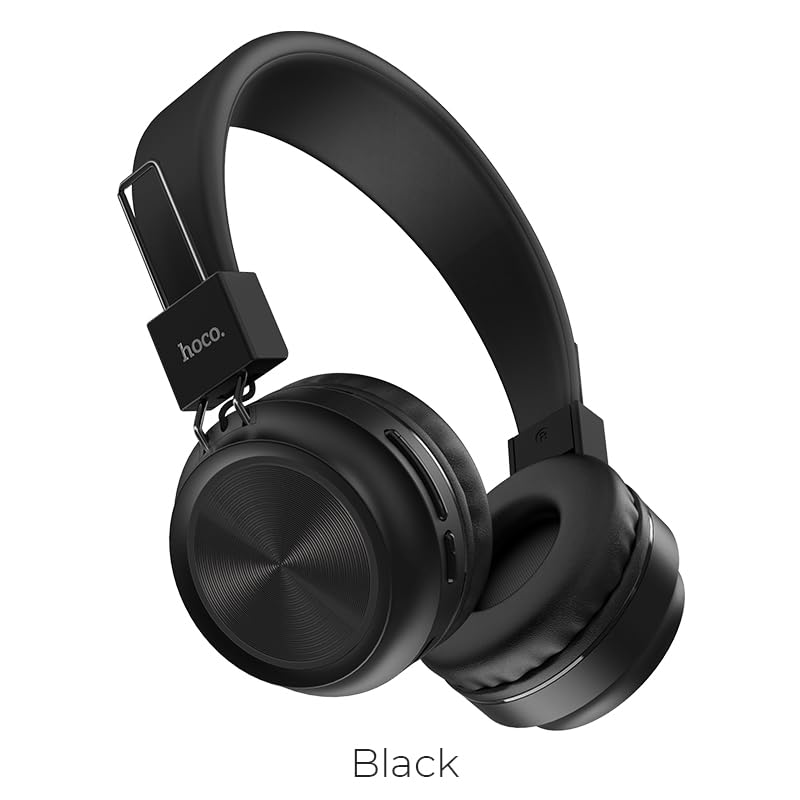
olusin 2: Iwaju view of the HOCO W25 Bluetooth Headphones, highlighting the black color option.
Awọn ẹya pataki:
- Didara Ohun Didara: Rich, deep bass and crystal-clear highs for an immersive audio experience.
- Water-Resistant and Sweat-Proof: Designed to withstand water and sweat, making them ideal for workouts and outdoor use.
- Awọn iṣakoso Fọwọkan: Convenient and intuitive control over music playback and calls.
- Bluetooth 5.3 Imọ-ẹrọ: Ensures seamless pairing, stable connectivity, and reliable wireless performance.
- Ipo Ere: Low latency performance for an enhanced gaming experience.
- Din ati Apẹrẹ Aṣa: Lightweight and comfortable over-ear design.
Ṣeto
1. Ngba agbara si awọn Agbekọri
Before first use, fully charge your HOCO W25 headphones. Connect the provided charging cable to the charging port on the headphones and the other end to a USB power source (e.g., computer USB port, wall adapter). The charging indicator light will show the charging status and turn off when fully charged. A full charge takes approximately 1 hour.
2. Sisopọ pọ pẹlu Ẹrọ Bluetooth kan
- Rii daju pe awọn agbekọri ti wa ni pipa.
- Press and hold the power button on the headphones until the indicator light flashes blue and red alternately, indicating pairing mode.
- Lori ẹrọ rẹ (foonuiyara, tabulẹti, kọǹpútà alágbèéká), mu Bluetooth ṣiṣẹ ki o wa awọn ẹrọ to wa.
- Select "HOCO W25" from the list of found devices.
- Once connected, the indicator light on the headphones will turn solid blue or flash slowly.
Àkíyèsí: Àwọn agbekọri náà yóò gbìyànjú láti tún so mọ́ ẹ̀rọ tí a so pọ̀ kẹ́yìn nígbà tí a bá tan án.
Awọn ilana Iṣiṣẹ
Titan/Apapa:
- Agbara Tan: Tẹ mọlẹ bọtini agbara fun awọn aaya 3.
- Agbara Pa: Tẹ mọlẹ bọtini agbara fun awọn aaya 5.
Sisisẹsẹhin orin:
- Ṣiṣẹ/Daduro: Single tap the multi-function button.
- Orin t’okan: Double tap the multi-function button.
- Tẹlẹ Orin: Triple tap the multi-function button.
- Iwọn didun Up: Tẹ bọtini iwọn didun +.
- Iwọn didun isalẹ: Tẹ bọtini Iwọn didun.
Isakoso ipe:
- Idahun/Ipe Ipari: Single tap the multi-function button.
- Kọ Ipe: Tẹ mọlẹ bọtini iṣẹ-ọpọlọpọ fun iṣẹju-aaya 2.
- Nọmba Ikẹhin Tun Tun: Double tap the multi-function button when not on a call.
Oluranlọwọ ohun:
- Mu Oluranlọwọ Ohun ṣiṣẹ: Press and hold the multi-function button for 1 second.
Ibamu ẹrọ
The HOCO W25 Bluetooth Headphones are designed for wide compatibility and can connect with virtually all Bluetooth-enabled devices, including:
- Àwọn fóònù alágbèéká (iOS àti Android)
- Awọn tabulẹti
- Kọǹpútà alágbèéká
- Smart TVs
- Other Bluetooth audio devices
batiri Life & Ngba agbara
- Akoko Sisisẹsẹhin: Up to 12 hours of continuous music playback or talk time on a single charge.
- Akoko Iduro: Titi di wakati 200.
- Akoko gbigba agbara: O fẹrẹ to wakati 1 fun idiyele ni kikun.
- Atọka gbigba agbara: Atọka LED yoo ṣe afihan ipo gbigba agbara ati pipa nigbati o ba gba agbara ni kikun.
Actual battery life may vary based on volume level, audio content, and usage conditions.
Itoju
- Ninu: Mu awọn agbekọri nu pẹlu asọ ti o gbẹ. Ma ṣe lo abrasive ose tabi epo.
- Ibi ipamọ: Tọju awọn agbekọri naa ni itura, aye gbigbẹ kuro lati orun taara ati awọn iwọn otutu to gaju.
- Ifihan omi: While water-resistant and sweat-proof, avoid submerging the headphones in water. Dry thoroughly if exposed to moisture.
- Itọju Batiri: To prolong battery life, avoid fully discharging the headphones frequently. Charge regularly, even if not in use for extended periods.
Laasigbotitusita
Ko si Agbara:
- Rii daju pe awọn agbekọri ti gba agbara ni kikun.
- Ṣayẹwo okun gbigba agbara ati orisun agbara.
Ko le So pọ:
- Make sure the headphones are in pairing mode (flashing blue and red light).
- Rii daju pe Bluetooth ti ṣiṣẹ lori ẹrọ rẹ.
- Gbe awọn agbekọri naa sunmọ ẹrọ rẹ.
- Forget "HOCO W25" from your device's Bluetooth settings and try pairing again.
- Tun awọn agbekọri mejeeji bẹrẹ ati ẹrọ rẹ.
Ko si ohun tabi iwọn kekere:
- Mu iwọn didun pọ si lori agbekọri ati ẹrọ ti o so pọ mọ.
- Rii daju pe awọn agbekọri ti sopọ daradara si ẹrọ rẹ.
- Check if another device is connected to the headphones.
Didara Ohun Ko dara:
- Sunmọ ẹrọ rẹ lati yago fun kikọlu.
- Rí i dájú pé kò sí ìdènà láàárín agbekọri ati ẹrọ rẹ.
- Gbiyanju awọn orisun ohun afetigbọ oriṣiriṣi.
Awọn pato
| Ẹya ara ẹrọ | Ẹ̀kúnrẹ́rẹ́ |
|---|---|
| Orukọ awoṣe | W25 |
| Asopọmọra Technology | Ailokun (Bluetooth) |
| Ẹya Bluetooth | 5.3 |
| Ariwo Iṣakoso | Iyasọtọ ohun |
| Omi Resistance Ipele | Omi sooro |
| Iṣakoso Iru | Fọwọkan, Iṣakoso iwọn didun |
| Igbesi aye batiri | 12 Hours (Playback) |
| Akoko gbigba agbara | 1 Wakati |
| Akoko Iduro | Awọn wakati 200 |
| Fọọmù ifosiwewe | Lórí Etí, Lórí Etí |
| gbohungbohun kika | Ti a ṣe sinu |
| Ohun elo | Ṣiṣu |
| Iwọn Nkan | 161 g |
| Olupese | HOCO |
Official ọja Video
Yi fidio pese ohun loriview of the HOCO W25 Bluetooth Headphones, highlighting key features such as deep bass, touch controls, water resistance, and battery life. It also showcases the product's compatibility and design.
Atilẹyin ọja & Atilẹyin
The HOCO W25 Bluetooth Headphones come with a standard brand warranty. For specific warranty terms and conditions, please refer to the warranty card included with your product or visit the official HOCO webojula.
For further assistance, technical support, or troubleshooting beyond this manual, please contact HOCO customer service or visit the product detail page on the retailer's webojú òpó tí o ti ra ohun náà.
- Atilẹyin ọja: 1 Odun atilẹyin ọja
You can find more information and support resources by visiting the product page on Amazon.in.
Ask a question about this manual
Ask about setup, troubleshooting, compatibility, parts, safety, or missing instructions. Manuals+ will review the question and use this page’s manual context to help answer it.