
1. Alaye Aabo
- This product is intended for children aged 3 to 12 years. Adult supervision is recommended during use.
- Do not disassemble or attempt to repair the camera. Contact support if issues arise.
- Pa kamẹra naa mọ kuro ninu omi ati ọrinrin pupọ lati dena ibajẹ.
- Lo okun USB ti a pese nikan fun gbigba agbara.
- The thermal print paper is a consumable item. Ensure replacements are compatible.
2. Package Awọn akoonu
Daju pe gbogbo awọn nkan wa ninu apo rẹ:
- 1 x GREENKINDER X6 Kids Instant Print Camera
- 1 x 32GB MicroSD Kaadi
- 3 x Rolls of Thermal Print Paper
- 1 x Lanyard
- 1 x Okun Ngba agbara USB-C
- 1 x Cartoon Sticker Set
- 5 x Color Pens
- 1 x Itọsọna olumulo
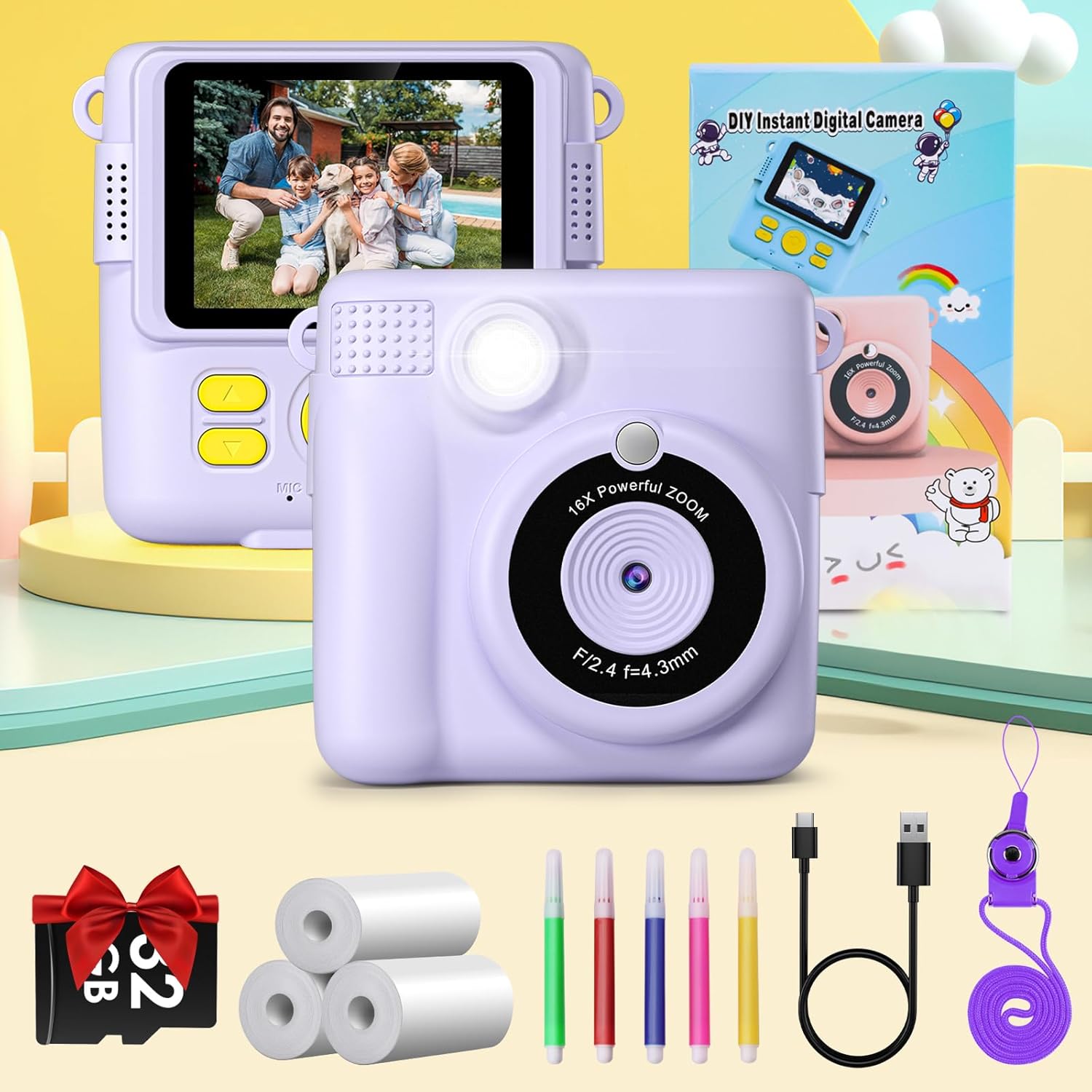
Figure 2.1: Complete package contents of the GREENKINDER X6 camera.
3. Ọja Ipariview
Mọ ara rẹ pẹlu awọn paati kamẹra:

olusin 3.1: Iwaju ati ki o ru views of the GREENKINDER X6 camera with key features highlighted.
- Lẹnsi: Main camera lens for capturing photos and videos.
- Filaṣi: Pese itanna ni awọn ipo ina kekere.
- Iboju LCD 2.4-inch: Fun viewgígé àwọn fọ́tò, fídíò, àti àwọn àkójọ ìṣàyẹ̀wò.
- Awọn bọtini Iṣakoso: Power, Shutter, Navigation (Up/Down/Left/Right), OK/Menu.
- Ibi tí a ti tẹ̀ jáde: Where instant prints emerge.
- Iho kaadi MicroSD: For memory expansion (32GB card included).
- Ibudo USB-C: Fun gbigba agbara ati gbigbe data.
4. Eto
4.1 Ngba agbara si Batiri naa
The camera is equipped with a 1000mAh lithium-polymer battery. Before first use, fully charge the camera.
- Connect the provided USB-C cable to the camera's USB-C port.
- So opin okun miiran pọ si ohun ti nmu badọgba agbara USB (kii ṣe pẹlu) tabi ibudo USB ti kọnputa kan.
- Ina Atọka gbigba agbara yoo tan imọlẹ. Yoo paa tabi yi awọ pada nigbati gbigba agbara ba ti pari.
4.2 Fi MicroSD Kaadi sii
A 32GB MicroSD card is included for storing photos and videos.
- Wa iho kaadi MicroSD ni ẹgbẹ kamẹra naa.
- Fi kaadi MicroSD sii pẹlu awọn olubasọrọ goolu ti o kọju si isalẹ titi ti o fi tẹ sinu ipo rẹ.
- Láti yọ ọ́ kúrò, fi pẹ̀lẹ́pẹ̀lẹ́ tẹ káàdì náà sínú títí yóò fi tẹ̀ ẹ́, lẹ́yìn náà, yóò tú u sílẹ̀, yóò sì yọ jáde.
4.3 Nfi iwe titẹ sita
The camera uses thermal print paper for instant black and white prints. Three rolls are included.
- Gently push the part of the camera with the lens upwards to open the paper compartment.
- Insert a roll of thermal print paper into the compartment, ensuring the paper feeds out from the top.
- Close the camera by pushing the two parts back together until they click securely.

Figure 4.1: Steps for loading thermal print paper.
5. Awọn ilana Iṣiṣẹ
5.1 Agbara Tan / Pa
- To power on, press and hold the Power button for a few seconds.
- Láti pa agbára, tẹ bọtini agbara náà kí o sì di mọ́lẹ̀ lẹ́ẹ̀kan sí i títí tí iboju náà yóò fi pa.
5.2 Basic Photography and Instant Printing
The camera allows for instant black and white prints using thermal technology.
- Tan kamẹra.
- Fírémù àwòrán rẹ nípa lílo ibojú LCD 2.4-inch.
- Tẹ bọtini Shutter lati ya fọto kan.
- The camera will automatically print the photo in black and white from the output slot.
5.3 Gbigbasilẹ fidio
Record moments in 1080P resolution.
- Navigate to video mode using the menu buttons.
- Tẹ bọtini Shutter lati bẹrẹ gbigbasilẹ.
- Tẹ bọtini Shutter lẹẹkansii lati da gbigbasilẹ duro.

Figure 5.1: Demonstrating 1080P video, time-lapse, and burst shooting features.
5.4 Pataki Awọn ẹya ara ẹrọ
- 16x Sisun oni-nọmba: Use the navigation buttons to zoom in or out before taking a photo.
- Filaṣi: Activate or deactivate the flash for improved lighting in dark environments.
- Aago akoko: Set the camera to take photos automatically at intervals of 3, 5, or 10 seconds.
- Fonkaakiri ibon Capture multiple photos in quick succession by holding down the shutter button.
- Awọn ere: The camera includes built-in puzzle games for entertainment. Access them via the menu.
- Filters and Frames: Apply various fun filters and decorative frames to your photos before printing or saving.

Figure 5.2: 16x Zoom and Flash functionality.

Olusin 5.3: Examples of different frames and filters.
5.5 DIY Coloring
After printing black and white photos, use the included color pens to personalize them.

Figure 5.4: DIY coloring of instant prints.
6. Itọju
6.1 Ninu kamẹra
- Lo asọ ti o rọ, ti o gbẹ lati nu ara kamẹra mọ.
- For the lens, use a specialized lens cleaning cloth.
- Ma ṣe lo awọn olutọpa omi tabi awọn ohun elo abrasive.
6.2 Storing the Camera
- Tọ́jú kámẹ́rà náà sí ibi gbígbẹ tí ó tutù, tí kò sí ìmọ́lẹ̀ oòrùn tààrà.
- Remove the MicroSD card if storing for extended periods.
6.3 batiri Itọju
- Charge the battery regularly, even if the camera is not in frequent use, to maintain battery health.
- Yago fun gbigba agbara si batiri ni kikun nigbagbogbo.
6.4 Rírọ́pò ìwé ìtẹ̀wé
When the print paper runs out, you can purchase compatible thermal print paper. Wa fun ASIN: B0C52Q298V for refills.
7. Laasigbotitusita
| Isoro | Owun to le Fa | Ojutu |
|---|---|---|
| Kamẹra ko ni tan. | Batiri kekere. | Charge the camera fully using the provided USB-C cable. |
| Kò le ya fọ́tò/fídíò. | No MicroSD card inserted or card is full. | Insert a MicroSD card or delete old files lati laaye aaye. |
| Prints are blank or faded. | Print paper is incorrectly loaded or has run out. | Check paper orientation and ensure it is loaded correctly. Replace the paper roll if empty. |
| Kámẹ́rà máa ń dì tàbí kò ní ìdáhùn. | Aṣiṣe sọfitiwia. | Tẹ bọtini agbara ki o si mu fun awọn aaya 10 lati fi agbara mu lati tun bẹrẹ. |
8. Awọn pato
| Ẹya ara ẹrọ | Ẹ̀kúnrẹ́rẹ́ |
|---|---|
| Brand | GREENKINDER |
| Awoṣe | X6 |
| Ọja Iru | Instant Print Camera (DSLR type) |
| Àwọ̀ | Lilac |
| Iboju | 2.4-inch LCD |
| Ipinnu fidio | 1080p |
| Ipinnu Iduro ti o munadoko | 12 Megapiksẹli |
| Digital Sisun | 16x |
| Asopọmọra Technology | USB-C |
| Iranti | Ṣe atilẹyin kaadi MicroSD (pẹlu 32GB) |
| Batiri Tiwqn | Lithium-polymer (1000mAh) |
| Pataki Awọn ẹya ara ẹrọ | Time-lapse, Flash, Burst Shooting, Games, Filters, Frames |
| Iwọn Nkan | 250 giramu |
| Odun awoṣe | 2023 |
9. Atilẹyin ọja ati Support
For warranty information or technical support, please refer to the contact details provided with your purchase or visit the official GREENKINDER webojula. Tọju iwe-ẹri rira rẹ bi ẹri rira.