
JTEMAN JT-L36
JTEMAN Cell Phone Stand with Wireless Bluetooth Speaker and Alarm Clock - User Manual
Model: JT-L36
Ọrọ Iṣaaju
O ṣeun fun riraasing the JTEMAN Cell Phone Stand with Wireless Bluetooth Speaker and Alarm Clock. This multi-functional device is designed to enhance your daily routine by combining essential features into one compact and stylish unit. It serves as a high-quality Bluetooth speaker, a reliable alarm clock with a clear display, and a stable, adjustable stand for your mobile devices. Please read this manual carefully to ensure proper use and optimal performance.
Alaye Aabo
- Ma ṣe fi ẹrọ naa han si awọn iwọn otutu to gaju, imọlẹ orun taara, tabi ọriniinitutu giga.
- Yago fun sisọ silẹ tabi tẹriba ẹrọ si awọn ipa to lagbara.
- Keep away from water and other liquids. If the device comes into contact with liquid, disconnect it immediately and allow it to dry completely before reuse.
- Má ṣe gbìyànjú láti tú ẹ̀rọ náà ká, tún un ṣe, tàbí ṣe àtúnṣe fúnra rẹ. Tọ́ka gbogbo iṣẹ́ ìtọ́jú náà sí àwọn òṣìṣẹ́ tó mọ̀ nípa rẹ̀.
- Lo okun gbigba agbara ti a pese nikan tabi iwe-ẹri deede.
- Jeki kuro ni arọwọto awọn ọmọde.
Package Awọn akoonu
- JTEMAN Cell Phone Stand with Wireless Bluetooth Speaker and Alarm Clock (Model: JT-L36)
- Iru-C Ngba agbara USB
- Itọsọna olumulo
Ọja Pariview
Familiarize yourself with the components and controls of your JTEMAN device:
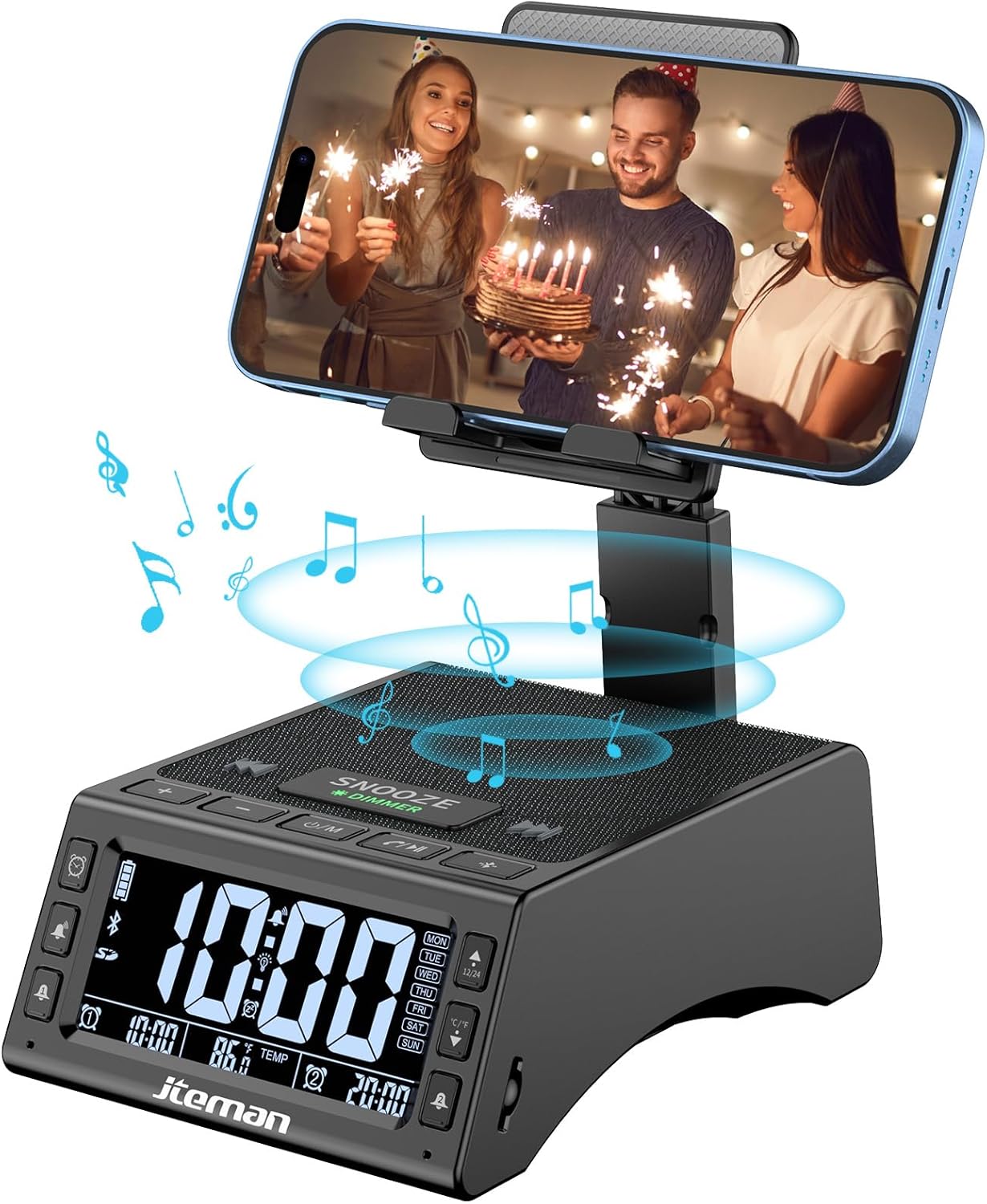
olusin 1: Iwaju view of the JTEMAN device with a smartphone on the adjustable stand, displaying the time and temperature.

Olusin 2: Pariview highlighting the multi-functional aspects including Bluetooth speaker, 12/24H time display, temperature display, foldable phone stand, TF card support, microphone, charging station, dual alarm clocks, and 9 ringtones.
Awọn iṣakoso ati awọn ibudo:
- Iboju ifihan: Shows time, temperature, day of the week, and alarm indicators.
- SNOOZE/DIMMER Button: Press to snooze an active alarm (5 minutes); long press to adjust display brightness (4 levels).
- Power On/Off/Mode Button: Long press to power on/off; short press to cycle through modes (Bluetooth, TF Card).
- Play/Pause/Answer Button: Controls music playback; answers/ends calls.
- Iwọn didun Soke/Bọtini orin atẹle: Increases volume; short press for next track.
- Iwọn didun isalẹ/Bọtini orin ti iṣaaju: Decreases volume; short press for previous track.
- Bọtini Pipọpọ Bluetooth: Ti bẹrẹ ipo sisọpọ Bluetooth.
- Alarm 1 & Alarm 2 Buttons: For setting and managing dual alarms.
- Gbohungbohun: Fun ipe ti ko ni ọwọ.
- Ibudo Iwọle Iru-C: Fun gbigba agbara ẹrọ.
- Ibudo Ijade Iru-C: Fun gbigba agbara awọn ẹrọ ita.
- Iho Kaadi TF: Fun orin ti ndun taara lati kaadi TF.
- Iduro Foonu ti a le ṣatunṣe: Foldable and extendable for various viewing angles. Features anti-slip pads and base for stability.
Ṣeto
1. Gbigba agbara akọkọ
- So okùn gbigba agbara Iru-C ti a pese mọ Iru-C Input Port lori ẹrọ.
- Connect the other end of the cable to a compatible USB power adapter (not included) and plug it into a wall outlet.
- The display will indicate charging status. Fully charge the device before first use.

Figure 3: The device connected via Type-C for charging itself and an external phone.
2. Eto Aago ati Ọjọ
- Upon powering on, the device should automatically synchronize the current time.
- If manual adjustment is needed, refer to the detailed instructions in the full user manual (included in the package).
- To switch between 12/24 hour format or °F/°C temperature display, use the dedicated buttons or refer to the full manual.

Figure 4: The HD display showing time, temperature, and alarm settings with brightness adjustment levels.
Awọn ilana Iṣiṣẹ
1. Using the Phone Stand
- The integrated phone stand can be pulled up from the back of the unit.
- Adjust the height and angle of the stand to your preferred viewing position. The stand is designed to be stable and strong, accommodating devices from 4.0 to 13 inches.
- When not in use, the stand can be folded back into the unit for a compact form factor.

Figure 5: Demonstrates the adjustable height and angle of the phone stand, along with its anti-slip features and foldable design.
2. Iṣẹ́ Agbọrọsọ Bluetooth
- Agbara Tan: Long press the Power On/Off/Mode button. The device will enter Bluetooth pairing mode, indicated by a flashing Bluetooth icon on the display.
- Pipọpọ: On your smartphone or other Bluetooth-enabled device, search for “JT-L36” in the Bluetooth settings and select it to pair. A confirmation sound will indicate successful pairing.
- Sisisẹsẹhin orin: Once paired, you can play audio from your device through the JTEMAN speaker. Use the Play/Pause, Volume Up/Next Track, and Volume Down/Previous Track buttons to control playback.
3. TF Kaadi Sisisẹsẹhin
- Insert a TF card (not included) with audio files into the TF Card Slot.
- The device will automatically switch to TF Card mode and begin playing music. If not, short press the Mode button to select TF Card mode.
4. Alarm Clock Features
- Eto Awọn itaniji: Use the Alarm 1 and Alarm 2 buttons to set up to two independent alarms. Follow the on-screen prompts to set the time and alarm frequency (e.g., Mon-Fri, Sat-Sun, Mon-Sun).
- Iṣẹ́ lẹ́ẹ̀kọ̀ọ̀kan: When an alarm sounds, press the large SNOOZE button on top to activate a 5-minute snooze.
- Atunse Imọlẹ: Long press the SNOOZE/DIMMER button to cycle through four levels of display brightness, including an off setting for minimal light disturbance.
5. Ọwọ-Ọfẹ Npe
- When a call comes in while your phone is connected via Bluetooth, press the Play/Pause/Answer button to answer the call.
- Lo gbohungbohun ti a ṣe sinu fun ibaraẹnisọrọ mimọ.
- Press the Play/Pause/Answer button again to end the call.
6. Ngba agbara si Awọn ẹrọ Ita
- Connect your external device (e.g., smartphone, tablet) to the Iru-C o wu Port on the JTEMAN unit using a compatible charging cable.
- The JTEMAN device will provide power to charge your external device.
Itoju
- Nu ẹrọ naa pẹlu asọ ti o tutu, ti o gbẹ. Ma ṣe lo abrasive ose tabi epo.
- Rii daju pe gbogbo awọn ebute oko oju omi ko ni eruku ati idoti.
- Tọju ẹrọ naa ni itura, aye gbigbẹ nigbati o ko ba wa ni lilo fun awọn akoko gigun.
Laasigbotitusita
| Isoro | Owun to le Fa | Ojutu |
|---|---|---|
| Ẹrọ naa ko ṣiṣẹ. | Low battery; power adapter/cable issue. | Charge the device fully. Check power adapter and cable connections. |
| Ko si ohun lati agbọrọsọ. | Volume too low; not paired correctly; wrong mode. | Increase volume on both device and connected phone. Re-pair Bluetooth. Ensure correct mode (Bluetooth/TF Card). |
| Asopọ Bluetooth kuna. | Device too far; pairing mode not active; interference. | Ensure device is in pairing mode and within 10 meters. Turn off other Bluetooth devices. Try restarting both devices. |
| Itaniji ko dun. | Alarm not set; alarm volume too low; alarm disabled. | Verify alarm settings and ensure it's enabled. Increase alarm volume. |
| Phone not charging via output port. | Cable issue; device battery low; incompatible device. | Ensure the JTEMAN device is charged. Try a different charging cable. Confirm your phone is compatible with Type-C charging. |
Awọn pato
| Brand | JTEMAN |
| Nọmba awoṣe | JT-L36 |
| Ọja Mefa | 6.1 x 4.3 x 2.1 inches |
| Iwọn Nkan | 1.26 iwon |
| Àwọ̀ | Dudu |
| Ni wiwo Hardware | USB 2.0 |
| Lapapọ Awọn ibudo USB | 2 (Type-C Input, Type-C Output) |
| Ibamu | 4.0-13 inch devices |
Atilẹyin ọja ati Support
JTEMAN products are manufactured with high standards of quality. For specific warranty information, please refer to the warranty card included in your product packaging or visit the official JTEMAN website. If you encounter any issues or have questions not covered in this manual, please contact JTEMAN customer support through the contact information provided on the product packaging or webojula.
Jọwọ ṣe idaduro ẹri rira rẹ fun awọn iṣeduro atilẹyin ọja.