
Ọrọ Iṣaaju
This manual provides detailed instructions for the UGREEN Nexode Mini 5000mAh 15W MagSafe Power Bank, model PB560. It covers setup, operation, maintenance, troubleshooting, and product specifications to ensure safe and efficient use of your portable magnetic wireless charger.
Package Awọn akoonu
- 1 x UGREEN Nexode Mini 5000mAh 15W MagSafe Power Bank
- 1 x USB-C to USB-C Cable (0.6 m)
- 1 x Itọsọna olumulo
Ọja Pariview
The UGREEN Nexode Mini Power Bank is a compact and portable charging solution designed for MagSafe-compatible devices. It features both wireless magnetic charging and wired USB-C charging capabilities.

Aworan: UGREEN Nexode Mini Power Bank showing its non-slip silicone surface for secure attachment and comfortable handling.

Aworan: A hand holding an iPhone with the UGREEN Nexode Mini Power Bank attached, highlighting its ultra-mini size (approximately 10.6 x 6.9 x 1.3 cm) for portability.

Aworan: Diagram illustrating the UGREEN Nexode Mini Power Bank's safety features, including Over-Voltage, Over-Current, Short-Circuit, and High-Temperature Protection, ensuring safe charging with 15W Power Delivery and 5000mAh battery capacity.
Ṣeto
Gbigba agbara ni ibẹrẹ
Before first use, fully charge the power bank using the provided USB-C to USB-C cable and a compatible USB power adapter (not included). The LED indicators will show the charging status and battery level.
Awọn ilana Iṣiṣẹ
Titan/Pa a
- Lati Tan: Short press the power button. The power bank will automatically turn off after a period of inactivity if no device is charging.
Oofa Alailowaya Ngba agbara
Align the power bank with the back of your MagSafe-compatible iPhone or a phone equipped with a MagSafe-compatible case. The magnets will securely attach, and charging will begin automatically. The power bank provides up to 7.5W wireless charging.

Aworan: Illustration showing the UGREEN Nexode Mini Power Bank's magnetic charging compatibility with MagSafe cases and incompatibility with non-magnetic cases. Ensure your device or case supports MagSafe for optimal magnetic attachment and charging.
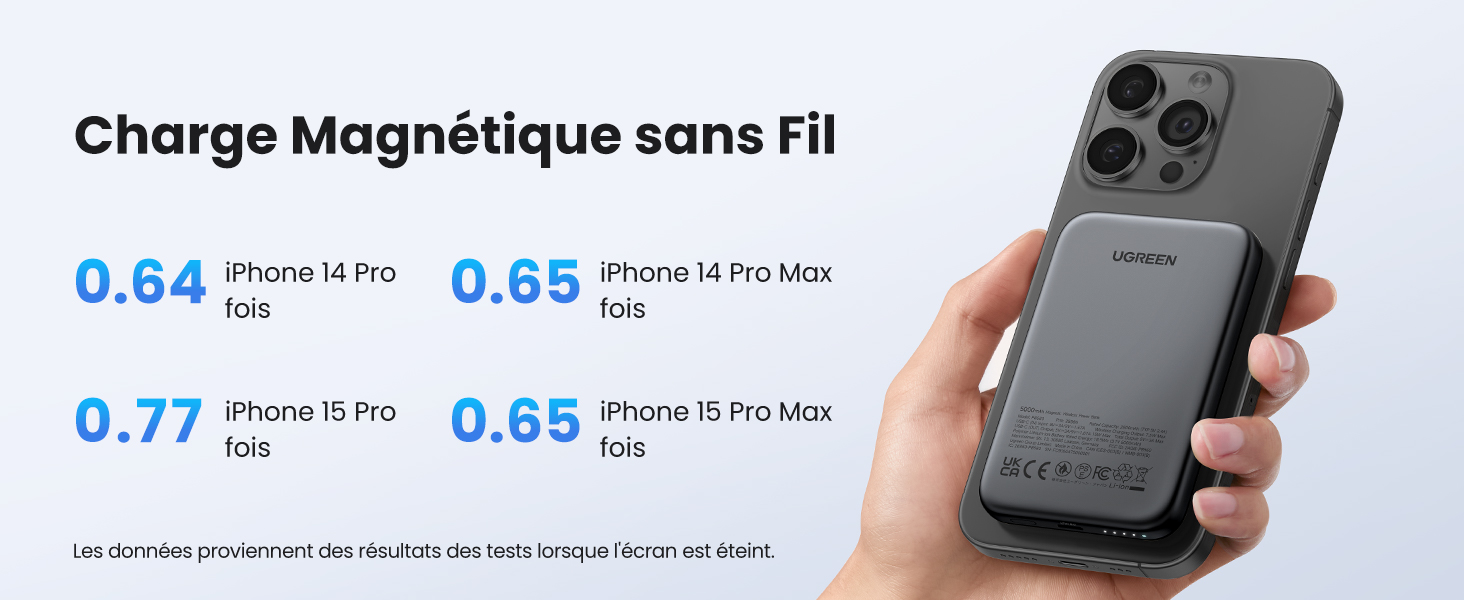
Aworan: Chart detailing wireless magnetic charging performance for various iPhone models (iPhone 14 Pro, 14 Pro Max, 15 Pro, 15 Pro Max) with the UGREEN Nexode Mini Power Bank. Data is based on tests with the screen off.
Wired USB-C Charging
Connect your device to the power bank's USB-C port using a compatible USB-C cable. The power bank supports up to 15W wired fast charging.

Aworan: UGREEN Nexode Mini Power Bank simultaneously charging an iPhone wirelessly (7.5W) and an AirPods case via wired USB-C (15W).
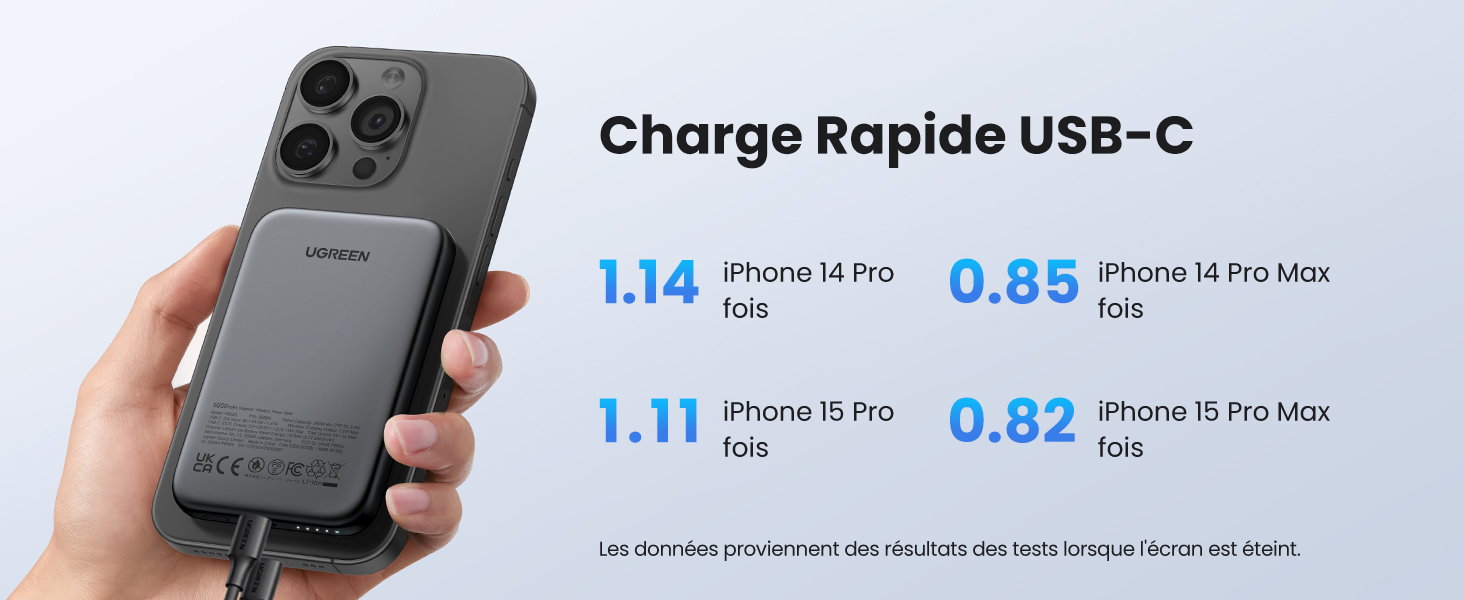
Aworan: Chart detailing wired USB-C fast charging performance for various iPhone models (iPhone 14 Pro, 14 Pro Max, 15 Pro, 15 Pro Max) with the UGREEN Nexode Mini Power Bank. Data is based on tests with the screen off.
Kekere Ipo Gbigba agbara lọwọlọwọ
- Mu ṣiṣẹ: Long press the power button for 3 seconds. This mode is suitable for charging low-power devices such as wireless earbuds (e.g., AirPods) or smartwatches.
- Muu ṣiṣẹ: Long press the power button again for 3 seconds, or the mode will automatically deactivate after 3 hours.
Itoju
- Jeki ile-ifowopamọ agbara gbẹ ati kuro lati ọrinrin.
- Nu dada mọ pẹlu asọ asọ, gbẹ. Maṣe lo awọn kẹmika lile tabi awọn ohun elo abrasive.
- Tọju ni itura, ibi gbigbẹ nigbati ko si ni lilo.
- Yago fun awọn iwọn otutu to gaju ati imọlẹ orun taara.
Laasigbotitusita
| Oro | Owun to le Fa | Ojutu |
|---|---|---|
| Ẹrọ ko gba agbara lailowa. | Not MagSafe compatible; improper alignment; power bank off. | Ensure device/case is MagSafe compatible. Realign the power bank. Short press power button to turn on. |
| Ẹrọ ko gba agbara nipasẹ USB-C. | Ọrọ USB; banki agbara kuro; ẹrọ ko ni ibamu. | Try a different USB-C cable. Short press power button to turn on. Ensure device is compatible. |
| Bank agbara ko gba agbara. | Charging cable issue; power adapter issue. | Try a different USB-C cable and power adapter. Ensure power adapter meets specifications. |
| Ile-ifowopamọ agbara n gbona lakoko gbigba agbara. | Normal operation; excessive load. | Slight warmth is normal. If excessively hot, disconnect and allow to cool. Ensure proper ventilation. |
Awọn pato
| Ẹya ara ẹrọ | Ẹ̀kúnrẹ́rẹ́ |
|---|---|
| Brand | UGREEN |
| Nọmba awoṣe | PB560 (25207) |
| Agbara Batiri | 5000 mAh |
| Asopọmọra Iru | USB Iru C |
| Àwọ̀ | Alagara |
| Pataki Ẹya | Gbigba agbara yara |
| Voltage | 5 Volts |
| Batiri Tiwqn | Litiumu-polima |
| Iṣeduro Lilo | Foonuiyara |
| Orisun agbara | Cable ina |
| Agbara lọwọlọwọ | 3 A |
| Nọmba ti Ports | 1 |
| Akoko gbigba agbara | wakati meji 1.5 |
| Awọn ẹrọ ibaramu | iPhone 15 Pro Max, Pro, 15, 14 Pro Max, 14 Pro, 14 Plus, 13, 13 Mini, 13 Pro, 12, 11, SE 2022, XS, XS Max; iPad Pro, Air, mini, AirPods 3, 2, Pro, MagSafe, Watch 8, 7, Watch SE, Galaxy S24, S24+, S24 Ultra, S23, S23+, S23 Ultra, S22, S22+, S22 Ultra, S21 FE, S20FE, S10, S9, S8+, S8; Z Flip; Note 10, Note 9, A72, A71, A53, A52, A50, A40, A21, A20, M43, Tab A8, A8.7, S8, S7, S6, Galaxy Fold 2, Redmi Note 11, 10, Note 9, Note 8; Poco F3, X3, M3, Pixel 7, 6, Pixel 6 Pro, Pixel 5, 4 |
| Wireless Charging Standard | MagSafe |
| Atunlo | Gbigba agbara |
| Atilẹyin ọja Iru | Lopin |
| International Ìwé Code | 06941876222070 |
| Iwọn Nkan | 140 giramu |
| Awọn iwọn Nkan | 10.6 x 6.9 x 1.3 centimeters |
Alaye Aabo
- Do not expose the power bank to fire, water, or extreme temperatures.
- Ma ṣe tuka, tunṣe, tabi tun ẹrọ naa funrararẹ.
- Jeki kuro ni arọwọto awọn ọmọde.
- Yago fun sisọ tabi tẹriba banki agbara si awọn ipa to lagbara.
- Lo awọn kebulu gbigba agbara ifọwọsi nikan ati awọn oluyipada.
Atilẹyin ọja ati Support
This UGREEN product comes with a limited warranty. For detailed warranty terms and conditions, please refer to the warranty card included in your package or visit the official UGREEN website. For technical support or customer service, please contact UGREEN customer support through their official channels.