
BOTHSTAR YJ42
Itọsọna olumulo
Double Sided Keyless Door Knob Lock with Fingerprint and Keypad
Brand: BOTHSTAR | Model: YJ42
1. Ifihan
Thank you for choosing the BOTHSTAR Double Sided Keyless Door Knob Lock. This advanced smart lock provides secure and convenient access control for both interior and exterior doors. With multiple unlocking methods including fingerprint, keypad code, and traditional key, it offers enhanced security and flexibility for homes, offices, and various other settings. This manual will guide you through the installation, setup, operation, and maintenance of your new smart doorknob.

Figure 1.1: BOTHSTAR Double Sided Keyless Door Knob Lock (Satin Nickel)
2. Alaye Aabo pataki
- Ka gbogbo awọn itọnisọna ni pẹkipẹki ṣaaju fifi sori ẹrọ ati lo.
- Má ṣe gbìyànjú láti tú tàbí ṣe àtúnṣe sí titiipa náà. Èyí lè fa ìbàjẹ́ kí ó sì sọ àtìlẹ́yìn náà di òfo.
- Keep backup keys in a secure location outside the property.
- Ensure proper battery installation and replace batteries when the low battery voice prompt is activated.
- This product is designed for specific door thickness and backset. Verify compatibility before installation.
- While the lock is IPX6 waterproof, avoid prolonged submersion or direct high-pressure water spray.
3. Package Awọn akoonu
Carefully unpack the box and ensure all components are present and in good condition. If any items are missing or damaged, please contact customer support.
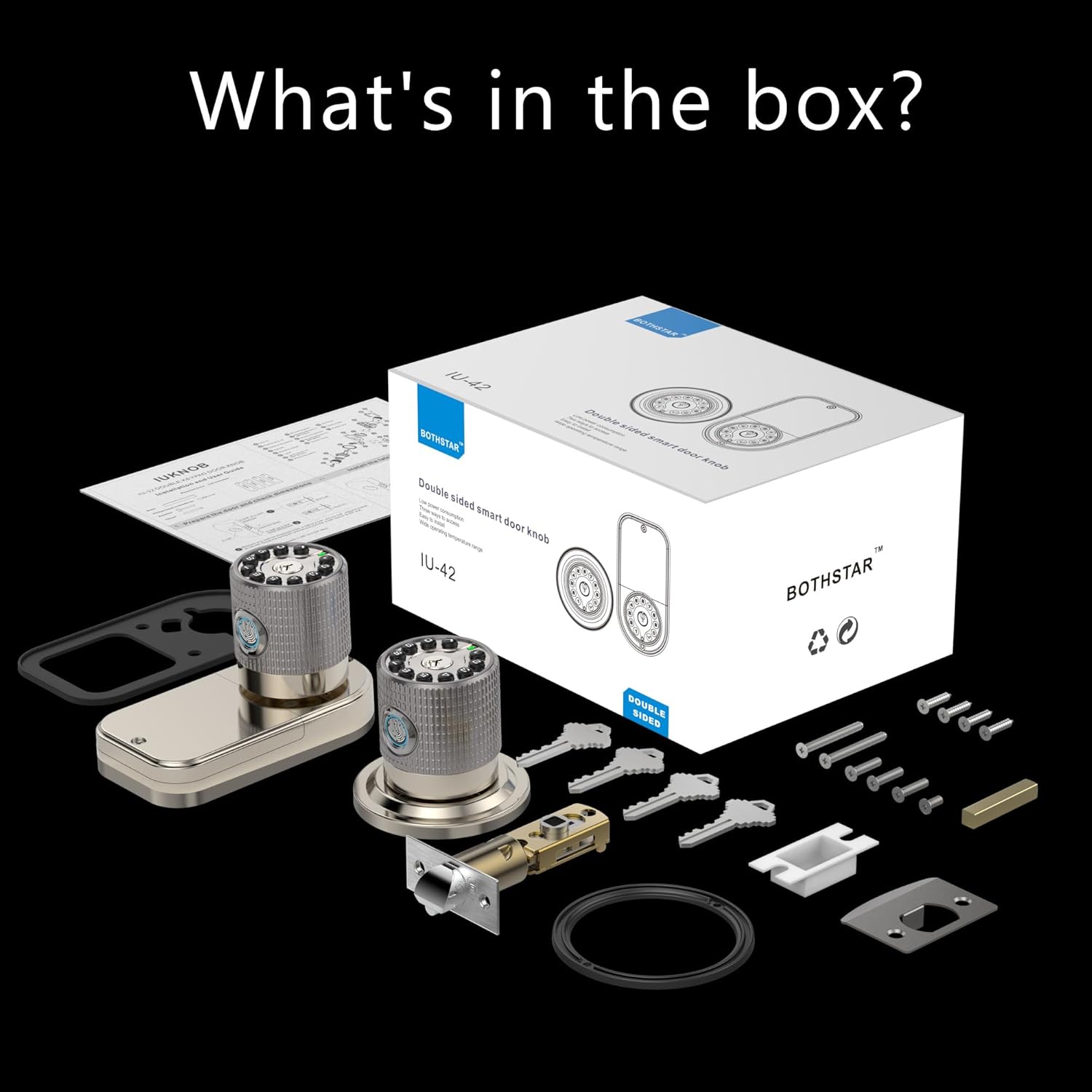
Àwòrán 3.1: Kí ni ó wà nínú àpótí náà?
- Double Sided Fingerprint Door Knob (Exterior)
- Double Sided Fingerprint Door Knob (Interior)
- Adjustable Latch (2-3/8" or 2-3/4")
- Kọlu Awo
- Iṣagbesori skru ati Hardware
- Physical Keys (Set of 4)
- Fifi sori Àdàkọ
- Itọsọna olumulo
4. Itọsọna fifi sori ẹrọ
Before beginning installation, ensure your door meets the following specifications:
- Door Thickness: 1-1/4" to 3-7/8" (32mm to 98mm)
- Backset: Adjustable for 2-3/8" (60mm) or 2-3/4" (70mm)

Figure 4.1: Door thickness and latch dimensions
Awọn igbesẹ fifi sori ẹrọ:
- Ṣetan ilẹkun: If replacing an existing lock, remove it. Use the provided template to mark and drill holes if installing on a new door.
- Fi sori ẹrọ Latch: Insert the latch into the door edge. Ensure the latch bolt faces the correct direction (slanted side towards the door frame). Secure with screws.
- Install the Exterior Knob: Feed the cable from the exterior knob through the door hole. Align the knob with the latch and secure it.
- Fi sori ẹrọ Knob inu ilohunsoke: Connect the cable from the exterior knob to the interior knob. Align the interior knob with the mounting plate and secure it with screws.
- Fi awọn batiri sii: Open the battery cover on the interior knob and insert 4 AAA batteries (not included), ensuring correct polarity.
- Iṣiṣẹ Idanwo: After installation, test the mechanical operation of the latch and knobs.
5. Eto ibẹrẹ ati Eto
The BOTHSTAR smart lock offers multiple functions for enhanced security and convenience.

Figure 5.1: Multi-function & Security Features
5.1 Adding Fingerprints (Up to 100)
- Press the 'Set' button on the interior knob. The lock will prompt for administrator fingerprint.
- Place your finger on the fingerprint sensor. The lock will beep and prompt you to lift and place your finger multiple times for a complete scan.
- Once successfully registered, the lock will confirm with a voice prompt.
- Repeat for additional fingerprints.
5.2 Adding User Codes (Up to 50)
- Press the 'Set' button. Enter the administrator code (default is 123456) followed by '#'.
- Press '1' to add a user code.
- Enter your desired 6-10 digit user code, then press '#'.
- Re-enter the same user code and press '#' to confirm.
- The lock will confirm successful addition.
5.3 Setting Auto-Lock Function
The auto-lock feature can be set to automatically lock the door after a specified delay (2 seconds to 12 hours).
- Press the 'Set' button. Enter the administrator code followed by '#'.
- Press '3' to enter auto-lock settings.
- Enter the desired delay time in seconds (e.g., '5' for 5 seconds) or hours (e.g., '12H' for 12 hours), then press '#'.
- The lock will confirm the setting.
6. Isẹ
The BOTHSTAR smart lock provides convenient access from both sides of the door.

Figure 6.1: Double-sided access with multiple unlock methods
6.1 Šiši pẹlu Fingerprint
- Gbe ika ti a forukọsilẹ sori sensọ itẹka.
- The lock will verify the fingerprint (approx. 0.25s) and unlock.
- Tan bọtini lati ṣii ilẹkun.
6.2 Unlocking with Keypad Code
- Enter a registered user code on the keypad.
- Tẹ bọtini '#'.
- The lock will verify the code and unlock.
- Tan bọtini lati ṣii ilẹkun.
6.3 Ṣii silẹ pẹlu Bọtini Ti ara
- Insert the physical key into the keyhole.
- Turn the key to unlock the door.
- Tan bọtini lati ṣii ilẹkun.
6.4 Titiipa ilekun
- Titii Aifọwọyi: If auto-lock is enabled, the door will lock automatically after the set delay once closed.
- Titiipa Ọwọ: Press and hold the '#' key on the keypad for 2 seconds to manually lock the door.
7. Itọju
7.1 Batiri Rirọpo
- The lock will provide a voice prompt when batteries are low.
- Open the battery cover on the interior knob.
- Replace all 4 AAA batteries with new, high-quality alkaline batteries. Ensure correct polarity.
- In case of completely dead batteries, the lock can be temporarily powered via a 5V USB-C cord for emergency access.
7.2 Ninu
- Clean the lock surface with a soft, damp asọ.
- Má ṣe lo àwọn ohun ìfọṣọ, àwọn ohun èlò ìfọ́, tàbí àwọn kẹ́míkà líle, nítorí pé wọ́n lè ba àwọn ohun èlò ìfọ́ àti ẹ̀rọ itanna jẹ́.
- Jeki sensọ itẹka mimọ ati ki o gbẹ fun iṣẹ ṣiṣe to dara julọ.
8. Laasigbotitusita
| Isoro | Owun to le Fa | Ojutu |
|---|---|---|
| Titiipa ko dahun. | Awọn batiri ti o ku. | Replace batteries. Use USB-C for emergency power. |
| Titẹ ika ọwọ ko mọ. | Finger is wet/dirty, sensor is dirty, or fingerprint not registered correctly. | Clean finger and sensor. Re-register fingerprint if necessary. |
| Keypad code not working. | Incorrect code entered, code not registered, or keypad malfunction. | Verify code. Re-register code. Check for keypad damage. |
| Titiipa ko ni titiipa laifọwọyi. | Auto-lock feature disabled or incorrect delay set. | Check auto-lock settings and enable/adjust as needed. |
| Titiipa n ṣe awọn ariwo ti ko wọpọ. | Mechanical obstruction or internal issue. | Check for obstructions around the latch. If problem persists, contact support. |
9. Awọn alaye ọja
| Ẹya ara ẹrọ | Sipesifikesonu |
|---|---|
| Brand | BOTHSTAR |
| Orukọ awoṣe | YJ42 LOCK |
| Titiipa Iru | Titiipa Apapo |
| Pataki Awọn ẹya ara ẹrọ | Double sided fingerprint, Double sided keypad |
| Ohun elo | Zinc Alloy, Metal Handle |
| Àwọ̀ | Didan yinrin Nickel |
| Ọja Mefa | 8 x 4 x 4 inches |
| Iwọn Nkan | 3.58 iwon (1.63 kilo) |
| Ibamu Sisanra ilekun | 1-1/4" to 3-7/8" |
| Latch Bolt Specifications | 2-3/8" or 2-3/4" adjustable |
| Orisun agbara | Awọn batiri 4 x AAA (kii ṣe pẹlu) |
| Agbara pajawiri | 5V USB-C |
| Mabomire Rating | IPX6 |
| Awọn iwọn otutu ti nṣiṣẹ | -22°F si +176°F (-30°C si +80°C) |
| Agbara Ika ika | 100 |
| User Code Capacity | 50 |
10. Atilẹyin ọja ati Support
BOTHSTAR provides a comprehensive warranty and dedicated customer support for your smart lock.
Alaye Atilẹyin ọja:
- Rirọpo Ọfẹ: Enjoy a free replacement for your product within 1 year from the date of purchase.
- Lifetime After-Sales Customer Service: We are committed to providing support for the lifetime of your product.
Oluranlowo lati tun nkan se:
For any technical assistance, troubleshooting, or warranty claims, please contact our 24/7 online technical support. Refer to the contact information provided on the product packaging or the official BOTHSTAR webojula.