
1Mii RT5066Pro
Ìwé Àfọwọ́kọ Olùlò Olùgbà Ẹ̀rọ Aláìlókùn 1Mii RT5066Pro 2.4Ghz
Model: RT5066Pro
Ọrọ Iṣaaju
The 1Mii RT5066Pro is a 2.4Ghz wireless audio transmitter and receiver kit designed to transmit high-fidelity audio wirelessly. This system allows you to send audio from various sources like TVs, PCs, or AV receivers to active speakers, subwoofers, or amplifiers without the need for long audio cables. It supports multiple input/output options including Optical, Coaxial, and 3.5mm (RCA) connections, offering flexibility for different audio setups.

Image: The 1Mii RT5066Pro wireless audio transmitter and receiver units, showcasing apẹrẹ kekere wọn ati awọn eriali ita.
Alaye Aabo
- Ma ṣe fi ẹrọ naa han si omi tabi ọrinrin.
- Yago fun gbigbe ẹrọ naa si nitosi awọn orisun ooru tabi ni imọlẹ orun taara.
- Lo awọn oluyipada agbara ti a pese nikan lati yago fun ibajẹ.
- Ma ṣe gbiyanju lati tunto tabi tun ẹrọ naa funrararẹ. Kan si atilẹyin alabara fun iranlọwọ.
- Jeki ẹrọ naa kuro ni awọn aaye oofa ti o lagbara.
- Rii daju pe afẹfẹ to dara ni ayika awọn ẹrọ lakoko iṣẹ.
Package Awọn akoonu
Jẹrisi pe gbogbo awọn ohun kan wa ninu package:
- 1Mii RT5066Pro Wireless Audio Transmitter (Tx)
- 1Mii RT5066Pro Wireless Audio Receiver (Rx)
- 2 x Awọn ifikọra Agbara USB
- 2 x Optical Audio Cables
- 2 x 3.5mm to 3.5mm Audio Cables
- 2 x Iru-C Ngba agbara Cables
- Afowoyi Olumulo (iwe-ipamọ yii)

Image: All components included in the 1Mii RT5066Pro wireless audio kit, laid out for inspection.
Ọja Pariview
The RT5066Pro kit consists of two main units: a Transmitter (Tx) and a Receiver (Rx). Both units feature a compact metal shell design with external antennas for enhanced signal range.
Transmitter (Tx) Unit
The transmitter unit is responsible for receiving audio from your source device and sending it wirelessly to the receiver.
- Audio In Ports: Optical, Coaxial, 3.5mm (for RCA connection via adapter).
- Ibudo DC 5V: USB Iru-C fun titẹ agbara.
- Ibudo eriali: For connecting the external antenna.
- Bọ́tìnì Agbára/Àmì: Controls power and shows status.
Image: The transmitter unit of the 1Mii RT5066Pro, highlighting its audio input ports (Optical, Coaxial, 3.5mm) and power input.
Receiver (Rx) Unit
The receiver unit receives the wireless audio signal from the transmitter and outputs it to your audio playback device.
- Audio Out Ports: Optical, Coaxial, 3.5mm (for RCA connection via adapter).
- Ibudo DC 5V: USB Iru-C fun titẹ agbara.
- Ibudo eriali: For connecting the external antenna.
- Bọ́tìnì Agbára/Àmì: Controls power and shows status.

Image: The receiver unit of the 1Mii RT5066Pro, showing its audio output ports (Optical, Coaxial, 3.5mm) and power input.
Awọn ilana iṣeto
Follow these steps to set up your 1Mii RT5066Pro wireless audio system.
1. Connect the Transmitter (Tx)
- Connect one end of an audio cable (Optical, Coaxial, or 3.5mm) to the audio output port of your source device (e.g., TV, PC, AV Receiver).
- So opin keji okun ohun naa pọ mọ eyi ti o baamu Audio In port on the 1Mii RT5066Pro Transmitter unit.
- So okun gbigba agbara Iru-C si awọn DC 5V port on the Transmitter and plug the USB power adapter into a power outlet.
2. Connect the Receiver (Rx)
- Connect one end of an audio cable (Optical, Coaxial, or 3.5mm) to the Ohun Jade port on the 1Mii RT5066Pro Receiver unit.
- Connect the other end of the audio cable to the corresponding audio input port of your audio playback device (e.g., active speaker, subwoofer, amplifier).
- So okun gbigba agbara Iru-C si awọn DC 5V port on the Receiver and plug the USB power adapter into a power outlet.

Image: A diagram illustrating the "Plug & Play" setup, showing how to connect the transmitter to an audio source (TV) and the receiver to an audio output device (stereo system).
3. Laifọwọyi Sisopọ
Once both the Transmitter and Receiver units are powered on, they will automatically search for and connect to each other. The indicator lights on both units will confirm a successful connection.
4. Audio Source Configuration (for TV Optical/Coaxial)
If you are using the Optical or Coaxial connection from your TV, you may need to adjust your TV's audio settings:
- Lọ si TV rẹ Eto akojọ aṣayan.
- Yan Ohun or Ijade ohun.
- Yan Optical Jade or Digital Jade.
- Ṣeto awọn Ọna kika Digital si PCM/Stẹrio or ensure Dolby - Off. The RT5066Pro does not support Dolby or DTS formats.

Image: Screenshots of a television's audio settings menu, demonstrating how to select Optical/Digital Out and set the digital audio format to PCM/Stereo or turn Dolby off.
Akiyesi: The RT5066Pro is designed for audio transmission and does not support HDMI connections.

Image: A comprehensive diagram illustrating various input sources (TV, AV Receiver, PC) connected to the transmitter, and various output devices (Soundbar, Power Amplifier, Subwoofer, Active Speakers) connected to the receiver, highlighting Optical, Coaxial, and 3.5mm interfaces.
Awọn ilana Iṣiṣẹ
Titan / Paa
Press the power button on each unit to turn it on or off. The units will automatically connect once powered on.
Gbigbe ohun
Once connected, audio from your source device will be wirelessly transmitted to your playback device. Ensure the volume on both your source and playback devices is adjusted appropriately.
The system operates on a 2.4GHz frequency, providing a low latency of less than 20ms, ensuring audio and video synchronization. It supports high-quality audio up to 24bit/192kHz.

Image: A diagram illustrating the concept of zero latency with 2.4GHz wireless technology, showing a person watching TV with synchronized audio from a speaker.
Ibiti ero
The 1Mii RT5066Pro can achieve a wireless range of up to 328 feet (100m) outdoors and 100-165 feet (30-50m) indoors. For optimal performance and range, avoid placing the units near Wi-Fi routers (2.4G/5.8G) or other devices that may cause interference. Physical obstacles like walls and metal objects can also affect the transmission range.
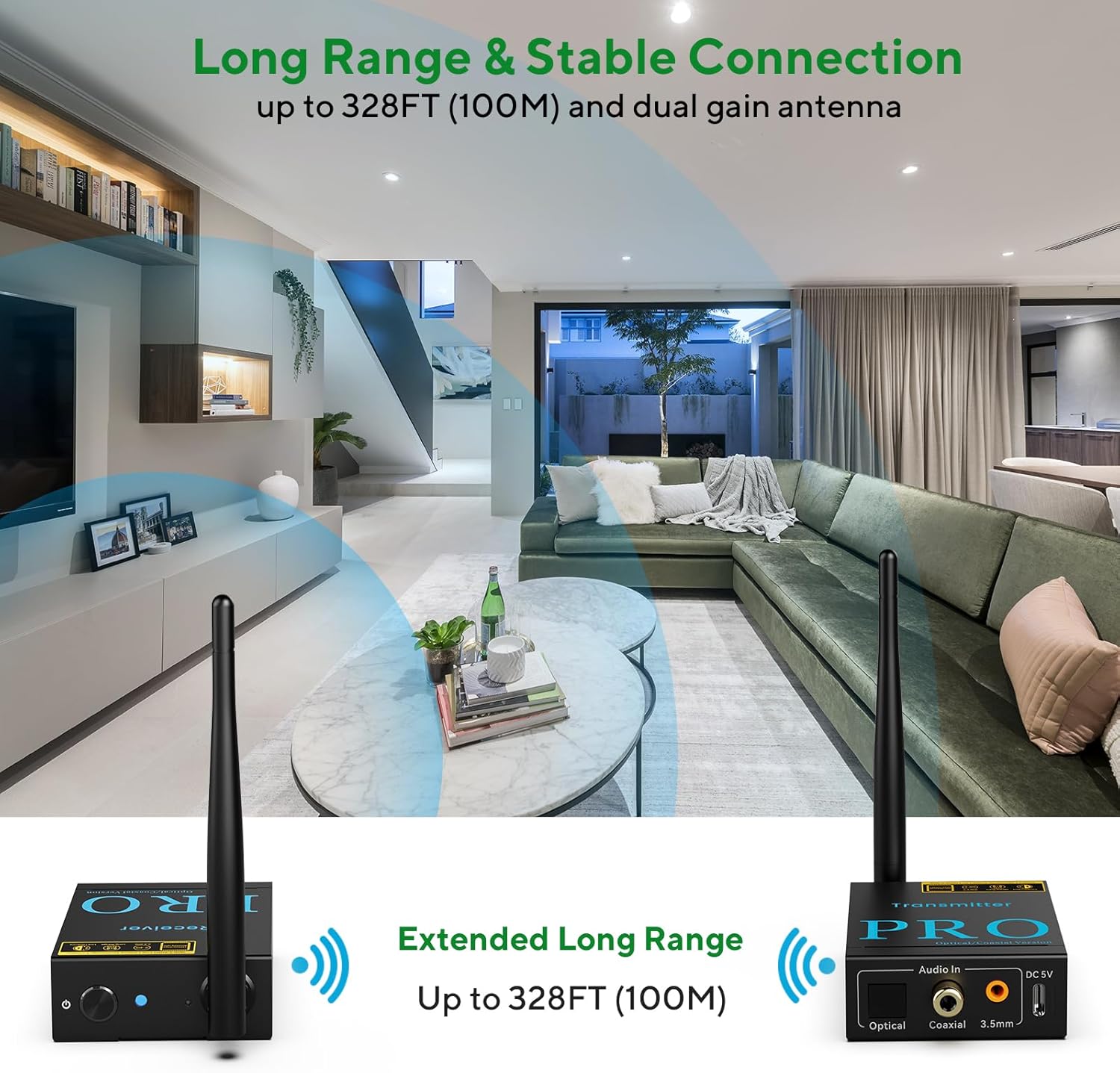
Image: An illustration demonstrating the extended long range capability of the 1Mii RT5066Pro, showing the transmitter and receiver units wirelessly connected across a large living space.
Itoju
- Ninu: Lo aṣọ rírọrùn tí ó gbẹ láti nu àwọn ẹ̀rọ náà. Má ṣe lo àwọn ohun èlò ìfọmọ́ omi tàbí aerosols.
- Ibi ipamọ: When not in use for extended periods, store the units in a cool, dry place away from direct sunlight.
- Eriali: Handle the antennas carefully to avoid bending or breaking them.
Laasigbotitusita
| Isoro | Owun to le Fa | Ojutu |
|---|---|---|
| Ko si idajade ohun |
|
|
| Static or distorted audio |
|
|
| RCA port not working (if using 3.5mm to RCA adapter) |
|
|
Awọn pato
| Ẹya ara ẹrọ | Ẹ̀kúnrẹ́rẹ́ |
|---|---|
| Nọmba awoṣe | RT5066Pro |
| Asopọmọra Technology | Alailowaya 2.4GHz |
| Ohun SampOṣuwọn ling | Titi di 24bit / 192kHz |
| Lairi | Kere ju 20ms |
| Wireless Range (Outdoor) | Titi de ẹsẹ mẹwa (328m) |
| Wireless Range (Indoor) | 100-165 ẹsẹ (30-50m) |
| Input Ports (Tx) | Optical, Coaxial, 3.5mm AUX (RCA compatible) |
| Output Ports (Rx) | Optical, Coaxial, 3.5mm AUX (RCA compatible) |
| Agbara Input | DC 5V (USB Iru-C) |
| Ọja Mefa | 3.43 x 2.76 x 0.98 inches (fun ẹyọkan) |
| Iwọn Nkan | 10.4 iwon (295 giramu) |
| Àwọ̀ | Dudu |
Atilẹyin ọja ati Support
1Mii products are designed for reliability and performance. For warranty information and technical support, please refer to the official 1Mii webojula tabi kan si wọn onibara iṣẹ taara. Tọju iwe-ẹri rira rẹ fun awọn ẹtọ atilẹyin ọja.
Fun iranlọwọ siwaju sii, o le ṣabẹwo si 1Mii Store on Amazon.