
1. Ifihan
Thank you for choosing the Diffuserlove Cloud Humidifier Rain Water Drip Diffuser. This device combines the functions of a humidifier, a rain sound generator, and a multi-color mood lamp to create a relaxing and comfortable environment. Please read this manual thoroughly before use to ensure proper operation and maintenance.
Alaye Aabo pataki
- Do not use with essential oils. This device is designed for water-based humidification and rain effects only.
- Jeki kuro ni arọwọto awọn ọmọde ati awọn ohun ọsin.
- Place the humidifier on a stable, flat surface away from direct sunlight or heat sources.
- Ensure the power cord is not damaged and is properly connected.
- Maṣe fi omi inu ipilẹ sinu omi tabi awọn omi miiran.
- Unplug the device before cleaning or refilling.
2. Package Awọn akoonu
Jẹrisi pe gbogbo awọn ohun kan wa ninu package:
- Diffuserlove Cloud Rain Humidifier Unit
- Remote Control (requires two AAA batteries, not included)
- Type-C Power Cord (plug not included)

Image: The Diffuserlove Cloud Humidifier unit with its remote control.
3. Ọja Ipariview
The Diffuserlove Cloud Humidifier features a unique mushroom-shaped design with integrated rain and mist functions, along with customizable lighting.

Image: The humidifier showing its approximate dimensions: 16cm (6.3 inches) wide and 25cm (9.95 inches) tall.
Awọn eroja:
- Mushroom Top: Houses the light and rain drip mechanism.
- Omi omi: Transparent section for water, capacity 300ml.
- Ẹka ipilẹ: Contains controls, power input, and ultrasonic mist generator.
- Awọn bọtini Iṣakoso: Located on the front of the base unit for light, power, and mist/rain functions.
- Isakoṣo latọna jijin: For convenient adjustment of settings.
4. Eto
- Ibi: Place the humidifier on a flat, stable surface. Ensure it is not near electronic devices sensitive to moisture.
- Yọ Àpáta kúrò: Gently lift the transparent water tank section from the base.
- Kun Omi Omi: Fill the water tank with clean tap water up to the MAX line. Do not overfill. Do not add essential oils.

Image: A hand pouring water into the humidifier's base reservoir.
- Ṣe atunto: Carefully place the transparent water tank back onto the base unit, ensuring it is securely seated.
- So agbara: Insert the Type-C power cord into the port on the back of the base unit, then connect the other end to a suitable USB power adapter (not included).

Image: A hand connecting the Type-C power cable to the humidifier's power port.
5. Isẹ
The humidifier can be operated using the touch buttons on the base unit or the included remote control.
5.1 Agbara Tan / Pa
- Bọtini Ẹrọ: Tẹ bọtini agbara (U) on the base unit to turn the device on or off.
- Isakoṣo latọna jijin: Tẹ bọtini 'ON' tabi 'PA' lori iṣakoso latọna jijin.
5.2 Rain & Mist Modes
The humidifier offers three combined rain and mist modes:
- Heavy Rain & Mist: Provides a strong rain sound and mist output.
- Light Rain & Mist: Offers a softer rain sound and mist output.
- Mist Only (No Rain): Produces mist without the rain sound effect.
Use the 'Rain' and 'Mist' buttons on the remote control to adjust these settings. The touch button on the device cycles through mist modes.

Image: Visual representation of the three rain and mist modes: Heavy, Light, and No Rain.
5.3 Awọn Iṣẹ́ Ìmọ́lẹ̀
The mushroom top features a 7-color LED mood light with various display options:
- Ipo Awọ ti o wa titi: Select a specific color from the remote control (R, G, B, or other color buttons).
- Cycling Color Mode: The light transitions through all 7 colors automatically.
- Ipo Imọlẹ Mimi: The selected or cycling color gently fades in and out.
- Atunse Imọlẹ: Use the sun icon buttons on the remote to increase or decrease light brightness.
The light button on the device cycles through light modes. The remote offers more precise control.
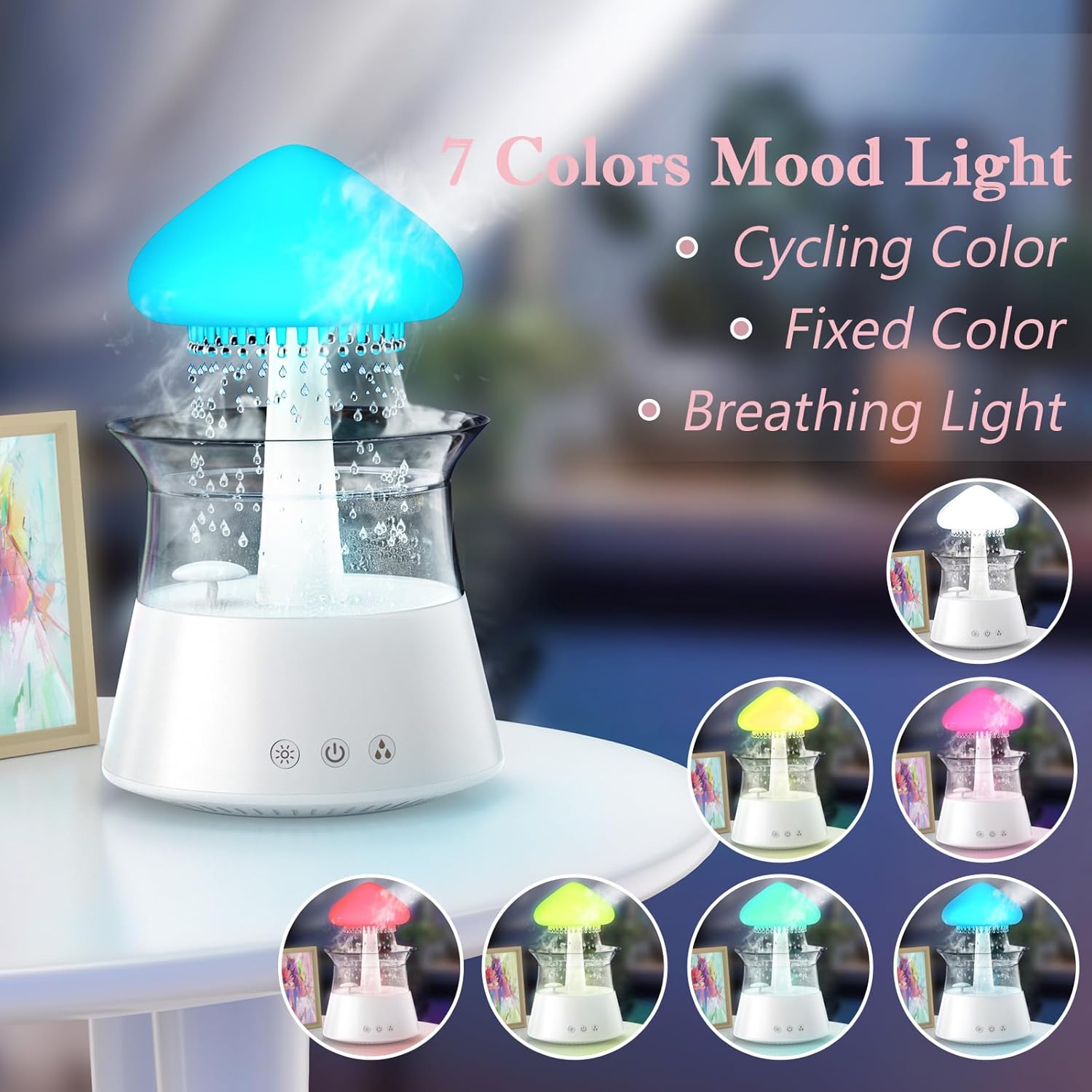
Image: The humidifier showcasing its 7-color mood light feature, including cycling, fixed, and breathing light modes.
5.4 Aago Eto
Set an automatic shut-off timer using the remote control:
- Press the '4H', '6H', or '8H' buttons on the remote to set the timer for 4, 6, or 8 hours respectively.
- The device will automatically turn off after the selected duration.

Image: A diagram illustrating the remote control with buttons for timer settings (4H, 6H, 8H), light colors, breathing light, rain volume, mist volume, and light brightness.
6. Itọju
Regular cleaning ensures optimal performance and extends the lifespan of your humidifier.
6.1 Daily Itọju
- Iyipada omi: Change the water in the tank daily to prevent bacterial growth.
- Parẹ́: Wipe the inside of the water tank and the mushroom top with a clean, damp asọ.
6.2 osẹ Cleaning
- Yọọ: Máa yọ ohun èlò ìfọwọ́sí omi kúrò kí o tó sọ ọ́ di mímọ́.
- Tutu: Carefully remove the mushroom top and the transparent water tank.
- Omi omi mimọ: Wash the water tank with mild soap and water. Rinse thoroughly to remove all soap residue.
- Ẹka Mimọ mimọ: Use a soft brush or cotton swab to gently clean the ultrasonic mist generator and any small openings in the base unit. Do not use abrasive cleaners.
- Fifọ: If mineral deposits accumulate, fill the tank with a mixture of equal parts white vinegar and water. Let it sit for 30 minutes, then rinse thoroughly.
- Gbẹ Gba gbogbo awọn ẹya laaye lati gbẹ patapata ṣaaju iṣakojọpọ.

Image: Hands gently lifting the transparent water tank from the humidifier's base, indicating how to access for cleaning or refilling.
7. Laasigbotitusita
If you encounter issues with your Diffuserlove Cloud Humidifier, refer to the following common problems and solutions:
| Isoro | Owun to le Fa | Ojutu |
|---|---|---|
| Ko si owusuwusu tabi iṣẹjade owusuwusu alailagbara | Ipele omi kekere Mineral buildup on mist generator Afẹfẹ afẹfẹ dina | Ṣafikun ojò omi Clean the mist generator as per maintenance instructions Ensure air vents are clear |
| No rain sound or weak rain sound | Ipele omi kekere Rain drip holes blocked Rain function not activated | Ṣafikun ojò omi Clean rain drip holes (a small wire may be needed, not included) Activate rain function via remote or device button |
| Imọlẹ ko ṣiṣẹ | Ina iṣẹ pa Ẹrọ ko ni agbara | Turn on light function via remote or device button Ensure device is plugged in and powered on |
| Isakoṣo latọna jijin ko dahun | Awọn batiri ti o ku Obstruction between remote and device | Rọpo awọn batiri AAA ni isakoṣo latọna jijin Ensure clear line of sight to the device's sensor |
| Omi jijo | Omi omi ko joko daradara Overfilled omi ojò Damage to unit | Re-seat the water tank correctly Maṣe fọwọsi laini MAX kọja Contact customer support if unit is damaged |
8. Awọn pato
Technical details for the Diffuserlove Cloud Humidifier (Model CH06):
- Orukọ awoṣe: CH06
- Brand: Diffuserlove
- Awọn iwọn ọja: 6.3"D x 6.3"W x 9.95"H (160 x 160 x 251 mm)
- Agbara Omi: 300ml
- Ibi ti ina elekitiriki ti nwa: Type-C electric, 5V 2A
- Wattage: 10 watt
- Voltage: 2.3E+2 Volts (Note: This value seems unusually high for a 5V USB device. Please refer to the product label for accurate voltagawọn ibeere e.)
- Ipo isẹ: Manual (via device buttons) / Remote Control
- Awọn ẹya pataki: Auto Shut Off, Night Light, Rain Sounds, Remote Control
- Imọlẹ: 7 colors LED night light
- Igbohunsafẹfẹ Ultrasonic: 2.4MHz
- Rain Sounds: White noise 30-50dB
- Ohun elo: ABS + PP ṣiṣu
- Ìwọ̀n Nkan: 1.87 iwon
- UPC: 663992505702

Image: The back of the product packaging displaying detailed product parameters and specifications.
9. Atilẹyin ọja ati Support
The Diffuserlove Cloud Humidifier (Model CH06) comes with a 12-osu atilẹyin ọja lati ọjọ ti o ra. Atilẹyin ọja yi ni wiwa awọn abawọn iṣelọpọ labẹ lilo deede.
For warranty claims, technical support, or any questions regarding your product, please contact Diffuserlove customer service through the retailer where the product was purchased or refer to the contact information provided on the product packaging.