
CAMMHD Z3
CAMMHD Z3 1440P Body Mounted Camera User Manual
Awoṣe: Z3
Ọrọ Iṣaaju
This manual provides detailed instructions for the operation and maintenance of your CAMMHD Z3 Body Mounted Camera. Please read this manual thoroughly before using the device to ensure proper function and to maximize its lifespan. The CAMMHD Z3 is designed for security and personal recording, featuring high-definition video, audio recording, and night vision capabilities.
Package Awọn akoonu
- CAMMHD Z3 Body Mounted Camera
- USB Data Cable
- Agekuru ejika
- Agekuru pada
- Afowoyi Olumulo (iwe-ipamọ yii)
- Built-in 3000mAh Battery (pre-installed)
Ṣeto
1. Gbigba agbara akọkọ
Before first use, fully charge the camera. Connect the camera to a power source using the provided USB data cable. The charging indicator will show the charging status and turn off or change color when fully charged. A full charge provides approximately 8-10 hours of continuous recording (with infrared off at 1080p resolution).
2. Síso Kámẹ́rà pọ̀ mọ́ra
Select either the shoulder clip or the back clip based on your preference. Attach the chosen clip to the camera and then secure it to your clothing or gear. The camera is lightweight, weighing only 0.2 pounds, ensuring comfortable wear.
3. Ibi iranti
The CAMMHD Z3 comes with built-in memory (available in 32GB, 64GB, or 128GB options). No external SD card is required for operation. Ensure sufficient storage is available for your recording needs.
Awọn ilana Iṣiṣẹ
1. Agbara Tan / Paa
- To power on: Press and hold the Power button until the screen illuminates.
- Lati pa agbara: Tẹ mọlẹ Bọtini Agbara titi ti ẹrọ yoo fi ku.
2. Gbigbasilẹ fidio
- From the main screen, press the Record button to start video recording. The recording indicator will activate.
- Tẹ bọtini igbasilẹ lẹẹkansi lati da gbigbasilẹ duro.
- The camera supports 1440P resolution for high-definition video capture and a 130° wide-angle view.
3. Gbigbasilẹ ohun
The camera records audio simultaneously with video. There may be an option in the settings to record audio only; refer to the on-screen menu for specific audio-only recording functions.
4. Night Iran
- The camera features built-in infrared lights for night vision.
- Night vision can be switched manually or set to automatic mode. In automatic mode, the camera senses light levels and adjusts accordingly.
- Effective night vision range is up to 50 feet.
5. Local Playback and File Isakoso

Aworan: File Viewing, Transmission, and Storage options for the CAMMHD Z3 Body Camera. This includes local playback on the device, connecting to a PC, connecting via OTG to a phone, and the internal memory card.
- The 2.0-inch display screen allows for one-key operation to playback and view gba silẹ files taara lori ẹrọ.
- Lilö kiri nipasẹ filenípa lílo àwọn bọ́tìnì ìṣàkóso kámẹ́rà náà.
6. Nsopọ si Kọmputa kan
- Connect the camera to a computer (Windows or macOS) using the provided USB data cable.
- The camera will appear as a removable storage device, allowing you to view, transfer, and manage recorded files.
7. Awọn ẹya ara ẹrọ ti ilọsiwaju
- Iwari išipopada: Activates recording when motion is detected. This feature can be enabled/disabled in the camera settings.
- Gbigbasilẹ Loop: When memory is full, the camera will automatically overwrite the oldest files. This ensures continuous recording without manual deletion.
- Independent Volume Adjustment: Adjust audio recording levels through the camera's menu.
- Extended Recording: The camera supports extended recording sessions, ideal for long shifts or continuous monitoring.
Itoju
- Ninu: Lo aṣọ rírọrùn tí ó gbẹ láti nu ara kamera náà. Fún lẹ́ńsì náà, lo aṣọ ìfọmọ́ lẹ́ńsì pàtàkì àti omi ìfọmọ́ lẹ́ńsì. Yẹra fún àwọn ohun èlò ìfọ́ tàbí àwọn kẹ́míkà líle.
- Ibi ipamọ: Tọju kamẹra naa ni itura, aye gbigbẹ kuro lati orun taara ati awọn iwọn otutu to gaju.
- Itọju Batiri: Láti mú kí batiri pẹ́ sí i, má ṣe jẹ́ kí batiri náà máa jáde nígbà gbogbo. Gba agbára kámẹ́rà náà déédéé, kódà bí a kò bá lò ó fún ìgbà pípẹ́.
- Omi Resistance: The camera is waterproof; however, avoid submerging it beyond its rated depth or for prolonged periods. Ensure all ports are securely closed before exposure to water.
Laasigbotitusita
- Kamẹra ko ṣiṣẹ:
- Rí i dájú pé batiri náà ti gba agbára tán pátápátá. So mọ́ orísun agbára kí o sì tún gbìyànjú lẹ́ẹ̀kan sí i.
- Tẹ mọlẹ bọtini Agbara fun o kere ju 5 awọn aaya.
- Recording issues (e.g., not recording, poor quality):
- Check available memory. If full, loop recording should overwrite old files, but ensure it's enabled.
- Rii daju pe lẹnsi naa jẹ mimọ ati ofe lati awọn idiwọ.
- Verify recording settings (resolution, night vision mode).
- Ko le sopọ si kọnputa:
- Rí i dájú pé okùn USB náà so mọ́ kámẹ́rà àti kọ̀ǹpútà náà dáadáa.
- Gbiyanju ibudo USB miiran tabi okun USB.
- Tun kamẹra ati kọmputa naa tun bẹrẹ.
- Ensure the camera is powered on when connected.
- Igbesi aye batiri kukuru:
- Rii daju pe kamẹra ti gba agbara ni kikun ṣaaju lilo.
- Continuous recording at higher resolutions or with infrared night vision enabled will consume more power.
- Check battery health; if significantly degraded, contact support.
Awọn pato
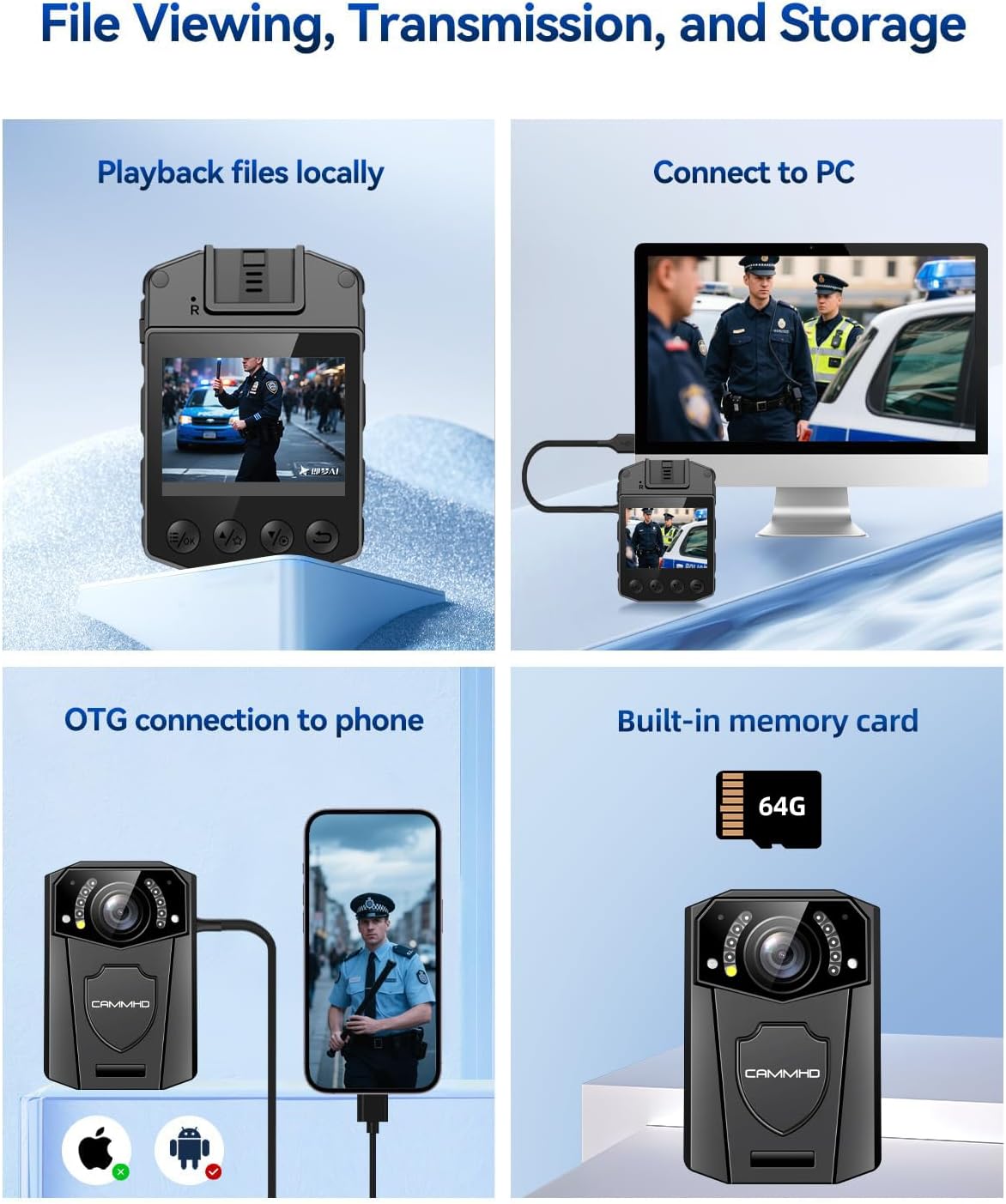
Image: The CAMMHD Z3 Body Camera demonstrating its versatile applications, including law enforcement, personal security, and recreational recording.
| Ẹya ara ẹrọ | Ẹ̀kúnrẹ́rẹ́ |
|---|---|
| Nọmba awoṣe | Z3 |
| Ipinnu fidio | 1440P (Effective), 1080p (Capture) |
| Iduro Aworan Ṣi | 48 MP |
| Lẹnsi Iru | 130 ° Wide-Igun |
| Iboju ifihan | 2.0 inches |
| Agbara Batiri | 3000mAh |
| Tesiwaju Gbigbasilẹ Time | 8-10 hours (1080p, IR off) |
| Ibiti Iran Night | Titi di 50 ẹsẹ |
| Asopọmọra | USB (for PC connection) |
| Iranti Iru | Built-in (32G, 64G, 128G options) |
| Awọn iwọn | 2.07 x 2.99 x 1.03 inches |
| Iwọn | 0.2 iwon |
| Ibamu System isẹ | Windows, macOS |
| File Ọna kika | MP4 |
Atilẹyin ọja ati Support
The CAMMHD Z3 Body Mounted Camera comes with a ọkan-odun atilẹyin ọja from the date of purchase. Additionally, CAMMHD provides s'aiye imọ support for this product. If you encounter any issues or have questions regarding your device, please contact CAMMHD customer service for assistance.
For technical support or warranty claims, please refer to the contact information provided on the CAMMHD official webojula tabi rẹ ra iwe.
Ask a question about this manual
Ask about setup, troubleshooting, compatibility, parts, safety, or missing instructions. Manuals+ will review the question and use this page’s manual context to help answer it.