
DOOGEE V30
DOOGEE V30 Rugged Smartphone User Manual
Your comprehensive guide to setting up, operating, and maintaining your DOOGEE V30.
1. Ọja Ipariview
The DOOGEE V30 is a rugged smartphone designed for durability and high performance, featuring advanced connectivity, a powerful camera system, and a long-lasting battery.
Key Awọn ẹya ara ẹrọ
- Built-in eSIM Global Network: Seamless global connectivity with support for multiple phone numbers and data plans.
- 6.6" FHD+ 120Hz Display: Immersive visual experience with a high refresh rate and vibrant colors.
- Kamẹra Mẹta 108MP AI: High-resolution main camera, 32MP front camera, 20MP night vision, and 8MP wide-angle/macro lens for versatile photography.
- 10800mAh Battery & 66W Fast Charging: Extended usage time with rapid charging capabilities.
- Ààbò Kíkún 360°: IP68/IP69K and MIL-STD-810H certified for water, dust, and drop resistance.
- MediaTek Dimensity 900 Processor: Efficient performance for demanding applications and multitasking.

Aworan: Iwaju ati sẹhin view of the DOOGEE V30 Rugged Smartphone, highlighting its robust design and camera module.
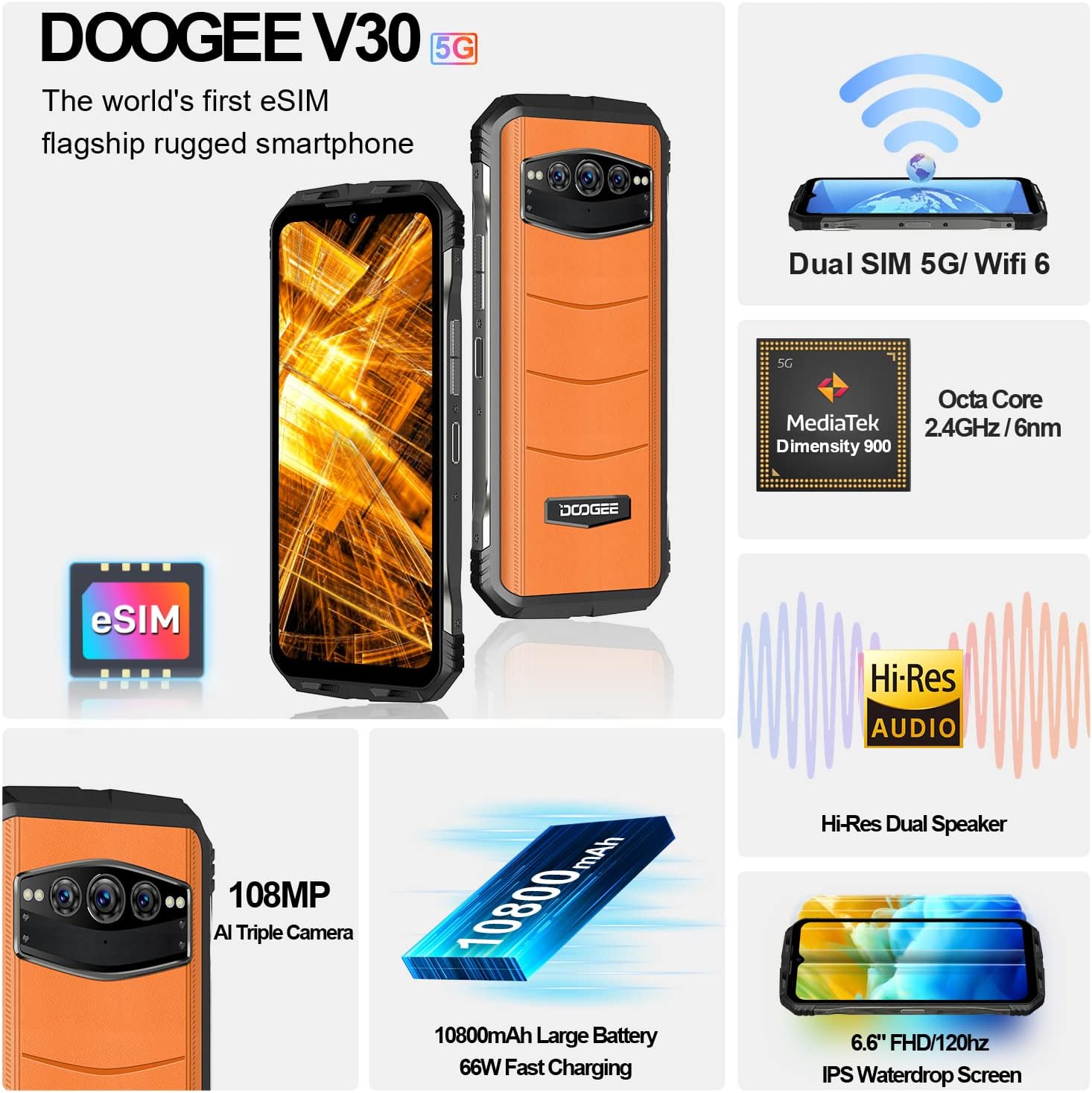
Aworan: An loriview of the DOOGEE V30's key features including eSIM, Dual SIM, MediaTek Dimensity 900, Hi-Res Audio, 108MP camera, 10800mAh battery, and 6.6" FHD+ display.
2. Eto Itọsọna
2.1 Kini ni Apoti
Ṣaaju ki o to bẹrẹ, rii daju pe gbogbo awọn eroja wa:
- DOOGEE V30 Unlocked Rugged Smartphone X1
- Iru C Cable x1
- 66W Fast Charger x1
- Anti-explosion film (pre-applied) x1
- Anti-explosion film x1 (spare)
2.2 SIM Card and eSIM Setup
The DOOGEE V30 supports both physical SIM cards and eSIM technology.
- Fifi sori kaadi SIM ti ara: Locate the SIM card tray on the side of the device. Use the provided SIM ejector tool to open the tray. Insert your Nano-SIM card(s) into the designated slots, ensuring the gold contacts face downwards. Close the tray securely.
- Mu eSIM ṣiṣẹ: The DOOGEE V30 features built-in eSIM functionality. To activate an eSIM profile, navigate to Settings > Network & internet > SIMs. You can typically scan a QR code provided by your carrier or manually enter activation details. This allows for multiple phone numbers and data plans without physical SIM cards.

Image: Illustration of the DOOGEE V30's eSIM toolkit interface, showing options to scan, choose from album, or input download for eSIM activation.
2.3 Gbigba agbara akọkọ
Before first use, it is recommended to fully charge your DOOGEE V30. Use the provided 66W Fast Charger and Type C cable for optimal charging speed.
- Connect the Type C cable to the charging port at the bottom of the phone.
- Connect the other end of the cable to the 66W Fast Charger.
- Pulọọgi ṣaja sinu iṣan agbara kan.
- The phone will indicate charging status on the screen. A full charge typically takes approximately 2 hours.

Image: Visual representation of the DOOGEE V30's 10800mAh battery capacity and 66W super fast charging, showing 50% charge in 30 minutes.
3. Operating Your DOOGEE V30
3.1 Ipilẹ Lilọ kiri
- Bọtini agbara: Located on the side, press and hold to power on/off or restart. A short press will lock/unlock the screen.
- Awọn bọtini iwọn didun: Ṣàtúnṣe iwọn didun media, iwọn didun ipe, ati iwọn didun ohun orin.
- Awọn afarajuwe iboju ifọwọkan: Swipe, tap, pinch-to-zoom for navigation and interaction with apps.
3.2 kamẹra Lilo
The DOOGEE V30 features a versatile camera system:
- 108MP AI akọkọ kamẹra: For high-resolution photos with enhanced detail.
- 32MP Front-facing Camera: Fun awọn selfie ati awọn ipe fidio ti o han gbangba.
- Kamera Iran Alẹ́ 20MP: Utilizes infrared sensors to capture images in low-light or complete darkness.
- 8MP Wide Angle & Macro Camera: For expansive landscape shots or detailed close-ups.
To access the camera, tap the Camera icon on your home screen or app drawer. Select different modes (Photo, Video, Night Vision, Portrait, Pro, etc.) from the interface.

Image: Comparison of 48MP and 108MP image quality, demonstrating the enhanced detail of the DOOGEE V30's 108MP AI main camera.
3.3 Ifihan ati Audio
Experience superior visuals and sound with your DOOGEE V30:
- 6.6" FHD+ Display: Enjoy crisp, clear visuals with 2408*1080 resolution and 401 PPI.
- Oṣuwọn Isọdọtun 120Hz: Provides smoother scrolling and more fluid animations, especially noticeable in gaming and video playback.
- Dual Hi-Res Speakers: Delivers rich, immersive audio for music, videos, and calls.

Image: Visual comparison of 90Hz and 120Hz refresh rates on the DOOGEE V30's 6.6" FHD+ display, highlighting the smoother experience of 120Hz, alongside the Hi-Res Audio logo.
3.4 išẹ
The DOOGEE V30 is powered by the MediaTek Dimensity 900 processor, ensuring efficient and responsive performance. It comes with 8GB of RAM, expandable virtually by an additional 7GB, and 256GB of internal storage, expandable up to 2TB via TF card.
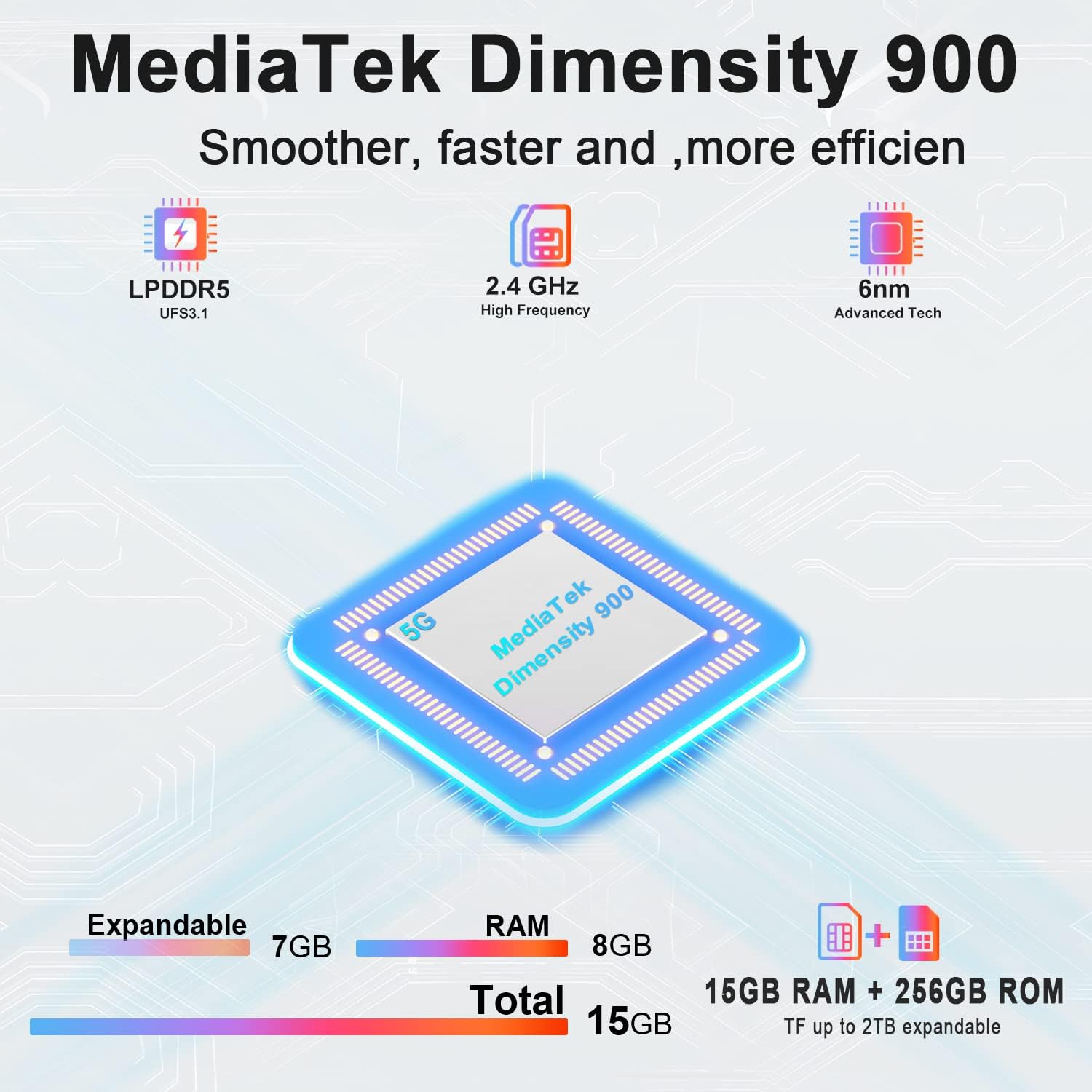
Image: Diagram illustrating the MediaTek Dimensity 900 processor's features, including LPDDR5, UFS3.1, 2.4 GHz high frequency, and 6nm advanced tech, along with the 15GB (8GB+7GB expandable) RAM and 256GB ROM.
4. Itọju ati Itọju
4.1 Awọn ẹya ara ẹrọ agbara
The DOOGEE V30 is built to withstand harsh environments, certified with:
- IP68: Water-resistant up to 1.5 meters for 30 minutes.
- IP69K: Ó ń kojú àwọn omi tí ó ní ìfúnpá gíga, tí ó ní ìwọ̀n otútù gíga.
- MIL-STD-810H: Military-grade standard for resistance against drops, shocks, and extreme temperatures.
While rugged, avoid intentional abuse or exposing the device to conditions beyond its specified limits.

Image: Demonstrations of the DOOGEE V30's ruggedness, including its MIL-STD-810H compliance, IP68 waterproof rating (30 minutes, 1.5m deep), and IP69K dustproof rating (360°).
4.2 Cleaning Awọn ilana
- Lo asọ, asọ ti ko ni lint lati nu iboju ati ara.
- Fun agidi smudges, die-die dampen awọn asọ pẹlu omi tabi a iboju regede.
- Yago fun lilo awọn kẹmika lile, awọn ohun elo abrasive, tabi afẹfẹ fisinuirindigbindigbin.
- Rí i dájú pé gbogbo àwọn èbúté gbẹ kí o tó gba agbára tàbí so àwọn ohun èlò pọ̀.
4.3 batiri Itọju
- Yago fun awọn iwọn otutu to gaju (gbona tabi tutu) nitori wọn le ba igbesi aye batiri jẹ.
- Do not fully discharge the battery regularly; try to keep it above 20%.
- Lo awọn ṣaja ati awọn okun waya atilẹba tabi ti a fọwọsi nikan.
5. Laasigbotitusita wọpọ oran
| Isoro | Owun to le Fa | Ojutu |
|---|---|---|
| Foonu ko ṣiṣẹ | Batiri kekere; Eto naa kuna | Gba agbara foonu naa fun o kere ju iṣẹju 10. Tẹ bọtini agbara naa ki o si di mu fun awọn aaya 10-15 lati fi agbara mu lati tun bẹrẹ. |
| Ko le sopọ si nẹtiwọki | SIM card issue; Network settings; Out of coverage | Ensure SIM card is correctly inserted. Check network settings (APN). Try restarting the phone. Contact your carrier. |
| Iboju ko dahun | Software glitch; App conflict | Force restart the phone. If issue persists, try factory reset (backup data first). |
| Batiri n ṣan ni kiakia | Background apps; High screen brightness; Poor signal | Close unused apps. Reduce screen brightness. Disable unnecessary features (GPS, Wi-Fi, Bluetooth). Check for app updates. |
| Camera issues (e.g., yellow filter) | Software bug; Specific camera mode | Clear camera app cache/data (Settings > Apps > Camera). Check for system updates. If a specific filter is applied, try changing camera modes or resetting camera settings. |
6. Imọ ni pato
| Ẹya ara ẹrọ | Sipesifikesonu |
|---|---|
| Orukọ awoṣe | V30 |
| Eto isesise | Android 12.0 |
| isise | MediaTek Dimensity 900 (Iyara Sipiyu 2.4 GHz) |
| Àgbo | 8 GB (expandable with 7GB virtual RAM) |
| Agbara Ibi ipamọ Iranti | 256 GB (expandable up to 2TB via TF card) |
| Iwon iboju | 6.58 Inches FHD+ (2408 x 1080 Resolution) |
| Oṣuwọn sọtun | 120Hz |
| Kamẹra akọkọ | 108MP AI Triple Camera (includes 20MP Night Vision, 8MP Wide Angle & Macro) |
| Kamẹra iwaju | 32MP |
| Batiri Power Rating | 10800 mAh |
| Akoko gbigba agbara | Approx. 2 Hours (with 66W Fast Charger) |
| Awọn ọna ẹrọ Asopọmọra | 5G Cellular, NFC, GPS, eSIM/Dual SIM |
| Alailowaya ti ngbe | Ṣiṣi silẹ fun Gbogbo Awọn Olukọni |
| Ọja Mefa | 6.67 x 3.2 x 0.63 inches |
| Iwọn Nkan | 9.5 iwon (270 Giramu) |
| Pataki Awọn ẹya ara ẹrọ | eSIM/Dual SIM 5G, 108MP AI Triple Camera, 8GB+7GB Virtual Expandable RAM, Dual Band Navigation(L1+L5), 120Hz Refresh Rate |
| Awọn Iwọn Agbara Iwaju | IP68 / IP69K, MIL-STD-810H |
7. Atilẹyin ọja ati Support
DOOGEE is committed to providing excellent customer service for your V30 Rugged Smartphone.
- Atilẹyin ọja: Your DOOGEE V30 comes with a 2-year free warranty from the date of purchase. This warranty covers manufacturing defects and malfunctions under normal use.
- Ẹri Owo Pada: Enjoy a 30-day money-back guarantee without reason, along with free returns.
- Atilẹyin Onibara: For any issues or inquiries, a professional support team is available 24/7 to assist you. Please refer to the contact information provided with your purchase or visit the official DOOGEE webojula fun support awọn aṣayan.
For more information and to explore other DOOGEE products, visit the Ile itaja DOOGEE lori Amazon.
Ask a question about this manual
Ask about setup, troubleshooting, compatibility, parts, safety, or missing instructions. Manuals+ will review the question and use this page’s manual context to help answer it.