
Thomson 43QA2S13

THOMSON 43-inch QLED Smart Android TV
Itọsọna olumulo
Model: 43QA2S13
1. Ọja Ipariview
The THOMSON 43-inch QLED Smart Android TV (Model 43QA2S13) offers an immersive viewing experience with its Ultra High Definition (UHD) display and QLED technology. Enjoy vibrant colors and sharp details, four times more precise than Full HD. This smart TV integrates Android TV, providing access to a vast library of applications, intelligent voice control with Google Assistant, and built-in Chromecast for seamless content streaming. Its sleek, frameless design on three sides ensures a captivating visual experience.

Aworan 1.1: Iwaju view of the THOMSON 43-inch QLED Smart Android TV, showcasing its vibrant display and slim bezels.
2. Eto Itọsọna
2.1 Ṣiṣii silẹ
Carefully remove the TV and all accessories from the packaging. Retain the packaging materials for future transport or storage.
2.2 Stand Assembly / Wall Mounting
Your TV comes with two stand feet for tabletop placement.
- Attach the stand feet to the designated slots at the bottom of the TV using the provided screws. Ensure they are securely fastened.
- For wall mounting, use a VESA compatible wall mount (200x200 mm, not included). Refer to the wall mount's instructions for proper installation.

Aworan 2.1: Iwaju view of the TV with its two stand feet attached.

Aworan 2.2: Pro ẹgbẹfile of the TV, showing its slim design.

Aworan 2.3: Diagram illustrating the TV's dimensions (102.3 cm width, 59 cm height with stand, 30 cm depth with stand).
2.3 Awọn ẹrọ Nsopọ
So awọn ẹrọ ita rẹ pọ mọ TV nipa lilo awọn ibudo ti o yẹ.
- HDMI (x3): Fun sisopọ awọn ẹrọ orin Blu-ray, awọn afaworanhan ere, awọn apoti ṣeto-oke, ati bẹbẹ lọ.
- USB (x2): Fun sisopọ awọn ẹrọ ibi ipamọ USB lati mu media ṣiṣẹ.
- Lan: Fun isopọ Ayelujara ti a firanṣẹ.
- Audio Out (Digital Optical): Fún sísopọ̀ mọ́ àwọn ohun èlò orin tàbí àwọn ètò eré ilé.
- Satellite (DVB-S2): For satellite antenna connection.
- Antenna (DVB-T2/C):): For terrestrial or cable antenna connection.
- AV Ninu: Fún sísopọ̀ àwọn ẹ̀rọ àtijọ́ pẹ̀lú àwọn ìjáde fídíò/ohun tí a ṣe àkópọ̀.
- Ìfọwọ́sowọ́pọ̀ tí a wọ́pọ̀ (CI+): For inserting a CAM module and smart card for encrypted channels.

Aworan 2.4: Ẹyìn view of the TV, illustrating the various input and output ports available for connectivity.
2.4 Ni ibẹrẹ Oṣo
After connecting the power cable and turning on the TV, follow the on-screen instructions for the initial setup:
- Yan ede ti o fẹ.
- Sopọ̀ mọ́ nẹ́tíwọ́ọ̀kì Wi-Fi rẹ tàbí lo ìsopọ̀ LAN oníwáyà.
- Wọlé pẹ̀lú àkọọ́lẹ̀ Google rẹ láti wọlé sí àwọn ẹ̀yà ara ẹrọ àti àwọn àpù Android TV.
- Scan for available TV channels using the built-in triple tuner.
- Gba awọn ofin ati ipo lati pari iṣeto naa.
3. Ṣiṣẹ TV rẹ
3.1 Iṣakoso latọna jijin
The ergonomic, backlit remote control provides easy navigation and access to all TV functions.
- Bọtini Iranlọwọ Google: Press to activate voice control and search for content, control smart home devices, or get information.
- Favorites Button: Customize this button to quickly launch your most-used application with a single click.
- The backlight ensures visibility even in dim lighting conditions.

Aworan 3.1: A user interacting with the TV using the Google Assistant voice command feature on the remote control.
3.2 Android TV Awọn ẹya ara ẹrọ
Your THOMSON TV runs on Android TV, offering a rich entertainment experience.
- Wiwọle App: Browse and download over 400,000 movies and TV shows from various applications available on the Google Play Store (e.g., Netflix, Prime Video, Disney+, YouTube, Spotify, Apple TV).
- Chromecast ti a ṣe sinu: Wirelessly stream movies, music, and videos from compatible devices (smartphones, tablets, computers) directly to your TV.
- Oluranlọwọ Google: Lo awọn pipaṣẹ ohun lati wa akoonu, ṣakoso ṣiṣiṣẹsẹhin, ṣatunṣe awọn eto, ati ṣakoso awọn ẹrọ ile ti o gbọn.

Aworan 3.2: The Android TV home screen, displaying popular streaming service applications and content recommendations.
3.3 Dídára Àwòrán àti Ohùn
Experience superior visual and audio performance with advanced technologies.
- Imọ-ẹrọ QLED: Delivers vibrant and realistic colors through Quantum Dots, enhancing brightness and color accuracy.
- Ipinu UHD 4K: Provides incredibly sharp and detailed images with 3840 x 2160 pixels.
- HDR (High Dynamic Range) with Dolby Vision: Improves contrast, brightness, and color reproduction for a more realistic and immersive picture, especially in scenes with extreme light and shadow.
- Dolby Audio: Creates a dynamic and immersive sound experience.
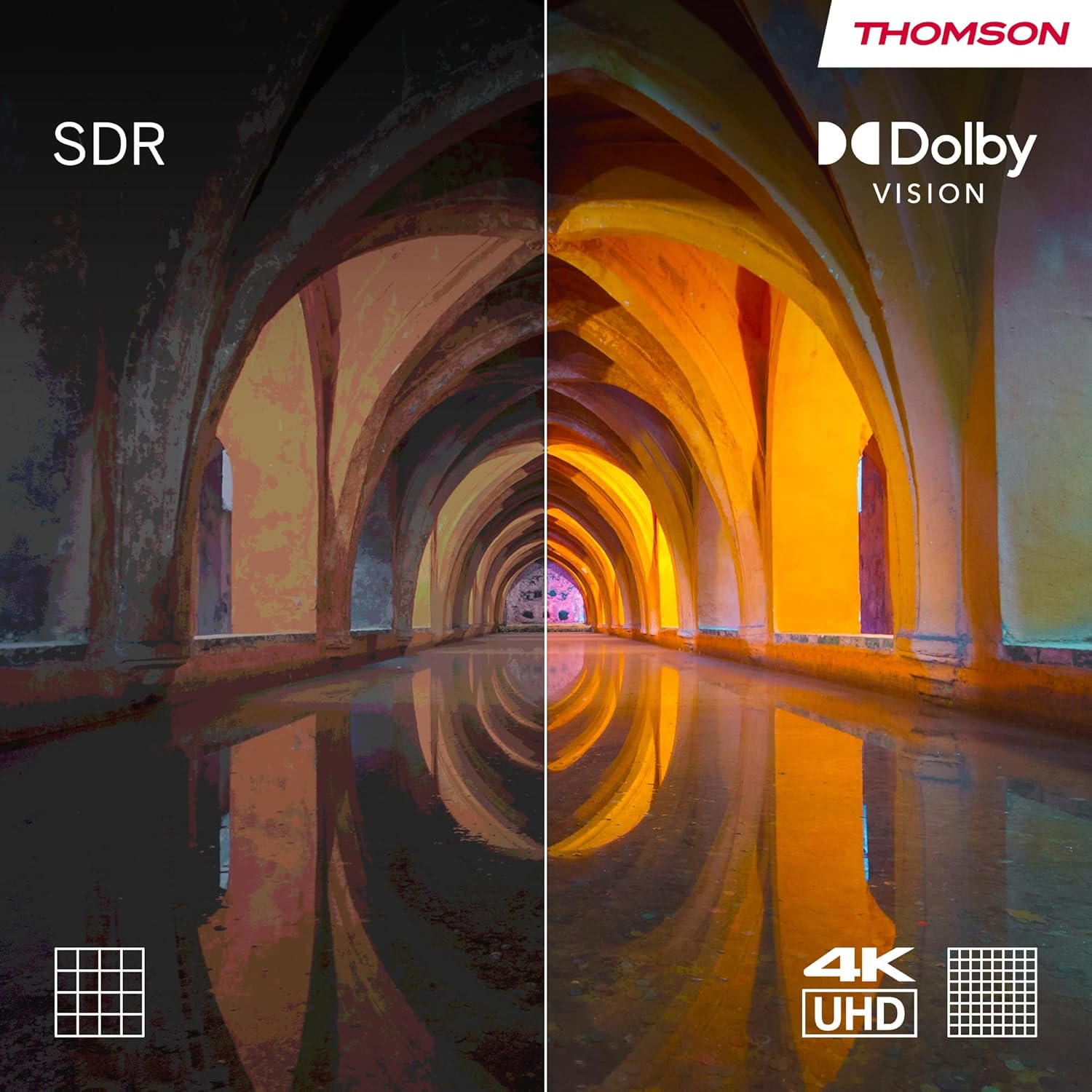
Aworan 3.3: Visual comparison demonstrating the enhanced contrast and color depth provided by Dolby Vision compared to standard dynamic range (SDR).

Aworan 3.4: An illustration depicting the immersive, multi-dimensional sound experience created by Dolby Atmos technology.
4. Itọju
Itọju to dara ṣe idaniloju igbesi aye gigun ati iṣẹ to dara julọ ti TV rẹ.
- Ninu iboju: Gently wipe the screen with a soft, lint-free cloth. For stubborn marks, use a screen-cleaning solution specifically designed for electronics, applied to the cloth, not directly to the screen.
- Ninu Igbimọ Ile-igbimọ: Lo asọ asọ ti o gbẹ lati nu minisita TV kuro. Yago fun lilo abrasive ose tabi epo.
- Awọn imudojuiwọn sọfitiwia: Ensure your TV's software is up-to-date. The TV will typically notify you of available updates. You can also check manually in the settings menu. Regular updates improve performance and security.
- Isakoso Agbara: For optimal performance and to clear temporary data, it is recommended to occasionally power off the TV completely (unplug from the wall) for a few minutes, especially if you notice any slowdowns.
5. Laasigbotitusita
Ti o ba pade awọn ọran pẹlu TV rẹ, tọka si awọn iṣoro ti o wọpọ ati awọn ojutu wọnyi.
| Isoro | Owun to le Fa / Solusan |
|---|---|
| Ko si Agbara |
|
| Ko si Aworan / Black Iboju |
|
| Ko si Ohun |
|
| Isakoṣo latọna jijin Ko Dahun |
|
| Awọn oran Asopọ nẹtiwọki |
|
For more complex issues, please refer to the support section or contact customer service.
6. Awọn pato
| Ẹya ara ẹrọ | Ẹ̀kúnrẹ́rẹ́ |
|---|---|
| Brand | Thomson |
| Nọmba awoṣe | 43QA2S13 |
| Iwon iboju | 43 inches (109 cm) |
| Ifihan ọna ẹrọ | QLED |
| Ipinnu | Awọn piksẹli 3840 x 2160 (4K UHD) |
| Oṣuwọn sọtun | 60 Hz |
| Eto isesise | Android TV |
| Pataki Awọn ẹya ara ẹrọ | Chromecast built-in, Google Assistant, HDR (Dolby Vision), Dolby Audio |
| Asopọmọra | 3x HDMI, 2x USB, Wi-Fi, Bluetooth, LAN, Digital Optical Audio Out, AV In |
| Tuner | DVB-C/S2/T2 (Triple Tuner) |
| Iṣeto ohun | 2.0 |
| Awọn iwọn Ọja (L x W x H) | 102.3 x 30 x 166.7 cm (pẹlu iduro) |
| Iwọn | 6.3 kilo |
| VESA Wall Mount Support | 200x200 mm (mount not included) |
6.1 Lilo Agbara
This product has an energy efficiency rating of F.

Aworan 6.1: EU Energy Label for the THOMSON 43QA2S13 TV, showing its energy efficiency class F.
For more details, visit the EPREL database: https://eprel.ec.europa.eu/qr/1471757
7. Atilẹyin ọja ati Support
Your THOMSON 43-inch QLED Smart Android TV comes with a comprehensive 3-odun olupese ká atilẹyin ọja, demonstrating our commitment to quality and reliability.
For technical assistance, troubleshooting beyond this manual, or warranty claims, please contact THOMSON customer support.
- Olupese: OSANVIEW GMBH
- Refer to the official THOMSON website or your purchase documentation for the most up-to-date contact information and support resources in your region.
Awọn iwe aṣẹ ti o jọmọ - 43QA2S13
 |
Ìwé Ìtọ́sọ́nà Olùlò Thomson Smart TV àti Ìwífún nípa Ààbò Ìwé ìtọ́ni tó péye nípa lílo àti ààbò fún Thomson Smart TVs, tó ní àwọn ètò tó wà, àwọn ẹ̀yà ara rẹ̀, àwọn ìlànà ààbò àti àwọn àṣàyàn wíwọlé. Ó ní Google TV, Dolby Vision, Dolby Atmos, Bluetooth, àti Wi-Fi. |
 |
Thomson Streaming Box 260 Pro მომხმარებლის სახელმძღვანელო Thomson Streaming Box 260 Pro-ს ინსტალაციისა და გამოყენების დეტალური სახელმძღვანელო, რომელიც მოიცავს უსაფრთხოების ინსტრუქციებს, დაყენებას, ფუნქციებს და ტექნიკურ მახასიათებლებს. |
 |
Thomson Streaming Dongle 150 Castors pẹ̀lú Google TV: Ìwé Ìtọ́sọ́nà Olùlò Ìwé ìtọ́ni tó péye fún Thomson Streaming Dongle 150 Cast, tó ní Google TV nínú. Ó ní àwọn ìtọ́ni ètò, àwọn ẹ̀yà ara ẹ̀rọ, ìtọ́sọ́nà ìṣàkóso láti ọ̀nà jíjìn, ìsopọ̀mọ́ra, àwọn ètò, ìṣòro, àti àwọn ìlànà ìmọ̀ ẹ̀rọ. |
 |
Thomson Smart TV z Android TV: Uporabniški priročnik Podroben uporabniški priročnik za Thomson Smart TV z operacijskim sistemom Android TV. Ta vodnik ponuja navodila za namestitev, začetno nastavitev, uporabo funkcij kot so Google Assistant, Chromecast, Google Play, ter reševanje pogostih težav. Vključuje tehnične specifikacije in licenčne informacije. |
 |
Manuale Utente Thomson Go Plus Pro Guida completa all'installazione, configurazione e utilizzo del Thomson Go Plus Pro Smart Display, incluse informazioni sulla sicurezza, specifiche tecniche e risoluzione dei problemi. |
 |
Thomson Android TV Benutzerhandbuch Umfassende Anleitung zur Installation, Einrichtung und Bedienung Ihres Thomson Android Smart TV. Enthält Sicherheitshinweise, technische Daten und Fehlerbehebung. |
Ask a question about this manual
Ask about setup, troubleshooting, compatibility, parts, safety, or missing instructions. Manuals+ will review the question and use this page’s manual context to help answer it.