
ikuai 11-Port 10Gbps
User Manual: ikuai 11-Port Hybrid USB Hub
Model: 11-Port 10Gbps
1. Ifihan
Thank you for choosing the ikuai 11-Port Hybrid USB Hub. This manual provides essential information for setting up, operating, and maintaining your device. This hub is designed to expand your device's connectivity, offering high-speed data transfer and efficient power delivery for a wide range of peripherals.
2. Ọja Ipariview
The ikuai 11-Port Hybrid USB Hub features a robust aluminum shell and a versatile 2-in-1 connector cable, supporting both USB-C/Thunderbolt 3/4 and USB-A ports for broad compatibility.

Figure 2.1: ikuai 11-Port Hybrid USB Hub and included accessories.
The hub is equipped with a variety of ports to meet your connectivity needs:
- 3x USB 3.2 Ports: N pese awọn iyara gbigbe data to 10Gbps.
- 7x USB 3.0 Ports: Pese awọn iyara gbigbe data to 5Gbps.
- 1x USB-C 20W Power Delivery (PD) Charging Port: Dedicated for rapid charging of compatible devices.

Nọmba 2.2: Alaye view of the 11-Port Hybrid USB Hub's various ports and their specifications.
Each USB 3.0 port features an individual ON/OFF switch and an LED indicator for convenient control over connected devices.

Figure 2.3: Individual ON/OFF switches and LED indicators for each USB 3.0 port.
3. Awọn ẹya ara ẹrọ
- Gbigbe Data Iyara Giga: The hub includes 3x USB 3.2 ports (up to 10Gbps) and 7x USB 3.0 ports (up to 5Gbps), enabling rapid transfer of large files and smooth operation of high-bandwidth devices.
- 2-in-1 Connector Cable: The integrated cable supports both USB-C/Thunderbolt 3/4 and USB-A host ports, ensuring broad compatibility with various laptops, desktop computers, tablets, and smartphones.
- 20W Agbara Ifijiṣẹ (PD) Gbigba agbara: The dedicated USB-C PD charging port delivers rapid charging for your devices, minimizing downtime and keeping your essential electronics powered.
- Ibamu gbooro: Compatible with a broad range of operating systems and devices, including PC, Laptop, MacBook Pro/Air, Mac mini, iMac Pro, iPad Pro, iPad mini, and more. OTG function is supported.
- Reliable & Robust 60W Power Adapter: The included universal DC 12V/5A power adapter ensures stable data transfers and optimal performance for all connected devices, even under heavy load.

Figure 3.1: Illustration of SuperSpeed data transfer capabilities.
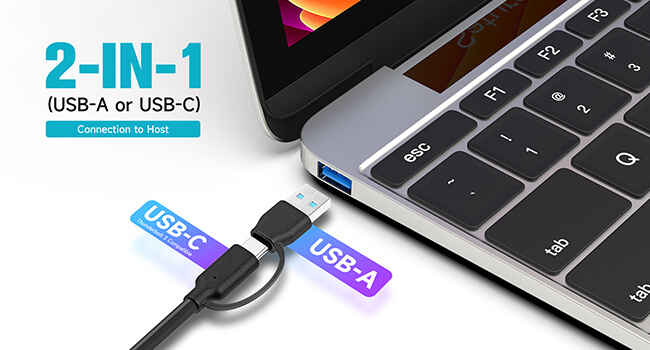
Figure 3.2: The versatile 2-in-1 connector for USB-A and USB-C host devices.

Figure 3.3: Fast charging a smartphone using the 20W USB-C PD port.

Figure 3.4: The hub's extensive compatibility with systems and devices.
4. Eto
- Sopọ Adapter Agbara: Plug the provided 60W (DC 12V/5A) power adapter into the DC IN port on the hub and then into a wall outlet.
- Sopọ si Ẹrọ Gbalejo: Use the integrated 2-in-1 connector cable to connect the hub to your computer's (PC, Laptop, MacBook, etc.) available USB-A or USB-C/Thunderbolt port.
- Awọn Agbeegbe Sopọ: Plug your USB devices (external hard drives, flash drives, keyboards, mice, printers, etc.) into the available USB 3.2 (10Gbps) or USB 3.0 (5Gbps) ports on the hub.
- Awọn ẹrọ gbigba agbara: For rapid charging, connect your compatible device (e.g., smartphone, tablet) to the dedicated USB-C 20W PD charging port.
The hub is plug-and-play and does not require any driver installation for most operating systems.
5. Awọn ilana Iṣiṣẹ
- Iṣakoso Ibudo Ẹyọkan: Each USB 3.0 port has an individual ON/OFF switch.
- To turn a port ON: Briefly press the button next to the desired port. The blue LED indicator will light up.
- To turn a port OFF: Press and hold the button next to the desired port for approximately 2 seconds. The blue LED indicator will turn off.
- Gbigbe Data: Connect your USB storage devices to any of the USB 3.2 or USB 3.0 ports for high-speed data transfer. Ensure your host device and connected peripherals support the respective USB standards for optimal performance.
- Ifijiṣẹ Agbara: The USB-C PD port is solely for charging and does not support data transfer. Use this port to quickly charge devices that support USB Power Delivery.
- Iṣẹ ṣiṣe OTG: The hub supports On-The-Go (OTG) functionality, allowing compatible smartphones and tablets to act as a host for USB peripherals.
6. Itọju
- Ninu: Lo asọ ti o rọ, ti o gbẹ lati nu oju oju ibudo naa. Yago fun lilo awọn olutọpa olomi tabi awọn aerosols, nitori wọn le ba ẹrọ jẹ.
- Ibi ipamọ: Nigbati o ko ba wa ni lilo, tọju ibudo naa ni itura, aye gbigbẹ kuro lati orun taara ati awọn iwọn otutu to gaju.
- Mimu: Handle the hub with care. Avoid dropping it or subjecting it to strong impacts, which could damage internal components.
- Ge asopọ agbara: Always disconnect the power adapter from the wall outlet when the hub is not in use for extended periods.
7. Laasigbotitusita
| Isoro | Owun to le Fa | Ojutu |
|---|---|---|
| Kọ̀ǹpútà kò dá Hub mọ̀. | Loose connection, faulty cable, or insufficient power. | Ensure the 2-in-1 connector cable is securely plugged into both the hub and the host computer. Try a different USB port on your computer. Verify the power adapter is connected and functioning. |
| Connected devices are not working. | Port is off, device requires more power than available, or faulty device. | Check if the individual ON/OFF switch for the specific port is activated (LED lit). Ensure the hub's power adapter is connected. Try connecting the device directly to your computer to rule out a faulty device. |
| Awọn iyara gbigbe data lọra. | Device connected to a lower speed port, or high power consumption. | Ensure high-speed devices are connected to the USB 3.2 (10Gbps) ports. Disconnect other high-power consumption devices if not in use. |
| USB-C PD port not charging. | Device not compatible with PD, or cable issue. | Verify your device supports USB Power Delivery. Try a different USB-C charging cable. Ensure the power adapter is securely connected to the hub. |
8. Awọn pato
- Brand: ikuai
- Awoṣe: 11-Port 10Gbps
- Awọn iwọn ọja: 7.7 x 1.5 x 0.9 inches
- Ìwọ̀n Nkan: 1.1 iwon
- Àwọ̀: Dudu
- Ni wiwo Hardware: Thunderbolt, USB, USB 3.0
- Awọn ẹya pataki: 2-in-1 Connector to PC or Laptop, 20W PD Charging Port, Powered Hybrid USB Hub
- Awọn ẹrọ ibaramu: Desktops, Gaming Consoles, Hard Disk Drive, Laptops, Tablets
- Adapter agbara: DC 12V/5A (60W)
- Ọjọ Akọkọ Wa: Oṣu Kẹjọ Ọjọ 16, Ọdun 2023
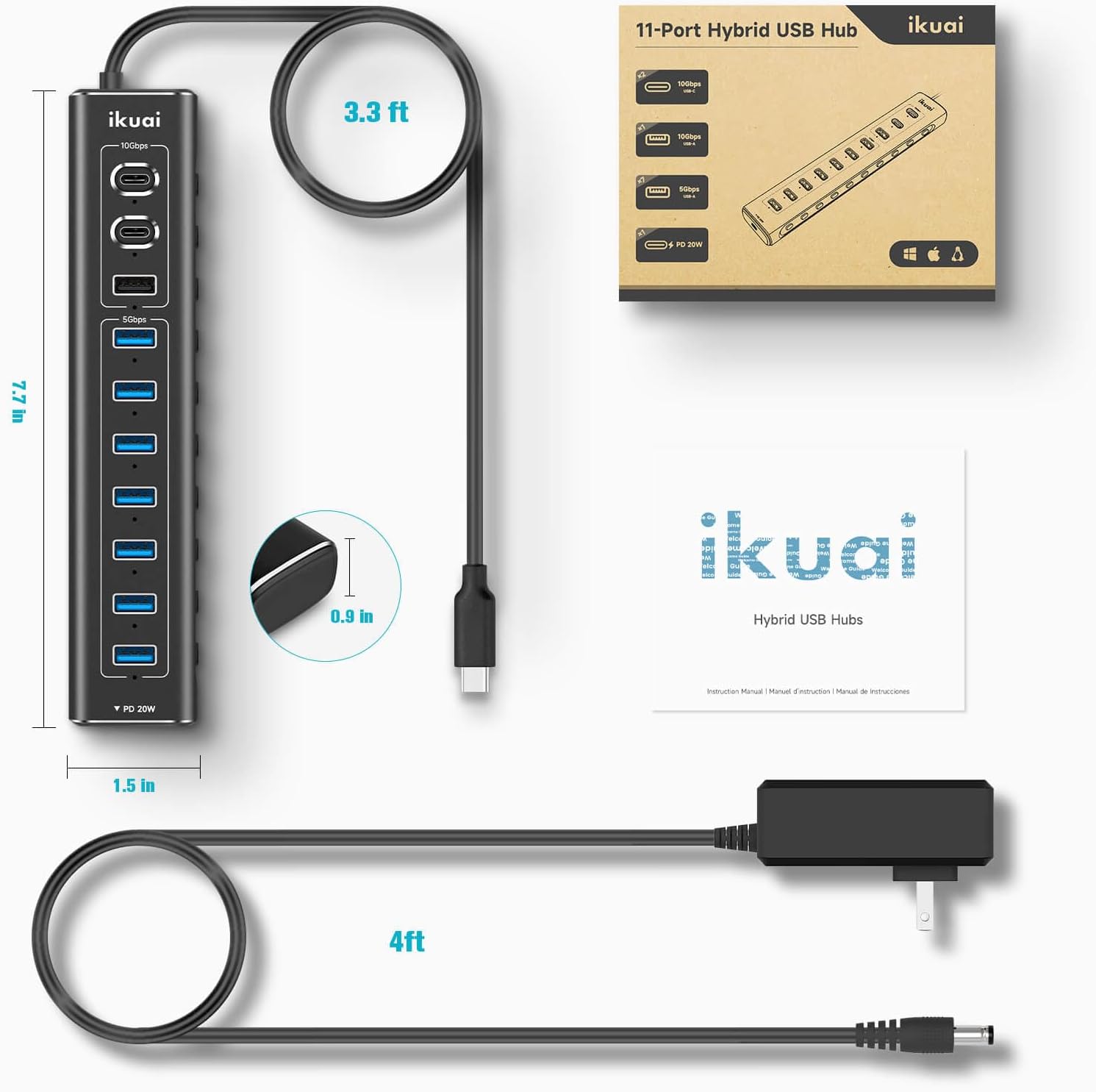
Figure 8.1: Product dimensions and cable lengths.
9. Atilẹyin ọja ati Support
ikuai products are designed for reliability and performance. For any questions, technical support, or warranty inquiries, please contact ikuai customer service through the retailer's platform or the official ikuai webojula. Jọwọ ṣe idaduro ẹri rira rẹ fun awọn iṣeduro atilẹyin ọja.
Fun alaye diẹ sii, ṣabẹwo si osise naa ikuai Store.
Ask a question about this manual
Ask about setup, troubleshooting, compatibility, parts, safety, or missing instructions. Manuals+ will review the question and use this page’s manual context to help answer it.