
Ọrọ Iṣaaju
The Aoyygg SVP-916 Adjustable Over and Under Voltage Protector is an advanced electrical safety device designed to safeguard your household appliances and electrical circuits from voltage fluctuations and overcurrent conditions. This intelligent relay automatically monitors the circuit's voltage and current, disconnecting the power supply when values exceed or fall below pre-set safe limits, and reconnecting it once conditions normalize. It features a dual LED display for real-time monitoring of voltage and current, also functioning as a voltmeter and ammeter.
Alaye Aabo
WARNING: Electrical shock hazard. Installation and maintenance should only be performed by qualified personnel. Always disconnect power before working with electrical circuits.
- Rí i dájú pé a fi ẹ̀rọ náà sí ibi tí ó gbẹ, tí kò sí ọrinrin àti oòrùn tààrà.
- Verify that the rated current of the protector matches or exceeds the maximum current draw of the connected load.
- Do not attempt to open or repair the device. Refer to qualified service personnel.
- Rii daju didasilẹ to dara ni ibamu si awọn koodu itanna agbegbe.
Package Awọn akoonu
- 1x Aoyygg SVP-916 Over Under Voltage Protection Relay
Ọja Awọn ẹya ara ẹrọ
- Idaabobo Aifọwọyi: Automatically cuts off power during over-voltage, labẹ-voltage, or over-current conditions.
- Ìgbàpadà Àìfọwọ́sowọ́pọ̀: Restores power automatically once voltage and current return to normal ranges.
- Awọn paramita ti o le ṣatunṣe: User-adjustable over-voltage, labẹ-voltage, àti àwọn ààlà tí ó ju agbára lọ.
- Ifihan LED meji: Real-time display of current voltage and current, also functions as a voltmeter and ammeter.
- Ikole ti o tọ: Made from high-quality ABS and electronic components for long service life.
- Fifi sori Rọrun: Designed for convenient installation in electrical panels.
Awọn pato
| Paramita | Iye |
|---|---|
| Ohun elo | ABS, Electronic Components |
| Oṣuwọn Voltage | 220V AC |
| Optional Rated Current | 40A/63A/80A |
| Lori VoltagIbiti e (A le ṣatunṣe) | 221V - 300V |
| Labẹ VoltagIbiti e (A le ṣatunṣe) | 150V - 219V |
| Over Current Range (Adjustable) | 1A - 40A (for 40A model) |
| Awọn iwọn (Itosi.) | 85mm (H) x 35mm (W) x 65mm (D) |
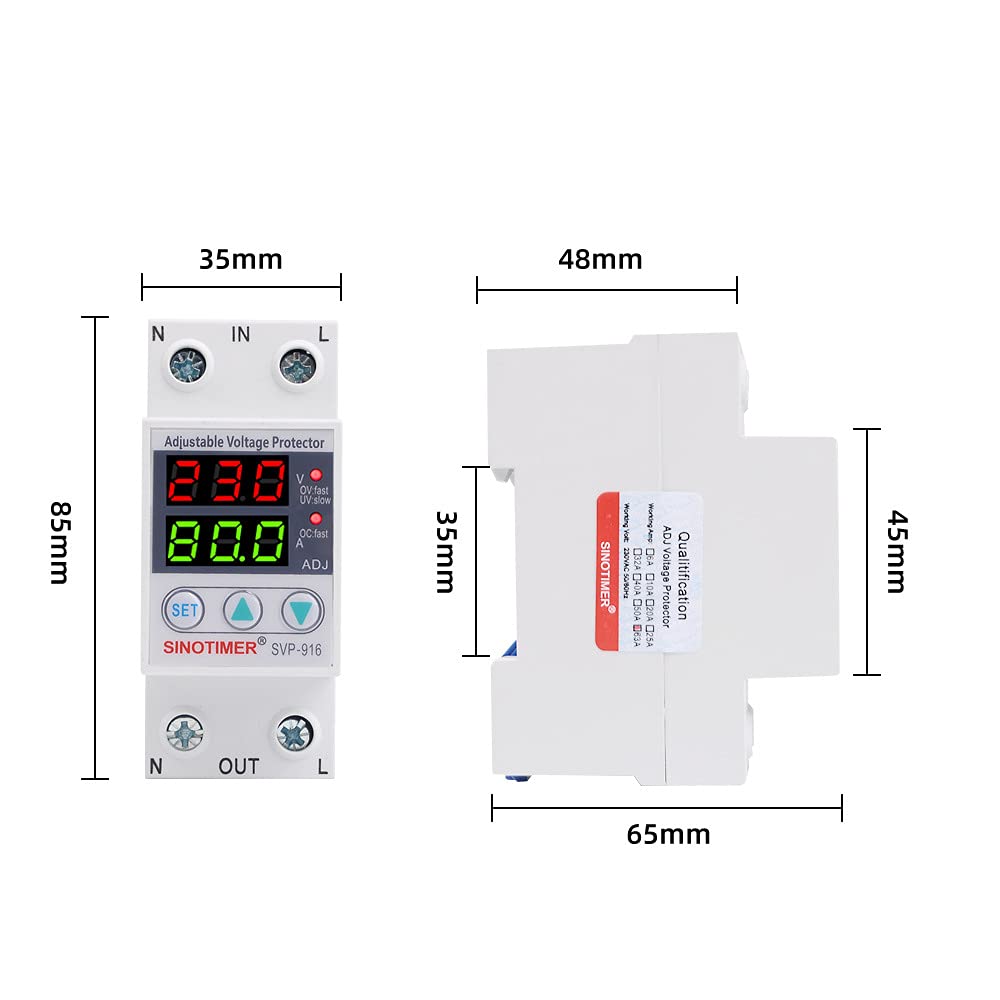
Image: Approximate dimensions of the Aoyygg SVP-916 voltage protector, showing height, width, and depth measurements.
Eto ati fifi sori
The SVP-916 is designed for DIN rail mounting. Follow these steps for proper installation:
- Ge asopọ agbara: Before starting any electrical work, ensure that the main power supply to the circuit is completely disconnected at the circuit breaker or fuse box.
- Iṣagbesori: Mount the SVP-916 protector onto a standard DIN rail within your electrical panel.
- Asopọmọra: Connect the incoming live (L) and neutral (N) wires to the "IN" terminals of the protector. Connect the outgoing live (L) and neutral (N) wires to the "OUT" terminals, leading to your protected load. Refer to the wiring diagram below for correct connections.
- Awọn isopọ to ni aabo: Ensure all wire connections are tight and secure to prevent loose contacts and potential hazards.
- Ìmúdájú: Double-check all wiring against the diagram before restoring power.

Image: Wiring diagram illustrating the connection of the SVP-916 voltage protector between a power switch and an air circuit breaker, showing live (L) and neutral (N) connections.
Awọn ilana Iṣiṣẹ
Once installed and power is restored, the SVP-916 will display the current voltage and current on its dual LED screens. The device is pre-set with default protection values, but these can be adjusted.
Adjusting Protection Parameters:
- Tẹ awọn SET button to enter the setting mode. The display will show the current setting for over-voltage (OV).
- Lo awọn ▲ (Soke) ati ▼ (Down) buttons to adjust the desired over-voltage threshold (221V-300V).
- Tẹ SET again to cycle through other parameters: under-voltage (UV), and over-current (OC).
- Adjust each parameter using the ▲ ati ▼ buttons to your desired values.
- After setting all parameters, press and hold the SET button for a few seconds until the display returns to normal operation mode, saving your settings.
Understanding the Display Indicators:
- Top LED Display: Shows current voltage (V).
- Bottom LED Display: Shows current ampigba (A).
- OV.fast/OV.slow: Tọkasi lori-voltage protection status (fast or slow trip).
- UV.fast/UV.slow: Indicates under-voltage protection status (fast or slow trip).
- OC.fast/OC.slow: Indicates over-current protection status (fast or slow trip).
- ADJ: Illuminates when in adjustment mode.

Aworan: Iwaju view of the Aoyygg SVP-916 voltage protector, highlighting the dual LED display showing voltage and current, along with the SET, Up, and Down adjustment buttons.
Itoju
The SVP-916 voltage protector is designed for minimal maintenance. However, periodic checks can ensure its optimal performance and longevity:
- Ayewo wiwo: Máa ṣe àyẹ̀wò ẹ̀rọ náà lẹ́ẹ̀kọ̀ọ̀kan fún àwọn àmì ìbàjẹ́ ara, àwọ̀ ara tí ó yí padà, tàbí àwọn ìsopọ̀ tí ó bàjẹ́.
- Ninu: If necessary, gently wipe the exterior of the device with a dry, soft cloth. Do not use abrasive cleaners or solvents. Ensure power is disconnected before cleaning.
- Ṣayẹwo Asopọmọra: Annually, or if you suspect an issue, verify that all terminal connections are still tight and secure.
- Awọn ipo Ayika: Rii daju pe agbegbe iṣẹ wa laarin iwọn otutu pato ati awọn sakani ọriniinitutu.
Laasigbotitusita
| Isoro | Owun to le Fa | Ojutu |
|---|---|---|
| Ẹrọ naa ko ṣiṣẹ. | Kò sí agbára ìtẹ̀síwájú; àwọn wáyà tí kò tọ́; àṣìṣe inú. | Ṣàyẹ̀wò ìpèsè agbára àkọ́kọ́. Ṣàyẹ̀wò àwọn ìsopọ̀ wáyà. Tí ìṣòro náà bá ń bá a lọ, kan sí olùrànlọ́wọ́. |
| Awọn ẹrọ n lọ nigbagbogbo. | Voltage/current outside set limits; sensitive settings. | Check actual line voltage/current. Adjust protection thresholds if necessary, ensuring they are within safe operating parameters for your appliances. |
| Display shows erratic readings. | Loose connections; electrical interference. | Ensure all wiring connections are secure. Check for strong electromagnetic interference sources nearby. |
| Kò le ṣàtúnṣe àwọn ètò. | Not in setting mode; buttons not responding. | Press the SET button to enter setting mode. If buttons are unresponsive, power cycle the device. |
Atilẹyin ọja ati Support
Aoyygg products are manufactured to high-quality standards. For warranty information and technical support, please refer to the documentation provided with your purchase or contact Aoyygg customer service through their official webaaye tabi alagbata lati ọdọ ẹniti o ti ra ọja naa.
Please have your model number (SVP-916) and purchase date ready when contacting support.