
OTOFIX OTOFIX D1 MAX Scanner
Ìwé Ìtọ́sọ́nà Olùlò OTOFIX D1 Max OE fún Àyẹ̀wò Àyẹ̀wò Ètò Kíkún
Model: OTOFIX D1 MAX Scanner
1. Ifihan
The OTOFIX D1 Max is a new generation, high-end diagnostic scan tool designed for comprehensive vehicle diagnostics and maintenance. It combines powerful hardware with advanced software capabilities to provide efficient and accurate solutions for automotive professionals and enthusiasts. This manual provides detailed instructions on setting up, operating, maintaining, and troubleshooting your OTOFIX D1 Max scanner.

Image 1.1: OTOFIX D1 Max Scanner highlighting key features like 40+ HOT Services, 3X Faster AutoScan 2.0, All System Diagnostics, Guided Functions, Blu. Wireless VCI, Wide Coverage, CAN-FD & DoIP, 2015+ Renault SGW, and 2 Years Update.
2. Ọja Ipariview
The OTOFIX D1 Max is engineered for superior performance and user experience. It features a robust design and advanced functionalities to meet the demands of modern vehicle diagnostics.
2.1 Key Awọn ẹya ara ẹrọ
- ECU Coding & Offline ECU Programming: Advanced capabilities for vehicle personalization and module replacement.
- Àwọn Iṣẹ́ Ìsìn 40+: Comprehensive maintenance solutions including Oil Reset, TPMS Reset, Injector Coding, Suspension, and Throttle Matching.
- Active Test (Bi-directional Control): Perform component tests by sending commands to vehicle modules.
- OE-level Full-System Diagnostics: Access all available vehicle systems for reading/clearing codes, live data, and ECU information.
- Ibori Ọkọ nla: Supports over 80 brands and 10,000+ vehicle models (1996-2025).
- Advanced Protocols: Supports DoIP & CAN FD for faster data transfer and diagnostics.
- Secure Gateway Access: Compatible with FCA (2018+) and Renault (2015+) SGW-equipped vehicles.
- Auto VIN 2.0: Faster and more accurate automatic vehicle identification.
- Ìtẹ̀wé Wi-Fi: Wirelessly print diagnostic reports.
- 2-Years Free Software Updates: Ensures continuous functionality and compatibility.
2.2 Hardware pato
| Ẹya ara ẹrọ | Sipesifikesonu |
|---|---|
| Eto isesise | Android 11.0 |
| isise | Qualcomm CPU (4-Core, 1.8GHz) |
| Iranti | 4GB Ramu + 128GB Ibi ipamọ |
| Iwon iboju | 10.4 inches |
| Ipinnu iboju | 2000*1200 |
| Agbara Batiri | 7250mAh litiumu Iwon |
| Awọn kamẹra | Front: 5MP; Rear: 8MP |
| Lower Computer (VCI) | V1 |
| Awọn iwọn | 10.8 x 7.1 x 0.7 inches |
| Iwọn Nkan | 9.79 iwon |

Image 2.1: Visual representation of OTOFIX D1 Max hardware specifications including Android 11.0, 4-Core CPU, 10.4" screen, 4+128G memory, 7250mAh battery, and 5MP/8MP cameras.
3. Eto
3.1 Unboxing ati Ibẹrẹ ayewo
Upon receiving your OTOFIX D1 Max, carefully open the packaging and inspect all components for any signs of damage. Ensure all items listed in the package contents are present.
3.2 Package Awọn akoonu
The OTOFIX D1 Max package typically includes the following items:
- 1x OTOFIX D1 MAX Diagnostic Tool (Tablet)
- 1x OTOFIX V1 (Vehicle Communication Interface)
- 1x okun USB-C
- 1x AC/DC Power Adapter (12V)
- 1x Apo Gbigbe
- 1x Packing List
- 1x Awọn ọna itọkasi Itọsọna
- 1x Soft Cloth
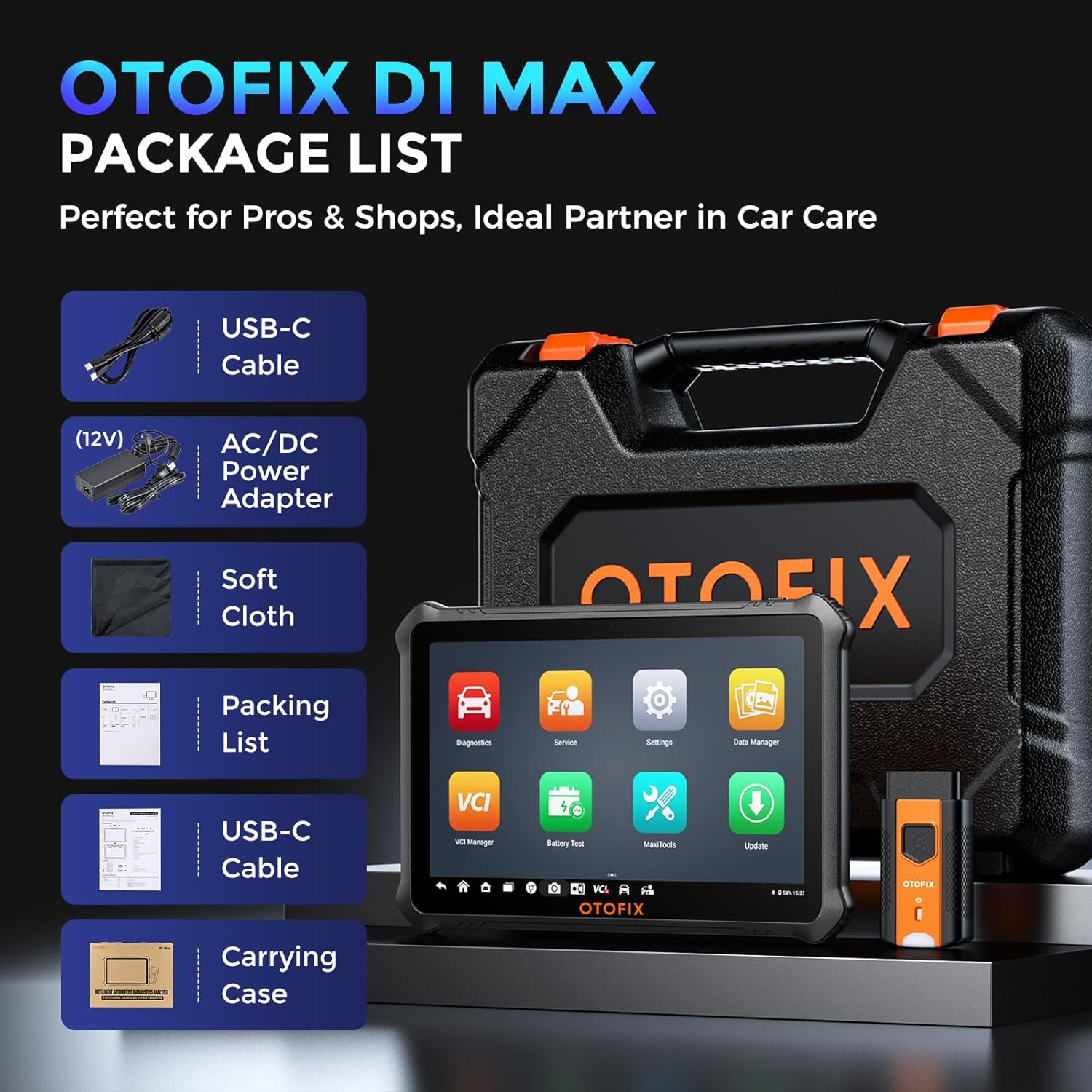
Image 3.1: Contents of the OTOFIX D1 Max package, including the tablet, VCI, cables, power adapter, carrying case, and documentation.
3.3 Agbara Lori ati Iṣeto ni ibẹrẹ
- Connect the AC/DC Power Adapter to the OTOFIX D1 Max tablet and a power outlet to ensure the device is charged.
- Press and hold the Power button until the OTOFIX logo appears on the screen.
- Follow the on-screen prompts to complete the initial setup, including language selection, Wi-Fi connection, and time zone settings.
- Register your device and activate the software updates as prompted. A stable internet connection is required for this step.
4. Isẹ
4.1 Nsopọ si Ọkọ ayọkẹlẹ kan
- Wa ibudo OBDII ti ọkọ ayọkẹlẹ naa, ti o maa n wa labẹ dasibodu ni ẹgbẹ awakọ naa.
- Plug the OTOFIX V1 (VCI) into the vehicle's OBDII port. The VCI's indicator light should illuminate.
- On the OTOFIX D1 Max tablet, ensure Bluetooth is enabled and the VCI is paired. The VCI Manager application can be used to manage the connection.
- Yí iná ọkọ̀ náà sí ipò ON (ẹ̀rọ náà ti pa).
4.2 Ìwádìí Gbogbo Ètò OE-Ipele Gbogbo
The OTOFIX D1 Max can access all available vehicle systems to perform comprehensive diagnostics.
- Ka Awọn koodu: Gba awọn koodu iṣoro ayẹwo (DTCs) lati gbogbo awọn modulu iṣakoso.
- Ko awọn koodu kuro: Pa àwọn DTC rẹ́ lẹ́yìn tí a bá ti parí àtúnṣe.
- Data Live: View real-time data streams from various sensors and components.
- Di data fireemu: Capture a snapshot of vehicle conditions when a DTC was set.
- Alaye ECU: Retrieve detailed information about the Electronic Control Unit.

Image 4.1: Illustration of OE-level all system diagnostics, showing the scanner connected to a car and accessing various systems like Engine, ABS, EPB, and BMS.
4.3 ECU Coding & Advanced Functions
This function allows for advanced vehicle customization and module adaptation.
- Ifaminsi lori ayelujara: Automatically retrieves coding values from the server for quick and precise operations. Compatible with brands like Volkswagen, Audi, Skoda, Peugeot, Citroen, DS, Porsche, BMW, Mini, Nissan, Infiniti, Nissan GT-R, Renault.
- Kóòdù Àìsí-à ...ẹ̀rọ: Allows manual input of coding values, suitable for experts and a wider range of car builds. Compatible with Ford, Ford AU, Ford EU, Subaru, Land Rover, Jaguar, Peugeot, Citroen, DS, Volkswagen, Volkswagen Brazil, Audi, Skoda, Volkswagen CV.
- Offline ECU Programming: Replace or update ECU software, program new blank ECUs, and fix software-controlled issues. Compatible with Ford, Ford AU, Ford EU, Land Rover, Jaguar, Opel, Vauxhall.
- Ti ara ẹni: Customize vehicle settings such as disabling auto start-stop, activating daytime running lights, and other comfort functions.
- V.A.G Guided Functions: Provides step-by-step procedures for complex diagnostics on Volkswagen, Audi, Skoda, and VW vehicles, skipping channel numbers and security codes.

Aworan 4.2: alaye view of ECU Programming & Coding capabilities, including open/close functions, module matching, personalization, parameter reset, and fixing complex issues.
5. Awọn iṣẹ iṣẹ
The OTOFIX D1 Max offers over 40 maintenance and service functions to address common vehicle issues.
- Atunto epo: Tun eto igbesi aye epo pada lẹhin iyipada epo.
- Atunto TPMS: Reset tire pressure monitoring system.
- SAS Reset: Ṣe àtúnṣe sensọ igun idari.
- EPB Tunto: Reset the electronic parking brake pads after replacement.
- Ibamu pẹlu Throttle: Relearn the throttle body position.
- BMS Tunto: Ṣe ìforúkọsílẹ̀ bátìrì tuntun lẹ́yìn ìyípadà.
- Ẹjẹ ABS: Perform ABS brake bleeding to get a firm brake pad.
- Idaduro: Adjust the vehicle height sensor for suspension calibration.
- Clutch Learning: Perform clutch adaptation.

Aworan 5.1: Pariview of 40+ service functions, including Oil Reset, SAS Reset, EPB Reset, Injector Coding, Throttle, BMS Reset, and Clutch Learning.
6. Iṣakoso itọsọna meji (Idanwo ti n ṣiṣẹ)
The bi-directional control feature allows the scanner to send commands to vehicle modules to perform specific tests, narrowing down diagnostic scope and quickly pinpointing problems.
- Activate components like windows, headlights, wipers, sunroof, radiator fans, fuel pump, A/C clutch, etc.
- Test the functionality of various actuators without disassembling the vehicle.
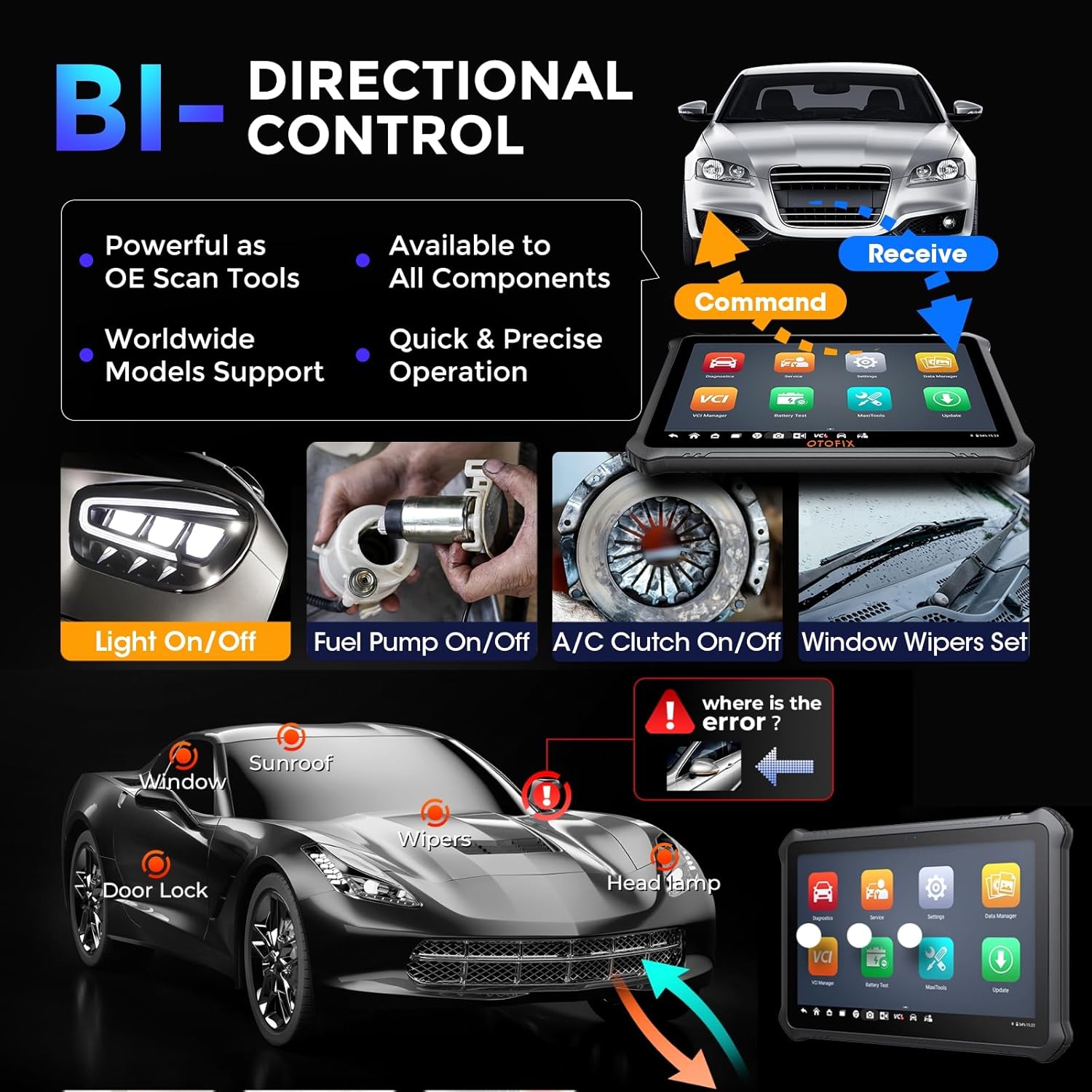
Image 6.1: Demonstration of bi-directional control, showing the scanner sending commands to vehicle components like lights, fuel pump, A/C clutch, and window wipers.
7. Itọju
Proper maintenance ensures the longevity and optimal performance of your OTOFIX D1 Max scanner.
- Awọn imudojuiwọn sọfitiwia: Regularly update the software to ensure compatibility with new vehicle models and access to the latest features. The device includes 2 years of free updates.
- Ninu: Lo asọ, damp Aṣọ láti nu ibojú àti ara tábìlì náà. Yẹra fún àwọn ohun ìfọmọ́ tàbí àwọn ohun olómi.
- Ibi ipamọ: Tọ́jú ẹ̀rọ náà sínú àpò ìrù rẹ̀ ní ibi gbígbẹ tí ó tutù tí kò sì ní jẹ́ kí a lò ó. Yẹra fún ooru gbígbóná janjan.
- Itọju Batiri: Gba agbara batiri nigbagbogbo, paapaa ti ẹrọ naa ko ba si ni lilo nigbagbogbo, lati ṣetọju ilera batiri.
- Ìtọ́jú VCI: Keep the VCI clean and free from debris. Ensure the OBDII connector pins are not bent or damaged.

Image 7.1: Information regarding the included 2 years of free software updates, emphasizing cost savings.
8. Laasigbotitusita
This section provides solutions to common issues you might encounter with your OTOFIX D1 Max scanner.
8.1 Wọpọ Oran ati Solusan
- Ẹrọ ko ṣiṣẹ lori: Ensure the battery is charged. Connect the power adapter and try again. If the issue persists, contact support.
- VCI ko sopọ mọ: Check if the VCI is securely plugged into the vehicle's OBDII port. Ensure Bluetooth is enabled on the tablet and the VCI is paired. Restart both the tablet and the VCI.
- Unable to communicate with vehicle: Verify the vehicle's ignition is ON. Check the OBDII port for power. Ensure the vehicle model and year are correctly selected in the software. Try a different vehicle to rule out vehicle-specific issues.
- Dídì sọ́fítíwà/iṣẹ́ dídín lọ́ra: Close unnecessary applications. Clear cache if available in settings. Ensure sufficient storage space. Perform a software update if available.
- Iṣẹ́ àyẹ̀wò kò ṣiṣẹ́: Ensure the vehicle supports the specific function. Some advanced functions may require specific vehicle conditions or procedures. Refer to the on-screen guided functions or vehicle service manual.
8.2 Olubasọrọ Support
If you encounter issues that cannot be resolved using the troubleshooting steps above, please contact OTOFIX customer support. Provide detailed information about the problem, including any error messages, vehicle details, and steps taken to troubleshoot.
Imeeli: otofixaftersales-amz@outlook.com
Support is available Monday-Friday 9:00 AM - 6:00 PM EST, with 24/7 support available via email.
9. Awọn pato
Detailed technical specifications for the OTOFIX D1 Max scanner.
| Iwa | Iye |
|---|---|
| Brand | OTOFIX |
| Awoṣe | OTOFIX D1 MAX Scanner |
| Eto isesise | Android 11.0 |
| isise | 4-Core, 1.8GHz |
| Iranti | 4GB Ramu, 128GB ipamọ |
| Iwon iboju | 10.4 inches |
| Ipinnu iboju | 2000 x 1200 |
| Batiri | 7250mAh Litiumu Ion (pẹlu) |
| Awọn kamẹra | Front: 5MP; Rear: 8MP |
| Asopọmọra | Wi-Fi, Bluetooth |
| Awọn Ilana atilẹyin | DoIP, CAN FD, J2534 (with VCI) |
| Awọn iwọn (L x W x H) | 10.8 x 7.1 x 0.7 inches |
| Iwọn Nkan | 9.79 iwon |
| Olupese Apá Number | OTOFIX D1 MAX Scanner |
| UPC | 850051166305 |
10. Atilẹyin ọja ati Support
OTOFIX provides comprehensive support and warranty for the D1 Max scanner.
- Atilẹyin ọja: 1-year quality undertaking.
- Awọn imudojuiwọn sọfitiwia: 2 years of free software updates included.
- Iranlọwọ Imọ-ẹrọ: Lifetime technical assistance is available.
- Ilana Pada: Hassle-free return policy within 30 days.
- Iṣẹ onibara: 24/7 support via email.
For any inquiries or support needs, please contact OTOFIX at otofixaftersales-amz@outlook.com.
Ask a question about this manual
Ask about setup, troubleshooting, compatibility, parts, safety, or missing instructions. Manuals+ will review the question and use this page’s manual context to help answer it.