
SUNOL T16
SUNOL T16 Wireless Earbuds User Manual
Model: T16 | Brand: SUNOL
Ọrọ Iṣaaju
The SUNOL T16 Wireless Earbuds are designed for an active lifestyle, offering high-quality audio and convenient features. These Bluetooth headphones provide up to 48 hours of total playtime with their wireless charging case, featuring an LED power display for easy monitoring. With earhooks for a secure fit and water resistance, they are ideal for workouts, running, and various sports activities. The built-in microphone with noise cancellation ensures clear calls.
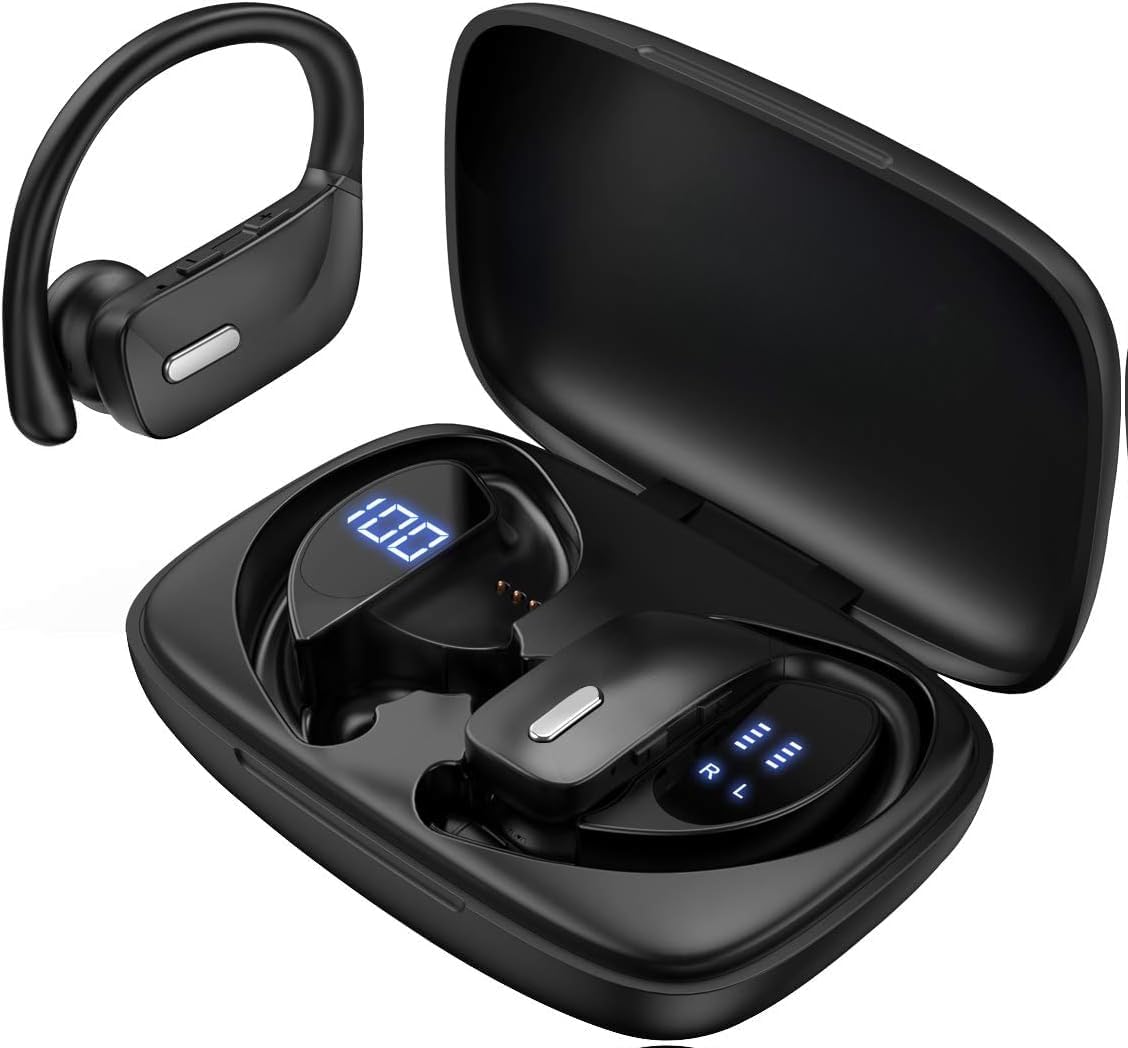
Image: The SUNOL T16 Wireless Earbuds with their charging case, showcasing the digital display.
Ohun ti o wa ninu Apoti
- SUNOL T16 Wireless Earbuds (Left and Right)
- Alailowaya Ngba agbara Case
- USB-C Ngba agbara Cable
- 3 Pairs of Ear Caps (S, M, L)
Awọn pato
| Ẹya ara ẹrọ | Ẹ̀kúnrẹ́rẹ́ |
|---|---|
| Orukọ awoṣe | T16 |
| Asopọmọra Technology | Ailokun (Bluetooth 5.0) |
| Bluetooth Ibiti | Ti o to awọn mita 10 |
| Igbesi aye batiri Earbud | Titi di wakati 9 (agbara ẹyọkan) |
| Lapapọ akoko ere (pẹlu ọran) | Titi di wakati 48 |
| Awọn aṣayan gbigba agbara | Wireless Charging, USB-C Charging |
| Audio Driver Iwon | 10 mm Awakọ Awakọ |
| Iwọn Igbohunsafẹfẹ | 20 Hz - 20,000 Hz |
| Ipalara | 40 ohm |
| Ariwo Iṣakoso | Ti nṣiṣe lọwọ Noise Ifagile |
| Gbohungbohun | Built-in with Noise Cancellation |
| Omi Resistance Ipele | Omi sooro |
| Iṣakoso Iru | Touch, Siri Voice Assistant |
| Gbigbe Eti | Lórí Etí (pẹ̀lú ìkọ́ etí) |
| Ohun elo | Acrylonitrile Butadiene Styrene (ABS) |
| Iwọn Nkan | 6.4 iwon |

Image: Diagram illustrating the premium stereo sound quality and Bluetooth 5.0 connectivity.
Ṣeto
1. Ngba agbara si Earbuds ati Ọran
The charging case supports both wireless charging and USB-C charging. The impressive 9 hours of listening time on a single charge for the sports wireless headphones are extended to a remarkable 48 hours of play time with the included charging case.
- To charge the case, connect a USB-C cable to the charging port on the back of the case, or place it on a compatible wireless charging pad.
- Place the earbuds into their respective slots in the charging case. Ensure they are properly seated to initiate charging.
- The smart LED digital power display on the case will show the remaining battery level of the charging case and the individual earbuds. The percentage in the middle indicates the case battery, while the battery icons on both sides indicate the left and right earbud charge levels.

Image: The charging case with its LED display showing battery levels for the case and individual earbuds.

Image: Diagram illustrating the battery life: 15 min charge for 1 hour playtime, 8 hours on a single charge, and 48 hours with the charging case.
2. Sisopọ pẹlu Ẹrọ Rẹ
Awọn agbekọri agbekọri tẹ ipo isọpọ wọle laifọwọyi nigbati o ba yọkuro lati apoti gbigba agbara.
- Ṣii apoti gbigba agbara ki o yọ awọn agbekọri mejeeji kuro. Wọn yoo tan-an laifọwọyi ati tẹ ipo sisopọ pọ sii.
- On your mobile device (smartphone, tablet, laptop), go to the Bluetooth settings.
- Wa fun available devices. You should see "T16" or "S8" appear in the list.
- Select "T16" or "S8" to connect. Once connected, you will hear an audio prompt, and the earbuds will be ready for use.

Image: Diagram showing the earbuds automatically pairing with mobile phones.
Video: Official product video demonstrating the unboxing, charging, and Bluetooth pairing process of the SUNOL T16 Wireless Earbuds.
Awọn ilana Iṣiṣẹ
Wọ awọn Earbuds
The T16 earbuds are designed with flexible earhooks to ensure a secure and comfortable fit, especially during physical activity. Gently place the earbud into your ear canal and adjust the earhook over the top of your ear until it feels stable and comfortable. Experiment with the included ear cap sizes to find the best fit for optimal sound and comfort.

Image: A woman wearing the SUNOL T16 earbuds, demonstrating their secure fit for an active lifestyle.
Awọn iṣakoso ifọwọkan
The earbuds feature physical buttons for precise control of various functions:
- Ṣiṣẹ/Daduro: Fọwọ ba ẹyọkan lori boya agbekọri.
- Dahun/Fi ipe duro: Fọwọ́ kan ṣoṣo lórí ètí méjì nígbà ìpè.
- Orin ti tẹlẹ: Fọwọ ba lẹẹmeji lori agbekọri osi.
- Orin to nbọ: Fọwọ ba lẹẹmeji lori agbekọri ọtun.
- Active Voice Assistant (Siri): Fọwọ ba meteta lori boya agbekọri.
- Kọ awọn ipe: Tẹ gun lori boya agbekọri lakoko ipe ti nwọle.
- Atunse iwọn didun: Use the dedicated volume buttons on the earbuds.

Image: Diagram detailing the physical buttons and their functions, including volume adjustment, play/pause, call management, and voice assistant activation.
Itoju
To ensure the longevity and optimal performance of your SUNOL T16 Wireless Earbuds, follow these maintenance guidelines:
- Ninu: Regularly wipe the earbuds and charging case with a soft, dry, lint-free cloth. For ear caps, remove them and clean with mild soap and water, then dry thoroughly before reattaching.
- Omi Resistance: While water-resistant, avoid submerging the earbuds in water. Dry them completely if they get wet from sweat or rain before placing them back in the charging case.
- Ibi ipamọ: Nigbati o ko ba si ni lilo, tọju awọn afikọti sinu apoti gbigba agbara wọn lati daabobo wọn ki o jẹ ki wọn gba agbara. Tọju ni itura, ibi gbigbẹ kuro lati awọn iwọn otutu to gaju.
- Ibudo gbigba agbara: Jẹ́ kí ibudo gbigba agbara USB-C wà láìsí eruku àti ìdọ̀tí.
Laasigbotitusita
If you encounter any issues with your SUNOL T16 Wireless Earbuds, try the following solutions:
- Awọn agbekọri ti ko so pọ:
- Rii daju pe awọn agbekọri mejeeji ti gba agbara ni kikun.
- Place earbuds back in the case, close the lid, wait a few seconds, then open and remove them again.
- Pa Bluetooth lori ẹrọ rẹ, lẹhinna tan-an pada ki o gbiyanju lati so pọ lẹẹkansi.
- Forget or remove the "T16" or "S8" device from your device's Bluetooth list and attempt to pair from scratch.
- Agbekọri agbekọri kan ṣoṣo ti n ṣiṣẹ:
- Rii daju pe awọn agbekọri mejeeji ti gba agbara.
- Place both earbuds back in the charging case, close the lid, and then take them out simultaneously.
- If the issue persists, try resetting the earbuds.
- Didara ohun ti ko dara:
- Ensure the earbuds are properly seated in your ears and the ear caps provide a good seal.
- Check the audio source device's volume and sound settings.
- Move closer to your connected device to avoid interference or exceeding the 10-meter Bluetooth range.
- Clean the earbud speakers and ear caps.
- Apo gbigba agbara ko gba agbara:
- Rii daju pe okun USB-C ti sopọ ni aabo si ọran mejeeji ati orisun agbara.
- Gbiyanju okun USB-C ti o yatọ tabi ohun ti nmu badọgba agbara.
- Ti o ba nlo gbigba agbara alailowaya, rii daju pe ọran wa ni ipo ti o tọ lori paadi gbigba agbara.
Atilẹyin ọja ati Support
For warranty information and technical support, please refer to the documentation included with your product or contact the manufacturer, SUNOL, directly through their official webAaye ayelujara tabi awọn ikanni iṣẹ alabara. Pa iwe-ẹri rira rẹ mọ gẹgẹbi ẹri rira fun eyikeyi awọn ẹtọ atilẹyin ọja.
Awọn iwe aṣẹ ti o jọmọ - T16
 |
Ìwé Ìtọ́sọ́nà fún Àwọn Agbọ́rọ̀ Aláìlókùn N35 True Wireless | PocBuds Ìwé ìtọ́ni tó péye fún PocBuds N35 True Wireless Earbuds. Kọ́ nípa ìṣètò, sísopọ̀ mọ́ra, ìṣàkóso, gbígbà agbára, ìtọ́jú, àti ṣíṣe àtúnṣe fún àwọn earbuds N35 rẹ. |
 |
Kogan NBK1OWSBLKF Open Ear Headphones User Guide User guide for Kogan NBK1OWSBLKF Open Ear Headphones with Earhooks Wireless Earbuds, featuring digital display and Bluetooth 5.3. Includes operation, pairing, charging, and specifications. |
 |
BMANI T16 Alailowaya Alailowaya otitọ Awọn afetigbọ olumulo olumulo ati Itọsọna Eto Iwe afọwọkọ olumulo ti okeerẹ fun BMANI T16 Awọn ohun afetigbọ Idaraya Alailowaya otitọ, sisopọ ibora, gbigba agbara, itọju, laasigbotitusita, ati awọn pato ọja fun iṣẹ ṣiṣe to dara julọ. |
 |
Afọwọṣe Olumulo Earbuds Alailowaya CT12 Iwe afọwọkọ olumulo fun PSIER CT12 agbekọri eti-ṣii alailowaya. Itọsọna yii ṣe alaye awọn akoonu ọja, awọn pato, titan/paa, Sisopọ Bluetooth, atunto agbekọri, awọn ilana wọ, awọn iṣakoso bọtini MFB, awọn ilana gbigba agbara, iwe-ẹri FCC, ati awọn itọnisọna aabo to ṣe pataki. |
 |
FOYCOY C17 Alailowaya idaraya Awọn agbekọri olumulo Afowoyi Itọsọna olumulo fun FOYCOY C17 Awọn agbekọri ere idaraya Alailowaya, ti o bo ọja naaview, awọn pato, awọn iṣẹ ṣiṣe, gbigba agbara, sisopọ, ati laasigbotitusita fun awọn ere idaraya ati lilo ojoojumọ. |
 |
Lakukom LA594A Olumulo Awọn agbekọri Bluetooth User manual for the Lakukom LA594A Bluetooth headphones. This guide covers features such as deep bass, 16 hours of playtime, IPX7 waterproof rating, in-ear design with earhooks, and microphone for calls. Suitable for running and sports. |
Ask a question about this manual
Ask about setup, troubleshooting, compatibility, parts, safety, or missing instructions. Manuals+ will review the question and use this page’s manual context to help answer it.