
1. Ifihan
O ṣeun fun riraasing the PPLEE RGB Digital Alarm Clock, Model CR1008R. This clock is designed to provide accurate timekeeping, customizable alarm functions, and convenient charging options. Please read this manual thoroughly before use to ensure proper operation and to maximize your product experience.
2. Alaye Aabo
- Ensure the power adapter is compatible with your local power supply (100-240V).
- Ma ṣe fi ẹrọ naa han si omi tabi ọriniinitutu pupọ.
- Avoid placing the clock near heat sources or in direct sunlight.
- Lo oluyipada agbara ti a pese nikan.
- Jeki kuro ni arọwọto awọn ọmọde.
- Insert AAA batteries correctly for backup function (not included).
3. Package Awọn akoonu
Daju pe gbogbo awọn nkan wa ninu apo rẹ:
- 1 x PPLEE RGB Digital Clock
- 1 x Agbara Adapter
- 1 x Okun Agbara
- 1 x Itọsọna olumulo (iwe yii)

Image: The package includes the RGB digital clock, power adapter, power cord, and user manual.
4. Ọja Ipariview
Mọ ara rẹ pẹ̀lú àwọn ohun pàtàkì nínú aago ìdánilójú rẹ.

Aworan: Iwaju view of the PPLEE RGB Digital Alarm Clock displaying time with RGB digits and a smartphone charging via its USB port.
Igbimo iwaju: Large LED display for time, AM/PM indicator, DST indicator, Alarm indicator.
Igbimọ oke: Snooze/Light bar, Hour button, Minute button.
Iṣakoso yii:
- DC IN Port: For power adapter connection.
- USB Charging Port: For charging external devices.
- Type-C Charging Port: For charging external devices.
- Alarm ON/OFF Switch.
- Alarm Volume Control (Low/Med/High).
- Dimmer Control (for display brightness).
- Time Format Switch (12H/24H).
- DST (Daylight Saving Time) Switch.
- Set Time Button.
- Set Alarm Button.
- Multi-Color Button (for display and night light).
- Battery Compartment (for 2x AAA backup batteries).

Aworan: Ẹyin view of the alarm clock highlighting the various control buttons and charging ports, including dimmer, alarm volume, time/alarm set, and time format switches.
5. Eto
5.1 Asopọ agbara
- Connect the power cord to the DC IN port on the back of the clock.
- Plug the power adapter into a standard electrical outlet (AC 100-240V).
- Ifihan aago naa yoo tan imọlẹ.
5.2 Batiri Afẹyinti fifi sori
For battery backup, which saves settings during power outages and can trigger the alarm, install 2 AAA batteries (not included) into the battery compartment on the back of the clock.
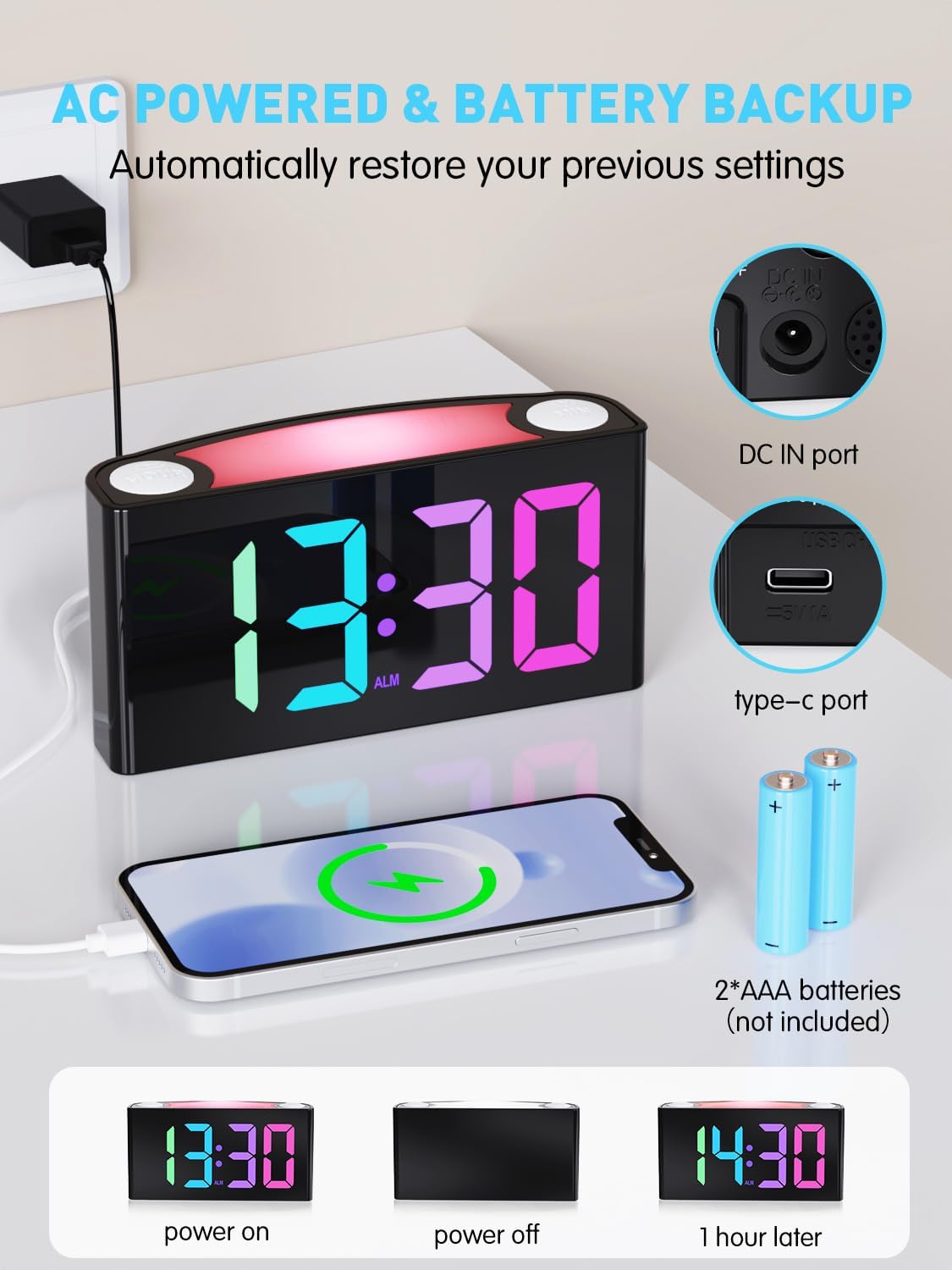
Image: The alarm clock is shown connected to AC power, with an open battery compartment indicating where to insert 2 AAA batteries for backup. The display shows "13:30" (power on), a blank screen (power off), and "14:30" (1 hour later, demonstrating time retention).
Akiyesi: The clock's main functions (display, USB charging, alarm) require AC power. Batteries only provide backup for time memory and alarm trigger during power interruptions.
6. Awọn ilana Iṣiṣẹ
6.1 Ṣiṣeto Aago naa
- Tẹ awọn "SET TIME" button on the rear panel. The display will start flashing.
- Tẹ awọn "HOUR" button (on top) to adjust the hour.
- Tẹ awọn "MIN" button (on top) to adjust the minute.
- Tẹ "SET TIME" again to save, or wait 5 seconds for automatic confirmation.
Video: Demonstrates how to set the time on the PPLEE RGB Digital Alarm Clock, including adjusting hours and minutes and confirming the setting.
6.2 Eto Itaniji
- Gbe awọn "ALARM ON/OFF" switch to the "ON" position. The alarm indicator will light up.
- Tẹ awọn "SET ALARM" button on the rear panel. The alarm time display will start flashing.
- Tẹ awọn "HOUR" button (on top) to adjust the alarm hour.
- Tẹ awọn "MIN" button (on top) to adjust the alarm minute.
- Tẹ "SET ALARM" again to save, or wait 5 seconds for automatic confirmation.
To turn off the alarm, slide the "ALARM ON/OFF" switch to the "OFF" position. The alarm indicator will disappear.
6.3 Ìmọ́lẹ̀ Ìfihàn (Dídán)
The clock features a 7-level dimmer for the time display (0%-100% brightness).
- Lo awọn "DIMMER" button on the rear panel to cycle through brightness levels.

Image: The alarm clock display shows various brightness levels from 0% to 100%, illustrating the 7-level dimmer function.
6.4 Night Light Ipo
The clock includes an 8-mode/7-color night light with 3 adjustable brightness settings.
- Tẹ awọn "SNOOZE/LIGHT" bar on top to turn the night light on/off and cycle through colors/modes.
- To adjust night light brightness, press and hold the "SNOOZE/LIGHT" igi.

Image: A person sleeping next to the alarm clock, which emits a soft yellow night light from its top bar. Below are icons indicating 3-level adjustable brightness for the night light.
6.5 Itaniji didun
Adjust the alarm volume to your preference (Low, Medium, High).
- Lo awọn "ALARM VOLUME" switch on the rear panel to select the desired volume level.

Image: A person reaching for the snooze bar on the alarm clock, which displays "8:30". The image also illustrates the 3-level adjustable alarm volume (90db, 103db, 110db).
6.6 Iṣiṣẹ Snooze
Nigbati itaniji ba ndun, tẹ tobi "SNOOZE/LIGHT" bar on top to activate snooze for 9 extra minutes of sleep.
The alarm will sound again after 9 minutes. To completely turn off the alarm, use the "ALARM ON/OFF" yipada.
6.7 12/24 Hour Format and DST
- Lo awọn "TIME FORMAT" switch on the rear panel to toggle between 12-hour and 24-hour display.
- Lo awọn "DST" switch on the rear panel to enable or disable Daylight Saving Time (adjusts time by 1 hour).
6.8 Dual Charging Ports
The clock is equipped with a Type-C output port and a USB output port for charging your devices.

Image: The alarm clock with its display showing "12:00" and two smartphones connected to its USB and Type-C charging ports, indicating active charging.
Simply connect your device's charging cable to the appropriate port on the back of the clock.
7. Itọju
- Fi aṣọ rírọrùn tó gbẹ nu aago náà. Má ṣe lo àwọn ohun ìfọṣọ tàbí àwọn ohun èlò ìfọṣọ.
- Ensure the clock is unplugged before cleaning.
- Tí o kò bá lò ó fún ìgbà pípẹ́, yọ àwọn batiri àfikún náà kúrò.
8. Laasigbotitusita
| Isoro | Ojutu |
|---|---|
| Ifihan aago ko ṣofo. | Check if the power adapter is securely plugged into both the clock and the wall outlet. Ensure the outlet has power. |
| Itaniji ko dun. | Verify the "ALARM ON/OFF" switch is in the "ON" position. Check the alarm volume setting. Ensure the alarm time is correctly set. |
| Akoko ti ko tọ lẹhin agbara utage. | Ensure 2 AAA batteries are installed in the battery compartment for backup. If batteries were not present or depleted, reset the time manually. |
| Awọn ẹrọ ko gba agbara nipasẹ USB/Iru-C. | Confirm the clock is connected to AC power. Check the charging cable and the device being charged. |
| Night light not working. | Press the "SNOOZE/LIGHT" bar to cycle through modes and turn on the light. Check if the clock is powered. |
9. Awọn pato
| Nọmba awoṣe | CR1008R |
| Brand | PPLEE |
| Ifihan Iru | Digital LED (RGB) |
| Ọja Mefa | 6.46"W x 3.39"H |
| Orisun agbara | Corded Electric (AC 100-240V) |
| Batiri Afẹyinti | Awọn batiri 2 x AAA (kii ṣe pẹlu) |
| Gbigba agbara Ports | 1 x USB, 1 x Iru-C |
| Ifihan Imọlẹ | 7-level adjustable dimmer |
| Imọlẹ alẹ | 8 modes / 7 colors, 3-level adjustable brightness |
| Iwọn didun itaniji | 3-level adjustable (Low, Medium, High) |
| Igba didun lẹẹkọọkan | 9 iṣẹju |
10. Atilẹyin ọja ati Support
For warranty information or technical support, please refer to the contact details provided with your purchase or visit the official PPLEE webojula. Tọju iwe-ẹri rira rẹ fun awọn ẹtọ atilẹyin ọja.
Imeeli: support@pplec.net