
1. Ifihan
This manual provides essential information for the safe and efficient operation of your THOMSON 40FD2S13 40 Inch LED Full HD Easy TV. Please read it thoroughly before using the television and retain it for future reference.
Your THOMSON Easy TV is designed for straightforward entertainment, featuring a Full HD display, multiple connectivity options, and a triple tuner for versatile signal reception.

Aworan: Iwaju view of the THOMSON 40FD2S13 40 Inch LED Full HD Easy TV, showcasing ifihan rẹ ati apẹrẹ didan.
2. Alaye Aabo
Nigbagbogbo tẹle awọn iṣọra aabo ipilẹ nigba lilo tẹlifisiọnu yii lati dinku eewu ina, mọnamọna, ati ipalara.
- Ma ṣe fi TV han si ojo tabi ọrinrin.
- Má ṣe ṣí àpótí ìtọ́jú; tọ́ka gbogbo iṣẹ́ ìtọ́jú sí àwọn òṣìṣẹ́ tó péye.
- Rii daju pe fentilesonu to dara ni ayika TV.
- Jeki TV kuro lati orun taara ati awọn orisun ooru.
- Yọ TV kuro lakoko iji manamana tabi nigbati a ko lo fun igba pipẹ.
- Position the TV on a stable, level surface or securely wall-mount it.
3. Package Awọn akoonu
Jẹrisi pe gbogbo awọn ohun kan wa ninu package:
- THOMSON 40FD2S13 40 Inch LED Full HD Easy TV
- Isakoṣo latọna jijin
- Okun agbara
- Afowoyi Olumulo (iwe-ipamọ yii)
- TV Stands (if applicable, check packaging)
- Screws for TV Stands (if applicable)
4. Eto
4.1 Installing the TV Stands
If you are not wall-mounting the television, attach the included stands to the bottom of the TV. Ensure the stands are securely fastened with the provided screws to prevent the TV from tipping.

Image: Diagram showing the dimensions of the THOMSON 40FD2S13 TV, including stand measurements, to assist with placement.
4.2 odi iṣagbesori
For wall mounting, use a VESA-compatible wall mount kit (not included) that matches the TV's specifications. Follow the instructions provided with your wall mount kit carefully. Ensure the wall can support the weight of the TV.
4.3 Nsopọ Peripherals
Your THOMSON TV offers various connection ports for external devices. Refer to the image below for port locations and types.
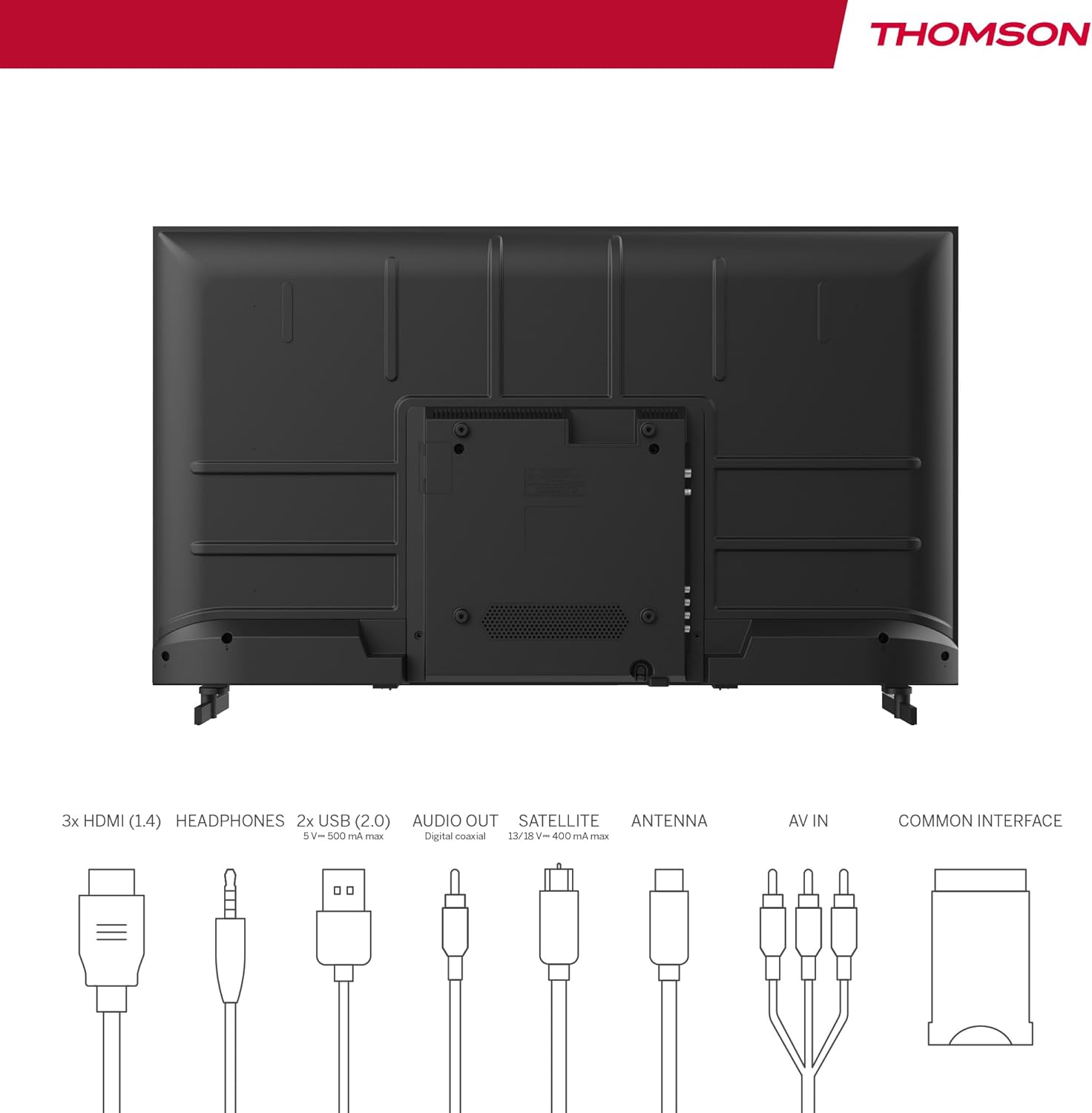
Image: Rear panel of the THOMSON 40FD2S13 TV, illustrating the location of all input and output ports, including HDMI, USB, Audio Out, Satellite, Antenna, AV IN, and Common Interface.
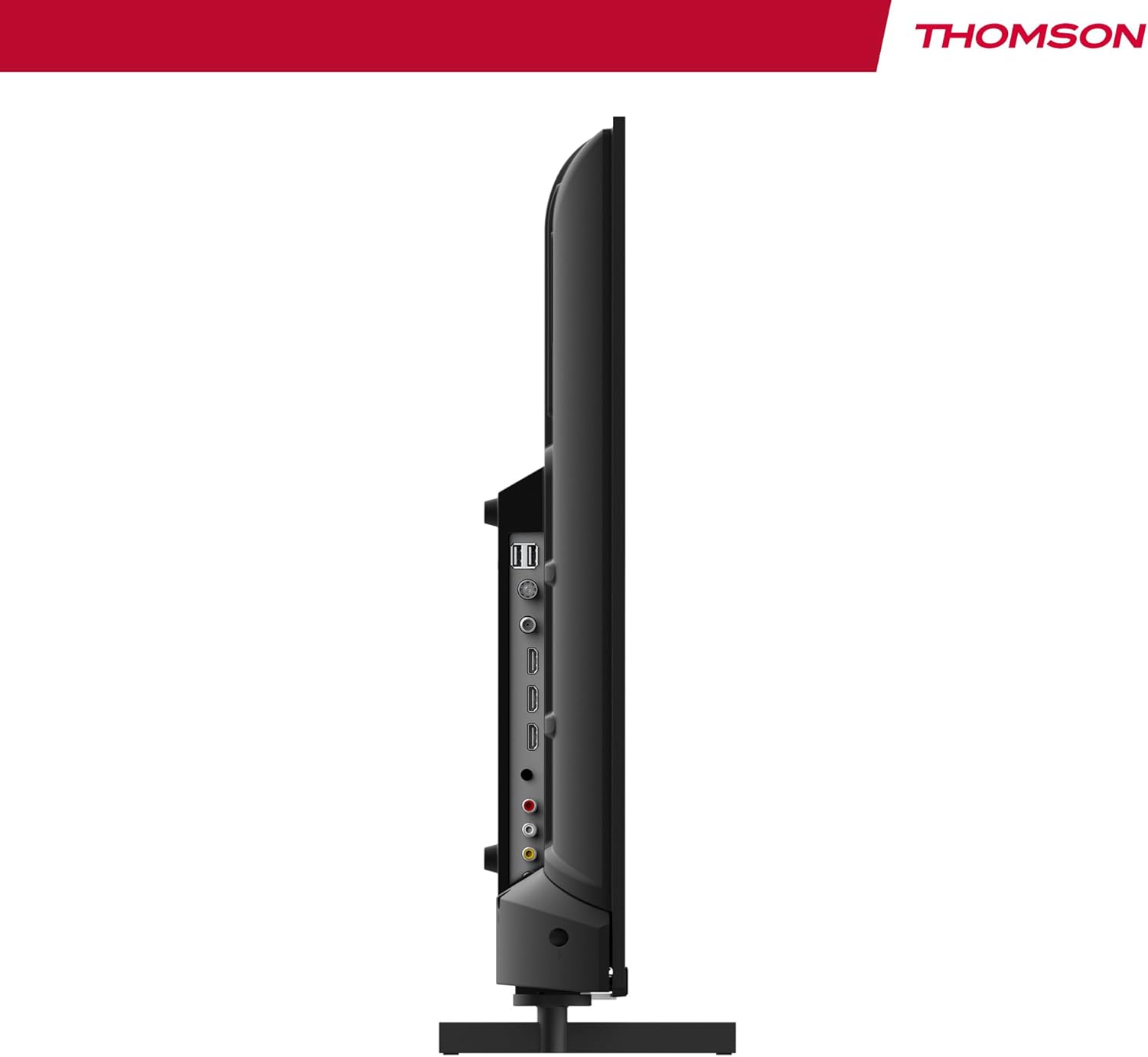
Aworan: Apa view of the THOMSON 40FD2S13 TV, highlighting the conveniently located side ports for easy access.
- HDMI (x3): Connect Blu-ray players, game consoles, set-top boxes, or other HDMI-enabled devices.
- USB (x2): So awọn ẹrọ ibi ipamọ USB pọ fun ṣiṣiṣẹsẹhin media.
- AV NI: So awọn ẹrọ agbalagba pọ nipa lilo fidio apapo ati awọn kebulu ohun sitẹrio.
- Agbekọri: So awọn agbekọri pọ fun igbọran aladani.
- Ohun Dijita Jade: Sopọ̀ mọ́ ètò ohùn ìta fún ohun tó dára síi.
- Antenna (DVB-T2): Connect a terrestrial antenna for digital broadcast reception.
- Satellite (DVB-S2): Connect a satellite dish for satellite broadcast reception.
- CI + Iho: Insert a Conditional Access Module (CAM) and smart card for encrypted channels.
4.4 Asopọ agbara
After connecting all necessary cables, plug the power cable into the TV's power input and then into a wall outlet. The TV will enter standby mode.
5. Ṣiṣẹ TV
5.1 Iṣakoso latọna jijin
The included remote control allows you to access all TV functions. It features backlit buttons for easy navigation in dim lighting.

Image: The THOMSON TV remote control, highlighting its ergonomic design and backlit buttons for convenient use.
- Bọtini agbara: Yi TV si tan/pa tabi si imurasilẹ.
- Awọn bọtini Nọmba: Yan awọn ikanni taara.
- Iwọn didun +/-: Ṣatunṣe ipele iwọn didun.
- ikanni +/-: Change channels sequentially.
- Bọtini Akojọ: Wọle si akojọ aṣayan akọkọ fun awọn eto.
- Awọn bọtini lilọ kiri (Soke/isalẹ/osi/Ọtun/DARA): Navigate through menus and confirm selections.
- Bọtini Orisun: Select input sources (HDMI, AV, Tuner).
- Bọtini Alaye: Display current channel information.
- GUIDE Button: Access the Electronic Program Guide (EPG).
- Bọtini REC: Initiate recording to a connected USB storage device (if supported and configured).
5.2 Initial Setup and Channel Scan
Upon first power-on, the TV will guide you through the initial setup process, including language selection, country, and channel scanning. Select your preferred reception type (Antenna, Cable, or Satellite) and follow the on-screen instructions to scan for available channels.

Image: Close-up of the TV's tuner inputs, indicating compatibility with DVB-T2 (terrestrial antenna), DVB-C (cable), and DVB-S2 (satellite) signals.
5.3 Ẹrọ orin Media
Connect a USB storage device to one of the USB ports to access photos, music, videos, and text files directly on your TV. Use the remote control to navigate the media player interface.
5.4 Pataki Awọn ẹya ara ẹrọ
- Itọsọna Eto Itanna (EPG): View upcoming program schedules and set reminders.
- Idaduro akoko: Pause live TV broadcasts (requires a connected USB storage device).
- Iṣakoso obi: Set restrictions on channels or programs based on age ratings.
- Ipo Hotẹẹli: Configure specific settings for use in hotel environments, such as default volume and input source.
- Dolby Audio: Experience enhanced sound quality with Dolby Audio technology.

Image: A family enjoying content on the THOMSON TV, with the Dolby Audio logo indicating superior sound experience.
6. Itọju
To ensure the longevity and optimal performance of your THOMSON TV, follow these maintenance guidelines:
- Ninu iboju: Rọra nu iboju naa pẹlu asọ ti ko ni lint. Fun awọn ami alagidi, die-die dampen awọn asọ pẹlu omi tabi a specialized iboju regede. Maṣe fun omi sokiri taara sori iboju.
- Ninu Igbimọ Ile-igbimọ: Lo asọ asọ ti o gbẹ lati nu minisita TV nu. Yago fun lilo abrasive ose tabi epo.
- Afẹfẹ: Rí i dájú pé àwọn ihò afẹ́fẹ́ tí ó wà lẹ́yìn TV kò dí.
- Okun Agbara: Máa ṣàyẹ̀wò okùn agbára déédéé fún ìbàjẹ́ èyíkéyìí. Tí ó bá bàjẹ́, kàn sí olùrànlọ́wọ́ oníbàárà fún ìyípadà.
7. Laasigbotitusita
If you encounter issues with your TV, consult the following common troubleshooting steps before contacting customer support.
| Isoro | Owun to le Fa | Ojutu |
|---|---|---|
| Ko si agbara | Okun agbara ko sopọ; iṣan agbara ko ṣiṣẹ. | Ensure the power cord is securely plugged into the TV and a working wall outlet. Check the power switch on the TV (if present). |
| Ko si aworan, ṣugbọn ohun wa | Ti yan orisun titẹ sii ti ko tọ; backlight oro. | Press the "Source" button on the remote to select the correct input. Try adjusting brightness/contrast settings. |
| Ko si ohun, ṣugbọn aworan wa | Ohùn tí a dákẹ́ tàbí tí ó lọ sílẹ̀ jù; àwọn ètò ìjáde ohùn tí kò tọ́. | Press the "Volume +" button or unmute the TV. Check audio output settings in the TV menu. |
| Isakoṣo latọna jijin ko ṣiṣẹ | Awọn batiri ti ku tabi fi sii ni aṣiṣe; idilọwọ laarin latọna jijin ati TV. | Fi àwọn bátìrì tuntun rọ́pò wọn, kí ó lè rí i dájú pé wọ́n ní ìdènà tó tọ́. Yọ gbogbo ìdènà kúrò. Tọ́ka sí ẹ̀rọ amóhùnmáwòrán IR ti tẹlifíṣọ̀n náà. |
| Didara aworan ti ko dara / Ko si ifihan agbara | Antenna/cable/satellite connection loose or damaged; incorrect tuner settings. | Check all antenna/cable/satellite connections. Perform a channel scan again. Ensure the correct tuner input is selected. |
8. Awọn pato
| Ẹya ara ẹrọ | Ẹ̀kúnrẹ́rẹ́ |
|---|---|
| Brand | THỌMSON |
| Awoṣe | 40FD2S13 |
| Iwon iboju | 40 Inṣi (101 cm) |
| Ifihan ọna ẹrọ | LED |
| Ipinnu | 1920 x 1080 (HD ni kikun) |
| Oṣuwọn sọtun | 60 Hz |
| Tuner Technology | DVB-C, DVB-S2, DVB-T2 |
| Awọn ibudo HDMI | 3 |
| Awọn ibudo USB | 2 |
| Miiran Awọn atọkun | AV IN, Headphone, Digital Audio Out, CI+ Slot |
| Iyipada ohun | DD (Dolby Digital) |
| Iṣeto ni Agbọrọsọ | 2.0 ayika Ohun |
| Voltage | 230 folti |
| Agbara Agbara Kilasi | E |
| Awọn Iwọn Ọja (W x H x D) | 72 x 42 x 8.2 cm (without stand, approx.) |
| Iwọn | 6.9 kg (isunmọ.) |
9. atilẹyin ọja Information
Your THOMSON 40FD2S13 TV comes with a 3-odun atilẹyin ọja from the date of purchase. This warranty covers manufacturing defects and ensures that your product meets high-quality standards. Please retain your proof of purchase for warranty claims.
For detailed warranty terms and conditions, please refer to the warranty card included with your product or visit the official THOMSON webojula.
10. Onibara Support
If you require further assistance, have questions not covered in this manual, or need technical support, please contact THOMSON customer service.
- Atilẹyin Ayelujara: Visit the official THOMSON support webAaye fun FAQs, awọn itọnisọna laasigbotitusita, ati awọn fọọmu olubasọrọ.
- Atilẹyin foonu: Refer to your product packaging or the THOMSON website for regional customer service contact numbers.
When contacting support, please have your TV model number (40FD2S13) and serial number ready.