
1. Ti pariview
The Moukey MAMP1 is a compact yet powerful 2.0 channel Bluetooth audio stereo amplifier receiver designed for various home audio applications. It delivers 400 watts of maximum power output, providing a high-quality audio experience for karaoke, home theater, acoustic sound systems, and monitor headphones. Featuring multiple input and output modes, EQ controls, Bluetooth 5.0 connectivity, and an HD LED screen, the MAMP1 offers versatile and user-friendly operation.
2. Alaye Aabo pataki
- Read and heed all instructions.
- Maṣe lo ọja yii nitosi omi.
- Mọ pẹlu asọ gbigbẹ nikan.
- Rii daju voltage of your local mains supply matches the product's requirements.
- Má ṣe dí àwọn ihò afẹ́fẹ́ kankan. Fi sori ẹ̀rọ náà gẹ́gẹ́ bí ìlànà olùpèsè.
- Maṣe fi sori ẹrọ nitosi awọn orisun ooru gẹgẹbi awọn imooru, awọn iforukọsilẹ ooru, awọn adiro, tabi awọn ohun elo miiran (pẹlu ampliifiers) ti o gbe ooru jade.
- Lo awọn asomọ/awọn ẹya ara ẹrọ ti olupese pato.
- Yọọ ọja yii kuro lakoko iji manamana tabi nigba lilo fun igba pipẹ.
- Tọkasi gbogbo iṣẹ si awọn oṣiṣẹ iṣẹ ti o peye.
3. Package Awọn akoonu
- Moukey MAMP1 Audio Stereo Ampitanna
- Isakoṣo latọna jijin
- Eriali FM
- Okun agbara
- Itọsọna olumulo
4. Awọn ẹya Ọja
- Agbara to pọ julọ: 400 Watts Compact yet powerful 2.0 Channel Bluetooth Audio Stereo Amplifier Receiver, ideal for karaoke, home theater, acoustic sound systems, and monitor headphones.
- Multiple Input and Output Modes: Supports 2 pairs of RCA audio inputs (for CD/DVD players), 2 x 1/4 inch (6.35mm) microphone inputs, USB (Max 64G), SD card (Max 32G), 3.5mm AUX IN, and FM radio. Features RCA Line Out and banana plug speaker outputs. Includes a 1/4 inch (6.35mm) headphone connection.
- Awọn iṣakoso EQ: Features clear, responsive buttons and knobs for microphone echo/volume, balance, bass, treble, master volume, input source, and unique folder/track control.
- Bluetooth 5.0 Asopọmọra: Professional indoor stereo receiver with Bluetooth music streaming up to 40 feet / 10 meters or more. Easily pairs with smartphones, tablets, iPads, iPhones, and computers.
- HD LED Screen: Integrated FM radio with built-in LED display and front panel audio control center. FM Antenna and Remote Control included for distant audio adjustments.
5. Awọn iṣakoso nronu iwaju
The front panel provides access to all essential controls for operating your Moukey MAMP1 amplifier.
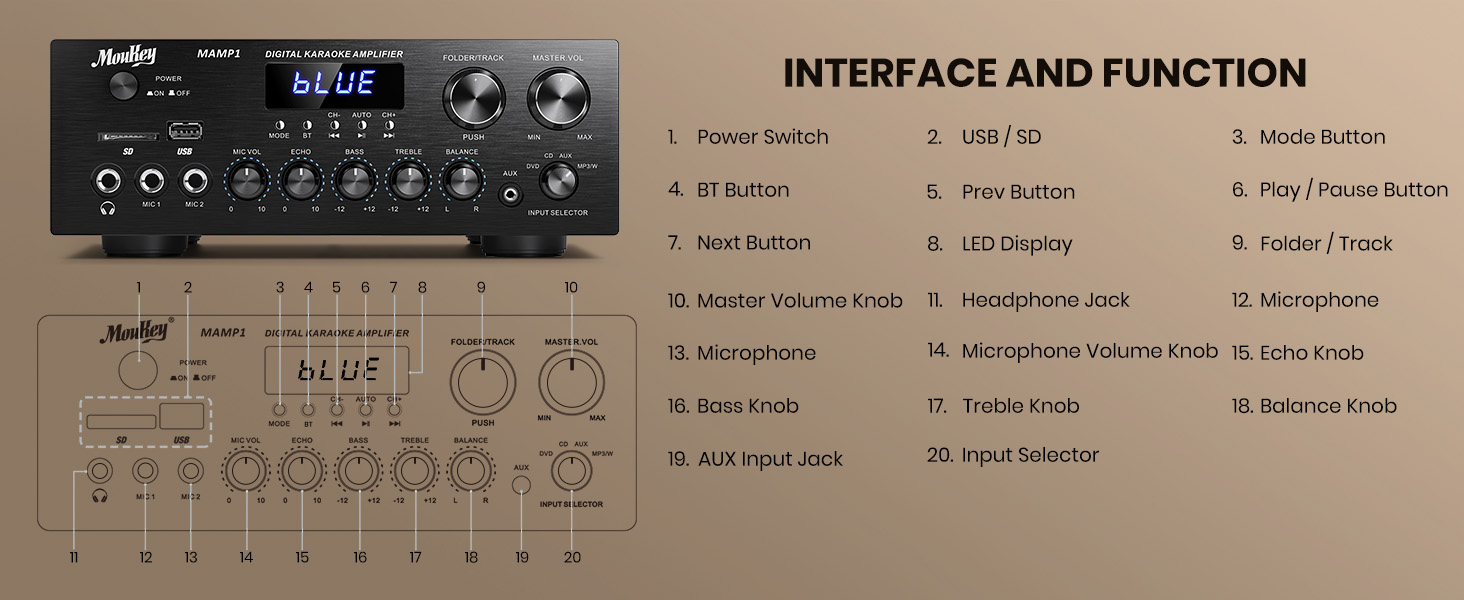
Figure 1: Moukey MAMP1 Ìṣètò Pánẹ́lì Iwájú
- Agbara Yi pada: Tẹ lati tan-an tabi PA kuro.
- USB / SD Card Slot: Insert USB flash drives (max 64GB) or SD cards (max 32G) for MP3 playback.
- Bọtini Ipo: Press to cycle through input sources (USB/SD, Bluetooth, FM, AUX, CD, DVD).
- Bọtini BT: Tẹ lati yan ipo Bluetooth.
- Prev/Next Buttons: Navigate tracks in USB/SD/Bluetooth mode or stations in FM mode.
- Bọ́tìnnì Ṣíṣe/Sánu duro: Mu ṣiṣẹ tabi da idaduro ṣiṣiṣẹsẹhin ohun.
- Ifihan LED: Ó ń fi ipò ìsinsìnyí, ìwífún nípa orin, tàbí ìgbóhùnsáfẹ́fẹ́ FM hàn.
- Folder/Track Knob: Select folders or tracks.
- Knob Iwọn didun Titunto: Satunṣe awọn ìwò o wu iwọn didun.
- Jack agbekọri (6.35mm): So awọn agbekọri pọ fun igbọran aladani.
- Microphone Inputs (MIC1, MIC2 - 6.35mm): Connect up to two microphones for karaoke or public address.
- Knob Iwọn didun Gbohungbo: Adjusts the volume of connected microphones.
- Echo Knob: Ó ń ṣe àtúnṣe ipa echo fún àwọn gbohùngbohùn.
- Knob Bass: Ó ń ṣàtúnṣe ìjáde ìgbóná-ìgbóná kékeré.
- Knob Treble: Ó ń ṣe àtúnṣe ìjáde ìgbohùngbà gíga.
- Knob iwontunwonsi: Ṣe atunṣe iwọntunwọnsi ikanni osi/ọtun.
- Kokoro Aṣayan Iṣawọle: Manually select input sources (CD, AUX, DVD, MP3/BT).
6. Ru Panel Awọn isopọ
The rear panel provides all necessary ports for connecting your audio sources and speakers.

Figure 2: Moukey MAMP1 Ru Panel Ìfilélẹ
- FM Antenna Jack: So eriali FM ti o wa ninu rẹ pọ fun gbigba redio.
- Audio Input (DVD/CD - RCA): Connect external audio sources like DVD or CD players using RCA cables.
- Laini Jade (RCA): Sopọ si miiran amplifier tabi ẹrọ gbigbasilẹ.
- Speaker Output (Banana Plugs): Connect your passive speakers. Ensure correct polarity (+ to + and - to -).
- Iṣagbewọle agbara: Connect the power cable to a standard AC outlet.
7. Eto
7.1 Asopọ Agbọrọsọ
To connect your passive speakers to the Moukey MAMP1 amplifier, tẹle awọn igbesẹ wọnyi:

Figure 3: Speaker Connection Diagram
- Rii daju pe amplifier ti wa ni pipa ati yọọ kuro lati inu iṣan agbara.
- Identify the positive (+) and negative (-) terminals on both your speakers and the amplifier.
- For bare wire connections: Rotate and loosen the speaker knob on the amplifier. Insert the bare wire (remove approximately 10mm insulation). Tighten the knobs to secure the wires.
- So ebute rere (+) ti agbọrọsọ rẹ pọ si ebute rere (+) ti awọn amplifier.
- So ebute odi (-) ti agbọrọsọ rẹ pọ si ebute odi (-) ti amplifier.
- Repeat for all speakers. Ensure all connections are secure to prevent short circuits.
7.2 Nsopọ Awọn orisun ohun
- RCA Devices (CD/DVD Player): Use RCA cables to connect the audio output of your CD or DVD player to the corresponding RCA input jacks on the amplifier ká ru nronu.
- Àwọn Ẹ̀rọ AUX: Connect devices with a 3.5mm audio output (e.g., smartphone, tablet) to the 3.5mm AUX IN jack on the front panel.
- Awọn gbohungbohun: Plug 1/4 inch (6.35mm) microphones into the MIC1 or MIC2 jacks on the front panel.
- Eriali FM: Connect the included FM antenna to the FM ANT jack on the rear panel for radio reception.
7.3 Asopọ agbara
- Ensure all audio and speaker connections are made.
- Connect the power cable to the AC POWER INPUT on the rear panel of the amplifier.
- Pulọọgi opin miiran ti okun agbara sinu iṣan agbara AC ti o dara.
8. Awọn ilana Iṣiṣẹ
8.1 Agbara Tan / Pa
Tẹ awọn AGBARA yipada lori iwaju nronu lati yi pada amplifier ON or OFF. The LED display will illuminate when powered on.
8.2 Aṣayan Orisun Input
Lo awọn MODE bọtini tabi awọn Oluyanju INPUT knob on the front panel to choose your desired audio source (Bluetooth, USB, SD, AUX, FM, CD, DVD).
8.3 Iwọn didun ati Iṣakoso ohun orin
- Iwọn Titunto: Yiyi awọn TITUNTO VOL koko lati ṣatunṣe ipele ohun gbogbo.
- Iwọn Gbohungbohun: Lo awọn MIC vol knob to adjust microphone volume independently.
- Echo: Adjust the microphone echo effect with the ECHO koko.
- Bass/Treble: Fine-tune the low and high frequencies using the Bass ati TREK. koko.
- Iwọntunwọnsi: Adjust the left/right channel balance with the Iwontunwonsi koko.
8.4 Sisopọ Bluetooth
- Tẹ awọn MODE bọtini tabi BT button to select Bluetooth mode. The LED display will show "BLUE".
- Lori ẹrọ alagbeka rẹ, mu Bluetooth ṣiṣẹ ki o wa awọn ẹrọ to wa.
- Select "MAMP1" from the list to pair. A confirmation tone will sound upon successful connection.
8.5 Sisisẹsẹhin USB/SD
- Insert a USB flash drive or SD card into the respective slot on the front panel.
- Awọn amplifier will automatically switch to USB/SD mode and begin playback. If not, press the MODE bọtini lati yan o.
- Lo awọn PREV/Next awọn bọtini lati fo awọn orin ati ERE/SINMI bọ́tìnì láti ṣàkóso ìṣiṣẹ́.
8.6 FM Radio isẹ
- Ensure the FM antenna is connected to the rear panel.
- Tẹ awọn MODE button to select FM radio mode. The LED display will show the frequency.
- Tẹ awọn AUTO bọtini lati ṣe ọlọjẹ laifọwọyi ati fipamọ awọn ibudo FM ti o wa.
- Lo awọn CH- ati CH+ awọn bọtini lati lilö kiri nipasẹ awọn ibudo ti o fipamọ.
9. Itọju
- Jeki ẹyọ naa di mimọ nipa fifẹ rẹ pẹlu asọ ti o gbẹ.
- Yẹra fun lilo awọn kẹmika lile tabi awọn afọmọ abrasive.
- Rii daju pe fentilesonu to dara nipa titọju awọn atẹgun kuro ninu awọn idena.
- Tọju awọn amplifier ni itura, aye gbigbẹ kuro lati orun taara ati awọn iwọn otutu to gaju.
10. Laasigbotitusita
| Isoro | Owun to le Fa | Ojutu |
|---|---|---|
| Ko si agbara | Kò sí okùn agbára tí a so pọ̀; Agbára tí a ti pa; Àìṣiṣẹ́ síta | Check power cable connection; Turn power switch ON; Test outlet with another device. |
| Ko si ohun jade | Incorrect input source; Volume too low; Speaker connections loose/incorrect; Faulty audio cable | Select correct input source; Increase master volume; Check speaker wiring; Replace audio cables. |
| Bluetooth ko sopọ | Not in Bluetooth mode; Device too far; Device already connected to another unit | Switch to Bluetooth mode; Move device closer; Disconnect from other devices and try again. |
| Gbigba FM ti ko dara | Antenna kò sopọ̀ mọ́ra; Àmì tí kò lágbára | Connect FM antenna; Adjust antenna position for better reception. |
11. Awọn pato
| Ẹya ara ẹrọ | Sipesifikesonu |
|---|---|
| Brand | Moukey |
| Awoṣe | MAMP1 |
| Agbara Ijade | 400 Wattis Max |
| Awọn ikanni | 2.0 ikanni |
| Ẹya Bluetooth | 5.0 |
| Bluetooth Ibiti | Titi de 40 ẹsẹ / 10 mita |
| Input Interface | 2x RCA (CD/DVD), 2x 1/4" (6.35mm) MIC, USB, SD, 3.5mm AUX IN, FM Antenna |
| O wu Awọn atọkun | RCA Line Out, Banana Plug Speaker Outputs, 1/4" (6.35mm) Headphone |
| USB/SD Max Capacity | USB: 64G, SD: 32G |
| Idahun Igbohunsafẹfẹ | 20Hz-20kHz |
| Tuner Technology | FM |
| Ọja Mefa | 81.28 x 78.74 x 43.18 cm; 3.19 kg |
12. Atilẹyin ọja ati Support
Moukey products are designed and manufactured to the highest quality standards. For detailed warranty information and customer support, please refer to the warranty card included in your package or visit the official Moukey website. If you encounter any issues or have questions regarding your MAMP1 amplifier, please contact Moukey customer service for assistance.